Volume Booster - Loud Speaker
- 2.15K
- 4.6
- Installs
- 5.00M
- Price
- Free
Screenshots


Analysis by Reviewed
I reach for a volume booster when a podcast is hard to hear over everyday noise or a phone speaker sounds too quiet across the room. That is the simple problem Volume Booster - Loud Speaker aims to solve, and it is worth judging it as a practical sound adjustment rather than a replacement for better speakers or headphones. It is a free music and audio app from Coocent, rated for Everyone, and its appeal is easy to understand: a quick way to push a phone’s speaker output higher when the usual controls are not enough.
When sound depends on the moment
A booster can be most useful when the audio source and the room are already working against you: a quiet clip in a busy kitchen, a spoken video while you are tidying up, or music shared casually with someone nearby. In those situations, I would raise the level in small steps and listen again rather than move straight to the maximum. The phone speaker, the recording and the room all affect the result, so a stronger setting will not make every track clearer.
Connectivity is part of that experience even though amplification itself is not the same thing as a network feature. Streaming audio depends on the connection and the service delivering it; if playback pauses or the stream becomes quiet, turning up the booster cannot fix the underlying interruption. I treat it as a final adjustment after checking the media player’s own volume and confirming that playback is behaving normally.
Useful in a few mobile situations, not all of them
For a quick everyday test, imagine following a recipe video while cooking with the phone resting on a counter. If the extractor fan or running tap makes speech difficult to catch, a modest boost may help you follow the instructions without holding the phone close. But it is not a substitute for headphones when you need clear dialogue in a crowded place, and it is not a good reason to play sound loudly around people who have not chosen to hear it.
I would also be cautious about relying on extra volume during calls. Call audio can be handled differently from music or video, so results may depend on the phone and the calling app. If a conversation is consistently hard to hear, checking the call’s own volume, speaker mode and surroundings is a better first step than assuming a booster will solve it.
Making a fair comparison before turning it up
When I test a sound adjustment, I use the same short section of speech before and after changing the level. A familiar line from a video or podcast makes it easier to notice whether the words are genuinely easier to understand or merely louder. I also keep the phone in the same place; moving it closer to me or turning its speaker toward the room can change what I hear without asking the app to do more.
This is a useful distinction for deciding whether the app suits a particular listening habit. If one clip is unusually quiet, a modest increase may be a convenient fix. If everything sounds thin or muffled, however, the limiting factor may be the phone speaker, the recording, or the room rather than the available volume. For long sessions, headphones or a separate speaker are usually a more dependable way to improve listening comfort.
More From Our News Desk

Weather by Xiaomi Review: Clear at a Glance, Less Clear Up Close

X Under Pressure: Can It Recover When Posting Goes Wrong?

Clash of Clans Is Won Between the Battles

Android Auto Makes the Case for Quieter Car Software

MobiOffice: Transforming Mobile Productivity with Seamless Integration

EA SPORTS FC™ Mobile Soccer: Redefining Mobile Sports Gaming
Unleashing the Power of Sound
First things first, let's talk about what the Volume Booster - Loud Speaker actually does. This app is crafted to enhance the audio output of your device, pushing it beyond its usual limits. It's like giving your smartphone's speakers a turbo boost! Whether you're watching a video, playing music, or even making a call, this app promises to amp up the volume without distorting the sound quality.
Setting Up and Getting Started
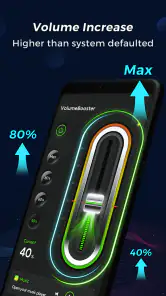
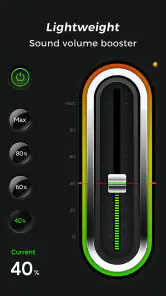
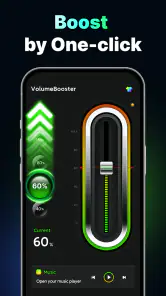
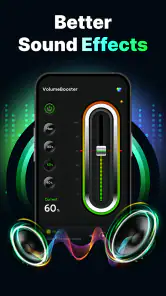
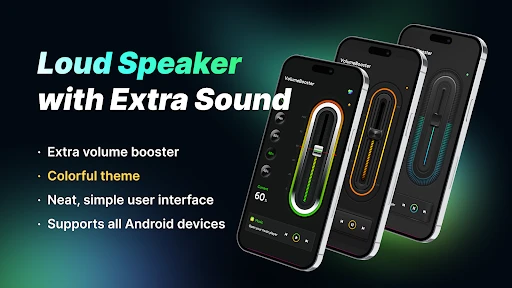
Getting started with this app is a breeze. Once downloaded, you're greeted with a user-friendly interface that's straightforward and easy to navigate. The app provides a simple slider control to adjust the volume levels. Just slide it up to increase the volume and feel the difference instantly. It's as easy as pie, and the best part? You don't need to be a tech whiz to use it.
For a first try, I would start with a low setting and a short piece of audio that I know well, then make one small adjustment at a time. That simple routine avoids confusing a change in the source or room with a change from the booster. It also gives me a clear stopping point if the sound turns sharp, rough or tiring. The goal is comfortable audibility, not the highest possible slider position.
Performance and Features
Now, onto the juicy part – performance. The app does a stellar job at boosting the volume, making it ideal for outdoor gatherings or when you're in a noisy environment. It even lets you customize the sound output according to your preference. Want more bass? No problem! Just tweak the settings to get that perfect sound mix. It's like having a mini sound engineer in your pocket.
That flexibility is most useful when the listening situation changes, but I would not assume that every adjustment improves every recording. A bass-heavy track can become less comfortable when pushed too far, while spoken audio may benefit more from being clearly audible than from sounding fuller. I would make small changes while listening to the actual material I plan to play, rather than tune the sound using one song and expect the same result from everything else.
One feature that stands out is the app's ability to work with various media players and streaming services. So, whether you're on YouTube, Spotify, or just playing local files, Volume Booster - Loud Speaker seamlessly integrates to enhance your listening experience.
What a network interruption can and cannot mean
If a stream buffers, cuts out or takes time to resume, I would troubleshoot playback first instead of raising amplification. A volume tool can only affect sound that is reaching the phone; it cannot fill in missing audio or make a connection more stable. Once the stream plays normally again, I can judge its loudness fairly and adjust the output if needed.
That order also helps avoid a misleading diagnosis. If a downloaded or otherwise locally available track plays steadily while one stream does not, the problem is more likely tied to that playback path than to speaker loudness. If several sources sound weak in the same setting, then checking the phone’s media volume and trying a careful boost makes more sense. The distinction saves time and prevents turning the sound up to compensate for an interruption that is not a volume problem.
Points to Ponder
While the app delivers on its promise, it's important to use it responsibly. Over-amplifying sound can potentially damage your device's speakers over time. It's always good to find that sweet spot where the audio is loud enough but not too much that it could cause harm.
I would also treat distortion as a practical warning rather than something to work around. If the speaker starts buzzing or voices sound brittle, I would lower the level instead of continuing to test higher settings. The same goes for long listening sessions: even when the phone can produce a louder signal, a comfortable level matters more than filling a room at maximum volume. People nearby matter too, so I would choose headphones when shared-space noise or privacy makes speaker playback inconsiderate.
Which listeners should choose it
I see the best fit as someone who mostly listens through a phone speaker and wants a simple control to try when a particular video or song comes through softly. It is less compelling for people who already use headphones, a Bluetooth speaker or a phone with enough output for their routine. Those options can provide a more dependable listening experience, especially when clarity matters more than raw loudness.
A useful habit is to compare the same short passage at the phone’s normal level and with a small boost. Speech is a better test than a bass-heavy song: if voices become harsher or start to buzz, lowering the level is more sensible than pushing it further. The slider makes experimentation straightforward, but the safe setting can vary by device and recording.
What to expect from playback and recovery
If sound suddenly stops or becomes uneven, I would first check whether the video or music app is still playing and whether the phone’s regular media volume is turned up. A network hiccup can interrupt streaming, while a local playback issue has a different cause; increasing amplification is unlikely to repair either one. Once playback is stable again, adjust the booster gradually and listen for unwanted distortion.
That distinction is helpful when deciding whether the app is doing its job. It can make an already audible source louder, but it cannot restore missing audio, improve a poor recording or make a weak connection reliable. If the problem follows one streaming service, troubleshoot that service or switch to another source before blaming the phone’s output.
In an ordinary day, that might mean starting a podcast on the way through a quiet room, then pausing when you move into a busier space. If the connection falters, I would wait for playback to recover before changing the booster; if the audio resumes clearly but remains too soft, a small adjustment is the relevant next step. Keeping those actions separate makes it easier to tell whether the issue is the stream, the recording, the environment or the phone’s speaker.
Data, cost and device fit
Because streaming consumes data through the service playing the audio, a booster should not be treated as a way to reduce network use. If you are watching video on mobile data, lowering video quality or choosing a lower-data listening option in the media service is the more relevant adjustment. The booster is about perceived loudness, not the amount of content delivered over the connection.
The app is free to install, with optional in-app purchases ranging from about fifty cents to seven dollars and fifty cents per item. Its current version is 1.4.5 and it supports Android 6.0 or later. I would check that your phone meets that requirement before trying it; the large audience—over five million installs and an average rating of 4.6 from around seventy-seven thousand ratings—suggests broad interest, but it does not guarantee identical results across different speakers.
For data-conscious listening, I would make changes in the streaming service rather than expect a booster to affect how much content is delivered. A voice-only or lower-quality option, where the player provides one, is the more relevant choice when mobile data is a concern. I would also avoid repeatedly restarting a stream just to compare volume; choose a short passage, make a careful adjustment, and keep listening if the result is comfortable.
A sensible way to decide
Compared with the usual alternatives, the main trade-off is convenience versus consistency. A quick software adjustment is handy when you do not have headphones or an external speaker nearby, while those accessories are generally the better choice for extended listening, privacy or fuller sound. I would skip a booster if you need studio-like sound, have a speaker that already crackles, or expect it to fix network dropouts; in those cases, changing the playback setup or source is more likely to help.
I would also skip it if the main problem is hearing speech in a particularly loud public place. Increasing speaker output may bother other people and still fail to overcome the surrounding noise cleanly. Headphones are the more sensible choice for private listening, while a Bluetooth speaker can be better when several people want to listen together. The booster makes most sense as a convenient option for occasional, nearby playback—not as a replacement for choosing the right listening equipment.
Overall, I would try it for occasional, careful volume adjustments rather than leave the phone turned up all the time. Its simple controls suit casual listeners, and the free starting point makes it easy to see whether it helps on your particular device. Keep the source and connection in mind, raise the sound gradually, and stop if the output becomes harsh. That is the most useful way to decide whether this Coocent audio app earns a place on your phone.
Moreover, while the app is free to download, some premium features might require in-app purchases. But honestly, the free version itself is quite adequate for casual users.
In conclusion, Volume Booster - Loud Speaker is a fantastic tool for anyone looking to maximize their device's audio potential. It's easy to use, effective, and delivers on its promise to enhance your sound experience. Just remember to keep the volume in check to protect your precious speakers. So, if you're an audio enthusiast or just someone who loves blasting music, give this app a shot and feel the difference!
Volume Booster - Loud Speaker Frequently Asked Questions
What is the current version of Volume Booster - Loud Speaker?
Volume Booster - Loud Speaker is currently at version 1.4.5. Checking the version before installing can help you know which release you are getting, especially if you are comparing it with an app already on your device. Its main purpose is to amplify speaker sound, with extra volume and a fun sound-enhancement focus.
When was Volume Booster - Loud Speaker released?
Volume Booster - Loud Speaker was released on December 3, 2020. It is a Music & Audio app from Coocent that focuses on amplifying speaker sound. If you are considering a download, its release date offers a little background on how long the app has been available, while the current version indicates its present release.
What devices can install Volume Booster - Loud Speaker?
Volume Booster - Loud Speaker is an Android app that supports devices running Android 6.0 or later. Before downloading, check your device’s operating system version to make sure it meets that requirement. The app is categorized under Music & Audio and is intended for people who want a louder speaker output from their device.
Who develops Volume Booster - Loud Speaker, and is it suitable for all ages?
The app is developed by Coocent and has an Everyone content rating, so it is presented as suitable for a general audience. It is a sound-enhancement utility rather than a game or social platform. If you are choosing apps for a family device, its age rating is useful context, though you should still supervise device use according to your household’s preferences.
What is Volume Booster - Loud Speaker and how does it work?
Volume Booster - Loud Speaker is an app designed to enhance the volume output of your device's speakers. Whether you're listening to music, watching a video, or making a call, this app amplifies the sound, providing a louder and clearer audio experience. It achieves this by manipulating the sound frequency and using advanced algorithms to boost your device's volume capabilities beyond their default limits.
Pros
- Enhances volume beyond device's max.
- Simple
- user-friendly interface.
- Works with all media types.
- Improves audio clarity.
- Customizable sound settings.
Cons
- May distort sound at high volumes.
- Can drain battery quickly.
- Contains ads in free version.
- Requires in-app purchases for features.
- Potential compatibility issues on some devices.
- Category
- Music & Audio
- Version
- 1.4.5













