Tattoo AI - Tattoo Design
- 1.88K
- 4.5
- Installs
- 5.00M
- Price
- Free

Screenshots
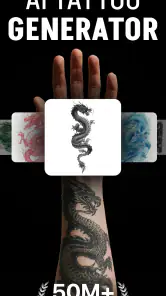
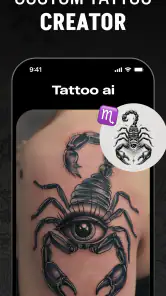
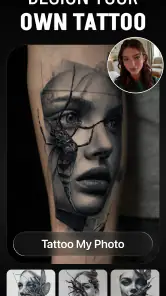
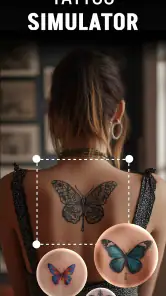
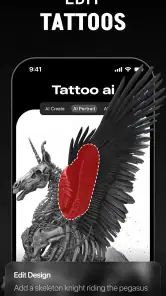
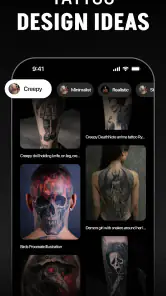
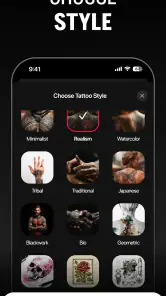
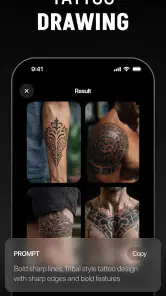
Analysis by Reviewed
I’d treat a tattoo concept as a conversation starter, not a finished plan. Tattoo AI - Tattoo Design is an AI art app from HubX that can help turn a rough idea into something visual, especially when I’m unsure how to describe a style to a tattoo artist. It’s free to install, rated Teen, and its 4.5 average from around 265,000 ratings suggests it has found a sizeable audience. That popularity is reassuring, but it doesn’t tell me whether a generated design will suit my body or translate cleanly into ink.
Starting with an idea, not a finished brief
I find the app most useful when I have a subject or feeling in mind but can’t picture a design yet. “A small reminder of a hiking trip,” for example, is a starting point rather than a complete tattoo brief. I can use generated images to discover whether I’m drawn to a mountain outline, a botanical detail, or a more symbolic treatment. The point is not to accept the first image, but to learn what visual language feels right.
That distinction matters because tattoo choices are personal and permanent. I’d avoid entering a sensitive story or private identifying details just to make a prompt sound more specific. A broad description can still help me explore style, while the personal meaning can stay between me and the artist. For anyone working through an emotional subject, that separation also makes it easier to use the app as a low-pressure sketching aid rather than a place to disclose more than necessary.
Making ideas easier to read and compare
The useful starting point is the gap between “I want something meaningful” and an image I can actually discuss. Instead of scrolling through general tattoo galleries, I can use the generator to explore a concept and compare visual directions. I’d try changing one element at a time—style, subject, or mood—rather than rewriting the whole idea for every attempt. That makes it easier to see which choice is changing the result and gives me a clearer reference to bring to a professional.
It also helps to save a small shortlist rather than treating every appealing output as a contender. A design that looks striking on a screen may need simpler lines, different spacing, or a different scale to work as a tattoo. I’d use the images to explain what I like, then ask an artist to judge what can be adapted safely and legibly for the intended placement.
Discovering Your Unique Tattoo Style
What I absolutely love about Tattoo AI - Tattoo Design is its ability to understand what you're looking for. The app uses AI technology to generate tattoo designs based on your preferences. Whether you're into intricate mandalas, minimalist symbols, or bold tribal patterns, this app's got you covered. It's like having a brainstorming session with an artist, but without the pressure.
Easy to Navigate
Navigation is a breeze. The user interface is intuitive, making it easy for anyone to use, even if you're not exactly tech-savvy. You start by selecting the type of tattoo you're interested in, and the app does the rest. It generates a slew of options, and you can tweak them to your heart's content. It's a fun process, almost like playing a game where you win by finding that perfect design.
More From Our News Desk

Weather by Xiaomi Review: Clear at a Glance, Less Clear Up Close

X Under Pressure: Can It Recover When Posting Goes Wrong?

Clash of Clans Is Won Between the Battles

Android Auto Makes the Case for Quieter Car Software

MobiOffice: Transforming Mobile Productivity with Seamless Integration

EA SPORTS FC™ Mobile Soccer: Redefining Mobile Sports Gaming
Personalization at Its Best
One of the standout features is the level of personalization. You can customize the size, color, and even the placement of your tattoo. Plus, it offers suggestions based on current tattoo trends, so you know you’re always in vogue. The app even lets you see what the tattoo would look like on your skin through an augmented reality feature. This is particularly useful for visualizing how a tattoo will complement your body’s natural contours.
Making comparisons more useful
When I’m exploring alternatives, I try to keep a consistent reference point. I might generate a few versions of the same subject, then compare the silhouette, amount of detail, and overall balance instead of judging only which one looks prettiest. That reveals a practical trade-off: a more elaborate image can feel distinctive on screen, while a simpler one may be easier for an artist to adapt to a smaller area.
I’d also separate choices that are easy to change from ones that define the whole design. Color can be reconsidered later, but the shape and placement often determine whether the idea reads clearly. If I’m unsure, I’d keep two contrasting concepts rather than endlessly adjusting a single image. That gives a tattooist something concrete to react to and avoids mistaking repeated generations for progress.
Turning a screen preview into a practical reference
For a more useful comparison, I’d view the same idea at the intended size and placement, then check whether its main shapes remain recognizable. Fine detail that looks elegant when enlarged can become busy at a smaller scale, so I wouldn’t assume the preview predicts how healed ink will look. If I’m choosing between a delicate line drawing and a bold symbol, I’d ask the artist which one is likely to stay readable on that part of the body.
A practical everyday use is planning during a break before a consultation: I can make a few versions of a flower, animal, or personal symbol, then note what I want to keep and what I want changed. That is more productive than asking an artist to guess from a vague description. It also gives me a reason to pause before committing; if I still like the idea after a few days, I can bring the shortlist to a professional rather than making a rushed decision based on the first attractive result.
How it fits alongside other ways to find designs
Compared with browsing tattoo photos, this app is better for exploring variations around my own prompt; a gallery is better for seeing healed work, established artists’ styles, and examples grounded in real tattoos. A drawing app offers more hands-on control if I already know how to sketch, while an in-person consultation is the right place to resolve questions about anatomy, line weight, and what is feasible. I see the generator as an idea tool between those options, not a replacement for either research or an artist’s judgement.
There are trade-offs to keep in mind. AI can produce an image that looks polished but contains awkward details, an unbalanced composition, or elements that don’t make sense together. I’d inspect lettering, symmetry, and small decorative marks closely, and I wouldn’t assume the result is original simply because it was generated for me. Before sharing a design or choosing a paid option, it is sensible to check what the current app experience offers and what any purchase includes; in-app purchases range from $5.99 to $99.99 per item.
Community and Feedback
Another cool aspect is the community feature. You can share your designs with other users, get feedback, and even collaborate on ideas. It’s a fantastic way to gain fresh perspectives and ensure your tattoo is as unique as you are. The feedback is usually constructive and can help refine your ideas further.
Who will find it useful, and where it may fall short
I’d recommend it most to curious first-timers, people who have a theme but no visual direction, and anyone who wants several rough concepts to take into a consultation. It is less suited to someone who needs precise custom lettering, medically or culturally significant imagery that must be exact, or a final stencil ready to tattoo without an artist’s review. If I need dependable examples of how a particular artist works, I’d look at that artist’s portfolio instead.
It is also not the best choice for someone who already has a detailed drawing and wants precise, layer-by-layer control. In that case, a conventional drawing tool or working directly with an artist gives more dependable control over each line. Likewise, if the main question is whether a particular symbol has a specific cultural meaning, I would research that meaning with reliable sources and speak to knowledgeable people rather than treating generated imagery or crowd feedback as authority.
Readability and navigation matter, but the experience also depends on how someone interacts with a phone. People who find small controls, visual detail, or extended screen use tiring may prefer to work in short sessions and compare a few designs at a time. The app’s creative process is visual, so it may not be equally comfortable for every sensory preference. I’d also check generated images at a comfortable screen size and brightness rather than relying on a quick glance in a crowded or dim setting.
Using it in different situations
If I’m browsing on a commute, I’d use the time to collect broad directions, not make a final decision while distracted. At home, I can compare the images calmly and write down what matters—placement, scale, subject, and the parts I want an artist to redraw. This kind of staged workflow is a useful accommodation in practice: it reduces the pressure to make every choice in one sitting, even though the app itself should not be mistaken for a dedicated accessibility tool.
For a real consultation, I’d prepare a compact set of references rather than a long stream of screenshots. I’d label what each image is meant to show—for instance, the composition in one, the line quality in another, and the mood in a third. That helps an artist understand my preferences without asking them to reproduce an AI image exactly. It also makes the meeting easier if I’m nervous or find it difficult to explain visual preferences on the spot.
Practical limits before you commit
A generated preview can suggest how a design might sit, but it cannot settle questions about skin, anatomy, healing, or the technical choices a tattooist will make. Placement tools and screen mock-ups are starting points for imagination, not reliable evidence that a tattoo will fit perfectly. I’d ask the artist to redraw or adapt the concept, especially if it includes thin lines, small text, tight symmetry, or a shape that needs to wrap around a curved area.
There is a useful answer to the question of whether the app can replace a consultation: no, and I would not want it to. It can help me arrive with clearer preferences, but the professional still needs to assess the design and placement. The same applies to originality. A result that feels personal to me may resemble familiar motifs or other generated images, so I’d treat it as a reference and ask the artist to make the final work distinctive.
HubX’s app is free, runs on Android 7.0 or later, and is currently version 1.5.5. With more than five million installs, it is easy to see why a quick visual brainstorming tool appeals to people considering body art. Still, anyone who wants a fully manual design process, dependable tattoo-ready linework, or a decision made without professional input may be better served by a tattoo artist or a conventional drawing workflow.
The app is in the art and design category, and its Teen rating is worth keeping in mind for younger users and families. It has around 1,900 written reviews alongside its much larger rating count, but I would still judge it by whether the image-making process fits my own needs. The free starting point lowers the barrier to trying it; optional purchases mean I’d check the current purchase details before paying and decide whether the extra value matters for a one-off idea or a longer project.
A more inclusive way to use a visual tool
For different abilities and settings, I see the strongest approach as adapting the workflow rather than expecting the app to solve every access need. Short sessions, a small shortlist, a calmer place to review images, and written notes can make the process more manageable for someone who tires easily or finds visual comparison demanding. If screen-based exploration is uncomfortable, asking an artist to talk through references or sketch options may be a better route.
There are still barriers: the central task depends on looking at generated imagery, and someone who needs nonvisual guidance or fine control may not find this kind of tool sufficient. I would not describe it as an accessibility product. Its value is that it can make early visual exploration less intimidating for many people, provided they can use the interface comfortably and are willing to involve a tattoo professional before making a permanent choice.
In conclusion, Tattoo AI - Tattoo Design is a must-have app for anyone considering getting a tattoo or simply exploring tattoo art. It simplifies the design process, makes it more interactive, and provides you with a plethora of ideas to choose from. Trust me, once you start using this app, you’ll wonder how you ever contemplated getting a tattoo without it. So go ahead, unleash your creativity, and let this app guide you to your next ink masterpiece.
Tattoo AI - Tattoo Design Frequently Asked Questions
Can I browse tattoo ideas before creating my own design?
Yes. Tattoo AI - Tattoo Design is presented as a tool for both generating designs and finding inspiration, so you can explore ideas even if you do not yet have a finished concept in mind. Browsing possibilities can help you compare visual directions and decide what you would like to discuss with a tattoo artist before committing to a permanent design.
Can I use the app to preview a tattoo on my skin?
Tattoo AI - Tattoo Design includes a feature for visualizing designs on skin, which can help you get a better sense of how a concept might look before a tattoo appointment. Treat that preview as a planning aid rather than a final guide to placement or appearance. A tattoo artist can help assess how a design will work on your body and in real life.
Does Tattoo AI - Tattoo Design work on my device?
Tattoo AI - Tattoo Design is an Art & Design app for Android, with a minimum operating system requirement of Android 7.0. Before downloading, check that your device meets this requirement. The app is developed by HubX and is intended for a Teen audience, so it may be worth considering that rating if the app will be used by younger family members.
Do I need tattoo-design experience to use Tattoo AI - Tattoo Design?
No specialist design background is needed to explore Tattoo AI - Tattoo Design. The app is intended to help people turn ideas and preferences into tattoo concepts, making it useful whether you are starting with a clear vision or just looking for inspiration. You can explore possible styles and designs before deciding what to discuss with a tattoo artist.
What is Tattoo AI - Tattoo Design?
Tattoo AI - Tattoo Design is an innovative app that leverages artificial intelligence to help users design and visualize tattoos. By using advanced algorithms, the app allows you to create custom tattoo designs tailored to your preferences. Whether you're looking for inspiration or a specific style, Tattoo AI can generate unique designs based on your inputs. Ideal for both tattoo enthusiasts and artists, it offers a wide range of options to suit different tastes.
Pros
- Provides diverse tattoo styles.
- High-quality design previews.
- AI-generated custom tattoos.
- User-friendly interface.
- Regular updates with new designs.
Cons
- Limited offline functionality.
- Occasional AI inaccuracies.
- Requires in-app purchases.
- Ads in free version may distract.
- Needs stable internet connection.
- Category
- Art & Design
- Version
- 1.5.5













