

MyTunes : AI Music Generator
- 5.13K
- 4.3
- Installs
- 5.00M
- Price
- Free

Screenshots
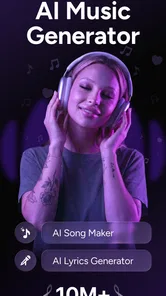
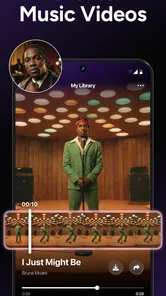
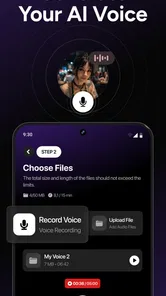
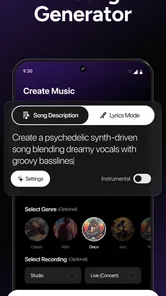
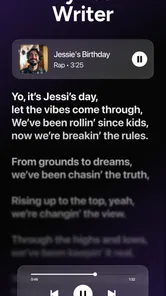
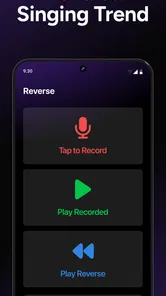
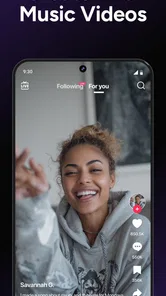
Analysis by Reviewed
I’m most comfortable treating MyTunes: AI Music Generator as a creative playground rather than a private music studio or a shortcut to finished, release-ready songs. Its appeal is the chance to turn a passing idea into something you can listen to, while its AI-generated results make it sensible to stay curious about how a track is made and what you can do with it afterward.
A sensible way to judge trust
When I try a music app, I separate what I can see on screen from what I might merely assume about its privacy or reliability. I look at each request for access, the choices offered before I save or share something, and the wording around purchases. Those checks don’t answer every question about a service, but they help me decide whether the next step feels appropriate for the task at hand.
For a first session, I’d keep the experiment deliberately ordinary: a broad mood or scene rather than a name, personal story, or sensitive recording. That gives me a way to judge the creative experience without making private material part of the test. If a permission request appears, I’d consider what I’m trying to do at that moment and whether the request makes sense for it, rather than approving everything automatically.
Trust starts with realistic expectations
MyTunes is a free entertainment app from HubX, with optional in-app purchases ranging from $4.99 to $59.99 per item. That makes it easy to try without paying upfront, but I’d check the purchase screen carefully before committing to anything. The app has a 3.3 average from around 135,000 ratings, so reactions are mixed rather than unanimous. I wouldn’t read that as proof of any single problem; I would take it as a reason to test the experience for myself before spending money.
It has more than a million installs and a Teen content rating. Those details help set expectations about its audience and reach, but they don’t tell me how the app handles every personal detail or creative upload. I prefer not to assume anything about permissions, account controls, or data practices without seeing those choices directly. If the app asks for access or information, I’d pause and consider whether it’s necessary for what I’m trying to do.
Keep the creative process in your hands
For a low-pressure first session, I’d start with an idea that doesn’t contain private details: a mood, a setting, or a broad musical direction. Then I’d listen to the result before deciding whether to save or share it. This small workflow keeps experimentation separate from personal material and makes it easier to judge whether the output is actually useful to me.
If I were making a track for a public post, I’d also review the app’s visible options and any terms shown around saving, exporting, or sharing before treating the result as ready to publish. A generated song can be fun to pass around, but I wouldn’t assume that creating it automatically settles questions about attribution or permitted use. For a casual clip, that may not matter much; for commercial work, I’d look for clearer rights guidance first.
More From Our News Desk

 Gmail
GmailGmail in a Busy Inbox: Who Benefits Most?
From first account to crowded workday, Gmail earns its place through dependable search and flexible sorting—but its best fit depends on how much inbox maintenance you can tolerate.

 Prime Video
Switching to Prime Video: What Changes in Your Viewing Routine
Prime Video can make a compelling second home for streaming, but switching means learning a different catalog, rental layer, and route from browsing to playback.

 Universal TV Remote Control
Universal TV Remote Control Works Best as a Reliable Backup
A phone remote earns its place through quick setup and reliable habits. Here is how to get more from Universal TV Remote Control—and where its limits show.

 Weather - By Xiaomi
Weather by Xiaomi Review: Clear at a Glance, Less Clear Up Close
Xiaomi’s weather app makes everyday forecasts quick to scan, but its calm surface can leave useful details and recovery paths harder to find than they should be.

 X
XX Under Pressure: Can It Recover When Posting Goes Wrong?
A resilience-focused review of X, examining setup, mistaken posts, interruptions, weak connections, and the gaps that matter when recovery needs to be dependable.

 Clash of Clans
Clash of Clans Is Won Between the Battles
Its raids are quick; its community is a long-term project of coordination, teaching, rivalry, and shared responsibility—with all the friction that entails.
Latest News



Getting Started with MyTunes
First things first, downloading MyTunes: AI Music Generator is a breeze. Available on both Android and iOS, it’s just a tap away from transforming your phone into a music studio. Once installed, you’re greeted with a sleek and intuitive interface that’s both welcoming and easy to navigate. I was pleasantly surprised by how user-friendly it was, making it perfect for both beginners and seasoned music creators.
Features That Struck a Chord
What truly sets MyTunes apart is its powerful AI engine. Imagine being able to generate unique music tracks that reflect your mood or style at any given moment. Whether you’re into pop, jazz, or something more experimental, the app’s AI can whip up a tune that feels tailor-made for you. I spent hours experimenting with different genres, and each track felt fresh and distinct!
Another highlight is the customization options. You can tweak the tempo, add effects, and even layer different instruments to craft a sound that’s truly yours. Plus, the app allows you to save and export your creations, making it easy to share your latest masterpiece with friends or on social media.
Making a track useful beyond the first listen
I’d treat genre and mood as starting points, not as a promise that every generation will land exactly where I want. A practical approach is to change one choice at a time, then compare the results; if I adjust the style, pace, and instrumentation all at once, it becomes harder to tell which change improved the track. That little bit of discipline can make casual experimentation feel less random.
For an everyday example, imagine I need a playful backing idea for a family slideshow or a short personal video. I could use the app to explore a few moods, keep the version that fits, and export it for a draft. If the project needs precise timing, a clean vocal recording, or detailed mixing, I’d move to a conventional audio editor instead. AI generation is handy for a quick spark, while traditional tools give me more control over individual notes and production decisions.
The “any voice” idea may sound especially tempting, but I’d be careful about using someone else’s voice or making a result that could be mistaken for their real performance. For a harmless experiment, I’d stick to my own material or a voice I have clear permission to use. That’s a more respectful way to explore voice-based creativity, and it avoids turning a playful tool into a source of confusion.
Small choices that make experimentation more useful
I’d keep a simple note of the prompt or settings behind a result I like. When a track feels close but not quite right, remembering the starting point makes it easier to make a focused adjustment instead of restarting from scratch. This is especially useful when testing a few styles for the same project: I can compare the mood and pacing without relying on memory alone.
I’d also listen through the whole result before deciding it works. A promising opening may not suit the rest of a slideshow or clip, and a track that sounds appealing on its own can compete with spoken audio. If I plan to use narration, I’d check the music underneath it at the intended listening volume and leave room for the voice. That small review step matters more than generating a long list of alternatives.
Saving and exporting are useful when a draft needs to leave the app, but I’d treat export as a handoff rather than a final production stage. I’d keep a copy of the version I prefer and check how it sounds in the destination app before sharing. That helps catch a mismatch in mood or loudness while changes are still easy, and it avoids assuming that a track will fit every platform or project equally well.
Choosing between a generator and a music library
The choice depends on whether I want to discover music or make a new starting point. A streaming service or stock-music library is usually more direct when I need a finished track with a known sound; MyTunes is more appealing when I want to explore an idea shaped around a mood or style. The trade-off is that generated output can require more listening and selection, while a library lets me compare established recordings.
For a creator who needs detailed control, a digital audio workstation is a different kind of tool. It takes more hands-on work, but it is better suited to arranging specific notes, editing performances, and building a mix deliberately. I wouldn’t replace that workflow with an AI generator for a project where every musical choice matters. I’d use MyTunes earlier in the process, as a way to test a direction, then move to a more precise editor if the idea earns further work.
That distinction also helps answer whether the app is suitable for beginners. I think it can be approachable for someone who wants to hear an idea without first learning a complex production setup. But people who already compose may find the generated result less useful if they want control over every part. The best fit is not a particular level of musical skill; it’s a willingness to treat the output as material to evaluate rather than a finished answer.
Where it fits—and where it doesn’t
MyTunes makes the most sense for curious beginners, people who want to try song ideas without learning a full digital audio workstation, and anyone who enjoys making shareable creative experiments on a phone. It is less suitable if I need exact control over a composition, dependable professional production, or clear commercial-use terms before publishing. In those cases, a traditional music-making app or a dedicated editor is the better starting point.
I’d also distinguish this from streaming services and standard music libraries. Those are built around finding finished songs; this app is aimed at making something of your own. That difference is useful when I want a personalized starting point, but it also means the result may need more judgment and editing than simply choosing a track from a library. Before paying, I’d try a small project and decide whether the creative control is worth the optional purchase for my needs.
What I’d check before paying or sharing
The app is free to start, but that doesn’t mean every useful option will necessarily fit a no-cost workflow. I’d first make one small track, then look at the exact purchase screen if I reach a point where an upgrade is offered. I’d check what the selected item includes, whether the cost is clear, and whether I’m choosing a one-off purchase or another kind of commitment. That is a better basis for deciding than paying because I’m already invested in an experiment.
Before sharing a result, I’d check the destination and the audience. A private message to a friend is a different use from a public post or a paid project, and I’d be more cautious as the stakes rise. If the track involves a voice, I’d make sure I have permission to use it and that listeners won’t mistake an artificial performance for someone’s real words. For commercial use, I’d want clear terms before relying on the track; if those terms don’t answer my question, I’d choose music with licensing that plainly fits the job.
These are practical checks, not a reason to avoid experimenting. They simply keep a playful creative tool in the right lane: try ideas with low-risk material, make deliberate choices about what leaves the app, and don’t treat a generated result as automatically cleared for every purpose.
Why You’ll Love It
One of the things I loved most about MyTunes is how it fosters creativity. Whether you’re a budding musician or someone who just loves to dabble in music creation, this app offers endless possibilities to explore. I found myself getting lost in the process, and it was incredibly rewarding to see my ideas come to life in such an effortless manner.
Moreover, the app continuously updates with new features and improvements, ensuring that it remains a fresh and exciting tool for music creation. The developers seem committed to enhancing the user experience, which is always a good sign!
Final Thoughts
In conclusion, MyTunes: AI Music Generator is more than just an app; it’s a gateway to unleashing your musical creativity. Its combination of powerful AI, user-friendly design, and robust customization options make it a standout in the world of music apps. Whether you’re aiming to create a chart-topping hit or just want to have some fun with music, MyTunes has got you covered. So, why not give it a try and let your creativity soar?
I’d make that recommendation more cautiously: the free entry point and quick creative appeal suit casual experimentation, while the mixed rating and paid options are good reasons to judge it on a small test rather than expectations. The current version is 2.2.14, and it requires Android 7.0 or later on Android. If you’re deciding whether to keep it, make one simple track, inspect the choices presented during use, and see whether the result is worth returning for. For me, that is the fairest way to weigh its fun against its limits.
MyTunes : AI Music Generator Frequently Asked Questions
Does MyTunes work on my phone’s operating system?
Before downloading, check that your device meets the app’s operating-system requirement. MyTunes runs on Android devices with version 7.0 or later, which covers many phones and tablets. Keeping your system up to date can also help with compatibility. MyTunes is an entertainment app from HubX, and it is available for Android and iOS.
Who makes MyTunes, and is it widely used?
MyTunes is developed by HubX and is listed in the Entertainment category. It has been downloaded over one million times and has an average rating of 3.3 from around 135,000 ratings, alongside roughly 3,900 written reviews. Those figures offer a broad sense of its reach and reception, but they cannot tell you whether its creative tools will suit your own expectations.
Is MyTunes suitable for beginners who have never made music?
Yes. MyTunes is designed to make music creation approachable, so you can explore ideas without needing formal musical training or technical production skills. You can experiment with different styles, moods, or instruments and let the AI shape a composition around your choices. It may also be useful for experienced musicians looking for a quick way to explore fresh musical directions.
What can I create with MyTunes: AI Music Generator?
MyTunes is an entertainment app for generating songs and making voice covers. Its store summary describes creating songs and covers with any voice, alongside a song generator. This makes it worth considering if you want to experiment with AI-assisted music creation or produce a personalized track, while the available features and options may depend on how you use the app.
What is MyTunes: AI Music Generator?
MyTunes: AI Music Generator is a cutting-edge application designed for music enthusiasts and creators. It leverages artificial intelligence to generate unique music tracks tailored to your preferences. Whether you are a professional musician or a hobbyist, this app provides a platform to explore new musical ideas and create personalized soundtracks effortlessly.
Pros
- User-friendly interface
- Wide variety of music styles
- Fast music generation
- High-quality sound output
- Customizable music parameters
Cons
- Limited free version features
- Occasional app crashes
- Requires internet connection
- Subscription-based pricing
- Ads in the free version













