Home AI - AI Interior Design
- 2.57K
- 4.5
- Installs
- 10.00M
- Price
- Free

Screenshots
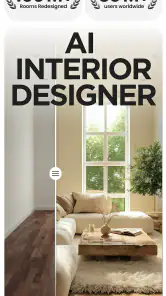
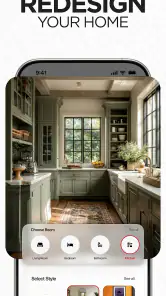
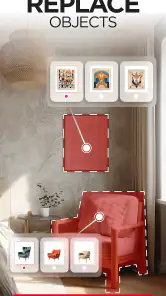
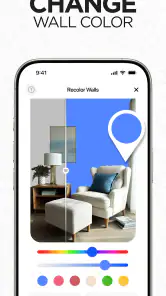
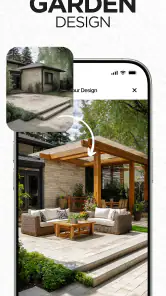
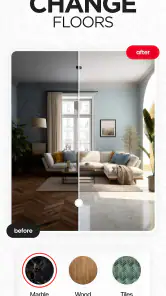
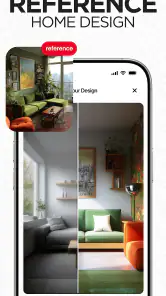
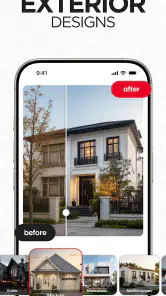
Analysis by Reviewed
When I want to change a room, the hardest part is often getting from a vague idea to a useful first plan. Home AI - AI Interior Design is aimed at that early, visual stage: it can help me explore possible looks before I commit to moving furniture or buying anything. I’d treat its suggestions as inspiration rather than a finished design, especially when a room has awkward corners or practical needs that a polished image may not capture.
Start with a clear room photo
Before judging a result, I’d take a moment to photograph the space in ordinary, even light and include as much of the room as possible. A cluttered view or a cropped corner can make it harder to assess whether a new look suits the actual layout. I’d also keep a second photo of the room as it is, so I can compare the AI’s concept with the real space instead of relying on memory.
That simple check matters because a visual redesign is not the same as a measured floor plan. If you need exact furniture clearances, accurate dimensions, or a contractor-ready layout, I’d use a proper planning tool or measure the room separately. Home AI is more useful for answering “Would I like this style here?” than “Will this sofa fit beside the radiator?”
Make the first ideas easier to use
A practical way to explore is to change one decision at a time. I’d compare a few different styles while keeping the room and its main purpose in mind, then note what consistently appeals to me: perhaps lighter colors, less visual clutter, or warmer materials. That gives the images a job beyond entertainment and helps turn a broad mood into a direction you can explain to a housemate or decorator.
For an everyday example, imagine I’m planning to refresh a bedroom over a weekend but don’t want to replace everything. I could use the app to look for a new overall feel, then separate affordable changes—such as rearranging what I own or switching accents—from purchases that need more thought. I wouldn’t treat an appealing image as a shopping list; I’d check each item against my room, budget, and actual needs first.
This is also where it helps to keep expectations grounded. AI-generated room concepts can be inspiring, but a beautiful image may not preserve every real-world detail. I’d use it to narrow down preferences, not as proof that a particular arrangement will work in daily life.
For a hands-on alternative, a room planner is better when exact dimensions and furniture placement are the main challenge. Browsing design photos can be better when you want real examples and product context. Home AI sits between those approaches: it gives a personal visual starting point without requiring you to build a detailed plan first. That makes it appealing for indecisive decorators, renters exploring reversible changes, and anyone who wants to test a style before discussing it with others.
More From Our News Desk

Weather by Xiaomi Review: Clear at a Glance, Less Clear Up Close

X Under Pressure: Can It Recover When Posting Goes Wrong?

Clash of Clans Is Won Between the Battles

Android Auto Makes the Case for Quieter Car Software

MobiOffice: Transforming Mobile Productivity with Seamless Integration

EA SPORTS FC™ Mobile Soccer: Redefining Mobile Sports Gaming
I’d skip it if you need precise renovation drawings, dependable measurements, or a guaranteed match to products you can purchase. It is also less useful if you already know exactly what you want and simply need a technical plan. In those cases, a conventional design or measuring tool is the more practical choice.
When a promising result is hard to judge
One common point of friction with a room redesign app is deciding whether an attractive result is actually useful. I try to look past the overall mood and check the parts that affect everyday life: whether the main walking route still seems open, whether the room’s purpose is clear, and whether the colors would work with fixed features I cannot change. A concept can be worth keeping even if I would never copy its furniture arrangement exactly.
I also avoid comparing images that answer different questions. If I’m trying to choose a color direction, I keep the room and its purpose in mind and focus on the palette. If I’m exploring a broader makeover, I accept that more elements may change at once and treat the output as a mood board. This makes it easier to tell whether I like the style itself or just one striking detail.
Small checks before starting over
If an image looks unexpectedly far from the room, I wouldn’t immediately repeat the same process several times. First I’d check the source photo: is the room visible, is the lighting reasonably even, and are important areas blocked by furniture or clutter? Then I’d reopen the app and try a more representative image. Changing one thing at a time makes it easier to tell whether the photo, rather than the design idea, was the sticking point.
For a room with mixed uses, such as a bedroom that also serves as a workspace, I’d take a photo that shows the features that matter to both activities. A tightly framed image may make a concept appear convincing while hiding the desk, doorway, or storage that shapes how the room actually works. The trade-off is simple: a wider view gives more context, while a close view may make it easier to focus on one area.
Use concepts without turning them into a shopping list
A visual suggestion can make it easier to describe what I want, but it does not automatically establish that a pictured item is available, affordable, or the right size. I’d write down the underlying idea—such as a calmer color scheme or a less crowded feel—before looking for specific purchases. That keeps the app useful even when I plan to reuse most of what I already own.
If I share a concept with a housemate, I’d ask what they like about it rather than asking for a simple yes or no. One person may respond to the colors while another notices the amount of open space. That conversation can reveal the parts worth carrying into a real plan, without pretending the generated image settles every practical decision.
Unleash Your Inner Designer
Have you ever found yourself staring at your living room, wishing it could somehow transform into the posh lounge of your dreams? Well, let me introduce you to Home AI - AI Interior Design, the app that's about to become your new best friend in home décor. If you're like me and your interior design skills are, let's say, a work in progress, then this app is a game-changer.
When I first opened Home AI, I was greeted with a sleek interface that even the most tech-challenged amongst us can navigate. The app uses cutting-edge AI technology to help you redesign your spaces effortlessly. You simply snap a photo of the room you want to revamp, and the app works its magic to suggest styles and layouts that fit your aesthetic preferences.
Features That Shine
One of the coolest features has to be the virtual reality preview. Imagine walking through your redesigned room before even moving a single piece of furniture! It's like having a crystal ball for your home renovations. The app also offers a wide range of styles—whether you're into minimalism, rustic charm, or modern chic, there's something for every taste.
The app doesn’t stop at just showing you what could be; it guides you on how to get there. With a detailed list of suggested items, from furniture to accessories, you can shop directly through the app. It's like having a personal shopper and interior designer rolled into one!
The Experience
Using Home AI is like having a creative partner who's available 24/7. I spent an entire evening playing around with different styles for my bedroom, and let me tell you, it was both fun and oddly therapeutic. The AI learns from your choices, offering more tailored suggestions the more you use it. It's like the app knows you better than you know yourself!
What I really appreciate is the app’s attention to detail. It considers lighting, space, and even color psychology to ensure your space not only looks good but feels right too. It's the kind of thoughtfulness that sets this app apart from the rest.
Worth trying, with a few sensible checks
Home AI is a free lifestyle app from HubX, with a 4.5 average from around 945,000 ratings and over 10 million installs. It is rated for Everyone, and version 1.6.0 requires Android 7.0 or later. In-app purchases range from $4.99 to $64.99 per item, so I’d look at any purchase details before committing rather than assuming every option is included at no cost.
If a screen seems slow or a result doesn’t look right, I’d start with ordinary checks: make sure the app is current, try a clearer room photo, and reopen the app before repeating the same action. If the image itself is misleading, the cause may simply be the camera angle, lighting, or objects blocking parts of the room—not necessarily a problem with the app. For an important decision, compare the idea with the real room and measure before buying.
Choosing the right tool for the job
The main alternative is a conventional room planner, and I’d choose one when the task has moved from “What atmosphere do I like?” to “How will these pieces fit?” A planner built around dimensions is more helpful for checking clearances and placements. By contrast, browsing real interiors is useful when I need examples of actual materials or want to see how a particular product looks outside an AI-created scene. These approaches solve different problems, so I wouldn’t expect one app to replace the others.
Home AI makes the most sense at the beginning of a project, when I have a room photo but not yet a confident direction. It can help a renter think through changes that are easy to undo, or help a homeowner explain a preferred look before discussing details with someone else. It is a weaker fit for a renovation where the key decisions depend on measurements, building constraints, or selecting specific products. In that situation, I’d use the generated concept only as a visual reference and move to a more precise tool for planning.
Who will get the most from it
I’d recommend trying it if you enjoy visual experimentation, find blank-page decisions difficult, or want a quick way to compare broad decorating directions. It can also help when two people have trouble describing a shared preference: looking at a concept gives you something concrete to react to. The useful outcome may not be a finished room design; it may simply be realizing that you prefer a lighter, calmer space over a darker, busier one.
I’d be more cautious if you dislike AI-generated images, need a reliable construction plan, or expect every suggested object to correspond to a purchasable item that fits your space. Someone who already has a detailed plan may get more value from a measuring or drafting tool. And if you mainly want inspiration from completed real homes, a collection of photographs offers more grounded examples than an imagined redesign.
Before paying or relying on a concept
The app is free to install, but optional in-app purchases are part of the experience, so I’d check the terms shown for any item before deciding. If I’m only exploring, I’d first see how far the available experience takes me and avoid treating a prompt to purchase as a requirement to begin planning. The listed age rating is Everyone, which makes the app broadly accessible, but adults should still make the purchase decision themselves, particularly when a device is shared.
My practical follow-up is usually: can I use a result without buying anything, and can I trust it for measurements? I’d approach the first by checking what is available in the app before paying; I’d answer the second by measuring the room independently. For whether a result will suit a particular home, I’d compare it with the original photo and account for fixed features, everyday routines, and furniture I intend to keep. Those checks make the visual ideas more useful without asking them to do a planner’s job.
Final Thoughts
If you're someone who wants to give their home a facelift without breaking the bank, Home AI is definitely worth checking out. It's user-friendly, efficient, and packed with features that make interior design accessible to everyone. Whether you're a seasoned decorator or a complete newbie, this app is a handy tool to have in your pocket.
So, go ahead and give it a whirl. Your dream home is just a click away!
My practical verdict is that I’d reach for it when I need visual inspiration and want to make a room conversation more concrete. I’d keep a shortlist of the ideas that suit the actual space, then use measurements and a separate budget check before acting on them. If you’re happy to treat the results as concepts rather than promises, Home AI can make the first step of redecorating more enjoyable and less intimidating.
Home AI - AI Interior Design Frequently Asked Questions
Can I use Home AI to explore a new look before buying furniture or redecorating?
Yes. Home AI - AI Interior Design is intended to help you explore ideas for redecorating, using a photo of your space as a starting point for AI-generated design suggestions. It can be useful for considering different directions before you make changes or shop. Treat the visuals as inspiration, though, rather than exact measurements or a guarantee that a particular item will fit your room.
What should I prepare before using Home AI for a room-design idea?
A picture of the room you want to rethink is a helpful starting point, since the app uses images of your space to generate design suggestions. It also helps to have a general idea of what you like, such as a preferred look or colors, so you can judge the results against your own taste. Keep in mind that generated concepts are for visualization, not a substitute for planning measurements.
Is Home AI - AI Interior Design easy to use for someone who has never planned a room before?
Home AI - AI Interior Design is designed to make home decorating approachable, including for people without design experience. Its central idea is to use a picture of a space as a starting point for AI-generated design suggestions, so you can explore possible looks without first learning professional design software. The results are best treated as inspiration to guide your decisions, rather than a substitute for measuring or planning a renovation.
Who develops Home AI, and what kind of app is it?
Home AI - AI Interior Design is a lifestyle app developed by HubX. It focuses on home decorating and interior design, with a store summary that describes it as a way to redecorate your home using AI, a room planner, and home-design tools. The app is free to download, though some features may involve in-app purchases, so it is worth considering how you plan to use it before choosing to buy anything.
What is Home AI - AI Interior Design and how does it work?
Home AI - AI Interior Design is an innovative app that leverages the power of artificial intelligence to assist users in designing and visualizing their home interiors. By simply uploading images of your space, the app can generate design suggestions, color palettes, and furniture arrangements tailored to your preferences. It simplifies the interior design process, making it accessible even for those without prior design experience.
Pros
- User-friendly interface for easy navigation
- Wide variety of design templates
- Real-time AI suggestions enhance creativity
- Compatible with both iOS and Android
- Cost-effective design solution
Cons
- Limited free features
- Requires stable internet connection
- Occasional lag during high usage
- Some design templates are premium
- AI suggestions can be repetitive
- Category
- Lifestyle
- Version
- 1.6.0













