PaperColor
- 12.96K
- 4.4
- Installs
- 10.00M
- Price
- Free
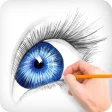
Screenshots
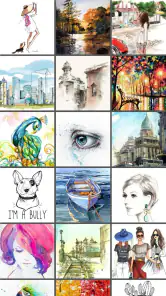
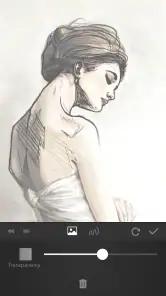
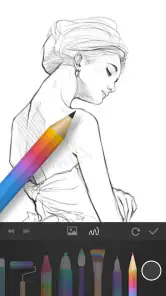
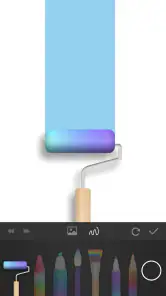
Analysis by Reviewed
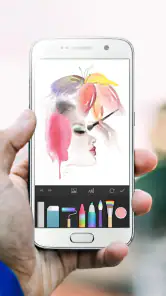
When I need a quick place to sketch an idea, I care less about a huge toolset than whether I can start drawing without fighting the interface. That is the decision point with PaperColor: it is a mobile art app from Eyewind that aims to make a phone or tablet feel like a handy drawing pad. I see it as a practical choice for casual sketching and learning, rather than a replacement for a full desktop art studio.
Choosing a drawing app that fits the way you work
Before choosing any drawing app, I’d ask what I want to make and where I’ll work. If I’m planning a quick study, a visual note, or a small illustration while away from my desk, a straightforward canvas matters more than an extensive professional workflow. PaperColor sits in the Art & Design space and is free to install, so it’s easy to try before deciding whether it suits your habits. It has a 4.4 average from around 218,000 ratings, and more than 10 million installs suggest it has reached a broad audience.
Why a simple sketching workflow works well here
First things first, PaperColor is designed to be user-friendly, even for those who might not consider themselves artists. The interface is clean and intuitive, which means you can dive right into sketching without feeling overwhelmed by complex settings. Whether you’re doodling during a meeting or sketching a masterpiece, the app provides a seamless experience.
That low-friction start is useful for people who tend to abandon creative tools when the setup becomes a project of its own. I’d use it for thumbnailing a room layout, jotting down a visual idea before it disappears, or making a quick birthday-card draft. Those are modest tasks, but they benefit from a canvas that feels ready for marks rather than a workspace that asks me to configure a dozen choices first.
It also makes the app approachable for a parent or teacher who wants to offer a child a place to experiment with drawing. The Everyone content rating is reassuring in that context, though I’d still stay nearby when a child uses any app that includes purchases. The app is free to install, but optional in-app items cost from $0.99 to $27.99 each, so I would check purchase settings on a shared device rather than assume every part of the experience is free.
Brushes, references, and layers in practice
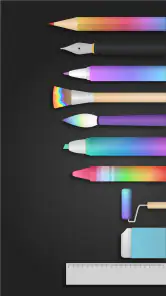
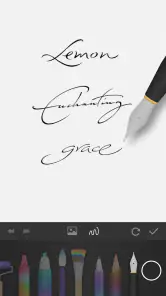
One of the app’s standout features is its variety of brushes and colors. You get everything from pencil and pen to watercolor and acrylic. The app even simulates the pressure sensitivity you’d get from real-life drawing tools, making your digital art feel more authentic. It’s like carrying a full set of art supplies in your pocket!
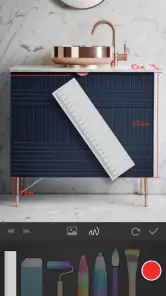
Another cool feature is the ability to import photos and use them as a reference or to draw over them. This is perfect for those who want to practice drawing portraits or landscapes. Plus, with layers, you can add depth and complexity to your creations without fear of ruining your initial sketch.
You May Like

Clash of Clans Is Won Between the Battles

Android Auto Makes the Case for Quieter Car Software

MobiOffice: Transforming Mobile Productivity with Seamless Integration

EA SPORTS FC™ Mobile Soccer: Redefining Mobile Sports Gaming

How Microsoft OneDrive Became a Mobile Productivity Giant

How Google Translate Breaks Language Barriers Effortlessly
One useful way to combine those tools is to keep a photo reference separate from the drawing work, then build the sketch in stages. I’d use that approach for a quick café study: take a photo of a cup and window, bring it in as a guide, block in the main shapes, and add details on another layer. It makes experiments less risky because the first marks don’t have to be final. For a beginner, that separation can also make it easier to see which part of a drawing needs attention.
A practical tip is to decide what the imported picture is doing before you start: is it a guide to look at, or a base you intend to draw over? Keeping that intention clear helps avoid tracing every edge when the real goal is to learn shape and proportion. I’d first sketch the large silhouette, then use the reference to check angles and spacing, and only afterward add small details. This turns a photo from a shortcut into a useful exercise.
Layers are most valuable when I give them jobs instead of adding them automatically. For a simple study, one layer can hold the rough construction and another the cleaner lines; for a color experiment, I’d keep the color pass apart from the drawing so I can judge it without losing the underlying shapes. The trade-off is that layers can make a small phone screen feel busier, so I wouldn’t build a complicated stack for a quick doodle. A few purposeful stages are easier to manage and revisit.
Sharing, keeping work, and everyday projects
Once you’ve created your masterpiece, sharing it is a breeze. The app allows you to easily share your work on social media platforms or send it directly to friends and family. It’s a great way to show off your skills and get feedback from others.
For those who love to keep their work organized, the app provides a gallery feature where you can store and manage your drawings. This way, you can look back and see how your skills have improved over time.
That gallery is especially useful if you treat drawing as a small daily habit rather than a one-off project. I’d keep rough gesture sketches, color tests, and finished pieces together so I can compare them later and spot recurring mistakes. For sharing, I’d send a finished image when I want a quick reaction, while keeping unfinished studies private until I’m happy with them. The app is best suited to this kind of lightweight practice and personal work.
Here’s a realistic use case: I might have ten minutes before meeting a friend and want to draw the plant on the windowsill. I can make a loose outline, try a couple of color choices, save the study, and move on without turning the moment into a formal art session. Later, I can look at the saved work and notice whether I made the leaves too evenly spaced. That short feedback loop is more useful for building a habit than waiting for a free afternoon to attempt a polished piece.
For someone learning, I’d also use the gallery as a record of decisions, not just a portfolio. Saving a rough version alongside a later pass can reveal whether the improvement came from better proportions, cleaner lines, or simply more time. If I’m sharing a drawing for feedback, I’d ask a specific question—such as whether the silhouette reads clearly—rather than asking people to judge the whole piece. That makes the app’s quick sharing more useful as part of practice.
When another kind of art app may be a better fit
PaperColor’s approachable feel is appealing, but it also points to its limits. People who need a highly configurable professional workspace, detailed control over every brush parameter, or a workflow built around complex production may be happier with a more advanced illustration app or desktop software. Those options can offer more room to customize, but often ask for more time to learn. If the goal is to make a fast sketch on a phone, that extra complexity may be unnecessary; if the goal is precise, layered work for a larger project, it may be worth it.
I’d also keep expectations grounded around mobile drawing. A finger can be fine for loose ideas, but careful line work is easier with a compatible stylus and a comfortable screen. If you’re using a small phone, zooming and adjusting details can interrupt the flow. Try a simple subject first, such as a leaf or a mug, and see whether the controls feel natural before committing to a longer piece.
The usual alternatives fall into a few broad groups. A note-taking app is often a better fit for diagrams mixed with typed text and reminders; a photo editor makes more sense when the main task is adjusting an image rather than drawing new marks; and a full illustration program is preferable when I need fine-grained control or a larger production workflow. PaperColor’s appeal is the middle ground: it gives a casual sketcher brushes, photo references, layers, and a gallery without asking them to approach every idea like a formal project.
That middle ground has limits for finished work. If I’m preparing artwork that must fit a strict professional handoff, I’d choose a tool whose export and production workflow I already trust rather than assume a mobile sketch app will cover every requirement. Likewise, if my goal is to paint with highly controlled texture or spend hours refining tiny details, I would test the actual drawing feel before building a project around it. For rough concepts and personal studies, those constraints matter much less.
For a phone-first user, the key question is not whether a stylus is essential, but whether the screen and input method let them make the marks they want. I’d test a short curved line, a few small shapes, and a broad color area before deciding. If those feel comfortable, the app can work well for spontaneous ideas. If I find myself constantly correcting finger placement or zooming to reach details, a larger tablet or a different tool is likely the better choice.
What to consider before settling in
The app is free, with in-app purchases ranging from $0.99 to $27.99 per item. I’d start with the free experience and only consider a purchase if I know which tool or addition I actually want; that avoids paying for extras before finding out whether the drawing routine sticks. Its content rating is Everyone, and version 2.9.15 requires Android 5.0 or later, useful points to check when deciding whether an older device is suitable. Eyewind released it on June 17, 2016, and it has accumulated around 13,000 written reviews.
Since the optional items are offered separately, I’d treat a purchase as a decision about a specific need, not as a required first step. I would use the free experience long enough to complete a few different tasks: a quick sketch, a photo-guided study, and a drawing I save and reopen. That gives a better basis for judging whether an extra item would solve a real limitation or whether I simply haven’t settled into the workflow yet.
Compatibility is another practical check before moving a regular drawing habit onto an older device. The current version is 2.9.15, and Android 5.0 is the minimum operating system requirement. The app’s long-running presence since June 17, 2016, and its broad audience are useful context, but I’d still judge it by how it behaves on the device I plan to draw with and whether that screen feels comfortable for the kinds of marks I make.
Switching from another drawing app has a practical cost: your familiar gestures, brush choices, and project organization may not carry over in the same way. I’d keep an original copy of any important artwork before changing apps, then test one small project from start to finish in PaperColor. That tells you more than a quick look at the brush menu: you’ll learn whether importing a reference, working in layers, revisiting a drawing, and sharing the result fit your actual routine.
I wouldn’t move a whole archive over just because a new app looks inviting. Instead, I’d start with one new piece and keep the old app available until I know how the new routine feels. That small trial answers the questions that matter in practice: can I find my saved study again, do I enjoy drawing with the available input, and is sharing straightforward enough for how I use the result? If the answer is no, the cost of switching is already clear without risking older work.
A sensible choice for casual creativity
In conclusion, if you’re looking for an app that mimics the traditional drawing experience while also offering modern conveniences, PaperColor is definitely worth checking out. It’s perfect for both beginners and seasoned artists who want a reliable digital sketchpad at their fingertips. With its easy-to-use interface and a plethora of features, this app is a fantastic tool for unleashing your creativity. So, why not give it a try and see what masterpieces you can create?
My recommendation is more specific: I’d choose it for approachable sketching, photo-guided practice, and keeping a casual drawing habit within reach. I’d skip it if I needed a deeply tailored professional pipeline or found drawing on my device uncomfortable. For someone unsure, the best test is a small everyday idea rather than a grand project: make a quick study, save it, and return to it later. If that feels enjoyable instead of fiddly, this could be the pocket-sized art space you’ll actually use.
The audience I’d most readily recommend it to is someone who wants to draw more often but doesn’t want learning the app to become a separate hobby. Beginners can use references and layers to explore without treating every mark as permanent, while occasional sketchers can capture ideas before they fade. I’d be more cautious about recommending it to an illustrator whose daily work depends on a highly customized setup, or to anyone who already knows that phone-based drawing strains their eyes or hand.
One final way to decide is to set a small, clear goal before opening the canvas: sketch a mug in five minutes, make a color study from a photo, or draw a simple idea you can send to a friend. A focused test shows whether PaperColor’s casual, mobile approach matches your habits better than a note app, a photo editor, or a more involved art program. If you enjoy returning to the drawing afterward, I think it earns a place in your creative routine; if the device gets in the way, choosing another format is the sensible call.
PaperColor Frequently Asked Questions
Does PaperColor work offline, or do I need an internet connection to draw?
PaperColor is a sketching and painting app, but whether every feature works without an internet connection can depend on how the app handles individual tools and content. If offline drawing is important to you, check that the brushes and features you plan to use are available after installation. The core appeal is its sketchbook-style approach to drawing and painting.
Can I use PaperColor with a stylus, or is it designed for finger drawing?
PaperColor is made for sketching and painting on mobile devices, so you can explore drawing with the input that feels most comfortable on your phone or tablet. A stylus may offer a more familiar, precise way to make strokes, while a finger can be convenient for casual sketches. The experience will also depend on your device’s screen and input support.
Is PaperColor suitable for a first digital drawing app?
PaperColor is listed for everyone and is aimed at sketching and painting, so it may suit someone starting out as well as people with more drawing experience. Its store summary describes it as a sketchbook that imitates brushes, with a simple approach to painting. You can consider whether that style matches what you want from a drawing app before downloading.
What is PaperColor and how does it work?
PaperColor is a digital drawing and painting app designed for both beginners and experienced artists. It emulates the real-life experience of sketching and painting with various brushes and tools available. The app offers a user-friendly interface and a range of features such as layers, color palettes, and customizable brushes, allowing users to create detailed and intricate artwork. It can be used on both Android and iOS devices, making it versatile for all users.
Does PaperColor offer any tutorials or guides for beginners?
Yes, PaperColor provides several tutorials and guides to help beginners get started with digital drawing. These resources cover basic techniques, such as using different brushes and colors, as well as more advanced features like layering and blending. The app’s intuitive design makes it easy for users to follow along and improve their skills over time. Additionally, online communities and forums can offer further guidance and inspiration.
Pros
- User-friendly interface with intuitive tools
- Realistic brush strokes and textures
- Wide range of colors and shades
- Supports layering for complex designs
- Offline mode available for sketching anywhere
Cons
- Limited export options for artwork
- Occasional app crashes reported
- No vector drawing support
- Advertisements in free version
- Requires in-app purchases for some features

- Category
- Art & Design
- Version
- 2.9.15












