AR Drawing - Sketchar App
- 2.81K
- 4.4
- Installs
- 10.00M
- Price
- Free
Screenshots

Analysis by Reviewed
What makes AR Drawing - Sketchar interesting to me is the way it puts a reference image into the real drawing space. Instead of repeatedly looking from a screen to a blank page and estimating proportions, I can follow an image through my phone’s camera while working on paper. That changes the task: the app can help me get a first outline down, while the choices that make a drawing feel like mine—line, shading, and detail—are still up to me.
Discovering the Art with Augmented Reality
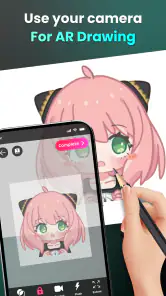
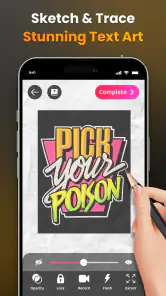
So, what's the deal with AR Drawing - Sketchar? At its core, the app allows you to draw using augmented reality. Imagine using your smartphone camera to overlay a virtual image onto a physical surface, and then tracing it to create your masterpiece. It's like having a digital stencil that you can adjust to fit any canvas size. Plus, the app's interface is straightforward and user-friendly, making it easy to dive right into your creative process without getting bogged down by complicated settings.
Making the overlay useful on paper
The practical trick is to treat the overlay as a guide, not as a promise that the drawing will come out perfectly. I’d begin with a simple subject and lightly mark its broad shapes before committing to darker lines. Keeping the phone steady matters: a small shift in its position can make the reference harder to follow, so a stand or another stable support can make a session less fiddly. This is especially useful when the goal is to understand proportions rather than simply copy every contour.
There is also a useful choice to make before tracing: pick an image whose main shapes are clear at the size you plan to draw. A busy reference can turn the overlay into visual clutter, while a clean silhouette gives your hand an easier starting point. I find this makes the app more helpful for practicing observation and control than for expecting it to do the creative work on my behalf.
Getting more from a guided drawing session
I’d plan the page before opening the camera view. Decide whether the subject should sit in the middle, leave room for lettering, or become one element in a larger scene. That small decision helps keep the traced outline from dictating the entire composition. For a card, for example, I might use the guide for a central flower but leave space around it for a handwritten message and extra decoration.
Tracing in stages also makes the process more forgiving. I start with the largest shapes, check that they sit comfortably on the page, and only then move to smaller details. If the image has a face, a vehicle, or another subject with recognizable proportions, I pay particular attention to its overall width and height before adding features. It is easier to correct a light outline than to work around a fully darkened drawing.
Features That Inspire Creativity
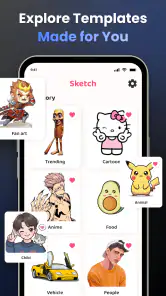
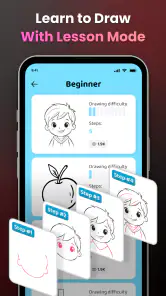
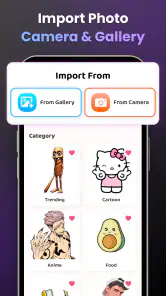
One of the standout features is the step-by-step drawing tutorials. Whether you're sketching a simple flower or a detailed portrait, the app guides you through each phase. This makes it a fantastic tool for learning new techniques or just practicing your skills. There's also a massive library of images and templates to choose from, so inspiration is never far away.
More From Our News Desk

Clash of Clans Is Won Between the Battles

Android Auto Makes the Case for Quieter Car Software

MobiOffice: Transforming Mobile Productivity with Seamless Integration

EA SPORTS FC™ Mobile Soccer: Redefining Mobile Sports Gaming

How Microsoft OneDrive Became a Mobile Productivity Giant

How Google Translate Breaks Language Barriers Effortlessly
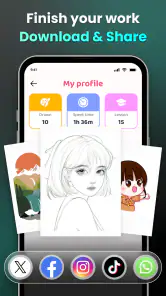
Another cool feature is the ability to share your creations with a community of fellow artists. You can see what others are working on, get inspired by their creations, and even receive feedback. It’s like having a supportive art class in your pocket!
How I’d use tutorials without becoming dependent on them
The tutorials are most useful to me when I treat each step as a reason to notice something, rather than as a line to reproduce automatically. I’d pause after a stage and ask what changed: did the shape get wider, did a curve become sharper, or did a smaller mark make the subject easier to read? That turns a guided session into a lesson I can carry to the next page.
A practical follow-up is to try a second drawing of the same subject with less help. I might keep the reference nearby but stop using the overlay, or redraw only the main shapes from memory. The result may be rougher, but comparing the two attempts shows whether I learned the structure or simply followed the projected lines. For anyone using the app to improve, that comparison is more informative than judging the finished picture alone.
A small project that shows the difference
For an everyday example, I’d use the overlay to sketch a greeting card or a small notebook illustration during a quiet break. I can choose a straightforward subject, trace its main outline, then put the phone aside and add my own patterns or color. That division is valuable: the AR reference gets me past the blank-page hesitation, but it doesn’t prevent me from changing the result. For a child or a complete beginner, that early sense of progress can make drawing feel approachable; for someone experienced, it can be a quick composition exercise rather than a replacement for freehand practice.
This kind of short project also makes it easier to decide how much guidance is actually needed. A simple outline for a card may be enough; a more involved illustration could benefit from working through a tutorial first and then taking a break before adding details. I would keep the paper, pencil, and phone arranged so I can still reach the page comfortably. If the device is awkwardly positioned, the convenience of an overlay disappears quickly, especially when the drawing needs careful hand movements.
Where the approach has limits
AR tracing is not the same as learning to draw from observation. If I follow every line mechanically, I may finish a recognizable picture without understanding why its proportions work. I’d use the tutorials and overlay as training wheels, then try the same subject without the guide to see what I retained. The camera-based workflow also asks me to divide attention between the screen and the page, so it may feel awkward for detailed work or for anyone who wants an uninterrupted, traditional sketching session.
It also depends on the drawing surface and the way I set up the phone. A cramped table, a page that shifts under my hand, or an unstable device can turn a promising sketch into a series of adjustments. I’d secure the paper and test the framing with a few light marks before investing time in fine detail. This is not a flaw unique to one drawing app so much as a real trade-off of tracing through a camera: the physical setup becomes part of the creative process.
Features That Inspire Creativity
One of the standout features is the step-by-step drawing tutorials. Whether you're sketching a simple flower or a detailed portrait, the app guides you through each phase. This makes it a fantastic tool for learning new techniques or just practicing your skills. There's also a massive library of images and templates to choose from, so inspiration is never far away.
Another cool feature is the ability to share your creations with a community of fellow artists. You can see what others are working on, get inspired by their creations, and even receive feedback. It’s like having a supportive art class in your pocket!
A realistic routine for using the app
Imagine having a spare half hour before leaving home and wanting to make a handmade card rather than scroll on your phone. I’d choose a clear reference from the available images or templates, set the paper where it will stay put, and use the overlay only to establish the main outline. After that, I’d close the guided part of the task mentally: add a personal detail, adjust a shape, or leave an intentional gap for a message. The point is not to produce a perfect copy, but to use the reference to get past the hardest first marks.
If I were preparing the same kind of drawing with a conventional art app, I could make and revise marks directly on the screen, but the result would remain digital unless I printed it. With a sketchbook alone, I could work anywhere without arranging a phone, though I would need to estimate the proportions myself. Sketchar sits between those choices. Its particular value is helping a person translate a screen reference into pencil marks on a physical page, not replacing either a full digital workspace or the freedom of drawing unaided.
Who benefits most from it
I see the strongest fit for curious beginners, hobbyists making handmade gifts, and artists who want a guided way to explore outlines. Braly JSC publishes this free Art & Design app; it is rated for Everyone and has a 4.4 average from around 123,000 ratings, with over 10 million installs. The app was released on June 23, 2024, and version 1.9.42 lists Android 7.0 as its minimum. Optional in-app purchases range from $2.99 to $29.99 per item. Those details make it easy to try, though I’d check the purchase options before settling into a routine if I want to keep my spending predictable.
It can also suit a parent or caregiver looking for a supported drawing activity, provided the adult is comfortable helping with the phone setup and keeping the exercise focused on making rather than copying. The Everyone content rating makes the app broadly approachable, but the best experience still depends on the person using it: a child who enjoys following visual prompts may find it inviting, while one who prefers unstructured play may be happier with crayons and a blank page.
On the other hand, I would not choose it as my main tool if I already draw confidently from observation and want to deepen that skill. Repeatedly tracing can make proportions feel easier in the moment without building the same judgement as freehand practice. I’d also skip it for detailed digital illustration, where working directly with editable marks is more suitable, or for a session where I want to draw outdoors without arranging a phone over the page. The app is most compelling when its specific bridge from reference to paper solves a real problem for me.
Choosing it over a blank canvas or a drawing app
Compared with a standard digital drawing app, this approach is less about building a complete image on a touchscreen and more about putting a visual guide beside physical marks on paper. A plain sketchbook offers more freedom and no screen to position, but also no projected reference to help with a tricky outline. I’d choose Sketchar when I want that bridge between reference and hand-drawn work; I’d choose a conventional drawing app for layers and direct digital editing, or a sketchbook alone when I want to practice without assistance.
There is a useful middle ground, too: use the overlay for a first pass, then deliberately change part of the image. A different expression, altered background, or added pattern gives the drawing a personal direction without requiring me to invent the entire composition from scratch. This is where the app feels more like a starting aid than a tracing machine. It can reduce the anxiety of getting proportions down, but the character of the finished work still comes from the decisions I make on paper.
Small decisions that improve the result
Before a longer session, I’d check that the page is a comfortable size for the subject and that the phone’s position lets me see both the projected image and the area where my hand is working. A reference that looks clear on a screen may feel too crowded when mapped to a small page, so choosing a simpler image is often the better call. If I am unsure, I would test a few large shapes first rather than trace the whole design immediately.
I would also decide in advance what I want to learn. If the goal is a finished gift, following the outline can be a practical shortcut. If the goal is to improve, I’d spend more time noticing the shapes, then set the phone aside and attempt a second version. Those are different uses, and neither needs to be treated as the only correct way to draw. Being clear about the goal helps prevent the app’s guidance from becoming either a crutch or an unnecessary obstacle.
Why You Should Give It a Try
What I love most about Sketchar is its potential to boost your confidence as an artist. The augmented reality aspect feels like having a personal art tutor, helping you improve with each drawing. And let's not forget, the app is constantly updated with new features and templates, keeping the experience fresh and exciting.
For me, the strongest reason to try it is specific: if a blank page makes you hesitate, seeing a reference over your paper can give your hand a clear first step. That does not guarantee that every session will feel smooth. You may need to adjust the phone, simplify the reference, or accept that a traced outline is only the beginning. But when those compromises are acceptable, the app offers a practical way to turn an image on a screen into a drawing you can hold, finish, and make your own.
In a nutshell, if you're looking for an innovative way to enhance your drawing skills, AR Drawing - Sketchar is worth checking out. It's not just an app; it's a gateway to a new art form that blends technology and creativity in the most delightful way.
So, grab your phone, download the app, and start sketching your way into the future of art!
AR Drawing - Sketchar App Frequently Asked Questions
What devices should I prepare before downloading AR Drawing - Sketchar App?
A mobile device with a working camera is the main thing to have ready, since the app uses the camera to show a drawing guide over a real surface. Choose a surface you can comfortably look at while drawing, and set up your device so its screen remains visible as you work. The app is free to download, with optional in-app purchases.
Is AR Drawing - Sketchar App suitable for children?
The app has an Everyone content rating, so it is presented as suitable for a general audience. Its focus is drawing and creative practice, which may appeal to younger users as well as adults. Parents can still review how a child will use a camera-based drawing app and discuss any optional purchases before downloading or making an in-app purchase.
What devices and operating systems can I use with AR Drawing - Sketchar App?
AR Drawing - Sketchar App is available for mobile devices, and its listed minimum operating-system requirement is version 7.0. Before downloading, check that your device meets this requirement and has a working camera, since the drawing experience uses the camera to place a guide in view of a real surface. The app is in the Art & Design category and is rated for Everyone.
What is AR Drawing - Sketchar App and how does it work?
AR Drawing - Sketchar App is an innovative application that utilizes augmented reality (AR) technology to assist users in drawing and sketching. By projecting virtual images onto real-world surfaces through your device's camera, the app guides you in tracing or freehand drawing, enhancing your artistic skills. It's ideal for artists at any level who want to explore or improve their drawing capabilities.
Is AR Drawing - Sketchar App suitable for beginners?
Yes, AR Drawing - Sketchar App is designed to be user-friendly and is suitable for beginners. The app offers a variety of tutorials and step-by-step guides that help new users get started. Whether you have basic drawing skills or are just starting, the app provides tools and templates to make the learning process smooth and enjoyable.
Pros
- Easy-to-use interface for beginners.
- Wide variety of drawing tools available.
- Supports augmented reality sketches.
- Offers step-by-step drawing tutorials.
- Regular updates with new features.
Cons
- Requires strong internet connection.
- Limited free features.
- In-app purchases can be pricey.
- Occasional app crashes reported.
- High battery consumption.

- Category
- Art & Design
- Version
- 1.9.42













