PENUP – Drawing-sharing SNS
- 11.77K
- 4.5
- Installs
- 100.00M
- Price
- Free

Screenshots


Analysis by Reviewed
I tend to judge a creative social app by two things: whether it makes drawing feel inviting, and whether sharing feels like a choice rather than the whole point. PENUP has a clear identity as an art and design space built around drawings and the people who make them. Samsung Electronics Co., Ltd. developed it, and its long-running presence is reflected in its release in 2013 and its reach of over 100 million installs. That scale can make the gallery feel lively, though it also means the experience is social first, not a private sketchbook by default.
What sharing changes about the drawing experience
When I’m deciding whether to post a sketch, I want to know what I’m getting from the audience. Here, the appeal is seeing how other people interpret a theme and having a place to show work that might otherwise stay buried in my camera roll. A useful habit is to treat a challenge as a prompt, not a deadline: I can make a quick study, browse other approaches, and stop there if I don’t want to turn a casual drawing into a regular posting routine.
Choosing the right creative workflow
For a small everyday scenario, imagine waiting for a friend and having ten minutes to spare. I’d use that time to sketch a simple object, experiment with a brush, or browse the gallery for an idea, rather than begin a detailed illustration that needs careful file management. That distinction matters: PENUP suits low-pressure practice and sharing, while an artist who needs a highly controlled production workflow, specialist editing tools, or a dependable portfolio pipeline may prefer a dedicated drawing app and a separate place to publish finished work.
That short-session approach also helps answer a practical question: can I use it without turning every visit into a full art project? I think so, if I set a small goal before opening it. One visit can be only browsing a theme or observing how other people solve a visual problem; another can be a quick sketch with no intention of posting. Keeping those activities separate makes the app easier to fit around work, study, or family time, and it prevents the social feed from becoming a measure of whether I have been productive.
Audience, boundaries, and practical trade-offs
The social side is a reason to try it, but it may not suit everyone. If you mainly want to draw offline, keep work private, or avoid comments and feeds, a standalone sketching tool is likely a better fit. Before posting, I’d pause over whether a piece is still a rough experiment or something I’m comfortable showing to other people. That small check helps keep the creative process enjoyable instead of making every drawing feel like a performance.
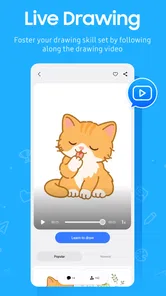
There is also a useful distinction between learning from a gallery and learning a technique. Browsing can expose me to different choices in composition, color, or subject, but seeing a finished image does not necessarily explain how its maker built it. I’d use PENUP to gather ideas and notice approaches, then turn to a focused tutorial or a dedicated drawing environment when I need step-by-step instruction or more control over a project.
For someone weighing up whether it is worth trying, the basic decision is straightforward: it is free, has a Teen content rating, and carries a 4.6 average from around 215,000 ratings. I’d see those figures as useful context, not proof that it will fit every artist. PENUP is most appealing if browsing other people’s art and sharing your own are part of the fun; it is less compelling if you want a strictly private canvas or professional-grade controls.
More From Our News Desk

 Gmail
GmailGmail in a Busy Inbox: Who Benefits Most?
From first account to crowded workday, Gmail earns its place through dependable search and flexible sorting—but its best fit depends on how much inbox maintenance you can tolerate.

 Prime Video
Switching to Prime Video: What Changes in Your Viewing Routine
Prime Video can make a compelling second home for streaming, but switching means learning a different catalog, rental layer, and route from browsing to playback.

 Universal TV Remote Control
Universal TV Remote Control Works Best as a Reliable Backup
A phone remote earns its place through quick setup and reliable habits. Here is how to get more from Universal TV Remote Control—and where its limits show.

 Weather - By Xiaomi
Weather by Xiaomi Review: Clear at a Glance, Less Clear Up Close
Xiaomi’s weather app makes everyday forecasts quick to scan, but its calm surface can leave useful details and recovery paths harder to find than they should be.

 X
XX Under Pressure: Can It Recover When Posting Goes Wrong?
A resilience-focused review of X, examining setup, mistaken posts, interruptions, weak connections, and the gaps that matter when recovery needs to be dependable.

 Clash of Clans
Clash of Clans Is Won Between the Battles
Its raids are quick; its community is a long-term project of coordination, teaching, rivalry, and shared responsibility—with all the friction that entails.
Latest News



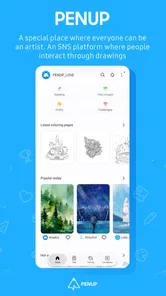
Hey there, art enthusiasts! Let me introduce you to an app that’s been my creative haven lately - PENUP. If you're anything like me, always doodling on the corners of notebooks, this app is going to be your new best friend. It’s a vibrant community for artists and art lovers alike, offering a platform to share your creations and get inspired by others.
Discovering the Artistic World of PENUP
From the moment you fire up PENUP, you’re greeted with a bustling gallery of colorful artwork right on the home page. I was instantly hooked. The app is designed with an intuitive interface, making it super easy to navigate through the plethora of features it offers. Whether you're a seasoned artist or just someone who loves to sketch, there's something here for everyone.
Unleashing Creativity with Digital Tools
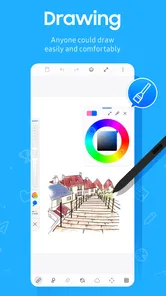
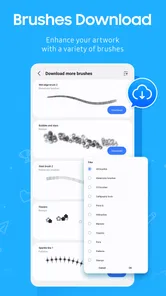
One of the standout features for me is the variety of digital tools available. You can choose from a spectrum of brushes and colors, allowing you to create detailed masterpieces or simple sketches depending on your mood. I spent hours playing with the different brush effects and blending techniques, and let me tell you, it’s a joy to see your ideas come to life on a digital canvas.
One practical way I’d approach those tools is to make a few small test marks before starting a finished piece. A brush that looks promising in a tiny preview can feel very different over a larger area, and a quick test helps me decide whether it suits the texture I have in mind. I also like separating a playful study from work I plan to share: it takes the pressure off experimenting and makes it easier to learn what each brush does without worrying about the result.
If I wanted to keep a small creative routine going, I’d choose one limited exercise rather than aim to make a polished illustration each time. For example, I could explore one color combination or draw the same everyday object from a different angle, then leave the result as practice. This is a sensible way to use a social drawing space without feeling that every session needs an audience. It also gives me a clearer basis for deciding whether I want to share: the piece has a purpose beyond collecting reactions.
Connecting with a Passionate Community
Now, what makes PENUP more than just a drawing app is its social networking aspect. It’s like Instagram for artists. You can follow fellow artists, comment on their work, and even participate in various challenges and contests. The community is incredibly supportive. I’ve received so much constructive feedback that has helped me improve my art skills significantly.
That feedback loop can be useful if I ask a focused question, such as whether a silhouette reads clearly or which color choice feels stronger. Broadly asking people to judge an entire piece can invite vague reactions, while a specific prompt gives others something concrete to respond to. I’d also remember that community comments are personal impressions, not formal instruction; for technique-heavy questions, a structured lesson or artist-led tutorial may be more dependable.
Compared with a conventional social feed, the drawing-centered focus is the main reason I would choose this community for art discovery. The work itself gives me a more direct starting point than a stream built around unrelated updates. But that focus can also be a limitation: if what I want is a private archive, advanced image editing, or a polished presentation for clients, I’d keep using tools designed for those jobs and treat PENUP as a place to browse or share selected pieces. It complements a broader workflow rather than replacing every part of one.
Daily Challenges to Keep You Inspired
Feeling stuck in a creative rut? PENUP has got you covered with its daily challenges. These challenges are a fantastic way to push your creative boundaries and try something new every day. I’ve taken part in a few, and it’s a great feeling to see the diverse interpretations of a single theme from artists around the world.
A challenge can also work as a gentle warm-up rather than a commitment to post every result. I might sketch a couple of possible interpretations privately, then share only the one I’m happy with. That gives the prompt room to spark ideas without letting the feed dictate my pace. If I’m short on time, I can simply browse how others approached the theme and save the idea as inspiration for a later drawing.
For someone new to drawing digitally, I’d treat the prompts as a way to practise observation rather than a test of skill. A theme can be interpreted with a simple shape, a study of light, or a small character sketch; there is no need to match the most elaborate entries I happen to see. That mindset makes the community more useful to beginners, while experienced artists can use the same prompts to break a familiar routine. In either case, the most productive comparison is with my own previous attempts, not with the most finished work in the gallery.
What I’d check before making it a habit
Questions about accounts, permissions, and handling personal information deserve care, especially in an app built around sharing. I would review the permission requests shown on my own device and read the current privacy and account settings before uploading work or adding personal details. Those screens are the right place to understand the choices available to me; I wouldn’t assume that a social drawing app is private just because I’m using it for casual sketches.
That check is especially important if a drawing includes something identifying in the background, or if I’m posting work that has not yet been released elsewhere. I’d inspect the image itself before sharing, not just its caption: a rough photo or sketch can unintentionally include personal details that I would not want attached to a public-facing post. I would also make a deliberate choice about how much context to include, since the artwork can stand on its own without a location, routine, or personal story.
In everyday use, I’d keep the first session deliberately simple: browse the artwork, try a quick drawing, and decide whether the community side adds something I want. If I later choose to share, I can be selective about what I post and how much personal context I attach to it. That approach is especially sensible for younger users and anyone who wants a clearer boundary between creative practice and a public-facing profile.
A common question for a cautious newcomer is whether it is worth creating an account immediately. I’d first explore the app’s visible experience and read the account choices presented on my device, then decide whether the social functions justify setting up a profile. I would not enter personal information just to browse casually unless the app makes that necessary for the activity I want. If I do create an account, I’d revisit its settings from time to time rather than assuming my first choices will remain right for me.
The app is rated for Teens, which is useful context for families, but I would still approach any social space with ordinary care. A young artist can benefit from prompts and exposure to other work, yet should also understand what they are choosing to publish and how to respond to feedback. I’d encourage a parent or guardian to look at the on-device settings together with the young user and agree on sensible sharing boundaries, rather than treating an age label as a substitute for conversation.
In conclusion, if you’re looking to explore your artistic side or just want a new way to unwind, PENUP is an app worth checking out. It’s a blend of creativity and community that keeps you coming back for more. So, grab your stylus, download the app and dive into the colorful world of PENUP. Happy doodling!
My cautious recommendation is to try it as a place for lightweight practice and art discovery, not as the only home for important work. Keep originals in whatever workflow you already trust, and use the social features when you genuinely want feedback or inspiration. If that balance sounds appealing, this free drawing community is easy to consider; if privacy, professional editing, or a fully controlled portfolio matters most, I’d choose a more specialized tool instead.
PENUP – Drawing-sharing SNS Frequently Asked Questions
Is PENUP suitable for casual users who just want to browse art?
Yes. PENUP is an art-focused social app where users communicate through drawings, so you can explore artwork and enjoy the community side without treating drawing as a serious commitment. If you later feel inspired, you can try creating something of your own and share it. The app is free, and its content rating is Teen.
What is PENUP’s age rating, and is it appropriate for younger users?
PENUP has a Teen content rating, which is useful to consider before downloading it for a younger person. The app’s central idea is social interaction through drawings, so it combines creative activity with a community experience. Parents and guardians may want to review the app together with the prospective user and decide whether its social features and age rating suit them.
Who develops PENUP, and how widely is it used?
PENUP is developed by Samsung Electronics Co., Ltd., and it has passed 100 million installs. That broad reach reflects the appeal of an app built around viewing and sharing drawings, although each person’s experience depends on what they want from an art community. It is listed in the Art & Design category and is intended for people interested in creative work.
What is PENUP and how does it work?
PENUP is a social networking service centered around drawing and sharing art. Users can create digital artwork using a variety of tools and share their creations with a community of artists and art enthusiasts. The app allows interaction through likes, comments, and follows, fostering an engaging environment for artists to grow and gain inspiration from others.
What features does PENUP offer for artists?
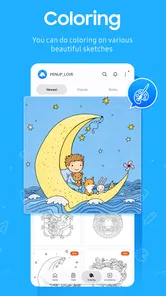
PENUP provides a range of features tailored for artists, including drawing tools that mimic traditional art techniques, coloring pages, and daily drawing challenges to inspire creativity. It also offers a platform to share artwork, receive feedback, and connect with a global community of artists. The app supports both amateur and professional artists looking to showcase their work.
Pros
- User-friendly interface for easy navigation.
- Large community for inspiration and feedback.
- Regular updates with new features.
- Wide range of drawing tools available.
- Free to download and use.
Cons
- Requires internet connection for full features.
- Limited offline functionality.
- May experience occasional app crashes.
- Ads can be intrusive at times.
- Some tools are behind a paywall.