Crafto
- 506.00
- 4.6
- Installs
- 100.00M
- Price
- Free

Screenshots
Analysis by Reviewed
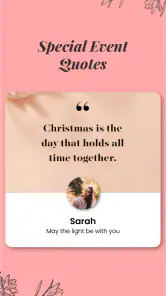
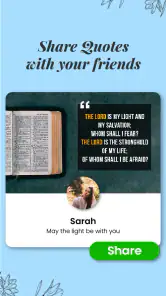
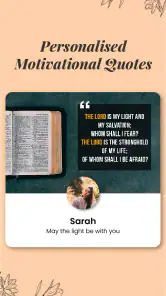
I approached Crafto expecting an app for hands-on craft projects, but its actual focus is quite different: it helps people make shareable quote images personalized with names and photos. That distinction matters. If you want knitting patterns, furniture plans, or a place to organize DIY builds, this is not the tool I would choose. If you want a quick way to prepare a personal greeting or an encouraging image to send or post, it is much closer to what you need.
What Crafto is useful for today
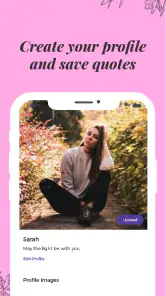
Crafto is a free art and design app from Kutumb App. Its central idea is straightforward: take a quote-style design, add personal touches such as a name or photo, and make something that feels less generic than a plain text message. That makes it most useful for small, frequent creative tasks rather than for building a complete design portfolio or producing elaborate artwork.
I would consider it when I need a warm greeting for someone, a simple celebratory image, or a short motivational message that looks ready to share. The personal details are the point: a familiar name or a relevant photo can make a template feel intended for one person, even when I do not have the time or design skills to create a layout from scratch. It is aimed at quick expression, not advanced image editing.
The Latest on Crafto
The app is rated for Everyone, and it is free to install. Its current version is 9.8.4, and it requires Android 5.0 or later. It has a 4.6 average from around 709,000 ratings, with over 100 million installs. Those figures suggest broad reach, but they do not tell me whether a particular design will suit my taste; I would treat them as context rather than a guarantee of quality.
How I would use it in an ordinary day
Imagine I remember a friend’s birthday while commuting and want to send something more personal than a stock greeting. I could look for a suitable quote design, add the person’s name, choose a photo if the layout calls for one, and share the result in a message. The benefit is not that this replaces a thoughtful note. It is that it gives me a visual starting point when I have only a few minutes and do not want to open a full design editor.
A similar workflow could help with a family celebration or a quick note of encouragement. I would decide on the recipient and tone first, then choose a design that fits rather than trying to force a favorite quote into an unsuitable layout. If the image is meant for a public social post, I would inspect the crop and text size before sharing; what looks readable on a phone preview may be less clear in a different feed or on a smaller screen.
One useful habit is to prepare the wording before choosing a design. Short phrases are easier to read in quote graphics, and a name can take up more space than expected. If I add a photo, I would choose one with a clear subject and enough space around it, then check that the quote and image are not competing for attention. These small choices can matter more than spending a long time browsing templates.
More From Our News Desk

Weather by Xiaomi Review: Clear at a Glance, Less Clear Up Close

X Under Pressure: Can It Recover When Posting Goes Wrong?

Clash of Clans Is Won Between the Battles

Android Auto Makes the Case for Quieter Car Software

MobiOffice: Transforming Mobile Productivity with Seamless Integration

EA SPORTS FC™ Mobile Soccer: Redefining Mobile Sports Gaming
Making a personal image without turning it into a design project
The practical appeal here is speed and personalization. A blank canvas in a general-purpose graphics editor offers more control, but it also asks me to make decisions about layout, type, and visual balance. Crafto’s quote-first approach makes sense when the message is already the main content and I only need a presentable way to deliver it. For a one-off greeting, that can be a better trade than learning a complicated tool.
Where it differs from other creative apps
Compared with a full design editor, Crafto is a narrower choice. A general graphics app is preferable when I want to build a poster from scratch, combine several images, control every detail, or reuse a precise brand style. A photo editor is a better fit when the picture itself needs substantial retouching. Crafto’s more focused use case is turning a short sentiment into a personalized visual without making the user start with an empty page.
It also differs from simply sending a quote as text. A designed image can feel more deliberate and can be easier to post as a visual, while plain text is quicker, more accessible to screen readers, and easier for the recipient to copy or translate. I would not use an image for every message. For a sensitive conversation or anything where clarity matters more than presentation, ordinary text is usually the kinder and simpler option.
Before sharing, I would check whether the image communicates the intended meaning without relying only on decorative styling. A quote may sound uplifting in isolation but feel out of place for the person receiving it. Personalization is most effective when the message is genuinely relevant, not merely when a name has been inserted into a template.
What to check before sharing
When a design includes a personal photo or someone else’s name, I would pause before posting it publicly. A graphic intended for a private message can reveal personal details if shared widely, and a photo may belong to someone who would rather not appear in a public post. I would use an image I have permission to share and choose a private channel when the message is meant for one person.
I would also preview the finished result rather than assuming every template will suit every use. Look at whether the quote is legible, whether the name feels naturally placed, and whether the picture remains recognizable after fitting into the design. If the result feels crowded, a shorter quote or a different photo may work better than continuing to adjust a layout that was not made for that combination.
Another practical trade-off is convenience versus control. A ready-made quote format can save time, but it may not provide the exact spacing, typography, or visual identity I would want for a professional campaign. If I were designing materials for a business, school, or event that needs consistent branding, I would use a dedicated design tool and treat Crafto as an option for informal personal messages instead.
Cost, expectations, and the app’s evolution
Crafto is free to download, while in-app purchases range from ten cents to $499.99 per item. That wide span makes it sensible to check the price shown for any optional purchase before confirming it. I would start with the free experience and only consider paying if a specific option solves a real need; I would not assume every design or capability is included at no cost.
The app was released on October 30, 2021, and its current version is 9.8.4. Those facts show that Crafto has continued to reach a current version since its launch, but they do not by themselves reveal which features changed or how the interface evolved. For someone already using it, the useful question is whether the present workflow still makes creating and sharing a personalized quote image easy. I would check the version available on my device and judge any change by that everyday task rather than assuming a version number guarantees a particular improvement.
For an existing user, a sensible approach is to keep copies of finished images that matter before changing devices or reorganizing personal photos. I would also review a design after opening it again, especially if it depends on a photo, rather than assuming every earlier choice will remain suitable for a new occasion. That is ordinary care for personal creative work, not a claim about a particular backup or account feature.
Who should choose it—and who should look elsewhere
I think Crafto is best for people who often share short greetings, affirmations, or quote-based images and want personalization to take less effort. It may also suit someone who enjoys visual messages but finds a blank canvas intimidating. The focused format gives a clear starting point, and adding a name or photo can make a simple design feel more personal without requiring professional design experience.
I would skip it if my main goal were learning a craft, following detailed project tutorials, buying materials, managing deadlines, or collaborating on physical DIY work. Those are different needs, and a quote-image app should not be judged as though it were a craft-planning workshop. I would also choose another tool if I needed exact typography control, complex layers, careful photo correction, or a consistent professional identity across many designs.
The main limitation is the same focus that makes the app approachable: a quote-led image is only useful when that is the format I actually want. It cannot make an irrelevant message meaningful, and a template-based result may feel less distinctive than a design made from scratch. I would use it for quick personal communication, not as a substitute for every kind of creative software.
My recommendation
All in all, Crafto is a useful option for a specific everyday job: making a short quote or greeting feel more personal through a name or photo. Its appeal is convenience, not a broad set of craft tools or unlimited creative control. I would recommend trying it if I wanted to produce shareable, personalized messages with little setup, while keeping a general design editor in mind for work that needs more precision.
If I were choosing today, I would begin with one real occasion rather than browsing indefinitely: pick the recipient, settle on a concise message, and see whether the finished image feels natural enough to send. If it does, the app has done its job. If I find myself wanting to reshape every element or create something beyond a quote graphic, that is a clear sign to move to a more flexible design tool.
Features That Spark Creativity
One of the standout features of Crafto is its extensive library of crafting tutorials. Each tutorial is well-detailed, with step-by-step instructions and visuals to guide you through the process. Whether you're interested in knitting, painting, or building your own furniture, there's something for everyone. I found the video tutorials particularly helpful, as they provided a clear visual representation of each step.
The app also offers a vibrant community section where users can share their creations, exchange tips, and collaborate on projects. This feature not only fosters a sense of community among crafters but also serves as a source of inspiration. I loved browsing through the community posts and even found a few new crafting buddies to connect with!
Tools and Materials Galore
Crafto takes the hassle out of sourcing materials by providing a comprehensive list of tools and materials needed for each project. The app even includes links to purchase these items online, making it incredibly convenient to gather everything you need without leaving the comfort of your home. I appreciated the attention to detail in this aspect, as it saved me time and effort in hunting down supplies.
Moreover, the app features a handy tool called "Craft Planner," which helps you organize your projects, set deadlines, and track your progress. This planner kept me on track and ensured I never missed a step in my crafting journey. It’s like having a personal assistant dedicated to your DIY adventures!
The Final Verdict
All in all, Crafto is a must-have app for anyone who loves crafting or is looking to explore their creative side. Its intuitive design, comprehensive tutorials, and supportive community make it a standout choice for crafters of all skill levels. Whether you're a hobbyist or a professional, Crafto offers endless possibilities to spark your imagination and bring your projects to life.
If you're ready to embark on a crafting adventure, I highly recommend giving Crafto a try. With its user-friendly interface and wealth of resources, it's like having a crafting workshop right at your fingertips.
Crafto Frequently Asked Questions
What should I know about Crafto before downloading it?
Crafto is an Art & Design app developed by Kutumb App. Its short description is simply “Crafto,” while its summary says it offers quotes with your name and photos daily. That gives prospective users a quick sense of its personalized content. The app is free to download, and its content rating is Everyone.
Will Crafto work on my Android device?
Crafto supports Android devices running version 5.0 or later. Before downloading, check your device’s operating system to make sure it meets that requirement. Crafto is an app rather than a game, and its content rating is Everyone, making it suitable for a broad audience. The app’s current version is 9.8.4.
Can I use Crafto to create personalized quotes with my name and photos?
Crafto’s store summary describes it as an app for getting quotes with your name and photos daily. That personalized focus may appeal if you want quote content connected to your own name or pictures. The short description is “Crafto.” Its Art & Design category provides a general indication of the kind of app it is.
Is Crafto free to download, and what might cost extra?
Crafto is free to download, so you can try the app without paying upfront. It also offers in-app purchases, with prices ranging from $0.10 to $499.99 per item. Those optional purchases can affect what you spend, so check the price and purchase details shown in the app before confirming anything. The free download and in-app purchases are separate.
What is Crafto and what does it offer?
Crafto is a versatile mobile application designed for both Android and iOS platforms that allows users to create, edit, and share handcrafted digital art. It provides a wide range of tools and features tailored for artists, designers, and hobbyists who are passionate about digital crafting. With an easy-to-use interface, Crafto makes it simple to bring your creative ideas to life, whether you're sketching, designing, or painting.
Pros
- User-friendly interface with intuitive navigation.
- Wide range of crafting tools available.
- Regular updates with new features.
- Great for beginners and experts alike.
- Offline mode available for creativity on the go.
Cons
- Limited free version with in-app purchases.
- Occasional bugs in older devices.
- Requires a stable internet for cloud features.
- Ads can be intrusive at times.
- Some advanced tools need premium access.
- Category
- Art & Design
- Version
- 9.8.4