Sketchbook
- 30.72K
- 4.0
- Installs
- 100.00M
- Price
- Free

Screenshots
Analysis by Reviewed
I judge a drawing app by what happens between noticing an idea and getting the first useful marks onto a canvas. Sketchbook makes that transition feel uncomplicated: I can open it for a quick study, build a more considered illustration, and return to a project without first wrestling with a crowded workspace. That directness is its main appeal, though the best experience depends on the device and kind of work I have in mind.
Where it fits in a real drawing routine
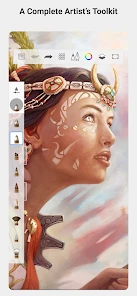
I find this app most useful when I want to move from a rough thought to a clean sketch without turning the process into a setup project. For example, I might notice an interesting shape while waiting for a friend, open a blank canvas, and block in the silhouette before the moment passes. The quick access toolbar makes that kind of brief session feel practical; I can get a mark down quickly and return to the drawing later.
That convenience has limits. A phone is handy for capturing ideas, but a larger screen and a stylus are more comfortable when I need precise line work or a long session. If you mainly want to paint with physical media, or need an app built around page layout, vector graphics, or animation, this is not automatically the right fit. I’d choose a tool designed for that specific job rather than expect a sketching app to cover every creative workflow.
Unleashing Creativity with Ease
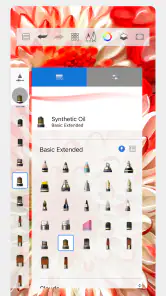
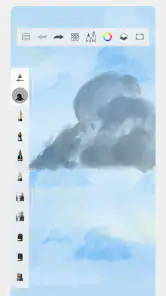
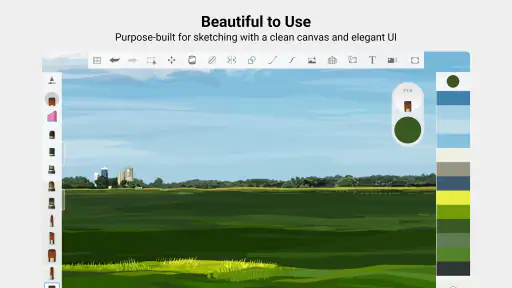
First things first, let's talk about how Sketchbook makes it incredibly easy to dive into your creative process. From the moment you open the app, you're greeted with a clean and intuitive interface that begs you to start sketching. The app offers a variety of brushes and pencils that mimic real-life tools, so you can experiment with different styles and techniques. Whether you're into detailed illustrations or quick sketches, there's a tool for every mood.
Features That Stand Out
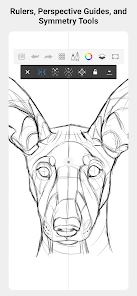
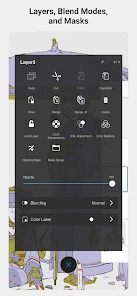
One of my favorite features is the customizable brushes. You can tweak everything from the texture to the opacity, giving you complete control over your artwork. Plus, the app supports layers, which is a game-changer for creating complex pieces. It's like having a mini Photoshop right in your pocket! And let's not forget about the symmetry tools that help you create perfectly balanced designs. It's those little touches that make a huge difference.
One practical way I use layers is to keep a loose construction sketch separate from the cleaner lines above it. That lets me test a pose or adjust a shape without repeatedly erasing the work I want to preserve. For a symmetrical logo idea or a decorative motif, the symmetry tools can help establish a balanced starting point; I still check the result by eye, since symmetry alone cannot make a design feel lively or intentional.
Another standout feature is the ability to import and export files with ease. You can work on your desktop and switch to your mobile device without missing a beat. It's perfect for those of us who are always on the go but never want to compromise on quality.
More From Our News Desk

Clash of Clans Is Won Between the Battles

Android Auto Makes the Case for Quieter Car Software

MobiOffice: Transforming Mobile Productivity with Seamless Integration

EA SPORTS FC™ Mobile Soccer: Redefining Mobile Sports Gaming

How Microsoft OneDrive Became a Mobile Productivity Giant

How Google Translate Breaks Language Barriers Effortlessly
For a handoff between devices, I’d make a habit of saving a working copy before moving to another stage, then reopening the exported file to check that the version I need is intact. That small checkpoint is useful when a sketch is becoming a finished piece, especially if I expect to make substantial edits later. It also helps separate quick experiments from artwork I want to keep developing.
Making the most of a sketch session
A useful way to start is to decide what the drawing is meant to answer. If I’m exploring a character’s pose, I keep the first pass loose and use a separate layer for cleaner contours only after the gesture reads well. If I’m planning a small object or a room, I can use the canvas to compare a few silhouettes before committing to detail. This keeps the app serving the idea instead of encouraging me to polish a weak starting point.
Brush customization is most helpful when I treat it as a repeatable setup, not an endless menu to browse. I would make a small set of dependable tools: a light mark for construction, a firmer line for definition, and perhaps a softer brush for tonal tests. Tweaking opacity can help keep early marks from competing with later ones. The trade-off is that too much adjustment can interrupt drawing, so I’d save experimentation for a separate practice session rather than the middle of a time-sensitive sketch.
Layers are also useful for trying alternatives without losing the first idea. I might duplicate the rough concept on a fresh layer, alter the proportions, and compare the two versions before deciding which direction works. For a beginner, that is a gentler way to learn than repeatedly erasing uncertain lines. For someone more experienced, it offers a simple structure for studies and revisions, but it does not replace careful file handling: I still keep a distinct copy when a piece matters.
Bringing Ideas to Life
Now, let's get real. Every artist knows the importance of bringing their ideas to life without any hiccups. Sketchbook excels in this department. The app is smooth, responsive, and rarely crashes, even when working on high-resolution projects. This means you can focus on what truly matters: your art.
For a beginner, the approachable drawing surface makes it easier to practice without learning a complicated toolset first. More experienced illustrators may appreciate the brush adjustments and layer-based process for studies, thumbnails, and personal projects. Compared with a basic note-taking app, it gives me more room to shape a drawing; compared with desktop art software, it is easier to pick up for a quick sketch, though a phone-sized workspace is naturally less comfortable for detailed editing.
The app is free, and optional in-app purchases are listed at $2.99 per item. It is rated for Everyone, so it can suit casual drawing as well as personal practice. Sketchbook is developed by Sketchbook and sits in the art and design category. Its average rating is 4.0 from around 698,000 ratings, with roughly 31,000 written reviews and over 100 million installs. Those figures suggest it has reached a broad audience, but I’d still judge it by whether its drawing workflow suits the device and projects I actually have.
And for those moments when inspiration strikes out of nowhere, the quick access toolbar is a lifesaver. It allows you to jot down ideas or start a project in seconds. Trust me, it's a feature you'll come to appreciate more than you'd expect.
What to consider before settling in
If you’re deciding whether to use it as your main drawing app, think first about where your work needs to go afterward. For loose concepts, character studies, and illustrations that stay within a sketching workflow, the combination of brushes, layers, and symmetry is a useful place to work. If your next step depends on specialized publishing, vector editing, or a tightly integrated desktop pipeline, compare those requirements before committing a project to any one app.
I’d also start with a small test drawing rather than trying to learn every brush at once. Pick one pencil for rough shapes, one brush for cleaner marks, and a separate layer for corrections. Once that feels comfortable, adjust a brush’s opacity or texture and see whether the change genuinely helps your style. This keeps customization from becoming a distraction and gives you a repeatable setup for future sketches.
How it compares with other creative tools
The closest everyday alternative may be a general note-taking app with a pen tool. That kind of app can be quicker for jotting a diagram beside written notes, but I prefer Sketchbook when the drawing itself deserves attention: choosing brushes, separating edits on layers, and using symmetry make it feel more like a dedicated art space. If all I need is a tiny reminder or a rough map, though, opening a notes app may be simpler.
Against a full desktop illustration program, the appeal is different. I’d reach for Sketchbook when I want to draw without setting up a large workspace, or when a tablet gives me a comfortable surface for a focused study. For intricate edits, extensive production, or a workflow tied to specialist tools, a desktop program is often the more sensible home base. This app can be a useful place to develop an idea, but I wouldn’t assume every finished project belongs there.
Vector applications are another distinct case. They are better suited when clean, scalable shapes and precise graphic output are the priority. Sketchbook’s strengths are more natural for freehand exploration and painted or sketched marks. The choice is not simply which app has more tools; it is whether I need expressive drawing or tightly controlled geometry. A logo concept can begin here, for instance, but a final vector deliverable may call for a different tool.
Who will get the most from it
I’d recommend it to someone who wants to practice drawing regularly, collect visual ideas, or make illustrations without turning every session into a technical project. It also makes sense for hobbyists who like trying different brush feels and for artists who want a convenient companion to a larger-screen workflow. The free starting point makes it approachable, while the optional purchases mean it is worth checking what is included before deciding whether to spend.
It is less compelling for people who do not enjoy drawing directly on a screen, need a specialised animation or page-layout workflow, or expect a phone to provide the comfort of a large tablet for hours of detailed work. Someone who mainly edits photos may also be happier in an image-editing app built for that task. I would not choose a drawing tool just because it has layers; the important question is whether its mark-making and working space suit the job.
A realistic day-to-day test
Imagine waiting for a friend at a café and noticing an unusual arrangement of cups, napkins, and window light. I might use the quick access toolbar to capture the broad shapes, then stop before the scene changes. Later, on a more comfortable screen, I could keep that rough study on its own layer, redraw the important contours above it, and test a second composition without erasing the first. That is a practical rhythm for an app like this: capture first, refine when there is time, and preserve options while the idea is still changing.
For a project I plan to share or continue on another device, I would make the file handoff part of the workflow rather than an afterthought. I’d export a copy, reopen it, and check that the result is the version I intend to continue. That modest check is especially helpful when I have made several alternatives or when a sketch is moving from casual exploration toward a more finished illustration. It is a useful habit, not a guarantee that every transfer will suit every production pipeline.
What its history can and cannot tell me
Sketchbook was released on October 8, 2014, and its long presence gives it a place among familiar digital drawing options. That date tells me the app has been around for years; it does not, by itself, explain what has changed in any particular version or promise what might arrive next. I prefer to separate that confirmed history from assumptions about future development rather than treat longevity as proof that every current need is covered.
For someone returning after time away, the practical test is the current experience on their own device: open a small canvas, try a brush, add a layer, and check the file workflow they actually expect to use. Existing users do not need to relearn the fundamentals just to make a quick sketch, but anyone relying on a specific handoff or production routine should verify that routine with a sample project before depending on it. That advice is more useful than guessing at changes that may or may not apply to their setup.
When I look ahead, I would watch for improvements that make longer projects easier to manage and cross-device work more dependable, because those are the areas where a convenient sketching app can meet the demands of serious use. That is a preference, not a claim about planned features. In the meantime, the app’s value is clearest when I use it for drawing, studies, and visual exploration rather than expecting it to become a complete replacement for every specialist creative tool.
Final Thoughts
In conclusion, Sketchbook is not just an app; it's a companion for every artist. Whether you're a beginner or a pro, this app caters to all levels of expertise. It’s packed with features that enhance creativity while maintaining a user-friendly experience. So, if you're on the hunt for a digital sketchbook that offers versatility and ease of use, give it a try. You won't be disappointed!
My recommendation is strongest for someone who wants a straightforward place to draw, build ideas in layers, and make use of a phone or tablet whenever inspiration appears. I would look elsewhere if the priority is a specialized production workflow or extended precision work on a small screen. For everyone else, a short trial with a simple sketch is the best way to see whether its direct, hands-on approach feels right.
Happy sketching, everyone!
Sketchbook Frequently Asked Questions
Can I use Sketchbook without an internet connection?
Sketchbook is built around sketching and painting on your device, with the feel and freedom of drawing on paper. That makes it a natural option to consider when you want to create away from a desk or use a mobile device for drawing. Your projects and any sharing or syncing needs may depend on how you use the app and the services available on your device.
What kind of app is Sketchbook, and what can I create with it?
Sketchbook is an Art & Design app for sketching and painting on a device. Its focus is the freedom of drawing on a digital canvas with a paper-like feel, so it can suit quick sketches as well as more involved artwork. If you enjoy making pictures or want a dedicated space for visual ideas, its purpose is easy to understand before installing.
Is Sketchbook free to download, and are there in-app purchases?
Sketchbook is free to download, so you can try its drawing and painting experience without paying upfront. The app also offers in-app purchases at $2.99 per item. That makes it worth checking which tools or extras you want before buying anything. You can begin with the free app and decide whether a paid item fits your needs.
Who develops Sketchbook, and what age group is it suitable for?
Sketchbook is an art and design app developed by Sketchbook. Its content rating is Everyone, making it suitable for a broad audience, including people exploring digital drawing for the first time. Whether you want to sketch casually or spend more time developing artwork, the app is focused on creating pictures on your device with the feel and freedom of drawing on paper.
What features does Sketchbook offer for artists?
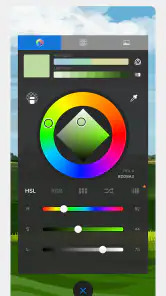
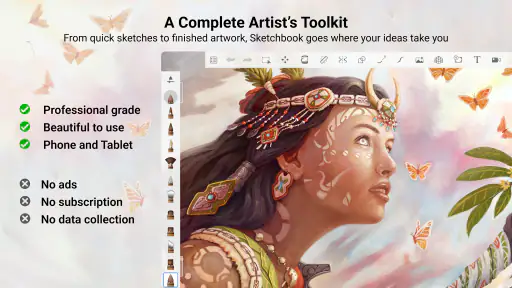
Sketchbook is renowned for its comprehensive toolset designed for artists of all levels. It offers a wide range of brushes, customizable tools, and an intuitive interface that mimics the feel of drawing on paper. Key features include layers, blend modes, and advanced color tools, making it ideal for sketching, painting, and illustrating.
Pros
- Intuitive user interface
- Wide range of brushes
- Customizable color palette
- High-resolution export
- Layer management features
Cons
- Limited free version features
- Occasional app crashes
- Requires powerful device
- In-app purchases needed
- Steep learning curve for beginners
- Category
- Art & Design
- Version
- Varies with device