Draw Anime: AR Drawing Sketch
- 713.00
- 4.4
- Installs
- 10.00M
- Price
- Free

Screenshots
Analysis by Reviewed
I’d reach for Draw Anime: AR Drawing Sketch when I want a clear starting point for an anime sketch but don’t want to open a full digital art workspace. Its guided approach is most useful when I’m practising shapes by hand: I can follow a visual reference, work on paper or another suitable surface, and focus on one part of a drawing at a time. The experience depends on a comfortable setup, though, so it helps to think about positioning and visibility before deciding that a difficult session means the app isn’t working well.
Where the first attempt can go wrong
The main appeal here is using an on-screen drawing guide as a starting point, but that does not mean every first try will feel effortless. I would treat the tracing stage as a practice aid rather than expecting it to produce a finished illustration by itself. Keeping the phone steady and choosing a surface where the guide is easy to follow can make a session less frustrating. If the image seems awkward to copy, I’d simplify the task and focus on one outline or feature at a time instead of trying to reproduce every detail at once.
For a realistic everyday use, imagine having a short break and wanting to sketch an anime face without setting up a full drawing workspace. I’d pick a simple reference, settle the device where I can see it comfortably, and use the exercise to practise proportions. That is a more useful goal than expecting a quick session to teach a complete style. The app is best for someone who wants a visual prompt and a low-pressure way to get started; people who already draw confidently may prefer a blank canvas and their own references.
Getting Started with Draw Anime
When I first stumbled upon Draw Anime: AR Drawing Sketch, I was curious but a bit skeptical. I mean, how much can an app really help with drawing? Well, I was in for a surprise. The app is super easy to download and once you open it, you’re greeted with a user-friendly interface. It doesn’t overwhelm you with too many options, which I appreciated as a beginner.
Features That You’ll Love
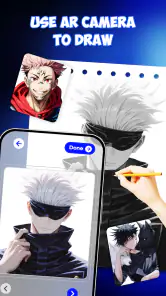
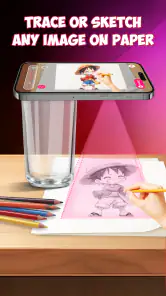
One of the coolest features is the augmented reality aspect. Imagine being able to project a sketch onto any surface and trace it. Yes, it’s as futuristic as it sounds! You just need to aim your camera and voila, your guide is ready. It’s like having a virtual tutor right beside you, making sure you get those tricky proportions just right. This feature alone had me hooked.
For a smoother start, I’d first check that the device is steady and that the drawing area is well lit enough for me to see the guide clearly. If the projected image looks hard to follow, changing the angle or position before beginning is often more sensible than trying to correct a shaky outline later. A small practical trade-off is that tracing asks you to divide your attention between the guide and your paper or surface. I find it works best in short passes: block in the broad shape, pause to check it, then add smaller details.
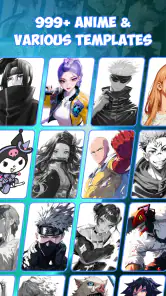
But wait, there's more! The app also comes with a plethora of tutorials for various anime styles. Whether you’re into chibi characters or prefer the more detailed shonen style, there’s something for everyone. Each tutorial is broken down step-by-step, which makes learning a breeze.
More From Our News Desk

Weather by Xiaomi Review: Clear at a Glance, Less Clear Up Close

X Under Pressure: Can It Recover When Posting Goes Wrong?

Clash of Clans Is Won Between the Battles

Android Auto Makes the Case for Quieter Car Software

MobiOffice: Transforming Mobile Productivity with Seamless Integration

EA SPORTS FC™ Mobile Soccer: Redefining Mobile Sports Gaming
My Drawing Journey
As someone who’s always admired anime art but never really knew where to start, this app was a game-changer. I began with simple characters, following along with the AR projections. It’s amazing how much you learn by seeing the guidelines and following each stroke. My confidence grew as I moved from basic sketches to more complex designs.
One useful way to make the practice stick is to repeat the same exercise without relying on the guide for every mark. I’d trace the broad proportions first, then try drawing the same feature from memory or on a fresh page. That reveals which shapes I actually understand and which ones I’m only copying. It also keeps the exercise from becoming purely mechanical. If a session goes off track, I would simply step back to the last clear stage and restart that portion rather than treating one uneven line as a failed drawing.
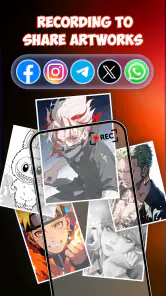
The app also offers a community feature where you can share your creations and get feedback. It feels great to be part of a community that’s as passionate about anime as you are. Plus, seeing other users’ artwork is incredibly inspiring and pushes you to improve.
For anyone comparing it with a conventional drawing app, the difference is the kind of help each one gives. A standard digital canvas is better when you want layers, detailed editing, or complete control over a finished image. This app’s tracing approach is more suited to learning by observing shapes and practising hand movement on a physical surface. I’d choose it for guided anime sketching, but not as a replacement for a full illustration workspace. It can also help to keep a simple record of what you practised, so you can notice progress instead of judging every drawing only by whether it looks polished.
Practical checks and limits
If the drawing guide is difficult to work with, I would check the basics before blaming the app: make sure the device is positioned securely, the surface is suitable for drawing, and the reference is visible from where I’m sitting. If the trouble continues, closing and reopening the app or restarting the session is a reasonable general troubleshooting step. These checks do not guarantee a fix, but they help separate a setup problem from a drawing challenge.
There is also a difference between learning to trace and learning to invent. The guide can support practice, but it cannot make decisions about expression, pose, or personal style for you. That is why I would pair guided sessions with occasional freehand attempts. If you mainly want to paint digitally, edit finished artwork, or build an illustration with precise controls, a dedicated art app is likely a better fit. If you want a gentle bridge into anime sketching, the guided approach makes more sense.
For context, this free art-and-design app is made by Braly JSC, is rated for Everyone, and has a 4.4 average from around 62,000 ratings. It has passed 10 million installs, and version 1.1.19 is listed for devices running Android 7.0 or later. I see those figures as signs that plenty of people have tried it, not a promise that every device or drawing setup will feel identical. The useful question is whether you want guided practice rather than a professional digital studio.
Making a short session useful
I get more from a quick drawing break when I decide on one narrow goal before opening the guide. It might be the shape of the eyes, the curve of the hairline, or the balance between the head and shoulders. Focusing on a single feature makes the exercise easier to finish and gives me something concrete to compare with the next attempt. Trying to copy an entire character in one go can turn a relaxed sketch into a test of patience, especially when I’m still learning how the guide and my drawing surface work together.
A practical follow-up is to mark the part that felt hardest on the page, rather than simply starting another complete drawing. If the eyes seem uneven, I can practise their spacing separately; if the head feels too wide, I can spend the next session checking the outer contour. This small habit makes guided practice more personal: the app provides a prompt, but I choose what skill to work on. It also helps me tell whether I’m improving at observation and control, rather than only getting quicker at tracing familiar lines.
Choosing the right setup and expectations
Before beginning, I’d make sure the workspace is comfortable for both looking at the guide and drawing. A cramped position can make it awkward to switch attention between the image and the page, while a surface that shifts under my hand can make careful lines harder to manage. I’d arrange the device first, take a moment to check that I can see the guide from where I’m sitting, and only then start drawing. That little bit of preparation is more useful than repeatedly adjusting things halfway through a line.
If the guide is visible but my result still looks different, I wouldn’t immediately assume there is a technical problem. Translating a reference into hand movements takes practice, and small differences in proportion are part of that learning process. I’d compare the broad shapes before worrying about detail, then decide whether the next attempt needs a steadier setup or simply slower drawing. This distinction matters: troubleshooting can improve visibility and stability, but it cannot remove the ordinary challenge of learning to sketch.
There is a genuine trade-off in having the reference guide so central to the exercise. It lowers the barrier to beginning, particularly for someone who finds a blank page intimidating, but it can also encourage passive copying if every mark is followed without reflection. I’d occasionally pause, look away from the guide, and try to continue from memory. Even a small freehand portion turns the session into a more active lesson and shows where I need further practice.
Who will get the most from it
I think the app makes the most sense for a beginner, a casual anime fan, or anyone who wants a structured reason to pick up a pencil for a few minutes. It can also suit someone who already sketches but wants a prompt for practising particular proportions. The appeal is not that it replaces drawing knowledge; it gives me a way to begin with a visible reference and then build confidence through repetition. That is a specific, useful role for an art app, especially when I don’t want to spend the session configuring a digital canvas.
I’d be less likely to recommend it to an artist who needs precise layers, detailed brush control, polished digital colouring, or a flexible workspace for finishing commissions. Those needs point toward a full illustration program instead. It may also frustrate someone who expects a guide to do the creative thinking for them. A reference can help with shapes, but choosing an expression, changing a pose, and developing a personal style still take decisions the user has to make.
Compared with drawing directly from a book or a static image, an AR-guided exercise can make the reference feel more connected to the physical act of sketching. Compared with a digital drawing app, however, it gives up some of the control and editing flexibility that come with working entirely on screen. I’d see those options as different tools rather than rivals: use the guide to practise hand movement and basic forms, then move to a digital canvas if the goal is to refine and finish an illustration.
Final Thoughts
In conclusion, Draw Anime: AR Drawing Sketch is a must-have for anyone interested in anime art, whether you're a newbie or a seasoned artist looking to refine your skills. The combination of augmented reality and comprehensive tutorials makes it a standout app in the art category. So, if you’re an anime fan eager to bring your characters to life, give this app a try. You might just discover a hidden talent or two!
My recommendation is more specific: I’d suggest trying it if you want a friendly prompt for practising anime outlines, especially when a blank page feels like too much of a hurdle. I would skip it if I needed advanced digital editing or expected tracing alone to teach me how to draw every character from imagination. Used with patience and a little freehand practice, it can make sketching feel approachable without pretending that the guide does all the learning for you.
Draw Anime: AR Drawing Sketch Frequently Asked Questions
What age group can use Draw Anime: AR Drawing Sketch?
Draw Anime: AR Drawing Sketch is rated Everyone, so its listed age suitability is broad. It is an art-focused app for people interested in following anime sketches and drawing on a real surface. Younger users can enjoy the guided activity, while parents may still want to help them position the device and prepare a comfortable, well-lit space.
Who develops Draw Anime: AR Drawing Sketch, and what kind of app is it?
Draw Anime: AR Drawing Sketch is developed by Braly JSC and belongs to the Art & Design category. Its focus is anime drawing with AR guidance, offering a way to follow a sketch while working on paper or another drawing surface. The app has an average rating of 4.4 from around 62,000 ratings, reflecting broad interest from people exploring its drawing approach.
Do I need an internet connection to use Draw Anime: AR Drawing Sketch?
An internet connection can be useful for downloading the app and accessing its content, while the actual drawing activity centers on viewing an AR guide and tracing it on a real surface. Before starting a session, make sure your device is ready to run the app and that you have a clear space to draw. This helps keep the focus on following the sketch rather than sorting out your setup.
What should I prepare before using Draw Anime: AR Drawing Sketch?
Set up a smartphone or tablet where you can comfortably view the AR guide, then place a sheet of paper or another suitable drawing surface in front of you. Good lighting and a steady position make it easier to see the projected lines as you work. Having a pencil and eraser nearby is also practical, since you can make light construction marks before refining the anime drawing.
Is Draw Anime: AR Drawing Sketch free to download?
Draw Anime: AR Drawing Sketch is free to download and is listed as an Art & Design app. Its short description is simply “Draw Anime,” and the app’s aim is to help users create pictures with AR drawing guidance. The experience may suit people who want to try tracing anime-style sketches on paper, whether they are exploring drawing for fun or building confidence with the basics.
Pros
- User-friendly interface for beginners
- Wide range of anime styles available
- Realistic AR drawing experience
- Regular updates with new features
- Supports offline usage
Cons
- Limited advanced tools for pro artists
- Occasional AR tracking issues
- Ads can be intrusive
- Requires good camera quality
- In-app purchases for premium features
- Category
- Art & Design
- Version
- 1.1.19













