Power Apps
- 608.00
- 4.5
- Installs
- 5.00M
- Price
- Free

Screenshots



Analysis by Reviewed
Many workplaces still rely on a familiar tangle of spreadsheets, forms, and messages to handle routine tasks. The trouble is not always a lack of software; it is the time spent copying details between places and chasing the latest version. I see Power Apps as a way to turn some of that repeated work into a purpose-built app, especially when a team already works with Microsoft tools. It is a business app from Microsoft Corporation, and its value comes down to a practical question: does a tailored workflow save more effort than it takes to build and maintain?
Where it can save a workday
Picture a small team that needs to log equipment checks. Instead of passing around a spreadsheet, a colleague could use a simple app to enter the result and the person responsible could review those entries in one place. That is the sort of contained task I would consider first: a clear form, a known set of fields, and a small group of users. Starting with one recurring bottleneck makes it easier to tell whether the app is genuinely reducing friction.
It is also useful to think about the work that happens around a record, not just the record itself. A sales team might need to look up customer details while preparing for a visit, while an operations group may need a consistent way to submit requests. In either case, the benefit depends on how well the app fits the actual process. If people still have to re-enter the same information elsewhere, the tool may move the hassle rather than remove it.
Choosing a sensible first build
For a first project, I would keep the scope narrow and map the current steps before choosing a template. Note who enters information, who needs to see it, and what decisions follow. This helps avoid building a polished screen around a process that is unclear or already changing. Templates can speed up a start, but I would treat them as examples to adapt rather than finished answers for every team.
Power Apps can connect with sources such as Excel and SharePoint, which can be handy when useful business information already lives there. A practical trade-off is that a connection is not the same as a clean data model: inconsistent columns, duplicate records, or unclear ownership can still make an app confusing. I would test the workflow with realistic entries before inviting a whole team, paying attention to whether people can find the right record and understand what to do next.
What feels different from ordinary tools
Compared with a spreadsheet, a custom app can present a more focused path through a task and reduce the temptation to edit unrelated cells. Compared with starting from a fully custom-coded application, a visual builder lowers the barrier for simple internal tools. But it is not a magic shortcut around design decisions. Someone still has to decide how the process works, check that the data is useful, and maintain the app as needs change.
That makes it a better fit for teams with a defined process and someone willing to own the result than for a person who simply wants a personal note-taking app. If the task is already quick in a spreadsheet, or the team needs a highly specialized product with complex behavior, the extra setup may not pay off. I would also avoid treating a first draft as a critical system before checking it with the people who will use it in ordinary, sometimes messy, working conditions.
More From Our News Desk

Weather by Xiaomi Review: Clear at a Glance, Less Clear Up Close

X Under Pressure: Can It Recover When Posting Goes Wrong?

Clash of Clans Is Won Between the Battles

Android Auto Makes the Case for Quieter Car Software

MobiOffice: Transforming Mobile Productivity with Seamless Integration

EA SPORTS FC™ Mobile Soccer: Redefining Mobile Sports Gaming
Getting Started: A Smooth Ride?
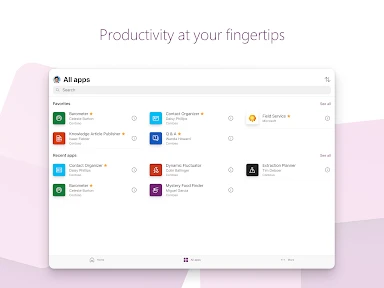
First off, let’s talk about the setup process. Power Apps is part of the Microsoft Power Platform, and if you’re already in the Microsoft ecosystem, it’s like adding a cherry on top of your existing suite of tools. Signing up is pretty straightforward. Once you’re in, the dashboard is clean and intuitive, almost like it’s whispering, “Don’t worry, I got you.”
The User Interface
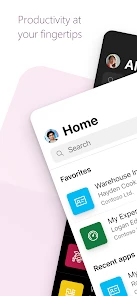
Now, I’m not one to gush about interfaces, but I gotta say, the layout here is quite user-friendly. You can create apps with a few clicks, almost like you’re customizing a website with a drag-and-drop builder. It’s refreshing to see that you don’t need to be a coding guru to make something functional and pretty.
Features and Flexibility
One of the coolest features is the ability to connect to a variety of data sources. Whether it’s Excel, SharePoint, or even third-party services, Power Apps doesn’t shy away from integrating seamlessly. This feature is especially handy for businesses that have data scattered across different platforms—no more data headaches!
And let’s not forget about the templates. Oh, the glorious templates! There’s a variety to choose from, whether you’re looking to manage customer data, streamline a workflow, or just create something completely custom. It’s like having a toolbox filled with all your favorite gadgets.
Performance and Reliability
While using Power Apps, I noticed that the app performance was generally smooth, but there were a few hiccups here and there, especially when dealing with large datasets. It’s not a deal-breaker, but it’s something to keep in mind if your app is going to be data-heavy.
In terms of reliability, it’s backed by Microsoft, so you can expect regular updates and a decent amount of support. Plus, there’s a community of users who are more than willing to lend a helping hand if you get stuck.
Working well within its limits
A useful way to reduce slowdowns is to keep the first version focused: show only the information people need for the task at hand, and test it with realistic records rather than a handful of tidy examples. Large datasets can expose performance issues, so I would be cautious about turning a quick prototype into the main way a whole department handles important work without checking how it behaves at scale.
One common decision is whether to build an app or keep using a shared spreadsheet. I would choose the app when users need a guided, repeatable process; I would stay with the sheet when the work is mostly open-ended analysis or frequent ad hoc changes. The right choice is less about which tool sounds more modern and more about whether the people doing the task actually make fewer mistakes and spend less time coordinating.
Making a small workflow easier to trust
For an equipment-check app, I would test more than whether the form accepts an entry. I would also try a missing value, an unclear result, and a record that needs correction. Those cases show whether the app helps someone make the next decision or merely collects information. A simple prompt to clarify what counts as a completed check can prevent a tidy-looking list from hiding inconsistent work.
I would also agree on who is responsible for keeping the underlying information usable. If a team changes a field name in a spreadsheet or adds a new category without telling the app owner, the workflow can become confusing even though the screen itself has not changed. A small review routine—checking a few real submissions and asking users where they hesitated—can catch that drift before people quietly return to side messages and personal copies.
Who benefits most from the extra setup
The strongest fit, in my view, is a group that repeats the same internal task and can describe its steps clearly. A facilities team recording inspections, a coordinator collecting requests, or a salesperson checking a shared set of customer details could all benefit if the app gives each person a consistent route through the work. The payoff is not simply having an app; it is reducing the small interruptions that accumulate when people ask where to enter something or which version to trust.
Someone working alone on a changing project may get less from it. If the job involves exploring data, drafting notes, or rearranging information freely, a spreadsheet or a standard notes tool can be quicker because it does not require a separate workflow to be designed. I would skip a custom build when the task happens rarely, has no clear owner, or changes so often that the app would need constant adjustment.
A realistic day with the app
Imagine a supervisor starting the morning by checking a set of equipment entries submitted by colleagues. A focused app could make it easier to scan the same key details in a predictable order, notice which items need attention, and follow up with the person responsible. The useful change is that the team no longer has to assemble the picture from scattered messages and several versions of a sheet. If the supervisor still has to copy every result into another system, however, the app has only moved the work to a new screen.
That is why I would agree on the full path before building: who submits, who reviews, and what happens after a problem is recorded. Even a neat form cannot decide what a team should do with an incomplete check or a result that needs escalation. Writing down those decisions first makes the finished workflow more dependable and gives new users a clearer idea of what their entry is for.
What the mobile experience should accomplish
On a phone, a business tool is most valuable when it helps someone finish a defined task without having to recreate an office-style spreadsheet on a small screen. I would keep the information visible at the point of entry limited to what the person needs, use labels that match the team’s everyday language, and avoid asking for details that are already available elsewhere. Those choices are more important than making the screen look clever.
Before relying on a mobile workflow, I would have the intended users try it where the work actually happens. A form that feels obvious at a desk may be awkward when someone is moving between tasks or trying to identify the right record quickly. This is also a good time to check whether the app’s connection to the chosen data source behaves as expected for ordinary records, rather than assuming that a successful first test represents the whole working day.
How it compares with ready-made business software
Compared with a general-purpose business service, a Power Apps workflow can be shaped around a team’s own fields and sequence. That can be useful when an off-the-shelf product asks people to adapt to a process that does not match their work. The trade-off is ownership: a ready-made tool usually arrives with a defined way of doing things, while a custom app puts more responsibility on the team to make sensible choices and keep them current.
It also sits between a shared spreadsheet and a fully custom-coded application. The spreadsheet is often easier for quick analysis and informal collaboration; custom development is more appropriate when the requirements demand complex behavior or a carefully engineered product. A visual builder can be a practical middle ground for contained internal jobs, but I would not choose it merely to avoid discussing requirements, data quality, or long-term responsibility.
Small decisions that prevent rework
One useful tip is to separate information people need to enter from information they only need to review. Showing every available field can make a screen feel complete while slowing down the person doing the task. I would start with the minimum fields that support the next decision, then add another only when users can explain why it matters. This keeps the first version easier to test and makes later requests easier to assess.
Another trade-off is deciding whether to preserve a familiar spreadsheet structure or simplify it for the app. Copying every column may feel safer, but it can carry over confusing labels and fields that nobody uses. I would take the opportunity to clarify the workflow while keeping the meaning of important records recognizable to the team. That balance reduces learning friction without turning the app into a replica of an untidy sheet.
Final Thoughts: Is It Worth It?
In the end, Power Apps is a solid choice for anyone looking to create apps without getting into the nitty-gritty of coding. It’s flexible, user-friendly, and integrates well with other Microsoft services. However, if you’re planning to build something extremely complex or data-intensive, you might hit a few snags along the way.
For a business tool, the handoff matters as much as the first build. I would make sure a colleague can understand the app’s purpose and the underlying process, rather than leaving all the know-how with the person who created it. That small bit of shared ownership helps when a form needs to change or a team’s routine shifts, and it makes the app more dependable in everyday use.
Power Apps is free to download, rated for Everyone, and has an average rating of 4.5 from around 43,000 ratings, with more than 5 million installs. It was released in 2016, and version 3.25112.10 lists Android 7.0 as its minimum OS. Those figures suggest it has found a substantial audience, but popularity alone does not tell you whether it suits your workflow. I would try it when you have a specific, repeated business task to improve; if you need a ready-made specialist service or a deeply customized application, another option may be a better fit.
So, if you’re like me and love the idea of creating apps with minimal fuss, give Power Apps a go. You might just find it’s the tool you didn’t know you needed.
Power Apps Frequently Asked Questions
Is Power Apps available for Android and iOS, and what is the minimum Android version?
Power Apps is a mobile app for accessing business applications on Android and iOS. On Android, it requires version 7.0 or later. Before downloading, check that your device meets this requirement and consider whether you have access to the business apps you plan to use. The app is published by Microsoft Corporation and is in the Business category.
Who develops Power Apps, and how widely is it used?
Power Apps is developed by Microsoft Corporation. It has more than 5 million installs and an average rating of 4.5 from around 43,000 ratings, reflecting broad use as a business app. Those figures can provide a general sense of its reach, but whether it suits you depends especially on the apps and access available through your organization.
Do I need a Microsoft account or workplace access to use Power Apps?
Power Apps is built for creating and using apps connected to business processes, so the experience can depend on the account and access associated with the app you want to use. Before downloading, consider whether your organization already uses Power Apps and can provide the relevant apps and permissions. The mobile app is a way to access Power Apps, rather than a collection of standalone tools that works independently of every organization.
Can I use Power Apps on my phone as well as on a computer?
Yes. Power Apps is available as a mobile app for Android and iOS, and it can also be used through compatible browsers. On a phone, the app is useful for accessing business applications while away from a desk; on a computer, a browser may suit users who prefer a larger screen. The right option depends on how your organization has built and shared the apps you need.
What is Microsoft Power Apps and what can it be used for?
Microsoft Power Apps is a suite of apps, services, connectors, and a data platform that provides a rapid application development environment. It allows users to create custom apps tailored to their business needs without extensive coding knowledge. With Power Apps, users can digitize business processes, improve productivity, and easily integrate with other Microsoft services, such as Office 365, Dynamics 365, and Azure.
Pros
- User-friendly interface for easy app creation
- Integrates seamlessly with Microsoft services
- Supports a wide range of data sources
- Customizable templates available
- Strong community support for troubleshooting
Cons
- Limited offline functionality
- Requires Microsoft 365 or Dynamics 365 license
- Complex pricing structure
- Steep learning curve for advanced features
- Performance issues with large datasets
- Category
- Business
- Version
- 3.25112.10













