Microsoft 365 Copilot
- 49.77K
- 4.5
- Installs
- 1.00B
- Price
- Free

Screenshots

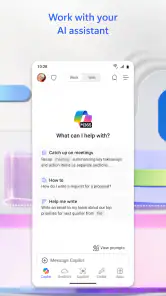
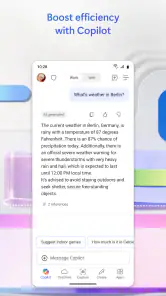
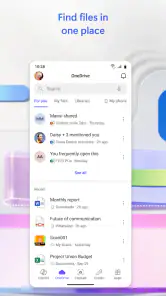

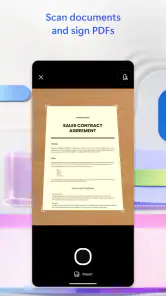
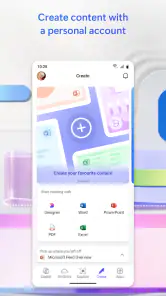
Analysis by Reviewed
When several people share a phone or tablet at home, a productivity app can quickly become part of the household routine: one person needs to edit a document, another wants help shaping an idea, and someone else just needs a quick answer. I find Microsoft 365 Copilot most useful when it helps move those small tasks along without making the device feel like a dedicated work machine. The important catch is that shared hardware does not automatically mean shared accounts, files, or conversations.
One device, different tasks
A realistic evening might look like this: I use the app to work through a document, then a family member picks up the tablet to plan a school presentation or organize notes. That can be convenient, but I would treat each person’s account and work as their own rather than assuming the next user will see the same files or history. Before handing over a device, I’d check which account is active and close anything private. That simple habit matters more than trying to turn one login into a common family workspace.
It also helps to think about the device itself. A shared tablet can make a quick writing task comfortable, while a phone is better for short prompts or reviewing a draft on the move. For a longer assignment, I’d rather use a keyboard and a larger screen if one is available. The app can help start or shape the work, but the small-screen experience does not remove the usual discomfort of editing a long document on a phone.
The Latest on Microsoft 365 Copilot
Set boundaries before handing over the phone
Copilot can be a handy place to explore ideas and get help with everyday content, but I wouldn’t use a shared device casually for sensitive personal material. Keep prompts focused on the task, avoid putting private details into a conversation unless you are comfortable doing so, and review the answer before copying it into a document. For a household, a useful boundary is to agree that people should not open someone else’s files or chats just because they are available on the same screen.
That distinction also helps answer a common setup question: should everyone use one account? I’d avoid treating one account as a household account when different people have separate work, school, or personal needs. It can blur ownership and make it harder to know whose material is being edited. If a person only needs a quick, occasional task, using their own access and keeping their work separate is a cleaner arrangement.
Before anyone starts, I’d take a moment to identify the account currently signed in and the place where a finished document should be saved. That small setup check can prevent a draft from ending up under the wrong person’s identity. If several people take turns on one device, signing out or switching accounts when appropriate is a practical boundary, not needless fuss. The app is easier to use responsibly when everyone knows whose workspace they are in.
Coordination without turning it into a family hub
For shared planning, I’d use the app to draft a shopping list, outline a trip, or turn scattered ideas into a clearer plan, then put the finished result somewhere the household already agrees to use. That is a more dependable workflow than assuming Copilot itself will coordinate everyone’s responsibilities. One person can prepare a first draft, share the appropriate document through the tools they already use, and ask others to make their changes there. It keeps the app useful without confusing assistance with a shared calendar or family-management system.
More From Our News Desk

Android Auto Makes the Case for Quieter Car Software

MobiOffice: Transforming Mobile Productivity with Seamless Integration

EA SPORTS FC™ Mobile Soccer: Redefining Mobile Sports Gaming

How Microsoft OneDrive Became a Mobile Productivity Giant

How Google Translate Breaks Language Barriers Effortlessly

Why Google Sheets Is the Ultimate Mobile Productivity Tool
A useful trick is to ask for a structure rather than a finished answer when the result needs input from other people. For example, I might start with sections for dates, tasks, and open questions in a trip plan, then have everyone fill in their own details in the shared document. That makes the first pass less daunting while leaving decisions with the people who are actually going. It also reduces the risk that a polished-sounding draft gets mistaken for an agreed plan.
Compared with a basic notes app or a conventional word processor, the appeal here is the combination of Microsoft 365 work and AI assistance in one place. A notes app may be simpler for a short list, and a standalone editor can be a better fit if you want to write without AI features in the way. I’d choose Copilot when I want help getting from a blank page to a workable draft, not when the task is simply saving a few lines for later.
Who will get the most from it?
I’d recommend trying it if your household already works with Microsoft documents or if you often move between drafting, organizing information, and asking for help with ideas. Microsoft Corporation makes the app, which is free to download, has a Teen age rating, and includes in-app purchases ranging from under a dollar to nearly two hundred dollars per item. Its average rating is four and a half from around nine million ratings, and it has over a billion installs. Those figures suggest wide use, but they don’t tell me whether a particular household will enjoy its workflow.
The strongest fit is someone who has a recurring reason to turn rough material into something usable: a student outlining a presentation, a parent organizing notes for a community event, or a worker looking for a starting point for a document. I would still check the result and make the final choices myself. If your usual work is already a quick note or a simple list, the extra assistance may add little; a plain notes app can be faster because it asks less of you.
For younger users, I’d focus less on the age label alone and more on supervision, the account being used, and the kind of information they enter. The Teen rating is a useful signal, not a substitute for household rules. I’d show a young person how to check generated material, avoid sharing private information, and ask an adult when a result affects schoolwork or an important decision. I would not assume the app provides family controls or parental oversight just because it is being used at home.
Where I’d draw the line
There are times I’d skip it. If you want a quiet writing space with no AI element, a standard editor may feel less distracting. If you need a guaranteed correct answer for health, legal, financial, or school-related decisions, I would verify it elsewhere rather than treating a generated response as authoritative. And if the household cannot keep accounts and private files separate on a shared device, I’d sort out that boundary before making the app part of everyone’s routine.
One limitation worth remembering is that a helpful first draft can still be wrong, incomplete, or simply unlike the voice you want. I treat generated text as material to inspect, not as work that is ready to send. For school tasks, that means checking facts and following the teacher’s rules; for a household message, it means reading it aloud and removing details or wording that do not sound like me. The time saved at the start is only useful if I leave room for that review.
My practical tip is to give each task a clear finish: use Copilot to brainstorm or shape a draft, check the result yourself, then save or share the final version in the right place. That avoids leaving half-finished work in a conversation and makes it easier for the next person using the device to know what is theirs. For coordinated household plans, decide in advance who maintains the final document; multiple people editing copies can create more confusion than the app solves.
People often wonder whether this can replace a regular editor or a shared planning tool. I wouldn’t treat it as a replacement for either. Its value is in helping me get moving on content, while a conventional document editor remains preferable when I want direct, predictable control over every sentence. For household coordination, an agreed shared document or calendar is clearer than relying on an AI conversation to track responsibilities. Pick the tool based on the handoff you need after the draft is made.
There is also a small expectation to set around cost. The app is free, but optional in-app purchases are available, so I’d check what an upgrade offers before paying and decide whether the added value fits how often the household uses it. I wouldn’t subscribe simply because the app is installed. Start with the tasks you actually need, then judge whether its assistance saves enough effort to justify spending.
My household verdict is that Microsoft 365 Copilot works best as a personal helper that can support shared projects, not as a shared family account or a substitute for clear coordination. It suits people who already handle documents and ideas digitally and are comfortable reviewing AI-generated work. If you mainly need simple lists, want a purely manual editor, or cannot keep personal accounts separate on a common device, another tool or a more careful setup will serve you better.
Unlocking Productivity with a Single App
First things first, Microsoft 365 brings together all your favorite Office apps—Word, Excel, PowerPoint, and more—into one neat package. This is perfect for folks like me who tire of opening different apps for each task. The interface is super sleek and intuitive, which means even if you're not tech-savvy, you'll find your way around easily.
Cloud Integration: A Game Changer
One of the standout features of Microsoft 365 is its seamless cloud integration. Imagine working on a document on your laptop and then picking up right where you left off on your phone or tablet. It's all about the cloud sync, baby! This feature is a lifesaver for someone who's constantly on the move. Plus, you don't have to worry about losing your work; everything is backed up in real-time.
Collaboration Made Easy
If you're working in a team, you're going to love the collaboration features. You can share documents with colleagues and work on them simultaneously. There's even a chat feature for live discussions right next to your files. It's like having a virtual office space where everyone can come together, no matter where they are in the world!
Security Without Compromise
Now, let's talk about security. With so much of our work happening online, security is a top priority. Microsoft 365 offers robust security features, ensuring that your data is protected. With advanced threat detection and multi-factor authentication, you can rest easy knowing your information is safe from prying eyes.
Subscription Model: Yay or Nay?
Alright, time for some real talk. The app operates on a subscription model, which might not be everyone's cup of tea. But here's the thing: you're not just paying for the apps. You're getting regular updates, new features, and top-notch customer support. Plus, you can choose a plan that fits your needs, whether you're an individual user or part of a big corporation.
To wrap it up, Microsoft 365 is a powerhouse of tools designed to boost your productivity, whether you're a student, a professional, or just someone who loves organizing their life digitally. It's got a little bit of everything for everyone, and it's all about making your workflow as smooth as possible. So, if you haven't tried it yet, I'd say give it a shot and see how it transforms your daily tasks!
Microsoft 365 Copilot Frequently Asked Questions
Can Microsoft 365 Copilot help me draft or improve written content?
Yes. Creating content is one of the app’s central uses, so you can turn to Copilot when you need help getting a draft started or exploring ways to express an idea. Treat the result as a working draft rather than finished copy: read it carefully, make it your own, and check that it suits the audience and purpose before sharing it.
Can I use Microsoft 365 Copilot to explore ideas or get answers?
The app is designed to help you explore ideas and get answers with Copilot, which can be useful when you are thinking through a topic or looking for a starting point. The usefulness of a response will depend on the question and context you provide. Review answers critically, especially if you intend to rely on them or pass them on to someone else.
Is Microsoft 365 Copilot useful for students and professionals?
It may suit students, professionals, and other users who want a mobile productivity companion for developing content, exploring ideas, or getting answers. Whether it fits your routine depends on the tasks you want help with and how you prefer to work. Copilot can support your thinking, but you should still review its output and make your own decisions about what to use.
What should I check before downloading Microsoft 365 Copilot?
First, make sure the app shown in your device’s app store is published by Microsoft Corporation, so you choose the intended app. Then consider whether its focus on creating content, exploring ideas, and getting answers matches what you want from a productivity tool. It is also worth noting that the app is rated Teen and that in-app purchases are available.
Can Microsoft 365 Copilot replace a person’s judgment when completing work?
It is better to think of Copilot as an assistant than as a replacement for your judgment. The app can help with content, ideas, and answers, but you remain responsible for checking whether a response is accurate, appropriate, and useful for the task. That is especially important before you share generated material or use it to inform an important decision.
Pros
- Integrates seamlessly with Windows.
- Offers cloud-based collaboration.
- Includes advanced security features.
- Regular updates with new features.
- Accessible across multiple devices.
Cons
- Requires subscription for full features.
- Can be expensive for individuals.
- Some features need internet access.
- Complex interface for new users.
- Limited offline functionality.
- Category
- Productivity
- Version
- Varies with device













