Microsoft Translator
- 22.73K
- 4.3
- Installs
- 50.00M
- Price
- Free

Screenshots
Analysis by Reviewed
I often reach for a translation app at the least convenient moment: with a sign in front of me, a question to ask, or a message I need to understand. Microsoft Translator brings several ways to handle those situations into one free productivity app from Microsoft Corporation. It has an average rating of 4.3 from around 792,000 ratings, and more than 50 million installs, so it is a familiar choice for people who want practical language help without paying to get started.
Where translation workflows can snag
The app’s range is useful, but switching between text, speech, camera, and conversations can take a moment when you are in a hurry. I find it helps to decide what kind of input I have before opening a tool: type or paste a sentence for a careful check, use speech when speaking is easier, and use the camera for short printed text. A camera view is not a substitute for a clean copy of a long document, and small print, glare, or an unusual layout can make a result harder to trust.
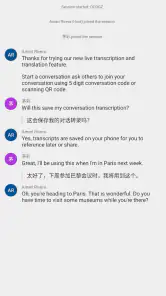
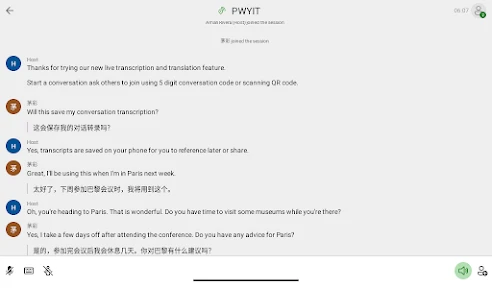
For a spoken exchange, short turns are usually more manageable than long explanations. I would say one thought at a time, pause to let the translation appear, then check whether the other person understood before continuing. That simple rhythm makes a group conversation less chaotic too; the app can help bridge language differences, but it cannot decide who should speak next or resolve ambiguity in what someone meant.
One useful habit is to separate understanding from replying. If I am reading a message, I first translate it to get the gist, then I look at names, times, locations, and any instruction that could change what I need to do. For a reply, I write a short sentence in plain language instead of translating a long, complicated thought. This keeps the exchange easier to check on both sides and makes it less likely that an idiom will obscure the point.
Setup checks before relying on it
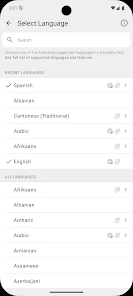
Microsoft Translator is aimed at a broad audience, with an Everyone content rating, and its current version is 25.10.2.8 g1db5cfa4 1db5cfa4 (2530202), for devices running Android 10 or later. Before a trip, I would open the app while connected and check that the languages I need are available in the relevant tools. If I plan to use it without a connection, I would also prepare offline language support ahead of time rather than assuming it will be ready at the destination.
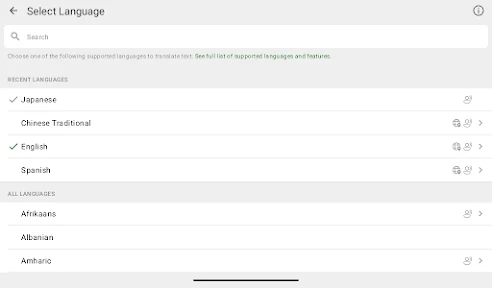
The app covers more than 100 languages overall, but that does not mean every mode behaves identically for every language. I treat text, speech, and camera results as separate jobs and test the specific pair I expect to use. For anything important, I keep the original wording visible and ask for confirmation rather than treating a fluent-sounding translation as proof of exact meaning.
For a practical pre-trip check, I would try one phrase in each mode I expect to use, rather than simply opening the app and assuming everything is ready. A typed greeting tests a different task from a spoken question or a printed sign. If I need offline use, I would make that check while connected and leave enough time to resolve any setup issue before I am depending on the phone. It is also sensible to keep essential details, such as an address, somewhere readable in the original language instead of relying on a live translation at the last minute.
More From Our News Desk

Weather by Xiaomi Review: Clear at a Glance, Less Clear Up Close

X Under Pressure: Can It Recover When Posting Goes Wrong?

Clash of Clans Is Won Between the Battles

Android Auto Makes the Case for Quieter Car Software

MobiOffice: Transforming Mobile Productivity with Seamless Integration

EA SPORTS FC™ Mobile Soccer: Redefining Mobile Sports Gaming
Features That Stand Out
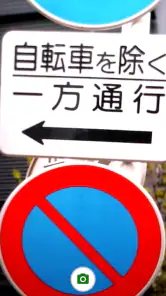
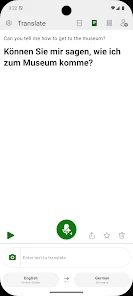
The first thing that caught my attention with Microsoft Translator is its ability to translate text, voice, conversations, and even images. I mean, how cool is that? You can just point your camera at a sign or menu in a foreign language, and voilà, instant translation! This feature is a lifesaver when you're traveling or even when you're just trying to decipher a foreign recipe.
Text and Voice Translation
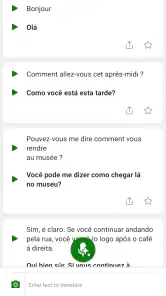
I found the text translation feature to be quite accurate, covering over 70 languages. The voice translation, on the other hand, is perfect for real-time conversations. You just speak into your phone, and it translates your words almost instantly. It’s like magic, really. Plus, the app supports multi-person conversations, which is great for group chats with friends who speak different languages.
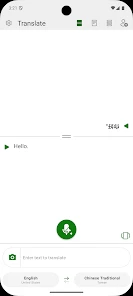
Text is the mode I would choose when precision and review matter more than speed. Before sending a translated sentence, I can read the source again and notice whether it contains a subject, a date, or a request that needs to survive the translation. Voice is more convenient when hands are occupied or when a quick spoken exchange feels natural, but it asks more of the environment: background noise, unclear pronunciation, or people talking over each other can make the input less dependable. I would not treat a voice result as a verbatim transcript.
Image and Camera Translation
The camera translation feature is another gem. I tested it on a few restaurant menus and street signs, and it worked like a charm. This feature supports a decent number of languages, and it’s incredibly convenient when you're on the go.
For camera use, I get better results by isolating the words I need rather than trying to capture an entire crowded page in one go. I hold the phone steady, avoid shadows where possible, and check the source text if the translated result looks oddly incomplete. That approach is especially useful with menus: a dish name may not explain ingredients or preparation, so I would ask a staff member to confirm anything important instead of making a dietary decision from an automated translation alone.
Offline Capabilities
One thing I really appreciate about Microsoft Translator is its offline functionality. You can download languages for offline use, which is super helpful when you're traveling to areas with limited internet access. It's like having a backup plan that ensures you're never left in the lurch.
Offline support is most valuable as a fallback for predictable needs, not as a reason to skip preparation. I would check the language pair and task before leaving coverage, and keep a small set of essential phrases available in a form I can read without translating. If an online-only interaction behaves differently from an offline one, I would first consider the connection and the language resources I prepared, then retry with a simpler sentence once conditions improve.
Another neat aspect is the phrasebook feature, which offers essential translations for common phrases. It’s perfect for quick references when you're trying to navigate through a new city or culture.
A routine that works on a busy day
Imagine arriving at a station in a place where you do not speak the local language. I would use the camera for a short direction sign, then type a follow-up question so I can review the wording before showing it to someone. If the reply is spoken, voice translation can help carry the exchange; if the connection is poor, a downloaded language may be useful for prepared basics. This mix-and-match approach is more dependable than expecting one mode to solve every part of the interaction.
The phrasebook is best treated as a starting point, not a script for every situation. I would use a saved common phrase to handle a simple request, then switch to typed text if I need to clarify details such as a time or destination. That small distinction matters: set phrases are quick, while a custom sentence gives more control when the context is specific.
A similar workflow works for a student reading a short passage or a traveler checking a notice: use the camera to orient yourself, then type a key sentence if you need to inspect its meaning more carefully. I would not copy a whole page into a quick camera workflow and assume every detail has been captured. For names, numbers, and directions, comparing the source with the translation is a small extra step that can prevent a larger misunderstanding.
Choosing it over a dictionary or specialist tool
Compared with a single-purpose dictionary, Microsoft Translator is more flexible because it can work with speech and images as well as typed words. A dictionary may still be the better choice when I want to study a word’s definitions, usage, or grammar rather than get a quick translation. Likewise, a human interpreter is the safer option for medical, legal, or other high-stakes conversations, where tone and exact nuance matter more than speed.
It also serves a different purpose from a language-learning course. I see it as a practical bridge for a task in front of me, not a way to build lasting speaking or reading skills by itself. Someone who wants lessons, structured practice, or a deeper explanation of grammar should choose a learning resource for that job. If the need is to understand a short sign, ask a basic question, or check a message, having several input methods in one place is more convenient than moving between separate tools.
I would also skip relying on any automatic translator for a polished, sensitive message without checking the result. A translation can sound natural while missing a subtle distinction, and camera recognition can struggle with a cluttered image. When accuracy matters, I compare the result with the source, simplify the sentence, or ask a fluent speaker to confirm it.
Recovering a conversation and spotting outside causes
If a translation seems wrong, I first try a shorter sentence and remove idioms, jokes, or slang. Then I check that I selected the intended languages and, for speech, speak clearly in a quiet enough setting. For a photo, I steady the phone and frame just the text I need. These are practical ways to isolate whether the issue is the input rather than the app itself.
If a feature does not respond, I check the connection for online use and confirm that any offline language preparation was completed before going offline. I also make sure the device meets the Android 10 minimum. If the same phrase translates oddly in more than one mode, the wording may be ambiguous; rephrasing it is often more useful than repeating it unchanged.
When the result is still confusing, I would avoid rapidly repeating the same attempt and instead change one thing at a time. For speech, that could mean moving somewhere quieter or shortening the sentence. For camera text, I would reframe around a clear section; for typed text, I would remove background detail and keep the key request. If only one person in a conversation is having trouble, checking that both people are following the same language direction can also help. These checks make it easier to tell whether the obstacle is the wording, the surroundings, or the connection.
Who will get the most from it
For travelers, students, and people who regularly exchange short messages across languages, the appeal is having several translation methods together at no cost. The app has been available since Aug 5, 2015, and its broad language coverage makes it a practical everyday helper, not a replacement for language learning. If you mainly need dictionary depth, formal writing support, or guaranteed precision for consequential decisions, a specialist resource or human help is a better fit.
I think it is especially useful for someone who switches between situations rather than needing one perfect tool for a single narrow task: checking a short message at home, reading a sign while out, then asking a simple spoken question. A person who mostly wants to look up word definitions may find a dictionary less distracting, while someone who regularly handles sensitive professional communication should build in human review. The free price makes it easy to try for everyday needs, but convenience should not be mistaken for a guarantee of exact meaning.
For a casual traveler, a useful test is to try the app on low-stakes tasks before relying on it for anything consequential. Translate a short direction or a simple request, then see whether the result is clear enough to use in a real exchange. If the experience fits the way you travel, prepare for the languages and modes you are likely to need. If you find yourself needing long, nuanced conversations, the app can still help with basic context, but it should not be the only support you bring.
My practical verdict
Overall, Microsoft Translator is a robust and versatile app that caters to both casual users and language enthusiasts. Whether you're a traveler, a student, or just someone who loves learning new languages, this app has something to offer. The user interface is intuitive, making it easy to switch between features, and the translations are generally spot-on.
What I value most is the choice of input: typing, speaking, and aiming the camera at text each solve a different everyday problem. The trade-off is that choice brings a little responsibility. You need to select the right mode, check the language direction, and use your judgment when the context matters. For a quick interaction, that is a fair exchange; for a high-stakes decision or a document that needs careful interpretation, it is not enough on its own.
So, if you're looking for a reliable translation app that won’t let you down, give Microsoft Translator a try. It’s like having a world of languages at your fingertips!
Microsoft Translator Frequently Asked Questions
Can Microsoft Translator help me communicate while traveling?
Microsoft Translator is built for situations where you need to understand or share information across language barriers. It can translate text, voice, images, and conversations into more than 100 languages, which can help with everyday communication while traveling. You can use the feature that fits the moment, such as translating spoken words or reading text captured in a photo.
Is Microsoft Translator suitable for study or work?
Microsoft Translator can be useful for personal, educational, or business purposes. It supports text, voice, image, and conversation translation, so it can help you understand a message, follow spoken communication, or read text in another language. The best fit depends on what you need to translate and the languages involved, but its range of translation tools makes it a practical productivity app.
Can I use Microsoft Translator for different translation tasks in one app?
Yes. Microsoft Translator brings several kinds of translation together: text, voice, images, and conversations. That lets you choose a method based on what you are trying to understand, whether it is a written message, spoken communication, or text visible in a photo. It supports more than 100 languages, making it a flexible option for a variety of everyday translation needs.
Is Microsoft Translator free to download, and what should I know about its age rating?
Microsoft Translator is free to download and is rated for Everyone, making it suitable for a broad audience. It is a productivity app from Microsoft Corporation, and its main purpose is helping people understand text, speech, images, and conversations across languages. As with any app, it is worth checking that your device meets the operating system requirement before installing it.
What languages and types of content can Microsoft Translator translate?
Microsoft Translator can translate text, voice, images, and conversations into more than 100 languages. That range makes it useful for tasks such as understanding a short message, following spoken communication, or reading text in a photo. The exact experience can vary depending on the language and feature you choose, so it is a good idea to select your target language before translating.
Pros
- Supports over 60 languages.
- Real-time conversation translation.
- Offline translation available.
- Camera translation feature.
- User-friendly interface.
Cons
- Inconsistent voice recognition.
- Occasional translation errors.
- Limited offline languages.
- Requires internet for full features.
- Can drain battery quickly.
- Category
- Productivity
- Version
- 25.10.2.8 g1db5cfa4 1db5cfa4 (2530202)













