MePic-AI Photo Video Generator
- 1.16K
- 4.5
- Installs
- 5.00M
- Price
- Free

Screenshots





Analysis by Reviewed
I’m drawn to creative apps that make it easy to turn a phone photo into something more polished or imaginative, but I’m wary of tools that promise a lot and become awkward as soon as a connection falters. MePic is an art and design app from Ocean Float Mobile that brings photo editing, portrait effects, AI-generated imagery and video creation together. Its appeal is breadth: I can imagine reaching for it to make a family picture feel more finished, then opening it again to experiment with an entirely different visual idea.
The app is free to install and rated for Everyone. It has a 4.5 average from around 108,000 ratings, and has passed 5 million installs. Those figures suggest a sizable audience, but they don’t tell me whether a particular edit will suit my taste. What matters in everyday use is choosing the right source image, having a clear idea of what I want, and allowing for the fact that AI-assisted results can be less predictable than a conventional adjustment slider.
Where a steady connection matters
I use a dependable connection as a cue to plan creative work rather than as a reason to keep tapping through delays. Before starting, I’d decide whether I’m testing a portrait look, exploring an image idea, or trying video creation; that choice helps me keep the session focused and judge the result on its own terms.
Creative tools are only as smooth as the moment
MePic’s AI-centered approach makes connectivity an important part of the experience. I would treat generating a portrait, transforming a photo, or making a video as tasks that may depend on a working network rather than assuming every step will be available in airplane mode. That distinction matters if I’m planning to edit during a commute or while travelling: I’d prepare the original photos beforehand and save the creative task for a place where the connection is dependable.
There is a useful difference between browsing an app and asking it to create something. A standard crop or small tonal adjustment is familiar, direct work; an AI transformation involves more interpretation and processing. If I’m trying a new style, I prefer not to start while rushing between appointments. A stable connection gives me a better chance to complete the process without wondering whether a delay means the request is still working or needs another attempt.
For a practical workflow, I’d first narrow the camera roll to two or three good candidates, then make one deliberate attempt with the image that best fits the intended result. This is more efficient than repeatedly sending near-identical pictures and hoping one works. For a family portrait, for example, a well-lit, forward-facing photo gives the app a clearer starting point than a dim group shot with faces partly turned away. That is a general image-making consideration, not a guarantee of any particular output.
Keep the task small on mobile
On a phone, the temptation is to do everything at once: edit a portrait, make a video, and try several art styles while standing in line. I find that’s a poor way to judge a creative app. A better mobile session has a single purpose. I might choose one image, make a portrait variation, compare it with the original, and decide whether it is worth keeping. Then I can move on rather than letting an endless stream of experiments blur together.
More From Our News Desk

Weather by Xiaomi Review: Clear at a Glance, Less Clear Up Close

X Under Pressure: Can It Recover When Posting Goes Wrong?

Clash of Clans Is Won Between the Battles

Android Auto Makes the Case for Quieter Car Software

MobiOffice: Transforming Mobile Productivity with Seamless Integration

EA SPORTS FC™ Mobile Soccer: Redefining Mobile Sports Gaming
This approach is especially handy for everyday sharing. If I’ve taken a quick picture at a birthday dinner, I can set aside a few minutes later to see whether a more stylized treatment adds warmth without making the people look unlike themselves. If the image is intended for a family group chat, likeness usually matters more than dramatic effects. For a playful greeting or a personal creative project, I might accept a more noticeable transformation.
MePic is a better fit for people who enjoy visual experimentation than for someone who wants a precise, repeatable editing workflow. Traditional photo editors generally give more direct control over exposure, color and small corrections. MePic’s draw is the possibility of a larger AI-led change. I’d use it alongside a conventional editor rather than expect it to replace every tool in my photo routine.
Recover calmly when a generation stalls
AI creation can feel less predictable than a normal edit, and connection interruptions add another layer of uncertainty. If a result takes longer than expected, I would avoid tapping repeatedly or submitting the same request several times in quick succession. First I’d check whether the phone still has a usable connection, then give the current attempt a moment to resolve. If it clearly hasn’t completed, I’d return to the image and retry once rather than generate a pile of duplicates.
It also helps to keep the original photo untouched. Before trying a strong transformation, I’d make sure I can find the source image again in my camera roll. That simple habit means an experimental result never becomes the only version of an important family picture. For work that matters, I’d finish the edit while connected and confirm that the result is available in the place I expect before closing the app or moving on.
When an output misses the mark, I wouldn’t assume that more attempts automatically improve it. I’d change one thing at a time: choose a clearer source image, simplify the composition, or decide whether a less dramatic treatment better suits the subject. This makes it easier to understand what helped. It also avoids spending time and, where applicable, paid resources on repeated guesses.
Be deliberate about images and spending
Because the app works with personal photos and offers AI creation, I’d choose images thoughtfully. A private family portrait is different from a picture I’m comfortable using for a casual visual experiment. I’d avoid submitting anything especially sensitive unless I had read the app’s current privacy information and felt comfortable with it. That is sensible practice for any connected photo tool, not a claim about MePic’s handling of images.
The app is free, but in-app purchases range from $4.99 to $69.99 per item. I’d explore the free experience first and pay attention to any purchase prompt before starting a longer session. If I were only curious about one portrait style, I would not commit to a high-cost option just because I was eager to see a result. A clear budget and a specific creative goal make it easier to decide whether an upgrade is worthwhile.
Connection quality can affect data use too, particularly when the task involves image or video creation. If I’m on a limited mobile plan, I’d save those experiments for Wi-Fi rather than assume they are negligible. I’d also avoid treating a slow connection as a reason to keep repeating the same operation: retries can add friction without making the final image better. Planning the edit before opening the generator is both more considerate of data and less frustrating.
Choose images with the intended result in mind
A useful extra step is to think about where the finished image will appear before choosing a source. A face-focused portrait for a profile or greeting has different needs from a family snapshot where everyone’s expression matters. I’d crop distractions from the frame first when possible, while keeping enough context for the people to remain recognizable. That small bit of preparation can make a creative attempt more purposeful than selecting the first recent photo in the camera roll.
I’d also avoid judging an AI result only by whether it looks impressive at first glance. For a keepsake, I’d check familiar details—eyes, hairlines, smiles and the way people look together—before sharing it. A dramatic image may work beautifully as a playful illustration while feeling wrong as a faithful family portrait. Deciding which of those goals matters most is a better guide than simply asking whether the output looks polished.
Who will enjoy MePic—and who may not
I can see MePic appealing to casual creators, families who want more expressive portraits, and anyone who likes exploring AI art without assembling a complicated desktop workflow. Its combination of photo and video creation gives it a broader creative role than a basic filter app. The current version is 4.7, and the minimum operating system is 7.0, so it is worth checking that a device meets that requirement before making it part of a routine.
On the other hand, I would steer away from it if I needed exact retouching, meticulous color matching, or a dependable professional process with fine control over every adjustment. A specialist photo editor is usually the better choice for those jobs. I’d also skip AI transformations when preserving a person’s natural appearance is essential: generated portraits can be fun, but they are not a substitute for careful, faithful correction.
Compared with ordinary mobile editors, MePic asks for more openness to interpretation and less expectation of pixel-level control. Compared with a dedicated video editor, its attraction is the AI-creation angle rather than a promise of a full production timeline. That makes it useful as a creative side tool, not necessarily the one app I’d choose for every image or video project.
Make a small trial before building a routine
If I were deciding whether to keep using it, I’d start with a photo that is easy to replace and a simple creative goal. That gives me a low-stakes way to see whether the app’s visual approach suits my taste before involving a treasured picture or planning a more involved project. I’d also note which kinds of source images seem to work best for me, rather than assuming one successful portrait means every photo will respond the same way.
For anyone wondering whether it is mainly for portraits or can support broader play, the app’s creative scope includes photo and video work as well as AI imagery. I’d still approach those as separate experiments instead of expecting one workflow to behave identically across all of them. Someone who wants to make a carefully edited video from many clips, for example, may be happier starting in a dedicated editor and using this app for a specific generated visual idea.
My connectivity verdict
For me, MePic makes the most sense when I have a clear idea, a suitable photo and a reliable connection. I’d use it for a playful portrait, a family image that could benefit from a fresh treatment, or a short creative experiment—not as the only place I keep or refine important photos. Keeping originals, limiting retries and watching purchase prompts are small habits that make the experience easier to manage.
Ocean Float Mobile has built an app aimed at people who want AI-assisted visual play on a phone, and its broad mix of creative uses is appealing. The trade-off is that network-dependent creation, unpredictable results and paid options call for a little patience and judgment. If you enjoy trying new looks and don’t mind checking your connection before starting, MePic is worth exploring. If your priority is precise editing or a workflow that must stay consistent regardless of network conditions, I’d choose a more conventional tool instead.
MePic-AI Photo Video Generator Frequently Asked Questions
What is MePic-AI Photo Video Generator?
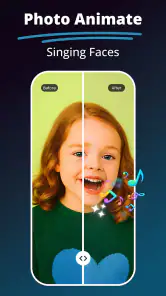
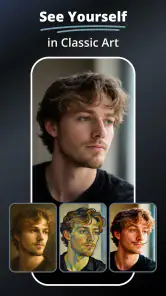
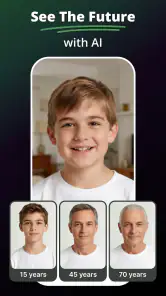
MePic is an AI-powered photo and video creation app designed to transform images into stylized visuals and short animated clips. Depending on the tools available in your version, you may be able to apply creative effects, generate portraits, or animate a photo. Results and features can change with app updates, so check the listing and in-app descriptions to confirm what is currently included.
How do I create a photo or video with MePic?
The usual workflow is to choose a creation tool, select or upload an image, pick a style or effect, and let the app process the request. Some features may offer additional settings or require you to provide a prompt. Processing time and output quality can vary with the image, selected effect, internet connection, and whether the feature is available to your account.
Is MePic free to use, or does it require a subscription?
The app may be free to download while placing some effects, generations, exports, or higher usage limits behind in-app purchases or a subscription. Pricing and trial terms can vary by country and may change, so review the current store listing and payment screen before confirming a purchase. Also check how subscriptions renew and how to cancel them through your app store.
What happens to the photos and videos I upload to MePic?
Creating AI content generally requires the app to process the images you provide, and some features may send them to online services. Before uploading personal or sensitive photos, read MePic’s privacy policy and review the permissions it requests. Avoid sharing images of other people without their consent, and check the app’s data-deletion options if you later want to remove uploaded content or account information.
Can I save and share MePic creations, and what should I check first?
MePic may let you save finished images or videos to your device and share them through other apps, although export options can depend on the feature, account, or subscription. Check whether downloads include a watermark, have limits, or use a particular resolution. If you plan to publish a result, consider the rights and consent of anyone depicted and the terms that apply to AI-generated content.
Pros
- Creates AI-generated photos and videos from your images.
- Offers a variety of creative styles for experimenting with portraits.
- Automates effects and edits
- requiring little manual photo-editing work.
- Makes it easy to create eye-catching content for social media.
- A convenient option for trying AI image and video tools in one app.
Cons
- Results can vary in quality depending on the source photo and selected style.
- Some features or styles may require a subscription or in-app purchase.
- AI processing may take time
- especially for video generation.
- Uploading personal photos raises privacy considerations; review the app's policy.
- Generated content may not always match the prompt or look realistic.
- Category
- Art & Design
- Version
- 4.7













