Flightsky: Flight Tracker 3D
- 394.00
- 4.7
- Installs
- 1.00M
- Price
- Free

Screenshots

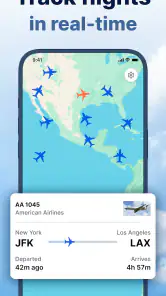
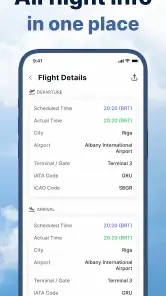
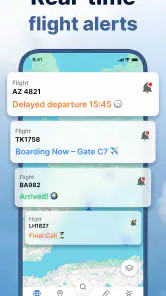
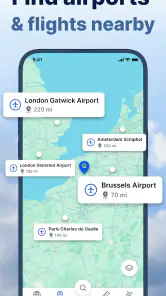


Analysis by Reviewed
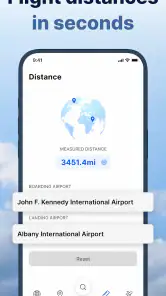
When I want to make sense of the aircraft moving across a map, I care less about flashy visuals than about whether I can quickly find a flight and understand what I’m seeing. Flightsky: Flight Tracker 3D is built for that curiosity: it presents live flight tracking with a 3D view, an augmented-reality mode, a cockpit perspective, and flight-status information. My impression is that its appeal depends on how much you enjoy exploring air traffic, not just checking a departure time.
A practical first check before exploring
If I were opening Flightsky for the first time on the way to meet someone, I would begin with one flight rather than trying to explore every view at once. Find the aircraft, check its status, and note what the map tells you. That gives you a useful baseline: if the answer you need is already clear, there is no reason to spend time changing perspectives. If you are curious about where the aircraft is in relation to its route, then the 3D view becomes a purposeful next step.
This one-flight-first approach is also a good way to judge whether the app suits your habits. People who enjoy following aircraft can treat it as a small exploration tool, dipping in to inspect a route and then returning later. Someone who opens a tracker only when a family member is landing may prefer a faster, simpler source for status updates. The distinction is not about which kind of user is right; it is about whether visual exploration is something you actually want from a travel app.
Quick checks and the appeal of watching flights
Flightsky sits in the travel-and-local category, but it is more of a window onto air traffic than a complete trip-planning tool. The central attraction is being able to follow aircraft visually, then switch to more immersive ways of looking at a flight. That makes it interesting for aviation fans and for someone waiting for a particular arrival, while a traveler who only needs a gate or booking detail may find a regular airline app more practical.
In everyday use, the useful question is whether the app helps you get from “I wonder where that plane is” to a meaningful answer without turning a quick check into a chore. The map is the natural starting point: locate a flight, inspect its progress, and use the available perspectives to make the aircraft’s position easier to picture. The 3D and cockpit-style views add context, while AR is most compelling when you want to connect the screen with the sky around you.
I would treat “live” as a reason to explore, not a promise that every position or status will update at precisely the moment you expect. Flight tracking depends on information reaching the app, and a moving map can feel less immediate when updates lag or coverage is limited. If you are coordinating a pickup, keep checking the airline or airport’s own status as well; those are the better sources for operational changes that affect your plans.
For a simple arrival check, I’d first identify the flight and read its status before spending time in the immersive views. That order is a small but useful habit: it keeps the practical answer visible and makes the 3D presentation an extra, rather than a substitute for information you need to act on. If the aircraft’s position is the main thing you care about, the map can be the destination; if you are just checking whether to leave home, avoid letting a visually engaging view distract you from the status.
More From Our News Desk

Weather by Xiaomi Review: Clear at a Glance, Less Clear Up Close

X Under Pressure: Can It Recover When Posting Goes Wrong?

Clash of Clans Is Won Between the Battles

Android Auto Makes the Case for Quieter Car Software

MobiOffice: Transforming Mobile Productivity with Seamless Integration

EA SPORTS FC™ Mobile Soccer: Redefining Mobile Sports Gaming
Where the extra views help—and where they slow you down
I find the extra views most useful when I already know which flight I want to follow and want a clearer sense of its movement, rather than when I’m trying to make a quick travel decision. Switching perspectives can add interest, but it also adds visual complexity, so I’d use the map first and save 3D or AR for moments when that added context is worth the extra attention.
Use the visual modes with a purpose
The different perspectives are not equally useful in every situation. A 3D view is a natural choice when you want to understand a route spatially or follow an aircraft for a while. The cockpit perspective is more about the feeling of looking along a flight than about making a fast travel decision. AR makes the most sense outdoors, where you can point your attention toward the sky; indoors or on a crowded commute, a conventional map is likely to be clearer and less fussy.
That distinction matters for perceived speed. A map-and-status check is the kind of task I would expect to feel quickest because it avoids extra visual layers. Three-dimensional scenes and AR can take more time to load or respond than a plain map, particularly on a device with limited headroom, but I would not assume that they are inherently slow. The practical takeaway is to begin with the simplest view and switch only when the richer perspective answers a question the map cannot.
A useful workflow for an airport pickup is to check the flight’s status before leaving, then revisit its position while you are on the way. The first look helps you decide whether the timing still makes sense; the second can give you a more intuitive sense of progress. I would not use a live aircraft position alone to judge exactly when to pull up at the terminal, since landing, taxiing, baggage, and passenger exit are separate parts of the arrival process.
Another good use is casual learning. Following a flight in 3D can make routes and aircraft movement more engaging than a text-only status screen. That is a genuine strength for people who like aviation, but it is also where the app can encourage unnecessary screen time: if you only need a departure time, switching among views adds spectacle rather than certainty. I’d keep the immersive modes for curiosity and use status information for decisions.
Busy sessions and interruptions
The moments most likely to feel demanding are not necessarily long sessions; they are sessions that combine repeated searching, switching perspectives, and checking several flights. Each extra layer asks the app and the device to do more than display a short status line. On an older or entry-level phone, I would keep the map as the default, close other demanding apps if the interface feels sluggish, and avoid treating AR as the mode for a rapid series of checks.
That is a practical trade-off, not a claim that Flightsky has a known stability problem. The app is currently at version 1.9, and it is developed by Ocean Float Mobile. A version number alone does not tell me how it behaves on every handset, so I would judge it by the basics on my own device: does the map remain responsive, do flight details appear consistently, and can I return to a useful view after switching away?
Interruptions are especially relevant when tracking while travelling. You may lock the screen, move between apps, or lose a dependable connection. When you come back, the safest routine is to refresh your understanding of the flight rather than assume the display has remained current in the background. If a position looks stale, cross-check the status and reopen the flight view. That simple recovery habit matters more than expecting an animated map to be a perfect real-time instrument.
If the app becomes slow during a visually rich session, I would step back to the map instead of repeatedly tapping through the same controls. Repeated input can make it harder to tell whether the app is processing or has stopped responding. A brief pause, followed by a return to the simpler view, is a more sensible first response; if the problem persists, restarting the app is a reasonable general troubleshooting step, though it may mean finding the flight again.
Device fit, cost, and audience
The minimum operating-system requirement is Android 7.0, which gives the app a broad potential device range, but compatibility does not guarantee the same smoothness everywhere. A phone that handles ordinary maps well may still feel less comfortable with 3D or AR, especially if it is older or already under load. I would try the standard tracking view first and treat advanced perspectives as optional. If your device heats up, drains quickly, or stutters in other graphics-heavy apps, that is a good reason to keep Flightsky’s use brief and map-focused.
The app is free to install and is rated for Everyone. It has a 4.7 average from around 76,000 ratings, with more than 1 million installs, which suggests it has attracted a substantial audience. In-app purchases range from $4.99 to $299.99 per item, so I would look carefully at what an offered purchase unlocks before committing. The free starting point is convenient, but the wide spread in purchase prices means it is worth deciding what you actually need rather than buying on impulse because a feature looks appealing.
Compared with the usual alternatives, Flightsky’s distinguishing angle is visual exploration. Airline apps are generally the better choice for managing a booking and getting carrier-specific travel updates. Airport information is more useful for terminal logistics, while a straightforward flight-status service can be preferable when all you want is a quick text answer. Flightsky earns its place when seeing an aircraft’s movement and trying different viewpoints is part of the fun.
I would skip it if you want a dependable replacement for airline notifications, a complete itinerary manager, or a minimal tool that opens directly to one essential answer. I would also be cautious about relying on any flight-tracking display as the sole basis for time-critical travel decisions. Its best audience is someone who values the visual side of tracking and is happy to verify important changes through the airline or airport.
My take on speed and reliability
Flightsky’s speed is best judged by separating a quick status check from a richer viewing session. The first should be your route to an answer; 3D, cockpit, and AR are optional layers that make following a flight more engaging but may place greater demands on the device. If the app feels less responsive, simplifying the view is the most useful adjustment. That gives the experience a sensible fallback instead of making every task depend on the most elaborate presentation.
For reliability, I value the combination of a visible flight position and status details, but I would still cross-check important travel decisions. A map can help explain where an aircraft appears to be; it does not by itself tell you everything you need to know about a passenger’s arrival at the terminal. Keeping that distinction clear makes the app more useful and prevents a fun tracking session from becoming false confidence.
Flightsky is a good fit if you regularly find yourself looking up at passing aircraft, tracking a flight for interest, or wanting more visual context than a basic status listing provides. I like that its core idea is easy to understand and that the alternate perspectives give aviation-minded users reasons to linger. My recommendation is qualified: start with the map, use the immersive modes when they genuinely add context, and verify consequential updates elsewhere. If that sounds like the way you want to follow flights, Flightsky: Flight Tracker 3D is worth trying; if you only need practical travel alerts, a simpler airline-focused option will probably serve you better.
Making it useful beyond the airport
There is also a low-pressure way to use Flightsky that does not involve an imminent trip: keep it for moments when an aircraft overhead catches your attention. Rather than guessing where it is going, I would use the map to follow its movement and then switch to a richer perspective only if I want to spend time with the route. This makes the app more of an occasional aviation companion than something that needs to stay open all day.
For families waiting at home, the most useful division of labor is simple: one person can use Flightsky to satisfy curiosity about the aircraft’s progress, while the person making travel arrangements checks the carrier’s updates. That avoids asking a visual tracker to answer questions it is not designed to settle, such as whether a passenger has cleared the terminal. It also keeps the app’s enjoyable side separate from decisions where exact operational information matters.
Choosing what to rely on
If you are deciding whether to pay for anything, I would first spend time with the free experience and identify a specific limitation you want a purchase to solve. The presence of in-app items does not make an upgrade automatically worthwhile; the value depends on whether the offered feature changes how you actually track flights. I would avoid buying simply because a premium-looking option appears during a curious browsing session, especially if your normal use is only an occasional status check.
Likewise, if a flight seems to disappear or the display feels out of date, I would not immediately assume the app has failed. Recheck the flight details, return to the map, and compare the situation with an airline or airport source before making plans. That routine is a little less convenient than trusting one screen, but it is the sensible trade-off for any tracker used around real travel arrangements.
Who will get the most from it?
I can see Flightsky working best for someone who enjoys the “where is that plane now?” question and wants more than a list of times. It is less compelling for a traveler who values a clean itinerary, rapid notifications, or a low-distraction interface above visual context. In that case, an airline app or a basic status checker is the better everyday tool, with Flightsky as an optional extra for exploring a route when time allows.
That distinction is ultimately what makes the app easier to judge. Its views give flight tracking a sense of place, but the richest presentation is not automatically the most useful one. Start with the map and status, keep a second source for consequential changes, and bring in 3D or AR when they answer a real question or simply make watching the flight more enjoyable.
Flightsky: Flight Tracker 3D Frequently Asked Questions
What is Flightsky: Flight Tracker 3D used for?
Flightsky: Flight Tracker 3D is designed to help users explore flight information through an interactive, three-dimensional view of air traffic. Depending on the data available for a particular flight, you may be able to look up aircraft movements, routes, and flight details. It can be useful for travelers, aviation fans, or anyone curious about planes overhead, but it should not replace airline or airport updates for important travel decisions.
Can I use Flightsky to check the status of my flight?
You may be able to search for a flight and view details such as its route or position when tracking data is available. However, tracking coverage and update timing can vary, and displayed information may not always reflect the airline’s latest operational changes. For gate assignments, cancellations, boarding times, and other time-sensitive details, confirm directly with your airline or airport rather than relying on the app alone.
Does Flightsky: Flight Tracker 3D work without an internet connection?
Flight tracking depends on receiving current information, so an internet connection is generally needed to load or refresh aircraft positions and flight details. Some screens or previously loaded information may remain visible temporarily, but you should not expect live tracking to work offline. If you plan to use the app while traveling, connect to Wi-Fi or mobile data and check any data or roaming charges that may apply.
Is Flightsky: Flight Tracker 3D free to download and use?
The app’s download price and available features can depend on the platform, region, and current store listing. Some flight-tracking apps offer basic features at no charge while reserving additional tools or removing limitations through in-app purchases or a subscription. Before downloading or starting a trial, review the listing for the latest pricing, renewal terms, and included features so you know what may require payment.
What permissions or privacy considerations should I know about before installing Flightsky?
Check the app’s store listing and privacy information before installing, especially if it requests access to location, notifications, or other device features. Location access may be useful for showing nearby aircraft or local airport information, but it may not be necessary for every tracking task. You can review and change permissions in your device settings, and should consult the developer’s privacy policy to understand how information is collected and used.
Pros
- 3D flight views make routes easier to understand at a glance.
- Live tracking helps you follow flights while they are in the air.
- Useful for checking flight progress without relying on airport displays.
- Can help friends and family estimate when to leave for an airport pickup.
- Flight details are presented in a travel-focused interface.
Cons
- Live flight data may be delayed or unavailable for some routes.
- Coverage and tracking detail can vary by airline and region.
- A reliable internet connection is needed for current flight updates.
- 3D maps may use more battery and data than a basic flight list.
- Some features or information may require a paid upgrade.
- Category
- Travel & Local
- Version
- 1.9