Python Master - Learn to Code
- 656.00
- 4.4
- Installs
- 1.00M
- Price
- Free
Screenshots
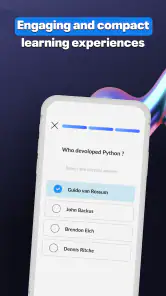
Analysis by Reviewed
I see Python Master - Learn to Code as a useful starting point for learning Python on a phone, especially if a blank editor and a long textbook would make you put off beginning. Its lesson-and-practice approach gives new learners a route into the subject, while quizzes offer a reason to pause and check what has actually stuck. I would treat it as a guided introduction, not a shortcut to professional programming: the best results will come from working through ideas carefully and then trying them in your own projects.
What a phone course can—and cannot—do
Python is often recommended as a first programming language, but its approachable syntax does not remove the need to practise. A lesson on a small screen can be handy when I have a few spare minutes, and a short quiz can turn passive reading into a quick check of whether I understand a concept. The important trade-off is that brief sessions are good for building familiarity, but they are not a substitute for sitting down to solve a larger problem from scratch.
For example, I could use a quiet break to review a lesson, then later try to write a small script on a computer using the same idea. That second step matters: recognizing a correct answer in a quiz is easier than deciding how to structure a solution without prompts. I would keep a note of concepts I had to guess at and revisit those before moving forward. That simple habit makes the app more useful as a learning routine rather than just a sequence of completed screens.
Make practice active, not just quick
The most practical way to approach a course like this is to slow down at the point where a new idea first appears. After a lesson, I would try to explain the concept in my own words, then take the quiz without rushing. If an answer feels uncertain, repeating the relevant material is more valuable than chasing a streak or finishing quickly. This is particularly useful with Python basics, where small details in punctuation, indentation, or the order of operations can change what a program does.
I would also separate “I understand this example” from “I can use this idea.” A helpful follow-up is to change one part of an example and predict what will happen before checking the result. If the app’s practice format allows code experimentation, that kind of deliberate variation can expose misunderstandings; if a lesson is mainly explanatory, I would recreate the idea in a separate coding environment. In either case, the aim is to move from recognizing patterns to making decisions independently.
A useful bridge between lessons and independent coding
The strongest way to get value from a phone-based Python course is to give each lesson a small job outside the app. After studying a topic, I would write down one question it could help answer, then make a tiny program that answers it. A lesson about conditions, for instance, can become a script that sorts a simple choice into one of two outcomes. The point is not to build something impressive; it is to practise deciding what the code should do before looking at a worked example.
This approach also helps answer a common beginner concern: whether a mobile course is enough to learn Python. I would say it can help establish vocabulary and introduce concepts, but a learner needs somewhere to write and run code independently to develop problem-solving habits. When a program behaves unexpectedly, trying to locate the cause is part of learning, not a sign that the lesson failed. Keep a short “mistake log” with the error, what you thought would happen, and what fixed it. That record is often more useful than rereading a lesson you already understand.
More From Our News Desk

Clash of Clans Is Won Between the Battles

Android Auto Makes the Case for Quieter Car Software

MobiOffice: Transforming Mobile Productivity with Seamless Integration

EA SPORTS FC™ Mobile Soccer: Redefining Mobile Sports Gaming

How Microsoft OneDrive Became a Mobile Productivity Giant

How Google Translate Breaks Language Barriers Effortlessly
Getting Started with Python Master
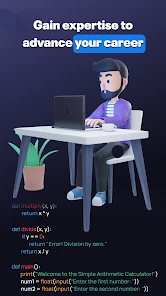
The first thing that caught my attention about Python Master - Learn to Code is its user-friendly interface. It’s like the app is holding your hand as you step into the complex world of coding. The onboarding process was smooth and intuitive, which is perfect for beginners who might feel overwhelmed at first. Once you’ve signed up, you’re greeted with a well-organized dashboard that neatly categorizes lessons from beginner to advanced levels.
Why the lesson format works best in short sessions
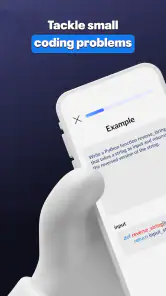
One of the standout features of this app is how the lessons are structured. They’re presented in bite-sized pieces that make learning digestible and less intimidating. I found myself eager to complete one lesson after another, thanks to the engaging content and interactive coding challenges. The lessons cover everything from the basics of Python syntax to more advanced concepts like data structures and algorithms.
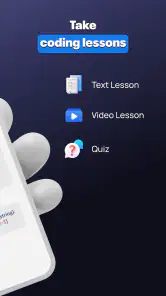
Another aspect I really appreciated was the use of real-world examples that make the content relatable and applicable. It’s not just about memorizing code, but understanding how it works in practical scenarios. Plus, the app includes quizzes at the end of each module, which is a great way to consolidate what you’ve learned and track your progress.
Keep the course’s level labels in perspective
The app is an Education app from Insight Ltd, and its beginner-to-advanced lesson path makes it easier to choose a starting point than jumping between unrelated tutorials. Still, labels such as “advanced” should not be mistaken for proof that someone is ready to build production software. I would use the course to establish concepts, then practise on a computer where I can create files, run programs repeatedly, and learn from errors in a more flexible setting.
That distinction also helps when comparing it with common alternatives. A video course can explain a topic in depth, but it is easy to watch without doing; a reference book is useful for looking up details, yet can feel dense when you are new. Python Master’s short lessons and quizzes are better suited to regular, guided practice. For a learner who needs a complete desktop workflow, project feedback, or unrestricted experimentation, a full coding environment and a project-based course will be a stronger companion.
Understand the cost before making it part of your routine
The app is free to download, with in-app purchases listed from $4.99 to $39.99 per item. I would begin by exploring the free access before deciding whether any paid item is worth it for my learning goals, and check the purchase details in the app before committing. It is rated for Everyone, runs on Android 6.0 or later, and version 6.3 is the current version. Those details make it approachable for a broad range of learners, though the purchase range is worth keeping in mind if you are trying to keep study costs at zero.
Before paying for any learning app, I would identify what I expect the purchase to change: more lessons, a different learning path, or something else. Then I would compare that with what I actually use during a few study sessions. That is a practical way to avoid buying based on enthusiasm after the first lesson. If you need a certificate, a portfolio project, or detailed personal feedback, consider whether a mobile course can meet that goal before spending; those outcomes call for more than brief guided exercises.
Who is likely to benefit most
Its audience is clearest: a curious beginner who wants a structured introduction, a returning learner who needs to refresh fundamentals, or someone who benefits from short, phone-friendly study sessions. It is less suitable as the only resource for someone preparing for a technical interview, building a substantial application, or needing tailored instruction. In those situations, I would pair lessons with independent coding practice and use a more comprehensive course or documentation when a topic needs deeper treatment.
It can also suit someone who has tried to learn from scattered online tutorials and found it difficult to know what to study next. A defined sequence provides a useful path, but I would still let my own questions guide extra practice. If a topic remains fuzzy after a quiz, pause and work through a tiny example rather than pressing ahead simply because the next lesson is available. Conversely, learners who already write Python comfortably may find introductory explanations slow; a reference or project challenge is likely to use their time better.
Community can help, but it is not the same as individual teaching
Learning to code can sometimes feel like a solitary endeavor, but not with Python Master. The app includes a vibrant community feature where you can interact with fellow learners, share insights, or even seek help when you hit a roadblock. I found this feature particularly helpful because it adds a social element to the learning process, making it more engaging and less isolating.
Moreover, their support team is top-notch. I had a minor issue with one of the quizzes and reached out for help. The response was prompt, and the team was incredibly helpful in resolving the issue. It’s reassuring to know that there’s a dedicated team ready to assist you whenever needed.
I would use peer discussion to compare approaches and clarify why a solution works, rather than copying a finished answer and moving on. Explaining a small piece of code to another learner can reveal whether I understand it or have only memorized its shape. Community help is most useful when I can show what I tried and describe where I got stuck. It should not be treated as a substitute for a tutor who knows my goals or can diagnose every gap in my understanding.
A routine that turns spare minutes into useful study
A realistic routine might be to complete one short lesson while commuting or waiting for an appointment, take its quiz when the material is still fresh, and reserve a longer session later in the week to write a tiny program using the same concept. For instance, after studying variables and conditions, I might make a simple decision-based script on a computer rather than simply rereading the explanation. This turns the app into a prompt for practice, not a replacement for practice.
Its audience response is encouraging but should be read in context: it has a 4.4 average from around 47,000 ratings, and more than a million installs. Those figures suggest that many people have tried it, but they cannot tell me whether a particular teaching style will suit me. I would judge it by whether the explanations help me answer questions without hints and whether I can transfer a lesson to code I write myself.
One limitation of learning through a mobile course is the temptation to equate completed lessons with mastery. Quizzes can show whether I recognize material, but a learner still needs to debug mistakes, combine concepts, and make choices without a prepared prompt. I would therefore avoid rushing through the path just to reach advanced topics. Revisiting an earlier idea after a day or two can be a better test of retention than finishing several modules in one sitting.
My recommendation for a first step into Python
All in all, Python Master - Learn to Code is a fantastic tool for anyone looking to dive into the world of programming, whether you’re a complete newbie or someone looking to polish your skills. The app’s structured approach, interactive lessons, and supportive community create an environment conducive to learning and growth. So, if you’re ready to embark on your coding adventure, I’d highly recommend giving this app a shot. You might just find yourself falling in love with Python and coding in general!
My recommendation is strongest for learners who want a guided first step and can pair phone lessons with hands-on coding elsewhere. The app is free to try, rated 4.4 from around 47,000 ratings, and has attracted over a million installs; it was released on January 12, 2023, and is rated for Everyone. Those are useful points of context, not a guarantee of fit. If you prefer learning by building complete projects from day one, choose a project-led resource instead. If you want a gentle structure that makes it easier to begin and keep returning, this is a sensible place to start.
Python Master - Learn to Code Frequently Asked Questions
Who develops Python Master - Learn to Code?
Python Master - Learn to Code is an education app developed by Insight Ltd. Knowing who publishes an app can help you decide whether it fits your expectations, but the learning experience itself is what matters most. Its focus is Python, with a store summary that describes interactive lessons, quizzes, and an editor as the tools for learning.
What does Python Master - Learn to Code teach?
The app focuses on learning Python, a programming language used by people exploring coding and software development. Its store summary describes a path from zero to pro through interactive lessons, quizzes, and an editor. That combination suggests a mix of instruction and practice, which can be useful if you prefer to engage with concepts rather than only read about them.
Is Python Master - Learn to Code free to download?
Python Master - Learn to Code is free to download, so you can try its educational content without paying upfront. The app also offers in-app purchases, with individual items ranging from $4.99 to $39.99. Consider checking which features or content are included before purchasing, especially if you plan to use the app as your main way to learn Python.
How much does Python Master - Learn to Code cost to download?
Python Master - Learn to Code is free to download, so you can try its educational content without paying upfront. The app also offers in-app purchases, with individual items ranging from $4.99 to $39.99. Consider checking which features or content are included before purchasing, especially if you plan to use the app as your main way to learn Python.
What devices can run Python Master - Learn to Code?
The app is available for Android devices running version 6.0 or later. Before downloading, check your device’s operating system version and make sure you have enough room for the app and any content you choose to access. Python Master - Learn to Code is an education app from Insight Ltd, intended for users interested in learning Python.
Pros
- Comprehensive Python tutorials.
- User-friendly interface for beginners.
- Includes interactive coding exercises.
- Supports offline learning mode.
- Frequent updates with new content.
Cons
- Limited advanced programming topics.
- Occasional app crashes reported.
- In-app ads can be intrusive.
- Requires internet for updates.
- No certification upon completion.
- Category
- Education
- Version
- 6.3











