Airbnb
- 96.84K
- 4.4
- Installs
- 100.00M
- Price
- Free

Screenshots



Analysis by Reviewed
When a household trip starts taking shape, I like having one place to compare possible stays, check what each one offers, and keep booking conversations tied to the trip. The Airbnb app is built around that sort of planning, with homes, experiences, and services gathered in a travel app from Airbnb. I find it most useful when the group wants a stay that feels different from a standard hotel room, but it works best when everyone agrees on the budget and priorities before the search gets serious.
Start with the group’s real needs
Before opening a search, I’d ask each traveler to name one need that could rule a place in or out: enough beds, a usable kitchen, a particular area, or a layout that lets people have some space. This turns browsing from an endless tour of attractive photos into a practical comparison. It also helps the person booking avoid choosing a place that suits one traveler’s taste but creates a daily problem for everyone else.
A shared-device scenario makes those boundaries especially useful. Imagine a family comparing stays on a tablet in the living room: everyone can look at the options together, but the account holder should make the final booking and keep control of account access and payment decisions. I’d write down the candidates or discuss them in a separate group chat rather than leave the device signed in for everyone to use later.
Planning together without sharing everything
A practical way to use the app with family or friends is to decide who will manage the booking, then share the important details outside the account: dates, neighborhood, sleeping arrangements, and the listing’s rules. That avoids the confusion of several people making separate searches or assuming that a saved option is already reserved. I’d treat the account as belonging to the person who uses it, rather than passing around a password or leaving a shared device signed in.
For example, if I were arranging a weekend away with relatives, I’d shortlist a few places and ask the group to compare the photos, location, and house details before choosing. A useful detail to check early is whether the listing suits the whole group’s routine, not just its appearance: think about shared living space, cooking needs, and how everyone will get around. If plans change, I’d return to the booking and host conversation rather than relying on a message buried in a group chat.
Account boundaries and everyday coordination
Because travel plans can involve personal booking and payment details, I wouldn’t make a household tablet a permanently shared Airbnb account. On a device used by several people, sign out when finished and let the account holder handle booking decisions and messages. Younger family members can help compare options with an adult nearby, but I’d keep purchases and conversations with hosts under the responsible traveler’s control. That’s a sensible boundary, not a claim that the app provides household or child-management tools.
Coordination also takes a little care: one person should keep track of the final choice, booking status, and any questions that still need an answer. Before committing, I’d read the listing details closely and ask the host about anything that could affect the group’s stay. Photos and reviews help set expectations, but they don’t replace checking practical points such as the sleeping setup or arrival arrangements. This extra step is especially worthwhile when several people are depending on the same booking.
More From Our News Desk

Weather by Xiaomi Review: Clear at a Glance, Less Clear Up Close

X Under Pressure: Can It Recover When Posting Goes Wrong?

Clash of Clans Is Won Between the Battles

Android Auto Makes the Case for Quieter Car Software

MobiOffice: Transforming Mobile Productivity with Seamless Integration

EA SPORTS FC™ Mobile Soccer: Redefining Mobile Sports Gaming
Make the shortlist useful, not just attractive
When several listings seem close, I find it helpful to compare them against the same small set of questions: does the location fit the plans, does the space work for the group, and are there unanswered details that could change the decision? That keeps a striking interior from dominating the choice when the group will spend most of its time out exploring. It also makes a “no” easier: if the listing’s written details don’t resolve an important concern, I’d move on rather than hope it works out.
One non-obvious trade-off is that a home can offer more room to gather while asking the group to make more decisions than a hotel stay. Travelers may need to agree on how they’ll use shared areas, prepare meals, or handle different schedules. For a family with a relaxed plan, that flexibility can be the point. For people arriving late, leaving early, or wanting a predictable routine, a conventional hotel may involve less coordination.
Finding Your Home Away from Home
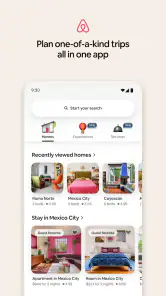
First off, the Airbnb app's interface is super user-friendly. As soon as you open it, you’re greeted with a clean, intuitive design that makes searching for accommodations a breeze. You can filter your search based on location, price, amenities, and more. Whether you’re looking for a cozy cabin in the woods or a chic apartment in the city, this app has got you covered.
Diving into the Details
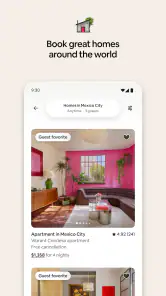
One of the things I love about this app is the level of detail available for each listing. You can see high-quality photos, read detailed descriptions, and check out reviews from past guests. This gives you a pretty good idea of what to expect before you book. Plus, the host profiles add a personal touch, making it feel like you’re staying with a friend rather than just renting a space.
Reading listings with a critical eye
I wouldn’t use photos as a substitute for checking how a place works in practice. I look for the written description to clarify what is included, then compare guest feedback for repeated comments rather than treating one glowing or unhappy review as decisive. If a detail matters to the group—such as whether the sleeping arrangement fits everyone—I’d ask the host directly before booking. A clear answer can settle the choice; an unclear one is useful information too.
Location deserves the same scrutiny as the property itself. A listing may look ideal, but the group’s plans can make a particular neighborhood more or less convenient. I’d map the day around the places everyone expects to visit and consider how people will get between them, rather than choosing solely by the home’s interior. This is especially helpful when different travelers have different energy levels or plans and the group won’t always move together.
Booking Made Easy
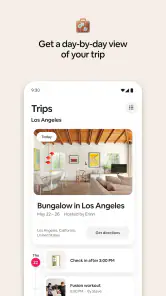
Booking through the app is straightforward and secure. You can communicate with hosts directly through the messaging feature, which is great for asking any questions or making special requests. The app also sends you notifications about your booking status and any updates from the host, so you're always in the loop.
Keep trip details easy to find
For a realistic weekend plan, I’d have one person book the stay, then make sure the rest of the group knows the confirmed address, key arrangements, and any relevant house rules through a channel everyone already checks. The app can keep the booking conversation connected to the reservation, while a separate group message can help travelers coordinate their arrival times. I wouldn’t assume that every traveler has access to the booking account or will see its notifications.
That distinction matters when plans shift on travel day. If a question concerns the reservation or the property, I’d keep it in the host conversation so the context stays together. If it concerns who is picking someone up or when the group is meeting, I’d use the group’s usual communication method. Separating those threads reduces the chance that an important host reply gets lost among everyday messages.
Exploring Beyond Stays
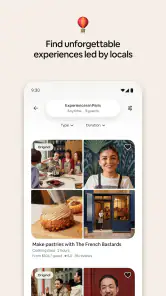
What’s cool about Airbnb is that it’s not just about finding a place to stay. The app also offers “Experiences” – unique activities hosted by locals. Whether you want to take a cooking class, go on a guided hike, or learn about local culture, there’s something for everyone. It’s a fantastic way to make your trip even more memorable.
Choose activities that suit the whole party
I’d treat an activity as a separate decision from the accommodation, even when both are being planned for the same trip. A locally hosted experience can be a good fit when the group wants a planned activity and has a shared interest. It may be less suitable when travelers need a flexible schedule or have very different ideas of a good day out. I’d check the activity’s own description and practical expectations before building the rest of the day around it.
There’s also no need to make every part of a trip an app-planned event. A home booking may be the main reason to use Airbnb, while the group explores independently. That balance can keep a family itinerary from becoming over-scheduled and lets people opt into the parts that appeal to them. The app’s broader range is useful, but only if it serves the trip rather than adding decisions for their own sake.
Choosing the right kind of trip
I’d choose Airbnb when the group values a distinctive place, wants to compare homes, or is interested in local activities alongside a stay. For a short stop where predictable hotel services and a familiar room format matter more, a hotel-booking app may be the simpler choice. Airbnb’s range can make browsing enjoyable, but it also means you need to compare listings carefully rather than assume every home offers the same setup or level of convenience.
The app is free, rated for Everyone, and has a 4.4 average from around 1.8 million ratings, with over 100 million installs. It’s a well-established option, though a high rating doesn’t guarantee that a particular listing will suit your group. I’d weigh recent guest feedback and the specific description more heavily than broad impressions, especially when the stay needs to meet a particular accessibility, space, or schedule requirement.
When another option makes more sense
If I’m booking a simple overnight stay and want a familiar, standardized room with as few decisions as possible, I’d compare hotel options rather than assume a home rental is automatically better value or more convenient. A hotel-focused service is also a natural alternative when consistent on-site services matter more than having a home-style setting. By contrast, Airbnb is worth considering when the group wants to compare different kinds of homes or make the accommodation part of the trip’s character.
For travelers who dislike messaging hosts or carefully reading individual property details, the marketplace format may feel like work rather than freedom. I’d also hesitate to choose a listing when the group cannot agree on essential requirements. The app can make options visible, but it cannot decide which trade-offs the travelers should accept; that conversation belongs to the people taking the trip.
Age, trust, and practical expectations
For a household, the Everyone content rating makes the app broadly suitable to browse, but booking travel is still an adult responsibility in my view. I’d involve children in choosing between appropriate options while keeping account access, payment decisions, and host communication with the adult arranging the trip. That keeps expectations clear and makes it easier to confirm that the selected home works for everyone.
It’s also worth remembering that a marketplace search is only as useful as the decisions made from it. A polished photo can’t tell you how a space will feel during a busy family morning, and a friendly host profile doesn’t answer every practical question. I’d check the written details, compare reviews for recurring concerns, and send a concise message before booking if something important remains unclear. That small bit of effort is the trade-off for having such a varied choice of places.
What the app is like to keep on hand
Airbnb is free to download, and its current version is 25.47.1 for devices running OS 9 or later. The app has been around since January 17, 2012, and its travel focus now extends beyond finding a place to sleep. I would keep it installed if I regularly plan trips where a home-style stay or a locally hosted activity appeals; occasional travelers can still browse when a specific trip comes up rather than treating it as an everyday utility.
Safety and Support
In terms of safety, Airbnb has various measures in place to protect both guests and hosts. The app provides 24/7 customer support, and there's a secure payment system which gives you peace of mind. Plus, with the current focus on cleanliness, many hosts are going above and beyond to ensure their spaces are safe and sanitized.
One person should own the final check
Before the trip, I’d have the booking holder revisit the reservation and make sure the group has the same understanding of the confirmed plan. That is a useful last check even when everyone helped choose the place: browsing together is not the same as confirming the final terms together. If one traveler is arriving separately, I’d make sure they know the relevant arrangements without giving them account access they don’t need.
For a shared household device, the routine can stay simple: use it together to compare options, leave booking actions to the responsible adult, and sign out when finished. That keeps trip planning collaborative without turning a personal account into a household login. It also gives younger travelers a chance to learn how to assess a listing while an adult handles commitments and communication.
My household verdict
For shared travel planning, I see Airbnb as a strong discovery and coordination tool, provided one responsible person owns the booking and the group checks details together. It’s a better fit for travelers willing to compare individual homes and communicate with hosts than for anyone who wants a standardized stay with minimal decision-making. I’d use it when the listing itself is part of the trip’s appeal, and choose a more conventional lodging option when consistency matters more than character.
To wrap it up, the Airbnb app is like having a travel buddy right in your pocket. It offers a seamless way to discover and book unique places to stay and things to do, all while keeping you informed and safe. So, whether you’re planning your next getaway or just browsing for fun, give it a try. It might just inspire your next adventure!
Airbnb Frequently Asked Questions
Can I browse Airbnb listings before creating an account?
You can use Airbnb to explore homes, experiences, and services and see whether the app suits your travel plans. Browsing first can help you compare options and understand what is available for a destination before you decide to make a booking. When you are ready to reserve or use other account-based features, follow the sign-in or account setup prompts in the app.
What can I search for in the Airbnb app?
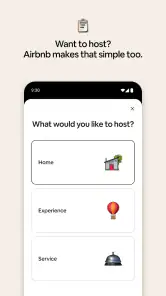
Airbnb brings homes, experiences, and services together in one app. For accommodation, you can search by destination and consider details such as price and amenities; you can also browse experiences and services that may be relevant to a trip. The redesigned app is intended to make these different kinds of travel bookings easier to explore in one place.
What is Airbnb and how does it work?
Airbnb is a platform that connects travelers with hosts offering unique accommodations, ranging from apartments and houses to treehouses and castles. Users can search for places to stay based on location, price, and amenities. Once you find a suitable listing, you can book it directly through the app. After your stay, both guests and hosts can leave reviews, creating a community-driven environment. The redesigned app also lets users book homes, experiences, and services.
Can I use Airbnb to find experiences and services, or only places to stay?
Airbnb is not limited to accommodation searches. Its app brings homes, experiences, and services together, so travelers can explore different kinds of bookings in one place. This can make it useful when you want to plan more than where to sleep, although the options you see will depend on the destination and what is available there. You can browse the offerings and decide which ones suit your trip before booking.
Is Airbnb available for my phone, and does it cost anything to download?
Airbnb is a free app in the Travel & Local category, developed by Airbnb. It is available for Android and iOS, and its listed minimum operating-system requirement is version 9. Before downloading, check that your phone meets the requirement and has enough space for the app. The app itself is free, while reservations and other bookings made through it may involve charges that are shown during the booking process.
Pros
- Wide variety of unique accommodations.
- Easy-to-use interface for booking.
- Hosts provide local tips and insights.
- Often cheaper than traditional hotels.
- Flexible cancellation policies.
Cons
- Cleaning fees can be high.
- Some listings may have hidden charges.
- Quality varies greatly between hosts.
- Limited customer support availability.
- Not all areas have Airbnb options.
- Category
- Travel & Local
- Version
- 25.47.1