Booking.com: Hotels & Travel
- 92.05K
- 4.8
- Installs
- 500.00M
- Price
- Free

Screenshots







Analysis by Reviewed
I’d begin with one straightforward job in Booking.com: Hotels & Travel: find a place to stay for a real trip, rather than trying to plan everything at once. The app is free, sits in the travel and local category, and is developed by Booking.com Hotels & Vacation Rentals. Its 4.8 average from around 5.4 million ratings suggests it has worked for a huge range of travelers, though that doesn’t mean every listing or booking will suit every person. It is rated for everyone and has been around since 2011, so new users are stepping into a well-established service rather than an unfamiliar experiment.
What to expect before you book
Think of it first as a broad accommodation search, with other travel services alongside it. The range can be useful when you want one place to compare hotels, apartments, and smaller stays, but a large result set can also make choosing feel harder. I narrow the search with the dates and guest count I actually need, then compare a handful of realistic options instead of scrolling until every listing blurs together.
For a first stay, the most useful habit is to read reviews for details that match your own priorities. A traveler who mentions a noisy street, awkward arrival, or a long walk may reveal more for your decision than a general comment about a pleasant visit. I also look closely at the photos and listing description together; neither should be treated as a promise that every room or view will be identical.
The Latest on Booking.com: Hotels & Travel
From install to a first useful result
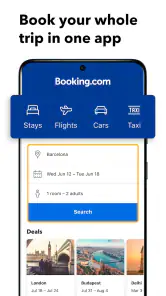
When you open the app, start with a destination, travel dates, and the number of guests. Those choices shape the results, so it is worth checking them before judging whether a place is affordable or available for your plans. If you are comparing stays for a weekend, save your attention for the details that could change the trip: location, room setup, cancellation terms, and what the listing says is included.
A reassuring first success does not have to mean paying immediately. It can simply be finding two or three plausible places and understanding the differences between them. Before confirming a booking, I would read the full terms shown for that specific option, especially cancellation rules and payment details. Flexibility varies by booking, so it is safer to verify the individual offer than to assume every stay can be changed or cancelled freely.
Where it helps, and where to slow down
The app has more than 500 million installs, and its scale is useful when I want to compare many stays in one search. It can also put flights, car rentals, tours, and activities within reach in the same travel-planning space. That breadth is convenient, but I would still compare the final details with the relevant provider when a trip has unusual requirements or when a specific transport option matters more than accommodation.
For a family trip, I would check the guest count, sleeping arrangements, and cancellation terms carefully before booking; a property that looks right in a thumbnail may not fit everyone comfortably. For a late arrival, I would pay particular attention to arrival information rather than assuming the property can accommodate any check-in time. These small checks take less time than sorting out a mismatch after reaching the destination.
More From Our News Desk

Android Auto Makes the Case for Quieter Car Software

MobiOffice: Transforming Mobile Productivity with Seamless Integration

EA SPORTS FC™ Mobile Soccer: Redefining Mobile Sports Gaming

How Microsoft OneDrive Became a Mobile Productivity Giant

How Google Translate Breaks Language Barriers Effortlessly

Why Google Sheets Is the Ultimate Mobile Productivity Tool
Discovering Stays Made Simple
First things first, the app’s user-friendly interface is a real winner. I mean, who has the time to navigate a complicated app when you’re trying to book a last-minute hotel? With Booking.com, it’s as easy as pie. Just pop in your destination, dates, and the number of guests, and voilà – a plethora of options right at your fingertips. Whether you’re looking for a swanky hotel or a quaint little B&B, there’s something for every taste and budget.
What I really appreciate is the honest guest reviews. They’ve saved me from potential travel disasters more than once! Plus, the app’s detailed descriptions and photos help paint a pretty accurate picture of what to expect. No more nasty surprises when you check in!
Travel Extras and More
But wait, there’s more! Booking.com: Hotels & Travel isn’t just about finding a place to crash. It offers a myriad of travel services right from the app. Need to rent a car? No problem. Looking for flights? They’ve got you covered. The app even offers guided tours and travel activities to make your trip unforgettable.
One feature I can’t stop raving about is the “Genius” loyalty program. It’s like a little travel secret that unlocks discounts and perks for frequent users. I’ve scored some sweet deals thanks to this program, and it’s definitely worth signing up if you’re a travel enthusiast like me.
Seamless Booking Experience
Now, let’s talk about the booking process. It’s smooth sailing all the way. The app securely stores your payment details, making future bookings a breeze. And if you’re anything like me, you’ll appreciate the flexibility of free cancellations on most bookings. Plans change, and this feature is an absolute lifesaver.
Another nifty feature is the ability to manage your bookings on the go. Change of plans? No worries, just hop on the app and tweak your itinerary. It’s like having a personal travel assistant in your pocket.
Making the choice work for your trip
A practical way to use the app is to search early, shortlist a few stays, and revisit the exact terms before you commit. If a plan is still uncertain, a cancellable option may be worth considering when one is clearly offered, even if another listing looks more appealing at first glance. I would compare the total conditions, not just the headline price: room details, payment timing, and cancellation rules can matter more than a small difference in the listing order.
On a simple overnight stop, the app can be a quick way to find a nearby place and keep the reservation details together for later. On a multi-stop holiday, I would treat it as a useful organizer, not a substitute for checking each transfer and arrival plan. Booking accommodation in one place does not automatically make separate travel arrangements fit together, so I keep departure times and addresses handy when moving between cities.
Who will get the most from it
I’d recommend trying it if you like comparing several kinds of accommodation, want reviews alongside listing details, or prefer to keep lodging and some trip extras in one app. Frequent travelers may also find the Genius program worth checking against the specific stays they are considering. The app is less compelling if you already know exactly which property you want and would rather book directly, or if you need specialist advice for a complex itinerary. In those cases, a direct conversation with the property or a focused travel service may answer your questions more clearly.
One common point of confusion is assuming a feature or perk applies to every booking. It doesn’t: read the terms shown for the individual stay, and check whether a benefit is actually attached to that option before relying on it. Likewise, “manage your booking” is useful for viewing or handling a reservation, but it does not mean every change will be available on every rate. I would use the app to start the conversation and confirm the rules before making plans around a change.
For a first-time user, I would keep the first search deliberately small. Imagine you need a room near a venue for one night: enter the destination, date, and guest count, then compare a few stays for location and arrival details before looking at extras. This avoids a common trap in broad travel searches—choosing a listing because it looks appealing, then discovering that its practical fit is wrong for the reason you are travelling.
Useful checks beyond the first search
When two options seem close, I compare the trade-offs that affect the day itself. A lower-priced room may be less useful if reaching it adds a difficult walk with luggage, while a more convenient location may matter less on a trip where you plan to drive. I also read recent, specific comments for clues about noise, room layout, or arrival rather than treating a high-level impression as a guarantee. Reviews help you ask better questions; they cannot make every guest’s experience identical.
If you are travelling with someone else, it is worth agreeing on the essentials before searching: separate beds, a kitchen, or a flexible cancellation option can change which results are suitable. That small conversation prevents one person from comparing attractive listings while the other is checking a requirement the search has not captured. I would use filters to reduce the field, then reopen the actual listing to verify the details that matter.
Choosing between one app and direct booking
Compared with searching hotel sites one by one, this app is useful when you want a broad view of accommodation choices and reviews in a single place. Its travel extras can also help keep parts of a trip together. The trade-off is that a broad marketplace requires careful reading: a listing’s specific terms matter more than the convenience of seeing it beside alternatives. If I have a particular property in mind, I may check its direct booking option too, especially when I need a clear answer about a special request.
For complicated itineraries, the app is better as a starting point than as the sole authority. A traveler coordinating several arrivals, transport changes, or unusual accommodation needs may benefit from speaking directly with the relevant providers. For a straightforward city break or a stay where comparing options is the main task, the app’s breadth is more useful and can save the work of opening many separate searches.
Who will get the most from it
I’d recommend trying it if you like comparing several kinds of accommodation, want reviews alongside listing details, or prefer to keep lodging and some trip extras in one app. Frequent travelers may also find the Genius program worth checking against the specific stays they are considering. The app is less compelling if you already know exactly which property you want and would rather book directly, or if you need specialist advice for a complex itinerary. In those cases, a direct conversation with the property or a focused travel service may answer your questions more clearly.
One common point of confusion is assuming a feature or perk applies to every booking. It doesn’t: read the terms shown for the individual stay, and check whether a benefit is actually attached to that option before relying on it. Likewise, “manage your booking” is useful for viewing or handling a reservation, but it does not mean every change will be available on every rate. I would use the app to start the conversation and confirm the rules before making plans around a change.
A sensible next step after finding a stay
Once you have a shortlist, take a moment to check the destination on a map and think through how you will reach the property with your actual luggage and arrival time. A listing can look close in search results yet be inconvenient for the purpose of your trip. I also keep the confirmation and key arrival details easy to find, rather than relying on memory while travelling. That simple habit makes the booking useful beyond the moment you tap to reserve.
If you are booking for someone else, share the exact room and policy details before confirming. A guest count alone does not settle questions about beds, accessibility, or arrival arrangements, and the person staying may care about something you would overlook. The app is a handy place to compare options, but a quick check with the traveler—or the property when a request is important—can prevent a mismatch.
To wrap it up, Booking.com: Hotels & Travel is more than just an app; it’s a travel companion that makes exploring the world a whole lot easier. From the seamless booking experience to the plethora of travel options, it’s a must-have for anyone with a case of wanderlust. So next time you’re planning a trip, give it a whirl – you won’t be disappointed!
Booking.com: Hotels & Travel Frequently Asked Questions
Can Booking.com help me plan an entire trip in one app?
Booking.com presents itself as a way to bring a whole trip together in one app. You can explore accommodation and other travel options, then review the details and terms for each choice before booking. This may suit travelers who prefer to keep several parts of their planning in one place, though availability and conditions vary by option.
Can I search for places to stay using a map?
Yes. A map view is available to help you see where accommodation options are located and compare their positions with the areas you want to visit. Pairing the map with listing descriptions, guest reviews, and filters can make it easier to narrow your search. Always check the full listing and reservation terms before confirming a choice.
Can I filter accommodation results to match my needs?
The app offers filters for preferences such as price range, amenities, and room types. These can help narrow a broad set of accommodation choices, while descriptions, guest reviews, and the map view provide further context. Filters are a starting point rather than a substitute for checking the listing: review the specific details and booking conditions before deciding.
Can I use the app to compare different accommodation options?
Yes. You can explore listings and consider their descriptions, guest reviews, location, and available details before choosing. Filters and a map view can also help you narrow the results to options that better fit your preferences. Compare the total price and terms for each reservation, since those details can differ from one option to another.
Does the app include flights and car rentals as well as accommodation?
Booking.com: Hotels & Travel includes options beyond accommodation, including flights and car rentals. This can be convenient if you want to explore multiple parts of a journey through one travel app. The options and booking conditions depend on what you select, so review the details for each part of your trip before confirming any arrangement.
Pros
- User-friendly interface.
- Wide range of accommodations.
- Real-time price updates.
- Comprehensive filters.
- 24/7 customer support.
Cons
- Occasional booking errors.
- Frequent app updates.
- Limited offline features.
- Inconsistent customer service.
- Some hidden fees.
- Category
- Travel & Local
- Version
- Varies with device