Skyscanner Flights Hotels Cars
- 16.37K
- 4.8
- Installs
- 50.00M
- Price
- Free

Screenshots




Analysis by Reviewed
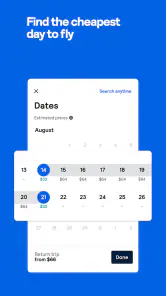
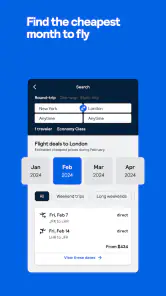
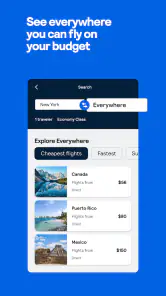
I use flight searches differently depending on how fixed my plans are. If I know the dates and destination, I start with those details and compare the options; if I only know when I can travel, I use the flexible destination search to discover possibilities. That distinction matters: a low fare is only useful if the place and timing work for me. I treat the results as a shortlist to investigate, not a decision made for me.
A routine that keeps comparisons useful
For a realistic example, imagine I have a free weekend but have not chosen where to go. I enter my departure city, explore destinations, then check whether the flight times leave enough of the weekend to enjoy the trip. I compare the total journey and any stopovers, rather than sorting by the cheapest fare and assuming it is the best fit. If a promising option is still outside my comfort zone, I can keep an eye on its price instead of repeatedly searching from scratch.
That repeatable process is where Skyscanner earns a place in my travel routine. I use it to narrow down flights, hotels, and car rentals in one app, then pay attention to what each result actually includes. A hotel that looks inexpensive may not suit my location needs; a rental car is only helpful if it fits the route and plans. Comparing these pieces early helps me avoid building an itinerary around a headline price.
Small habits that save decision time
I get more value from the app when I decide my non-negotiables before searching. For a flight, that might be avoiding a long layover or choosing a departure window that works with my day. For accommodation, I consider where I need to be, not just the nightly cost. For a car, I think about whether driving is genuinely useful at the destination. These choices make the filters more meaningful and keep a long list of results manageable.
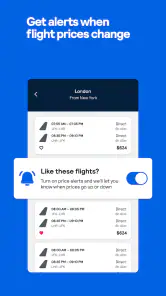
Price alerts are most useful when I have some flexibility and can wait. I would not treat an alert as a promise that a fare will fall, or delay a time-sensitive trip on the assumption that it will. Instead, I use one to notice a change and then reassess the itinerary, including the flight times and any onward plans. That is a more reliable habit than checking prices whenever I happen to remember.
Where I would look beyond the comparison
Skyscanner is a comparison tool, so I still read the details attached to an option before committing. I check the terms and inclusions shown for the specific flight, hotel, or car, and make sure the final choice matches my needs. The lowest listed price is not automatically the best value if the schedule, location, or rental details create extra hassle. For a trip with complicated requirements, I would also verify important arrangements directly with the relevant provider.
That is the trade-off compared with booking directly through an airline, hotel, or rental company: comparison is convenient when I am weighing several possibilities, while a provider’s own channel can be better when I already know exactly what I want or need to manage a booking there. I see the app as a strong starting point, not a substitute for checking the conditions that matter to me.
More From Our News Desk

Clash of Clans Is Won Between the Battles

Android Auto Makes the Case for Quieter Car Software

MobiOffice: Transforming Mobile Productivity with Seamless Integration

EA SPORTS FC™ Mobile Soccer: Redefining Mobile Sports Gaming

How Microsoft OneDrive Became a Mobile Productivity Giant

How Google Translate Breaks Language Barriers Effortlessly
For anyone wondering whether it costs anything to use, the app is free. It is a travel and local app from Skyscanner Ltd, rated for everyone, and its broad audience is reflected in an average rating of 4.8 from around 1.4 million ratings, alongside over 50 million installs. It has been available since July 20, 2011, and version 7.170 requires Android 9 or later. Those details make it easy to identify, but the real question is whether its comparison-first approach fits the way you plan.
If I am booking a straightforward trip and want to compare several choices without opening a separate search for every travel type, Skyscanner is a practical companion. It is especially useful for flexible travelers who enjoy exploring destinations and for planners who want a first pass across flights, stays, and transport. If I have a very specific booking already in mind, need extensive hands-on support, or prefer to handle every detail directly with one provider, I may be better served by that provider’s own app. I recommend Skyscanner for finding and evaluating options, while keeping a careful eye on the details before I book.
Make the shortlist fit the trip
One useful habit is to compare options against the same version of the trip, rather than changing the assumptions as each attractive result appears. I decide what time I can leave, how much time I want at the destination, and whether I need a room or a car before I start comparing. Then I can tell whether a cheaper flight genuinely improves the plan or merely shifts the cost into an inconvenient arrival, an extra night, or transport I had not expected to need.
This matters especially when I am planning with another person. We can each name one or two genuine deal-breakers, such as a late arrival or a location far from the places we want to visit, before looking at prices. That keeps the search from turning into an endless debate over small differences. Skyscanner is strongest at helping me see alternatives; the decision still gets easier when I know which trade-offs I am willing to accept.
Using alerts without letting them run the trip
When I set a price alert, I treat it as a prompt to review the whole choice, not a signal to buy automatically. If the price changes, I revisit the dates, route, and timing I originally cared about. A cheaper fare may be less useful if it no longer fits my schedule, and an alert cannot decide whether the saving is worth changing a hotel plan or a connection. I find alerts most helpful for trips that are optional enough to adjust, not for a fixed event where I need to secure workable travel.
I also avoid tracking too many hypothetical routes at once. A small, deliberate shortlist is easier to act on: one or two destinations I would genuinely visit, with dates I can realistically take. That makes a change in price meaningful instead of adding another notification to ignore. It is a simple way to use the comparison process actively without mistaking monitoring for planning.
Where the app fits among travel tools
Compared with searching airline, hotel, and car-company apps one at a time, Skyscanner gives me a broader first pass when I have not settled on a provider. That is particularly handy when I am choosing between destinations or trying to see whether a different travel date makes a trip more practical. A direct provider app has the advantage once I have made that choice: it is the natural place to review or manage a booking made with that company. I use the comparison app to explore, then turn to the provider when the provider’s own details or booking management matter more.
It also differs from a traditional travel agent in the kind of help it gives me. I can compare options at my own pace, but I am still responsible for checking whether the terms suit my situation and whether the pieces of the itinerary work together. For an uncomplicated break, that independence is a plus. If a journey has several linked arrangements, unusual needs, or little room for error, I would value direct assistance more than another round of comparisons.
Who will get the most from it
I would recommend the app to travelers who are still choosing between workable options, especially people with some flexibility in destination or timing. It can also help someone who already knows where they are going but wants a convenient way to compare flights, accommodation, and a rental car before deciding where to book. The key benefit is not that every result will be right for me; it is that I can bring a few choices into view and assess them against the same plan.
I would skip it as my main planning tool if I need a person to coordinate every detail, if I have already chosen a provider and only want to manage that booking, or if a special requirement makes direct confirmation essential. I would also avoid treating the cheapest result as a complete trip budget. The app helps with comparison, but it cannot replace my own checks of timing, location, included services, and the provider’s terms.
If you’re like me, constantly dreaming of your next getaway while juggling a hectic schedule, then you’ll want a trusty sidekick to make the planning a breeze. Enter Skyscanner! This app has become my go-to for booking flights, hotels, and even rental cars. It’s like having a travel agent in your pocket, ready to whisk you away to wherever your heart desires.
Getting Started
The first thing you notice when you open Skyscanner is its sleek and user-friendly interface. It’s not cluttered, which is a blessing when you want to find information quickly. The app neatly categorizes options for flights, hotels, and car rentals. You can easily toggle between them and start your search with just a few taps.
One feature I absolutely love is the ‘Everywhere’ option. If you’re feeling adventurous and just want to see where you can go within your budget, this is a game-changer. Just plug in your departure city and let the app show you a world of possibilities! It’s like spinning a globe and pointing, but way more practical.
Booking Made Simple
When it comes to booking flights, Skyscanner offers a comprehensive list of options from various airlines. The app allows you to filter results based on your preferences like layovers, time of departure, and even specific airlines. This is particularly handy if you’re trying to rack up those frequent flyer miles.
For hotels, the app doesn’t just show you big chains but also includes quirky boutique hotels and budget-friendly options. Each listing comes with reviews from fellow travelers, so you know exactly what you’re getting into. Plus, the app often highlights deals you might otherwise miss.
Car rentals are equally straightforward. The app compares prices from multiple providers, ensuring you get the best deal. You can filter by car type, rental company, and even customer ratings. It’s perfect if you’re planning a road trip and need a reliable ride.
Features That Stand Out
One of my favorite features is the price alert. If you’re eyeing a trip but waiting for the right price, you can set up alerts that notify you when prices drop. It’s like having a personal assistant keeping tabs on your dream vacation.
Another nifty addition is the travel restrictions info. In today’s world, knowing the restrictions and requirements for your destination is crucial. Skyscanner keeps this information updated, so you’re not caught off guard by any surprises.
Final Thoughts
In a nutshell, Skyscanner is more than just an app; it’s a travel companion that simplifies the daunting task of trip planning. Whether you’re planning a quick weekend getaway or a month-long adventure across continents, this app has got your back. With its intuitive design and helpful features, it’s no wonder it’s a favorite among travelers. So why not give it a whirl and see where it takes you?
Skyscanner Flights Hotels Cars Frequently Asked Questions
Can I use Skyscanner to compare different travel options before choosing one?
Yes. Skyscanner is designed to bring travel searches together so you can compare available choices before deciding where to book. It can help you explore flights, hotels, and car rentals in one app, rather than starting a separate search for each type of service. Review the provider’s final details before confirming a reservation.
What kinds of travel can I search for in the Skyscanner app?
The app supports searches for flights, hotels, and car rentals, making it useful for comparing several parts of a trip in one place. You can focus on the travel service you need and look through available options. Skyscanner helps with search and comparison; the selected provider handles the booking itself.
Can I search for flights, hotels, and car rentals in one app?
Yes. Skyscanner brings flight, hotel, and car rental searches together in one travel app, so you can compare options without switching between separate search tools. You can look for the type of travel service you need and review available choices in one place. It is a search and comparison service, while bookings are completed with the provider.
Is Skyscanner available for my phone, and is it suitable for all ages?
Skyscanner is a travel app from Skyscanner Ltd, available for Android and iOS devices. Its content rating is Everyone, so it is classified as suitable for a general audience. The app is free to download and use, making it easy to try its travel searches before deciding whether its comparison tools fit your planning routine.
What is Skyscanner and how does it work?
Skyscanner is a comprehensive travel search engine that helps users find the best deals on flights, hotels, and car rentals. By aggregating data from various travel providers, Skyscanner allows users to compare prices and options in one place. The app provides a user-friendly interface and advanced filtering options to tailor search results according to individual preferences and budgets.
Pros
- Extensive flight options worldwide.
- User-friendly interface and design.
- Price alerts for best deals.
- Comprehensive hotel listings.
- Car rental comparisons available.
Cons
- Price fluctuations can be frequent.
- Some ads may interrupt usage.
- Limited customer service support.
- Occasional app crashes reported.
- Hotel reviews may lack details.

- Category
- Travel & Local
- Version
- 7.170