Google Maps Go
- 6.70K
- 4.1
- Installs
- 1.00B
- Price
- Free

Screenshots




Analysis by Reviewed
I tend to judge a navigation app by what happens when I’m in a hurry, not by how many buttons it can fit on a screen. Google Maps Go is aimed at people who want the familiar Google mapping experience in a lighter app. It belongs in the travel and local category, is made by Google LLC, and costs nothing to try. Its broad appeal is reflected in an average rating of 4.1 from around 344,000 ratings, while more than a billion installs suggest it has reached far beyond a niche audience. The age rating is Everyone.
A practical place in the Maps family
The main question is not whether a lighter option can replace every part of a full-featured map app; it is whether it handles the journeys you actually make. For checking a route, looking up a nearby business, or getting a sense of traffic before leaving, this version has a clear purpose. I would consider it most useful on a phone where storage or responsiveness matters more than having every extra tool close at hand.
That trade-off is worth keeping in mind before installing it. Google Maps Go is not simply a reason to expect the full Maps experience in a smaller package. If your routine depends on exploring places in depth or switching among many advanced map tasks, compare the two versions on your own device and keep the one that suits your habits. A lighter interface can feel refreshingly direct, but fewer layers of functionality may matter once a straightforward trip becomes complicated.
Lightweight Champion
First off, let me just say that Google Maps Go is a breath of fresh air for anyone using an older device or dealing with limited storage. The app is designed to be super lightweight, taking up a fraction of the space that the regular Google Maps app requires. This means faster load times and less strain on your phone's memory. For those of us perpetually battling storage issues, this is a game-changer!
Core Features Without the Bulk
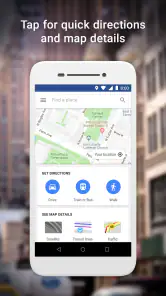
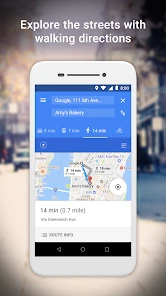
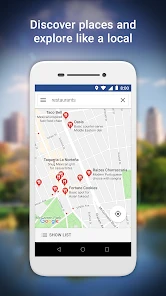
Despite its smaller size, Google Maps Go doesn’t skimp on the essentials. You can still enjoy real-time GPS navigation, discover local businesses and landmarks, and even get directions for driving, walking, and public transit. And yes, it still offers traffic updates, which is a lifesaver during rush hour. The interface is clean and intuitive, making it easy to find what you need without unnecessary clutter.
You May Like

Google Maps Go and the Quiet Power of Local Knowledge

Clash of Clans Is Won Between the Battles

Android Auto Makes the Case for Quieter Car Software

MobiOffice: Transforming Mobile Productivity with Seamless Integration

EA SPORTS FC™ Mobile Soccer: Redefining Mobile Sports Gaming

How Microsoft OneDrive Became a Mobile Productivity Giant
Designed for Connectivity
One of the standout features of Google Maps Go is how well it functions even in areas with spotty internet connectivity. This makes it an ideal companion for travelers exploring remote areas or for anyone in a region with less-than-stellar network coverage. The app manages to load maps quickly and efficiently, keeping you on track no matter where you are.
When a lighter app makes sense
For an ordinary weekday, I might check traffic before leaving home, search for a café near a meeting, then switch to transit directions if driving looks slow. That sequence makes the app useful as a quick decision tool, not just a voice-guided route. A small tip: search for the destination before setting off, then review the route and travel mode while you have time to compare options. That is often more comfortable than making choices at a busy junction.
It also works well for travelers who need to find a station, shop, or landmark while conserving space for photos and other essentials. Still, weak connectivity is a real trade-off: a lighter app does not guarantee that every place or route will be available offline. In an unfamiliar area with unreliable service, I would plan ahead and avoid relying on a last-second search as the only way to navigate.
Who Should Download It?
If you’re someone who needs a reliable navigation app but doesn’t want to deal with the hefty data and storage demands of the full Google Maps app, then Google Maps Go is definitely worth considering. It’s especially beneficial for users in countries where data can be costly, or for anyone with an older device that struggles with newer, more demanding apps.
If you already use the full Google Maps app and value its broader set of tools, there may be little reason to switch simply for novelty. Likewise, someone planning a journey that depends on extensive offline preparation or detailed exploration should check that their chosen setup covers those needs before leaving. In those cases, the full app—or a dedicated offline navigation option—may be the safer fit. For a lighter phone with everyday route-finding needs, though, this version has a sensible role.
Choosing between Maps Go and familiar alternatives
Compared with the full Google Maps app, the appeal here is restraint. If I mostly need a route, a nearby address, or a quick look at traffic, I would rather open a leaner tool than navigate a larger set of options I rarely use. But that preference reverses when a trip involves several stops, careful offline planning, or detailed place research. The main app is the more natural choice when those capabilities are central to the journey, while another navigation app may suit someone whose priority is dependable offline maps rather than broad place search.
For a fair comparison, I would test the same familiar trip in both apps instead of judging by screenshots or assumptions. Check whether the destination is easy to find, whether the route choices make sense, and whether the interface stays responsive on your phone. If you rely on spoken guidance, try that before a long drive too. A route that appears clear on screen may feel different when you need to follow directions without looking down. Keeping the two options available is reasonable if each serves a different purpose.
Small habits that make trips smoother
One useful workflow is to search for a place by its recognizable name, then confirm the address and nearby landmarks before choosing a route. Businesses can have similar names, and a quick glance at the map can prevent a frustrating arrival at the wrong branch. I also find it sensible to compare travel modes before leaving rather than assuming driving is automatically quickest; traffic can make transit or walking a better fit for a short city trip.
On a multi-part day, I would use the app to settle the next leg rather than trying to plan every decision while moving. Look up the next stop while waiting somewhere safe, note the route, and then put the phone away. This is especially helpful when you are walking in an unfamiliar neighborhood: checking directions at a calm pause is less distracting than stopping repeatedly at crowded corners. It is a simple habit, but it makes a map app easier to use responsibly.
Where convenience has limits
Lightweight should not be confused with a guarantee of smooth performance in every situation. Network strength, the age of the phone, and the complexity of a route can all affect the experience. In particular, I would not treat a successful search at home as proof that every detail will load during a remote drive. Before heading somewhere with poor reception, make a backup plan: know the broad direction, write down an important address, or use a navigation option designed around offline access.
There is also a practical difference between finding a destination and researching it. A quick search can help me locate a restaurant or station, but if I need to compare many places, inspect details, and organize a complicated outing, a more feature-rich map experience is likely more comfortable. That does not make the lighter app a poor choice; it means its strengths are clearest when the task is specific. I would skip it as my only travel tool if my plans regularly depend on extensive preparation or features beyond straightforward search and directions.
What to expect as it evolves
The app’s release date is February 6, 2018, and its continued presence alongside the main Maps app points to a lasting need for a leaner choice. That history is useful context, but it is not a promise about future features or changes. With around 6,700 reviews alongside its large rating base, there is plenty of public feedback to consult when deciding whether its current experience fits your device and routine. I would pay attention to how it behaves on your own phone: loading speed, route clarity, and whether the available directions cover your regular trips matter more than speculation about what might come next.
For an existing user, the sensible approach is to judge each change by its everyday effect rather than expecting a particular roadmap. Does the app still open comfortably on your phone? Can you find your usual destinations, and do the routes make sense for how you travel? Those answers matter more than a theoretical feature list. I would also avoid changing navigation tools immediately before an important trip; test any alternative on a familiar route first so you know how it handles the places and travel modes you actually use.
Who will get the most from it
I would recommend trying it if your phone is short on space, feels sluggish with larger apps, or you want a straightforward way to look up places and choose a route. It is also a sensible option for someone who mainly travels familiar routes and wants traffic or transit information without making map exploration a hobby. Since it is free, trying it alongside your current setup is an easy way to see whether its lighter approach feels like a real improvement on your device.
On the other hand, frequent travelers who depend on extensive offline preparation, drivers who need a very specific navigation workflow, or people who like to plan a day around many saved stops should compare alternatives carefully. The right choice is not necessarily the app with the smallest footprint; it is the one that keeps the trip manageable when conditions change. If the full Maps app already works well and its additional tools are part of your routine, switching may create more inconvenience than benefit.
A useful everyday companion, not a universal replacement
To wrap things up, Google Maps Go is like that trusty pocket knife you didn’t know you needed until you got one. It’s compact, efficient, and gets the job done without any fuss. So, if you’re looking to streamline your navigation experience without sacrificing the quality and reliability Google Maps is known for, give Google Maps Go a try. You might just find it becomes your go-to app for all your mapping needs!
My recommendation is a little narrower: treat it as a practical everyday map, especially if you value a light app and tend to make direct journeys. Keep a fuller mapping option or an offline-focused alternative in mind for trips that need more preparation. That balance lets you benefit from its simplicity without asking it to solve every navigation problem. For the right phone and routine, it is a sensible tool to keep within reach; for a feature-heavy travel planner, it is better viewed as one useful option rather than the whole kit.
Google Maps Go Frequently Asked Questions
Does Google Maps Go need an internet connection to search for places and directions?
Google Maps Go is a web-based app, so an internet connection is important for searching places, checking directions, and viewing current traffic information. If you expect to use maps while travelling, consider when you will have access to a connection and whether its limited offline options meet your needs. Its online focus is best suited to connected use.
Will Google Maps Go work well on a phone with limited storage or memory?
Google Maps Go is designed as a lighter alternative to the regular Google Maps app, with devices that have limited memory in mind. Its web-based approach can make it appealing when you want core map features without choosing the full app. Actual performance still depends on your device and connection, so the lighter design does not guarantee the same experience on every phone.
Is Google Maps Go free, and is it suitable for all ages?
Google Maps Go is free and is rated Everyone, so it is suitable for a broad audience. It belongs to the Travel & Local category and is published by Google LLC. Its focus is everyday map use, including searching for places and checking directions, making it a practical option to consider if you want those essentials in a lighter app.
What is Google Maps Go, and how does it differ from the regular Google Maps app?
Google Maps Go is a lighter, web-based version of the standard Google Maps app, designed to work smoothly on devices with limited memory and unreliable networks without compromising on core features. It consumes less storage and is optimized for low-end devices, making it ideal for users who need a fast, reliable map service without the need for heavy data usage.
Can I use Google Maps Go offline?
While Google Maps Go is primarily a web-based application, it offers limited offline capabilities. Users can save locations and directions for offline viewing, but the full range of offline functionality available in the regular Google Maps app is not present. To fully utilize the offline features, users might need additional support from the main app.
Pros
- Lightweight app with fast performance.
- Minimal data usage
- ideal for low data plans.
- User-friendly interface and easy navigation.
- Provides accurate real-time traffic updates.
- Compatible with older devices
- extending usability.
Cons
- Limited features compared to full Google Maps.
- Offline maps not available
- needs internet.
- No turn-by-turn navigation support.
- Less frequent updates with new features.
- Cannot integrate with other apps easily.

- Category
- Travel & Local
- Version
- Varies with device