Grab - Taxi & Food Delivery
- 11.95K
- 4.8
- Installs
- 100.00M
- Price
- Free

Screenshots

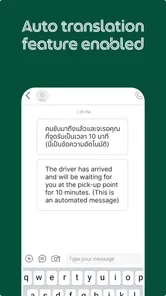
Analysis by Reviewed
I find Grab most useful when I treat it as a practical hub rather than a reason to change every habit. It brings rides, meals, and groceries into one travel-and-local app, which can cut down on app switching when I’m out or managing a busy day. It is free, developed by Grab Holdings, and has been around since May 30, 2013. Its 4.8 average from around 16 million ratings and more than 100 million installs suggest it has a large, established audience, though my experience still depends on what services are available where I am.
How I make the everyday workflow work
My first step is to confirm the pickup point or delivery address instead of trusting the first location the map selects. This matters especially around large buildings, busy roads, and shared entrances: a nearby pin can still send a driver to the wrong side. I also check the destination before booking, because correcting either end after a request is underway can create avoidable back-and-forth.
For a typical day, I might use a ride to reach an appointment, then place a food order later without opening a separate service app. When the timing is flexible, I compare the ride estimate with my own plan before committing; when I’m hungry, I check the restaurant’s menu and expected delivery details before placing the order. Having both tasks in one place is convenient, but it does not remove the need to make those small checks.
Rides are easiest when the pickup is precise
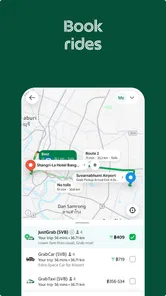
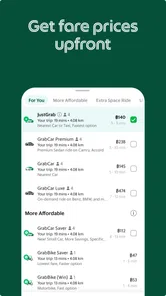
Booking is straightforward: enter pickup and drop-off locations, review the available vehicle options, and look at the fare estimate before confirming. I like having that estimate in view because it gives me a chance to decide whether the trip suits my budget before I request it. The range of options can be handy, but I wouldn’t assume that every type of ride is available in every area or at every moment.
A useful habit is to choose a pickup point that a driver can actually reach, not simply the closest point on the map. If I’m leaving a busy venue, I look for a clear meeting spot and make sure I can recognize it from the map. That can be more effective than sending several messages after the driver has arrived. In my experience, drivers have generally been courteous and professional, but the quality of any individual trip can vary.
Food orders benefit from a quick second look
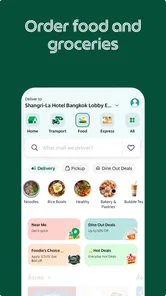
The restaurant selection makes it easy to browse different cuisines in one app, and order tracking helps me follow progress instead of guessing when a meal will arrive. Before I place an order, I read the menu carefully and check that the selected items and delivery address are right. This simple pause is particularly worthwhile when I’m ordering for other people or sending food somewhere other than my current location.
I’d use delivery when convenience matters more than choosing from every restaurant in town. A restaurant’s own ordering option or another local service may be better if it offers a particular menu or suits a specific situation. Grab’s advantage is the combined workflow; it is not a guarantee that every restaurant, item, or delivery window will be the best fit.
More From Our News Desk

Weather by Xiaomi Review: Clear at a Glance, Less Clear Up Close

X Under Pressure: Can It Recover When Posting Goes Wrong?

Clash of Clans Is Won Between the Battles

Android Auto Makes the Case for Quieter Car Software

MobiOffice: Transforming Mobile Productivity with Seamless Integration

EA SPORTS FC™ Mobile Soccer: Redefining Mobile Sports Gaming
Settings and repeatable habits that save effort
I recommend checking the app’s address and account details before a rushed day, rather than discovering a mistake at checkout. Keep commonly used destinations easy to select if the app offers them in your area, and take a moment to review the final trip or order screen each time. These are ordinary habits, not secret shortcuts, but they prevent the most frustrating errors: wrong endpoints, an old delivery location, or an order sent to the wrong place.
Promotions can be worth checking, but I treat them as a bonus rather than the reason to choose a ride or meal. A discount only helps if the service, route, and order already make sense. Likewise, I use trip-sharing and driver ratings as useful parts of making an informed ride choice, not as a substitute for paying attention to the pickup and destination.
Groceries broaden the routine, with a trade-off
Grocery delivery makes the app useful for more than commuting and restaurant meals. I can see the appeal when I need a few household items and would rather avoid another stop, particularly on a day when I’m already using the app for a ride. Still, for a planned weekly shop, I would compare the available selection and total order details with a dedicated grocery option or an in-person visit. A general-purpose hub saves switching; it may not be the strongest choice for every specialized shopping need.
Where the all-in-one approach has limits
Putting several services together is convenient, but it can also make the home screen feel busier than a single-purpose taxi or food app. If I only need one service, a focused alternative may be quicker to open and easier to compare against other providers. Availability and choice also depend on the area, so I would not install it assuming every feature will be equally useful wherever I travel.
On the technical side, the current version is 5.386.0 and it supports Android 5.0 or later. The content rating is Everyone. The app has around 11,000 written reviews, but I would still judge it by the service options and details shown for my own location rather than treating popularity as a promise of a particular experience.
A good fit for people who value convenience
I’d recommend Grab to someone who regularly needs local rides and wants food or grocery ordering close at hand, especially if those services are available in their area. It is less compelling for someone who rarely uses these tasks, prefers comparing several dedicated providers every time, or needs a service that is not shown locally. My best advice is to set up the basics before you’re in a hurry, verify the map pin and order details, and use each service when its convenience genuinely outweighs the alternatives.
When I’m deciding whether to use one app or several, I think about the whole errand rather than the first tap. If I need a ride to an unfamiliar address and lunch afterward, keeping both tasks in the same place is a real convenience. If I’m only booking a short trip, I may still compare another local ride option, especially when I care more about a particular vehicle choice or pickup arrangement than about having everything together. The best reason to keep Grab installed is repeated usefulness, not the promise that it will win every comparison.
A realistic busy-day routine
Imagine I have an appointment across town, a grocery item to pick up, and no time to make a separate stop. I would first confirm the appointment address and choose a pickup point that is easy to find, then review the available ride choices and estimate. Once the appointment is done, I can check whether grocery delivery is suitable for the item I need rather than assuming the first result will cover my whole shopping list. If I also want dinner, I can browse food options later and verify the delivery address before paying. That sequence makes the app useful without pretending every task has to be handled through it.
The practical lesson is to avoid stacking uncertain decisions while in a hurry. I try to settle the destination, pickup, and service choice before I request anything. For food or groceries, I check the order contents and location as a separate step. It takes only a moment, but it is more dependable than relying on memory when I’m moving between places or arranging something for another person.
Small checks that make repeat use smoother
For frequent rides, I make a habit of looking at the map from the driver’s likely approach, not only from my own position. A pin near a building entrance can be misleading if the road access is on the other side, so a nearby, legal, easy-to-recognize meeting point may be better. When I’m ordering for someone else, I treat the recipient’s address as a fresh detail to verify rather than assuming my usual delivery location is still selected. These habits are simple, but they address the errors most likely to create extra calls or delays.
I also separate browsing from committing. I can look through ride choices, menus, or grocery selections while planning, then place the request only after checking the final details. That is especially useful when comparing a meal against a restaurant’s own ordering channel: I focus on whether the menu and delivery arrangement suit me, rather than letting a promotion make the decision by itself. The app is most helpful when it reduces friction without rushing me past the decision that matters.
What to check before relying on it away from home
For someone arriving in a new neighborhood, the first question is not whether the app can do everything, but which services appear at the actual location. I would open it before depending on a ride or meal plan, enter the relevant area, and see what is available. A familiar interface can make travel easier, but local coverage and the set of choices can change from place to place. I would keep a backup plan for an important appointment rather than treating any ride app as a guarantee.
It is also worth thinking about how you prefer to handle a problem. A combined app is convenient for managing common tasks in one place, while a specialist service may be preferable if you want a narrower workflow or need a particular provider. For a one-off trip, comparing the options you can actually access is more useful than assuming one app is universally cheapest or fastest. I would make the choice based on the displayed details, not on the brand alone.
Who may prefer a different routine
Grab is a strong match for people who often use local rides and occasionally want meals or groceries delivered, particularly when the services they need show up in their area. It is less persuasive for someone who lives where selection is thin, rarely orders delivery, or already has a reliable specialist app that better fits their routine. People who prefer to inspect groceries themselves may also get more value from shopping in person, while a restaurant’s own channel can make sense when its menu is the priority.
I would not treat the app’s popularity as proof that every trip or order will be smooth. Ratings and broad adoption can help a new user feel comfortable trying it, but they cannot tell me whether a particular pickup is sensible or whether a specific restaurant suits tonight’s plans. I still check the details and keep my expectations flexible. That balance is what makes the all-in-one approach useful without turning it into my only option.
Let's dive into the world of Grab - Taxi & Food Delivery, the app that has become a centerpiece for convenience in Southeast Asia. If you're tired of juggling multiple apps for different services, this one-stop solution might just be your new best friend. From getting a ride to having your favorite meal delivered, Grab - Taxi & Food Delivery is designed to make life a little easier.
Seamless Navigation and User Interface
The first thing that struck me about the app was its clean and intuitive user interface. The design is straightforward, making it super easy to navigate even if you’re not tech-savvy. You can swiftly toggle between booking a ride or ordering food with just a few taps. The app’s home screen neatly organizes all its services, so you’re not overwhelmed with options.
Rides at Your Fingertips
Booking a ride is a breeze. Just enter your pickup and drop-off locations, and the app gives you a range of vehicle options, from budget-friendly choices to premium rides for when you’re feeling fancy. I love how the app provides an estimate of the fare before you book, so there are no surprises. Plus, the drivers I’ve encountered are generally courteous and professional.
A Gastronomic Adventure
Now, onto my favorite part – food delivery. The app offers a vast selection of restaurants and cuisines to choose from. Whether you’re craving local dishes or international flavors, you’ll find something to satisfy your taste buds. The delivery service is quite prompt, and you can track your order in real-time, which adds to the excitement as you wait for your meal.
More Than Just Rides and Food
But wait, there’s more! The app isn’t just about rides and food. It also provides services like grocery delivery and package sending, making it a versatile tool for everyday tasks. It’s like having a personal assistant in your pocket.
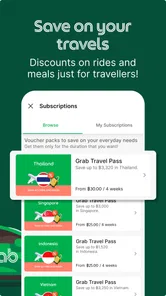
Moreover, the app often runs promotional offers and discounts, which is a nice bonus for saving some cash. Who doesn’t love a good deal, right?
Safety and Support
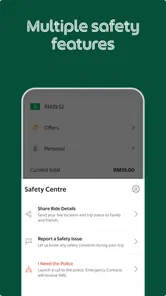
When it comes to safety, the app doesn’t disappoint. It includes features like driver ratings and the ability to share your trip details with loved ones. Plus, their support team is responsive, should you ever need help with any service-related issues.
All in all, Grab - Taxi & Food Delivery is a powerhouse app that brings convenience to your fingertips. Whether you need a quick ride or crave your favorite meal, this app has got you covered. Give it a try and see how it can simplify your daily routine!
Grab - Taxi & Food Delivery Frequently Asked Questions
Is Grab free to download, and is it suitable for a shared device?
Grab is free to download and has an Everyone age rating, making it an option for a broad audience and shared devices. It brings taxi and delivery services together in one app, so different users may find different sections useful. Before installing it on a shared device, consider who will use the services and review the app’s setup and options together.
What kind of app is Grab, and who makes it?
Grab is a travel and local app developed by Grab Holdings. Its all-in-one approach brings rides, food delivery, and grocery delivery into one place, which may suit people who want transport and everyday ordering in the same app. Whether each service is useful to you depends on what is available in your location and the choices shown after setup.
Can I install Grab on my Android phone?
Yes. Grab’s Android app requires Android 5.0 or later, so check your phone’s operating-system version before downloading. The app is free to install, but it still needs available device storage for the download and future updates. Once installed, the rides and delivery choices you see can depend on your location.
What should I expect when I first open Grab?
Grab combines several services in one app, including rides, food delivery, and groceries. After downloading, follow the in-app setup steps and review the services displayed for your area. Since the available choices can depend on location, the first screen and options may differ from what another user sees elsewhere. This can help you decide which sections fit your routine.
Does Grab require an account before I can use its services?
Grab brings rides and delivery options together in one app, so an account is part of getting started with the services you choose. After downloading, follow the in-app setup steps and provide the information requested there. The options available to you can depend on your location, so it is helpful to check which services appear in the app once you have set it up.
Pros
- Convenient all-in-one app for transport and food.
- User-friendly interface with easy navigation.
- Wide availability in Southeast Asia.
- Real-time tracking of drivers.
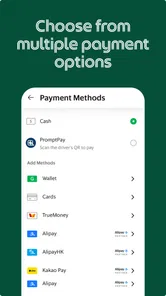
- Multiple payment methods
- including cash.
Cons
- May have higher prices during peak hours.
- Limited availability in non-urban areas.
- Occasional app crashes reported by users.
- Customer support response can be slow.
- Some features may vary by region.