WiFi Map・Internet, eSIM Travel
- 18.26K
- 4.3
- Installs
- 100.00M
- Price
- Free
Screenshots



Analysis by Reviewed
When I land somewhere unfamiliar, my first problem is rarely choosing a restaurant; it’s getting online well enough to check a map, message someone, or find my next stop. That is the practical gap WiFi Map・Internet, eSIM Travel tries to fill. It brings public hotspot discovery together with travel connectivity tools, so I can look for a nearby network before deciding whether I need mobile data instead. I see it as a useful backup in a travel kit, not a promise that every connection will be instant or dependable.
Start with the connection you need
My first decision is whether I need a quick connection or steady access throughout the day. If I only need to confirm an address or send a message, looking for a nearby hotspot makes sense. If I expect to be navigating between stops, working remotely, or moving around away from cafés, a cellular option may be more practical. Thinking about that before leaving accommodation helps me avoid treating every Wi-Fi symbol on a map as a guaranteed solution.
The app is free to download, with optional in-app purchases ranging from $1.49 to $29.99 per item. I would check what an offered purchase includes before tapping through, and compare it with my expected travel needs rather than assuming I need a paid option. The app is developed by WiFi Map LLC, sits in the travel and local category, and is rated for Everyone. Its current version is 8.6.23, and it requires Android 8.1 or later. Those details make it easier to judge whether it fits a device and budget before a trip.
Discovering WiFi Hotspots
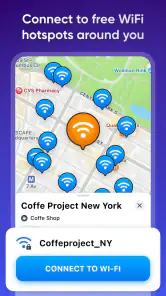
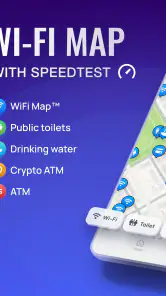
Imagine arriving in a new city and not having to scramble to find a coffee shop with decent WiFi. With WiFi Map・Internet, eSIM Travel, this could be your reality. The app boasts a massive database of over 100 million WiFi hotspots worldwide. I was initially skeptical, but after using it in several countries, I found it incredibly reliable. The app allows you to search for and connect to nearby networks, showing you the password if it's available. It’s like having a local friend who knows all the best spots!
Make the map useful before you walk
I get more value from a hotspot map when I use it to plan a short route, rather than wandering toward the nearest pin without checking where it is. A network inside a business may be accessible only to customers, while a listing may have changed since someone added it. I treat a password as a helpful lead, not a guarantee: I still check the venue’s instructions and ask staff if access is unclear. That small pause can save time and avoids assuming a listed network is open to everyone.
For a realistic arrival scenario, I might open the map while I still have a connection at the airport or hotel, identify a likely stop near my first destination, and save the route details I need before heading out. If the hotspot works, I can handle a quick task there; if it does not, I already know the next step is to use mobile data or find another venue. That workflow is more dependable than waiting until I am lost and then relying on a single nearby result.
One practical way to test a hotspot
When I reach a listed venue, I would first confirm that it is open and that using its network fits the setting; a pin does not tell me whether the business is welcoming visitors who are not customers. If access is appropriate, I can try the displayed network details and check whether a simple page or message loads before depending on it for anything important. I avoid beginning a large upload or a time-sensitive call until I know the connection is usable. This quick test helps me separate “there is a network here” from “I can rely on this network for my task.”
More From Our News Desk

Clash of Clans Is Won Between the Battles

Android Auto Makes the Case for Quieter Car Software

MobiOffice: Transforming Mobile Productivity with Seamless Integration

EA SPORTS FC™ Mobile Soccer: Redefining Mobile Sports Gaming

How Microsoft OneDrive Became a Mobile Productivity Giant

How Google Translate Breaks Language Barriers Effortlessly
There is also a useful trade-off between the nearest result and the best stop. A slightly farther café or public venue may fit my route better, offer a place to sit, or be easier to identify than a pin tucked inside a large building. I would compare a couple of options and choose the one that makes sense for the errand, not simply the one with the shortest map distance. Hotspot discovery is most helpful when it supports a sensible travel decision rather than becoming the whole plan.
The eSIM Feature
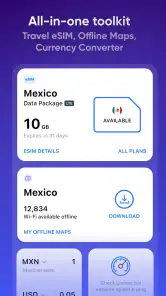
But wait, there’s more! The app isn’t just about finding WiFi. The eSIM feature is a game-changer. For those unfamiliar, an eSIM is a digital SIM that allows you to activate a cellular plan from your carrier without having to use a physical SIM card. This is especially useful for travelers who want to avoid roaming charges. Setting it up was a breeze, and I was pleasantly surprised by the seamless integration into my phone’s settings. This feature alone makes the app worth downloading.
Choose between a hotspot and mobile data
Although a hotspot can keep a quick check-in free of mobile-data use, the trade-off is dependence on its location, signal and access rules. An eSIM is the more sensible direction when I need coverage while moving, but I would check that my phone supports eSIM and review the plan details before relying on it abroad. Installation and activation are separate from simply finding Wi-Fi, so I would arrange that part while I have a stable connection and time to follow the phone’s setup prompts.
That distinction matters for common questions: a hotspot listing does not mean the app can make a weak network strong, and a digital SIM does not automatically mean every trip is covered. I would use Wi-Fi for stationary, low-stakes tasks and consider cellular access for navigation or work that cannot wait. If I already have a roaming plan that suits my trip, sticking with it may be simpler than adding another connectivity option.
Plan the handoff before connectivity matters
For a short trip, I would decide in advance what needs a connection and what can be handled offline. I can keep essential addresses and travel details accessible before leaving a dependable network, then use a hotspot for casual browsing or messages when one is convenient. If I need directions while walking between places, I would not make the plan depend on finding a public network at every turn. An eSIM or an existing mobile plan is a better handoff for that kind of continuous use, while the hotspot map remains a backup for a pause in the day.
Before purchasing any optional item, I would pause to check its stated terms and whether it matches my destination, device and expected usage. The app’s free starting point makes it reasonable to explore hotspot discovery first, but a purchase should solve a specific need rather than simply feel like a travel precaution. If the phone cannot use eSIM, or my existing provider already covers the trip comfortably, I can still use the hotspot-finding side without treating the cellular option as essential.
User-Friendly Interface
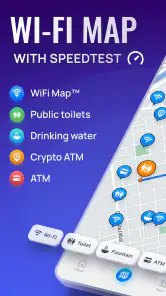
One of the things I appreciate about the app is its user-friendly interface. Navigating through the features is intuitive, and you don’t have to be a tech whiz to figure it out. The map feature is my favorite; you can zoom in and out to find WiFi hotspots or eSIM coverage areas. Plus, the app’s design is visually appealing, with a clean layout that doesn’t overwhelm you with too much information at once.
Use it as a travel tool, not a guarantee
Compared with searching the web for cafés or asking a hotel desk, the map can put network leads in one place and help me plan around them. Those usual alternatives still win when I want a confirmed connection: a hotel’s own Wi-Fi details or a café employee can tell me the current access rules, while a mobile carrier may be a better fit for uninterrupted use. I would also avoid sending sensitive information over a public network unless I have taken suitable precautions; convenience is not the same as privacy.
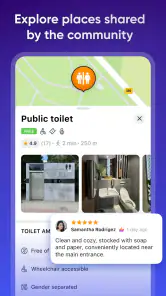
The community contribution model is useful, but it also creates a natural limitation: local details depend on people keeping them current. If a password fails or a venue has closed, I would move on instead of repeatedly trying stale information. Saving the destination and checking a second nearby option before leaving a working connection gives me a simple fallback. That is a small habit, but it makes the app more valuable when travel plans change.
Where the workflow can break
The app is less compelling if I travel mostly between places with dependable accommodation Wi-Fi and already have mobile data that works for my needs. In that case, opening a hotspot map may add another step without improving the day. It is also not the right sole solution for a remote worker who cannot afford interruptions, a traveler heading somewhere with few public venues, or anyone who must stay reachable while in transit. For those situations, I would arrange a reliable cellular option first and treat nearby hotspots as opportunistic extras.
Even a well-planned handoff can fail for ordinary reasons: a listing may be old, a venue may be closed, or the network may not reach the place where I need to sit. I would avoid assuming that a successful connection on one visit means the same details will work later. Keeping a second route in mind—another venue, mobile data, or information saved before departure—matters more than repeatedly troubleshooting a single pin. That is the honest limit of a community-maintained map: it can guide the search, but it cannot control the local network.
Staying Connected
Staying connected while traveling has never been easier. Whether you’re on a business trip needing reliable internet or a backpacker trying to upload your latest adventure pictures, this app has you covered. It’s the perfect tool for digital nomads or anyone who needs to stay online. Plus, the community aspect allows users to add new WiFi spots and update passwords, keeping the database fresh and current.
In practice, I think it suits travelers who are comfortable checking a map, adapting when a listing is out of date, and choosing between a public hotspot and mobile data. It is less suitable for someone who needs guaranteed connectivity for calls or time-critical work and does not have a backup plan. For that person, a trusted carrier arrangement or confirmed accommodation Wi-Fi is a better foundation, with hotspot discovery as an extra rather than the main connection.
The app has been available since July 25, 2014, and its scale is reflected in an average rating of 4.3 from around 3 million ratings, with over 100 million installs. Those figures suggest broad use, but they do not remove the need to judge each local network for yourself. I would keep it ready for travel, particularly for finding a first connection after arrival, while making sure essential directions and plans are accessible offline or through another route.
Who will get the most from it
I would recommend it most to people who travel through unfamiliar towns, take short breaks in cafés, or want a backup way to get online before deciding whether to use mobile data. It can be especially handy when arriving somewhere and needing to send one message, confirm a pickup point, or look up the next leg of a journey. The combination of hotspot discovery and an eSIM option puts two different kinds of connectivity in the same travel toolkit, but they solve different problems and should not be treated as interchangeable.
For frequent travelers, the practical benefit is having a place to begin the search rather than relying on memory or opening several map and search apps. For occasional travelers, it may be useful to install and explore before departure, then decide whether the extra cellular option is relevant to the trip. I would skip it as a primary connectivity plan if I need guaranteed access everywhere, dislike adjusting plans when a listing is stale, or already have a simple and dependable arrangement through my accommodation and provider.
In conclusion, WiFi Map・Internet, eSIM Travel stands out as a must-have app for travelers. It combines the best of both worlds by offering WiFi connectivity and eSIM technology in one package. With its extensive database and user-friendly design, it’s a reliable tool for anyone looking to stay connected on the go. So, if you’re planning your next adventure, make sure to have this app downloaded and ready to go. Trust me, it’s a lifesaver!
WiFi Map・Internet, eSIM Travel Frequently Asked Questions
Can I download maps for a destination before I travel?
Yes. WiFi Map supports offline use when you download maps and hotspot information for an area in advance. That can be handy when you arrive without mobile data or want to limit your reliance on an active connection while exploring. Prepare the relevant area before setting off, since real-time updates and the newest hotspot details are best accessed online.
Does WiFi Map include mobile data options as well as Wi-Fi hotspots?
Yes. Alongside hotspot discovery and shared Wi-Fi access information, WiFi Map offers a travel eSIM feature for mobile data. An eSIM can be a useful alternative when public Wi-Fi is unavailable or you would rather connect through mobile service while traveling. Your phone must support eSIM, and you can review the available data options in the app before choosing one.
Can I use WiFi Map to check Wi-Fi signal strength?
The app includes a Wi-Fi signal analyzer, which can help you assess the signal around you while looking for a connection. This can be useful when a hotspot appears nearby but the connection seems weak: checking the signal gives you another detail to consider before choosing a network. WiFi Map also focuses on hotspot discovery, shared access information, offline maps, and travel eSIM options.
Will WiFi Map work on my phone, and is it suitable for all ages?
WiFi Map is available for Android devices running version 8.1 or later, and its content rating is Everyone. That makes the listed age classification broad, though how useful the app is will depend on whether you want to find Wi-Fi hotspots, use offline hotspot information, or explore its travel eSIM feature. The app is developed by WiFi Map LLC.
What is WiFi Map and how does it work?
WiFi Map is an app designed to help users find free WiFi hotspots around the world. It operates by utilizing a vast database of user-shared WiFi passwords and access points, allowing you to connect to nearby networks with ease. This can be particularly useful for travelers or anyone in need of internet access on the go. The app also offers an eSIM feature for convenient mobile data access in various countries.
Pros
- Easy access to global WiFi spots.
- Includes eSIM for seamless travel.
- User-friendly interface.
- Offline maps available.
- Regularly updated WiFi data.
Cons
- Some features require paid subscription.
- Offline mode can be limited.
- Occasional inaccuracies in WiFi details.
- Ads in free version.
- Limited customer support.

- Category
- Travel & Local
- Version
- 8.6.23