Flightradar24 Flight Tracker
- 16.09K
- 4.5
- Installs
- 100.00M
- Price
- Free

Screenshots


Analysis by Reviewed
Before installing a flight tracker, I would ask what I actually want to find out. If I need to manage a booking, confirm a boarding instruction, or plan a route across town, a conventional travel app is the more direct tool. If I want to see an aircraft move across a map, make sense of an arrival, or identify traffic passing overhead, Flightradar24 Flight Tracker gives me a different and more engaging view. Its value is not just that it shows flights; it makes the movement behind a journey easier to follow.
That distinction also helps set expectations. I use a tracker to understand progress, not as the only authority for a travel decision. A position on a map can help me judge whether a pickup is worth setting out for, while airline and airport channels remain the places I would check for instructions that could change where I need to go. Used this way, the app complements familiar travel tools instead of trying to replace them.
Start with the question you need answered
For a first-time user, I would choose one real question before opening the map: “Is the flight I’m meeting still moving toward its destination?” or “What aircraft is that overhead?” That gives the screen a purpose and makes the detail easier to interpret. Without a goal, the map can turn into an absorbing scroll through traffic that has no connection to your plans.
There are two different kinds of value here. The practical side is following a flight that matters to you; the exploratory side is looking around simply because aviation is interesting. Those uses can overlap, but they do not have to. Someone who only wants a quick yes-or-no update may find the amount of visual information unnecessary, while someone who enjoys understanding routes and aircraft may regard that detail as the main attraction.
Features That Take Off
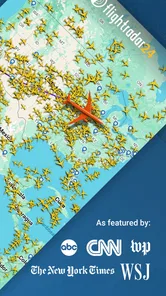
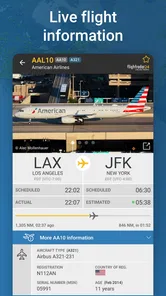
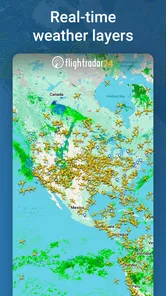
Let's dive into what makes Flightradar24 Flight Tracker so special. First off, the app is packed with features that are both practical and fascinating. You can literally see planes moving across the map as they soar through the skies. It's almost hypnotic. For anyone who's ever been curious about the mechanics of flight tracking, this app is a goldmine. You can tap on any plane to get detailed information about its departure, arrival times, and even its aircraft type.
The map is where I would start if a family member were flying in. I can follow the aircraft's progress rather than repeatedly refreshing a general travel app, and the route gives context to the journey that a single arrival estimate cannot. I would still treat a tracker as a helpful view, not the airline's final word on a gate, cancellation, or connection: for decisions that affect the trip itself, I would check the carrier or airport as well. That distinction matters most when plans are changing quickly.
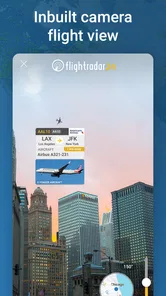
One of the standout features has to be the augmented reality view. Just point your phone at the sky, and the app will tell you what flights are overhead. It's like having x-ray vision for airplanes! Plus, the app covers flights worldwide, so whether you're tracking a friend's flight across the country or just curious about international air traffic, Flightradar24 has you covered.
More From Our News Desk

Weather by Xiaomi Review: Clear at a Glance, Less Clear Up Close

X Under Pressure: Can It Recover When Posting Goes Wrong?

Clash of Clans Is Won Between the Battles

Android Auto Makes the Case for Quieter Car Software

MobiOffice: Transforming Mobile Productivity with Seamless Integration

EA SPORTS FC™ Mobile Soccer: Redefining Mobile Sports Gaming
User Experience and Design
The user interface is sleek and intuitive. Even if you're not a tech whiz, you'll find navigating through the app a breeze. The developers have done an excellent job of presenting all the necessary information without cluttering the screen. It's all about the smooth experience, and this app delivers.
For a more useful first session, I would search for a flight I already know about, open its details, then compare that view with the wider map. That helps separate the aircraft's position from the practical questions a traveler has, such as where to meet someone or whether an airport pickup needs adjusting. When the purpose is simply collecting a passenger, I would use the app to judge progress and keep the pickup plan flexible, rather than assume the map replaces airport information.
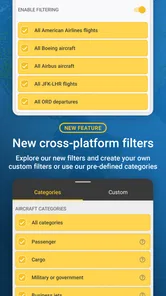
Another thing I love is the customization options. You can set up notifications for specific flights, which is super handy if you're picking someone up from the airport or just want to stay in the loop about a trip. There’s also a historical data feature where you can look back at past flights, which can be fun for aviation enthusiasts.
Notifications are most valuable when they reduce repeated checking: choose the flight that matters, then let an alert prompt you to look again. If you are following several journeys at once, being selective keeps the app from becoming another stream of updates to monitor. The history view has a different use: it can help an enthusiast revisit a route or compare what happened on a previous trip, while a casual traveler may never need it. Those features make the app more than a live map, but they are optional layers rather than essentials.
Making the map useful rather than distracting
A small habit makes the map easier to use: decide whether you are following one particular flight or browsing the surrounding traffic, then keep that purpose in mind as you tap around. When I am tracking an arrival, I would save my attention for that aircraft and use the broader map only when extra context helps. When I am simply curious, I can take time to explore without confusing that browsing with a travel update I need to act on.
The overhead view is especially suited to a short, specific moment. If I hear a plane while outside, I can point the phone toward the sky and use the app to turn a passing aircraft into a flight I can look up. It is a neat way to satisfy curiosity, but it is not a reason to keep the phone raised in situations where I should be watching my surroundings. I would treat it as an occasional tool, not a constant companion in the street.
Historical flight information also makes more sense when I have a comparison in mind. Rather than opening it at random, I might revisit a route I am interested in or look at a past flight after noticing an unusual path. That kind of use gives the feature a purpose beyond collecting details. If I only care about today’s pickup, looking backward is unlikely to make the immediate decision easier.
Choosing a Tracker for the Job
Compared with a standard airline app, this is the better choice when you want a visual overview of air traffic or to follow an aircraft beyond the narrow needs of your own booking. An airline app is usually the more direct place to manage your reservation and check carrier-specific travel instructions; a map-focused flight tracker is more engaging for watching movement and learning what is overhead. Airport information tools can also be preferable when your immediate concern is terminal logistics. I see these as different tools, not replacements for one another.
The trade-off is that a live map invites you to keep watching even when you do not need to act. It can make a long wait more interesting, but it cannot make travel predictable, and a displayed position is not the same as a confirmed arrival arrangement. If you only need a booking reference, boarding information, or a simple journey plan, I would stick with the airline’s own app. If curiosity about aircraft is part of the point, the extra map detail is exactly what makes this one worthwhile.
When another travel tool is the better fit
There is no need to choose only one kind of app. For an airport pickup, I would use a flight tracker to follow the journey and keep the airline or airport’s information available for practical details at the terminal. For managing a trip, I would start with the airline’s app; for navigating to the airport, I would use a mapping tool built around road directions. Each solves a different part of the problem, and forcing one app to cover all of them can create unnecessary friction.
A simple status checker may suit someone who wants to look up one flight and leave. This app is a stronger match if the map itself matters—if you enjoy watching the route, exploring nearby traffic, or identifying a flight above you. The difference is less about which tool is universally better and more about whether you want a compact answer or a richer view. If detailed maps usually feel busy to you, the simpler alternative is likely to be more comfortable.
I would also think about how often the curiosity comes up. A frequent traveler, someone who regularly meets arrivals, or an aviation enthusiast can find repeated reasons to open it. Someone who flies occasionally and only checks a departure time may not get enough out of the extra layers to justify adding another app to their routine. That is a genuine limitation of a detail-rich tracker: its appeal depends on wanting the detail.
Everyday Use, Cost, and Fit
A realistic use is checking a relative’s flight while you are still at home, then deciding when to leave for the airport instead of waiting there for the entire arrival window. I would open the flight early, use the map for a broad sense of progress, and rely on airport or airline updates for any last-minute change that affects where or when to meet. For a regular traveler, that small workflow can make pickup planning calmer; for someone who flies rarely and has no interest in aircraft, it may be more app than they need.
The app is free to download, with in-app purchases ranging from $1.49 to $64.99 per item. I would begin with the free experience and only consider a purchase if I had a clear reason to use the additional options; casual sky-watching does not automatically call for spending. It is rated for everyone, has been available since September 15, 2010, and requires Android 8.0 or later. Its 4.5 average from around 627,000 ratings and more than 100 million installs suggest it has reached a large audience, though popularity alone cannot tell you whether its detail suits your habits.
One practical trade-off is attention: maps and aircraft details are compelling, so I would avoid treating every change as something that needs action. Pick a specific purpose before opening it—checking a pickup, identifying an overhead flight, or exploring a route—and close it when that question is answered. That keeps an interesting tool from becoming a distraction during an already busy travel day.
Cost and the decision to switch
Because the app is free to download, trying it does not require changing the way I manage a booking or replacing another travel tool. I would keep my existing airline and airport apps where they are useful, then see whether a visual tracker adds something I actually use. The optional purchases are a reason to be deliberate rather than a reason to pay immediately: I would first work out whether the basic experience answers my regular questions, and only consider spending if I know what extra value I want.
Switching completely is not the goal I would set. A tracker is best understood as an additional lens on flights, not a full travel organizer. If I delete a simple status app in favor of this one, I may gain a more interesting map but lose the quick, uncluttered check I prefer when I am in a hurry. Keeping both kinds of tools is sensible when each has a distinct job; removing one is reasonable only if I find I never use its particular role.
Why You Should Download It
So, why should you give this app a try? Well, if you're someone who travels frequently or just has an interest in aviation, this app is a must-have. It brings a whole new level of insight into the world of air travel, and you'll find yourself checking it even when you don’t have a flight to catch. Plus, it's a great conversation starter when you're with friends or family. Imagine being the one who casually knows which flight is passing overhead!
If you are deciding between this and a simpler flight-status tool, think about what you want to know. For a single trip, reservation management, and airline-specific notices, the simpler option may be enough. For following a moving aircraft, browsing traffic, or identifying flights above you, I find a dedicated tracker more satisfying. People who dislike map-heavy interfaces, do not want optional purchases, or only check flights once in a while may be happier staying with familiar travel tools.
Moreover, during times when flight schedules can be unpredictable, having real-time data at your fingertips can be invaluable. Whether it’s for personal use or satisfying your curiosity, Flightradar24 Flight Tracker is an app that soars high in my books.
My recommendation is straightforward: try it if you want air travel to feel visible rather than hidden behind a status line. I would keep an airline app or airport source in reach for decisions that depend on official trip details, and use this one for the broader picture and the pleasure of watching flight paths unfold. That balance plays to its strongest side without asking it to do every travel job.
Overall, I would choose it for the combination of useful flight-following and satisfying exploration, not because it replaces every other travel app. It is most rewarding when I have a particular arrival to watch or a genuine interest in what is moving overhead. If that sounds like you, the map and its surrounding details give you a clear reason to keep it; if you only need a quick travel notice, a simpler option will probably feel more focused.
Flightradar24 Flight Tracker Frequently Asked Questions
Can I use Flightradar24 Flight Tracker to check whether a particular flight is in the air?
Yes. The app is designed to track airplanes and follow flights in real time, so you can look up a journey and view its flight information. It can be useful when you want to follow a flight connected to your plans, as well as when you are simply curious about aircraft overhead. Its central focus is tracking, not booking travel.
What should I know about the app’s age rating and general audience?
Flightradar24 Flight Tracker has an Everyone age rating, and it is in the Travel & Local category. That makes it a flight-tracking app intended for a broad audience, including people who travel and those interested in aviation. Its main purpose is to show aircraft and flight information, so it is worth considering whether those features match what you want from a travel app.
Is Flightradar24 Flight Tracker suitable for casual travelers as well as aviation enthusiasts?
Yes. Flightradar24 Flight Tracker can be useful whether you follow aircraft as a hobby or want to check on a flight connected to your travel plans. Its live map and flight information make it possible to explore air traffic or look up a particular journey. The app is in the Travel & Local category and is rated for Everyone.
What is Flightradar24 Flight Tracker?
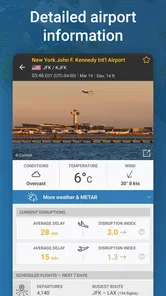
Flightradar24 Flight Tracker is a real-time flight tracking app that allows users to view live air traffic from around the world. It provides detailed information about flights, including departure and arrival times, flight paths, aircraft details, and more. It's popular among aviation enthusiasts, professionals, and travelers who want to stay updated on flight statuses.
How does Flightradar24 Flight Tracker work?
Flightradar24 Flight Tracker collects data from several sources, including ADS-B, MLAT, and radar data. The app aggregates this information to provide real-time updates on flight paths and statuses. Users can search for specific flights or airlines and view detailed information about any aircraft currently in the air. The app's map interface displays live traffic, making it easy to track flights globally.
Pros
- Real-time flight tracking data.
- Wide coverage across the globe.
- User-friendly interface design.
- Provides in-depth flight details.
- Customizable alerts for flights.
Cons
- Requires internet connection.
- Some features need a subscription.
- Can drain battery quickly.
- Occasional data inaccuracy.
- Ads in the free version.