Tripadvisor: Plan & Book Trips
- 69.05K
- 4.5
- Installs
- 100.00M
- Price
- Free

Screenshots



Analysis by Reviewed
When I’m planning a trip, I want one place to compare ideas without turning the whole process into a second job. Tripadvisor: Plan & Book Trips is a free travel app from Tripadvisor, and its strongest appeal is the combination of destination research, traveler opinions, and trip-planning options. I find it most useful as a starting point: it helps me narrow down where to stay or what to do, while leaving room to check important details before I commit.
What free access means in practice
You can install the app without paying for it, which makes it easy to try while you are still deciding where to go. Its store summary points to rewards connected with hotels, tours, and travel, but I would treat those as an extra to explore rather than the main reason to plan a trip here. The practical value is having a travel research tool ready before you know exactly what you want to book.
That distinction matters: free access is not the same as a guarantee that every travel purchase is free or that every booking is automatically the best deal. I use the app to compare possibilities and gather context, then check the final terms, dates, and total cost before paying. That habit keeps a convenient planning flow from becoming a rushed decision.
Planning a trip from first idea to shortlist
In everyday use, I would open Tripadvisor when a destination is still a question mark, or when I know where I’m going but need to decide how to spend a free afternoon. Its mix of places to stay, things to do, and places to eat can help turn a vague idea into a workable shortlist. The app is particularly handy when several people are planning together: each person can bring a candidate hotel or activity to the conversation, and reviews give the group something concrete to discuss.
A more useful way to read traveler reviews
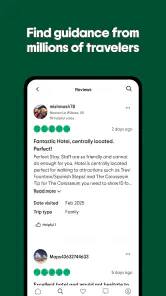
I don’t treat an overall opinion as a verdict. I look for reviews that match my own priorities: a traveler visiting with children, someone relying on public transport, or a guest concerned about noise may reveal details that matter more than a general recommendation. I also compare comments across different experiences rather than letting one glowing or angry review decide the whole plan. This is a small step, but it makes the app’s community content much more useful.
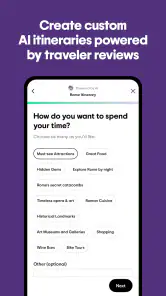
For a realistic example, imagine I have a free morning in a city and want to avoid spending it crossing town between stops. I can look for nearby attractions and places to eat, save a few promising options, and then check whether their locations and recent traveler comments suit the day. That is a better use of the app than trying to make it choose an entire itinerary for me. I still decide based on opening details, distance, and the pace I want.
Where it fits beside other travel tools
Compared with using a map app alone, Tripadvisor is more centered on traveler reviews and evaluating places to visit, stay, or eat; a map is usually better for precise navigation and checking a route. Compared with a dedicated booking service, it can bring several kinds of travel research together, while a specialist may be a better place to complete a particular reservation or compare its terms closely. I see it as a useful research companion, not a reason to stop checking other sources.
More From Our News Desk

Weather by Xiaomi Review: Clear at a Glance, Less Clear Up Close

X Under Pressure: Can It Recover When Posting Goes Wrong?

Clash of Clans Is Won Between the Battles

Android Auto Makes the Case for Quieter Car Software

MobiOffice: Transforming Mobile Productivity with Seamless Integration

EA SPORTS FC™ Mobile Soccer: Redefining Mobile Sports Gaming
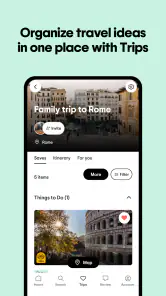
One practical tip is to save options while browsing instead of expecting to remember why each one caught your eye. I also keep a short note about the deciding factor—location, a review detail, or the type of experience—so that a long list does not become a collection of names with no context. When plans change, that makes it easier to revisit a few strong candidates instead of starting the search over.
Who is likely to get the most from it?
I’d recommend it to people who like to research before booking, travelers who value other visitors’ perspectives, and anyone comparing more than one part of a trip. It is also approachable for occasional travelers: you do not need to be an expert planner to search for a hotel, a restaurant, or something to do. The app is free, rated for Everyone, and has a 4.5 average from around 1.5 million ratings, which suggests a large audience has found it useful, though popularity alone cannot tell you whether its approach suits your travel style.
It may be less useful if you already know exactly what you want and prefer to book directly with one provider, or if your main need is turn-by-turn directions. In those cases, a map or a focused booking service may be a simpler fit. The app’s broad range can also make research feel busy: more choices are helpful only until they start making a straightforward decision harder.
Ease of Use
First off, the user interface is a breeze to navigate. You open the app and it's like the world is at your fingertips. From the very first click, Tripadvisor: Plan & Book Trips shows you that it’s all about making things simple. The search bar is prominently placed, begging you to type in your dream destination. Within seconds, you're not just looking at a list of places but a curated selection of experiences, accommodations, and eateries. It’s like having a personal travel agent in your pocket, minus the hefty fee.
Features Galore
Now, let’s talk features because this app is packed with them. You can book flights, hotels, and even find local attractions all in one place. It’s a Swiss army knife for travelers. I particularly loved the feature that allows you to read reviews from other travelers. Nothing beats getting the lowdown from people who’ve been there and done that. Plus, you can also write your reviews, adding to the community feel of the app.
Personalized Experience
One of the standout aspects of the app is its ability to tailor recommendations just for you. By analyzing your past searches and bookings, it offers suggestions that hit the mark more often than not. It feels like the app gets to know you better with every trip you plan. And the ability to save your favorite spots for future reference? Absolute game changer.
Booking Made Easy
The booking process is straightforward. Select your flight, choose your hotel, and voila, you’re set. I found the transaction process smooth, with various payment options that cater to different preferences. It’s all about convenience, and this app delivers in spades.
Community and Support
Let’s not forget the community aspect. The forums are a goldmine of tips and advice, making it easier to find answers to any travel-related question you might have. And if you ever hit a snag, customer support is just a tap away, ready to assist you with any issue.
Tripadvisor has been around since 2010, and its current version is 65.6. With over 100 million installs, there is a substantial pool of travelers contributing opinions. I still suggest checking how recent and relevant a review is: a high volume of feedback can help reveal patterns, but it does not ensure that a comment reflects the experience you will have.
Checking details before you book
A useful workflow is to separate discovery from commitment. First, use reviews and saved places to build a shortlist. Then verify the details that can change the decision: dates, location, cancellation terms, what is included, and the final price shown at checkout. This is especially worthwhile when a hotel or tour looks attractive for one reason but has conditions that would matter to your plans. I would not assume that a recommendation or reward mention settles those questions for me.
Another trade-off is that recommendations are personal by nature. A highly rated restaurant may not fit my budget or dietary needs, and a popular attraction may not suit a quiet, low-key day. I use other travelers’ comments to spot useful specifics, not as a substitute for my own priorities. If a detail is essential, I look for clear confirmation before building the day around it.
Making a shortlist work for a real trip
For a weekend away, I would use the app in two passes rather than trying to settle every choice at once. First I’d gather a small set of hotels, restaurants, and activities that seem plausible. Then I’d compare each option against one practical constraint, such as how much time I want to spend getting between places. This keeps a tempting but inconvenient choice from winning simply because its reviews caught my attention.
When a group is involved, I find it useful to ask each person to bring one candidate and one reason for it. A review that mentions a quiet room or an easy location can help the group discuss trade-offs more clearly than a bare rating. The app supplies ideas and experiences to compare; the group still needs to agree on what matters most, such as price, pace, or the kind of meal everyone wants.
Using reviews without letting them plan the day
One less obvious benefit of reading comments is spotting the questions I should verify elsewhere. If several travelers mention a long walk, a noisy setting, or a detail that affects timing, I can treat that as a prompt to investigate before committing. I would not assume every comment is current, but repeated, specific observations can help me decide what to check. That makes reviews useful even when they do not give a definitive answer.
I also avoid building a packed itinerary from a list of highly rated places. A shortlist is more valuable when it leaves room for travel time, meals, and a change of mood. For a free afternoon, I might save one main activity and a nearby backup rather than treating every promising result as a must-do. That is a simple way to use the app’s breadth without turning a holiday into a checklist.
When a different tool is the better choice
If I already have a confirmed hotel and a fixed schedule, a map app is usually the more direct tool for checking the route and getting around. If I am comparing the precise conditions of one hotel booking, I would look closely at the booking provider’s own details rather than rely on a general discovery view. Tripadvisor’s advantage is bringing travel research together; its limitation is that breadth does not remove the need to verify specifics at the point of decision.
The same distinction applies to spontaneous travel. For inspiration, reviews and nearby ideas can help me choose what to consider. For an urgent reservation or a time-sensitive change, I would prioritize the service handling that reservation and its current terms. I would skip using Tripadvisor as my only source when a single exact detail—such as a route, a booking condition, or a schedule—has to be certain.
Who should skip it, and what the free price buys
Because the app itself is free, trying it does not require an upfront purchase. That is its clearest value: I can use it for research and see whether traveler opinions and trip ideas help me make better choices. It does not mean that hotels, tours, or other travel plans cost nothing, and I would never treat the app’s free access or reward wording as proof that a particular booking is the cheapest option.
Someone who prefers a tightly controlled itinerary, has already chosen every provider, or wants only turn-by-turn navigation may get little from keeping another travel app in the routine. Likewise, if a wide range of reviews makes it harder for you to decide, a focused provider or a map may feel calmer. I see the best fit as a curious planner who wants to compare possibilities, then verify and book with care.
My recommendation
Overall, I’d keep this app on my phone if I were planning trips where research and comparing experiences are part of the fun. Tripadvisor is free to try, and its blend of traveler reviews and travel discovery can help me move from a broad idea to a sensible shortlist. I would skip relying on it as my only tool when I need precise navigation or want to compare one booking type in depth. Used with a quick check of the final terms, it is a practical companion—not a replacement for my judgment—and a good fit for travelers who want ideas before making a decision.
Tripadvisor: Plan & Book Trips Frequently Asked Questions
Can I use Tripadvisor to compare travel options before making a reservation?
Yes. Tripadvisor brings reviews and information about places to stay, eat, and visit together, so you can explore alternatives before deciding what suits your trip. You can compare traveler feedback and look at booking choices in the same app. This makes it useful for researching a destination first, whether you are arranging a full itinerary or simply collecting ideas.
Does Tripadvisor help me discover restaurants and attractions as well as hotels?
Yes. The app covers more than accommodation: it also offers restaurant recommendations and information about tourist attractions. Traveler contributions can give you a sense of what other visitors experienced and help you decide what to explore. You can use these resources alongside hotel information while planning, keeping several parts of a trip in one travel-focused app.
Is Tripadvisor: Plan & Book Trips suitable for first-time travelers?
Yes. The app brings together traveler reviews and information about places to stay, eat, and visit, which can help first-time travelers compare options while planning. You can also use it to organize trip ideas and explore booking choices in one place. Its broad travel focus makes it useful whether you are planning a detailed itinerary or just starting to explore a destination.
What is Tripadvisor: Plan & Book Trips?
Tripadvisor: Plan & Book Trips is a comprehensive travel app designed to help users plan their trips efficiently. It offers a platform where travelers can find hotel reviews, restaurant recommendations, and tourist attraction information, all contributed by other travelers. The app also allows users to book accommodations, flights, and activities directly from the app.
How does Tripadvisor ensure the reviews are trustworthy?
Tripadvisor employs a combination of automated tools and human moderation to ensure the authenticity of the reviews posted on its platform. Users are encouraged to provide honest feedback about their experiences, and suspicious reviews can be reported by the community for further investigation. This helps maintain a reliable source of information for travelers.
Pros
- Comprehensive travel information
- User-friendly interface
- Wide variety of travel options
- Trusted reviews from real users
- Easy booking process
Cons
- May contain outdated data
- Some ads can be intrusive
- Limited offline availability
- Occasional app crashes
- Requires internet connection
- Category
- Travel & Local
- Version
- 65.6