Google Maps
- 677.86K
- 3.2
- Installs
- 10.00B
- Price
- Free
Screenshots

Analysis by Reviewed
When I first open Google Maps, I don’t need a travel plan to get value from it: finding a nearby place or checking how to reach an address is enough to make the app useful. It’s a free travel and local app from Google LLC, rated for Everyone. Its average rating is 3.2, alongside around 19 million ratings and roughly 678,000 written reviews; that mix suggests a tool many people rely on, but one that won’t feel equally smooth for everyone.
What to expect from the first screen
The main strength is that directions and local discovery sit together. I can look up a destination, compare possible routes, and then check what is around the area without jumping between separate apps. It has more depth than a basic map, though that can make the screen feel busy when all I want is a quick answer. With over 10 billion installs, it is also a familiar option on many phones, but popularity alone does not make every suggestion or route the right one for a particular trip.
Getting Started with Google Maps
From the moment you open Google Maps, it’s like having a personal guide in your pocket. The interface is super user-friendly, and setting up is a breeze. Just plug in your Google account, and you’re ready to navigate the world. I love how it syncs across devices, so whether I’m using my phone or tablet, it keeps track of my favorite spots.
The Latest on Google Maps
Features That Stand Out
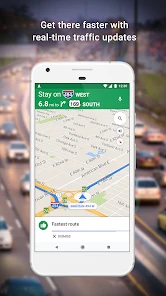
One thing that really caught my eye is the real-time traffic updates. It’s like having a traffic cop right there with you, letting you know the best routes to avoid congestion. And the street view? Absolute game-changer. I mean, who wouldn’t want a sneak peek of their destination before getting there? It’s perfect for those of us who like to visualize our routes.
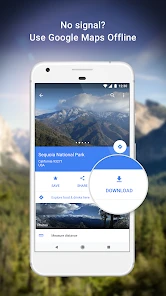
Another feature I find incredibly handy is the offline maps. We’ve all been in those situations where data is scarce, and this feature ensures you’re never lost, even without a signal. Just download the area you’re visiting in advance, and you’re good to go!
Getting your first trip right
For a first successful test, I’d enter a familiar destination before relying on the app somewhere unfamiliar. Check the route options, start navigation, and notice where the next turn appears on screen. That small practice makes it easier to recognize instructions when you are actually on the move. If you’re heading somewhere with unreliable mobile service, prepare by downloading the relevant map area while you still have a connection; an offline map is a useful backup, not a reason to skip planning.
A practical example: before meeting a friend at a café in an unfamiliar part of town, I can check the route, look at Street View to spot the entrance or nearby landmarks, and save the place so I can find it again. If plans change, I can search nearby food or activities instead of starting over with a different tool. That workflow is especially handy when the destination is easy to reach but tricky to recognize once you arrive.
More From Our News Desk

Clash of Clans Is Won Between the Battles

Android Auto Makes the Case for Quieter Car Software

MobiOffice: Transforming Mobile Productivity with Seamless Integration

EA SPORTS FC™ Mobile Soccer: Redefining Mobile Sports Gaming

How Microsoft OneDrive Became a Mobile Productivity Giant

How Google Translate Breaks Language Barriers Effortlessly
Making the first search more useful
For a new user, I’d start with a specific destination rather than browsing a broad area. Search for the business or address, open its place information, and check the map around it before choosing a route. This helps catch a common mismatch: the pin may mark the general property, while the entrance or the best drop-off point is somewhere else. When I’m meeting someone, I share the exact place name or address in advance rather than relying on “I’m near the pin” as a plan.
One small habit also makes route choices easier to judge: look at the route alternatives before starting, not only the highlighted suggestion. A route that looks shorter may be less convenient for the way I’m traveling, while a slightly longer option can be easier to follow. I treat the initial result as a proposal, then choose with the trip’s real priorities in mind—familiar roads, fewer turns, or avoiding a complicated arrival.
Explore and Discover
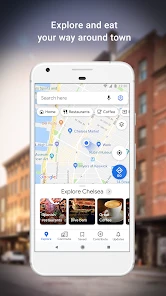
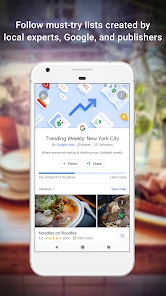
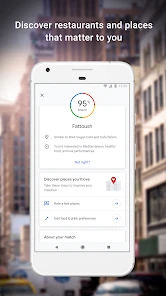
Apart from just getting you from point A to B, Google Maps is fantastic for discovering new places. The explore tab is like having a local friend suggesting the best places to visit. From restaurants to parks, the recommendations are spot on. Plus, you can see reviews and ratings from other users, which I find super helpful when trying to decide where to go.
I also appreciate the integration with services like Uber and Lyft. It’s seamless, and you can book a ride directly from the app without any hassle. Talk about convenience!
A realistic day out
Say I have a free afternoon in a neighborhood I don’t know well. I can search for lunch, check how far the choices are from where I’ll be, and compare their surroundings before picking one. Afterward, I can look for a park or another stop nearby and see how the walk fits into the afternoon. The practical advantage is not simply having several searches in one place; it is being able to make a plan that accounts for where each stop sits, then change it without losing the overall picture.
For a busy day, I’d save places I’m seriously considering instead of keeping a string of search results open. That gives me a short list to revisit and makes it easier to compare locations when plans change. I wouldn’t save every appealing result, though: a long, cluttered collection becomes another thing to sort through. A few likely stops are more useful than treating the map as a scrapbook.
Common confusions and useful trade-offs
One thing I would not do is treat a suggested route, traffic estimate, or place ranking as unquestionable. Live conditions can change, and local listings or reviews may not match what matters to me. I use the map as a strong planning aid, then pay attention to road signs and the situation around me. When I’m comparing restaurants, I read a few recent comments rather than deciding from a single score.
Offline maps are most useful when I prepare the area before leaving; they are not a substitute for checking the route while connected. Likewise, Street View helps me orient myself, but imagery can be outdated or simply not show the exact entrance I need. If I want a stripped-down navigation experience with fewer discovery features, a dedicated navigation app may feel calmer. For broader local searches and seeing a destination in context, this app is the more flexible choice.
What can trip up a new user
The abundance of information is useful, but it can also encourage overconfidence. A place that appears close on the screen may be awkward to reach, and a promising result still needs a quick check against my actual needs. I look at the location and the route together rather than assuming the nearest-looking option is automatically best. For a time-sensitive appointment, I leave room for uncertainty instead of treating an estimated arrival as a guarantee.
Another point worth understanding is the difference between having an offline map and having every part of the experience available offline. Downloading the area gives me a valuable map backup, but I plan ahead rather than assuming every live detail will be just as useful without a connection. If I know I’ll be without service, I check the destination and route while online, then keep the downloaded area as support. That simple sequence is more dependable than waiting until reception disappears.
Who will get the most from it
I’d recommend it to people who move between driving, walking, and finding places nearby, as well as travelers who want one familiar map for planning and arrival. It is especially useful when I need to check a destination before setting out or adjust plans once I’m in the area. On the other hand, someone who rarely needs local search and prefers a minimal interface may find the extra discovery content distracting. Anyone navigating should also avoid handling the phone while moving; set the destination before starting and follow directions safely.
Choosing it over another map
Compared with a basic map app, this one is more helpful when the question is not only “How do I get there?” but also “What is near the destination, and what should I expect when I arrive?” Its combination of navigation, local results, reviews, traffic context, and Street View makes it a strong all-rounder. The trade-off is that this breadth can feel like visual and informational clutter if all I want is a quiet route line and turn instructions.
A dedicated navigation option can be a better fit for someone who wants a narrower, less discovery-focused experience. A paper map or a saved route can also make sense when I want to avoid relying on a phone during a simple, familiar journey. I reach for this app when the destination, surrounding places, and changing plans all matter; I don’t expect one tool to be the best choice for every trip or every traveler.
My Personal Take
Using Google Maps feels like having a Swiss army knife for navigation. It’s versatile, reliable, and packed with features that cater to all my travel needs. Whether you’re a frequent traveler or someone who just needs directions around town, this app is a must-have. It’s more than just a map; it’s a tool that enhances your travel experience.
In conclusion, if you haven’t tried Google Maps yet, you’re missing out on one of the best navigation tools out there. It’s made my life so much easier, and I’m sure it’ll do the same for you. Give it a shot, and happy exploring!
My recommendation for a first visit
If you’re trying it for the first time, keep the first session simple: search for somewhere you already know, compare the route choices, and check the destination area before you set off. That gives you a low-pressure way to learn where key details appear and how local results fit alongside directions. Once that feels familiar, use it for a place you haven’t visited and prepare an offline map if you expect a weak connection.
I’d choose it if I want one flexible tool for getting around and making sense of what’s nearby, while keeping a healthy eye on route and listing details. I’d skip it as my only option if I need a very minimal interface or am unwilling to check directions against real-world conditions. Used as a capable guide rather than an unquestioned authority, it earns a place on my phone.
A calmer way to use local results
When I’m choosing between nearby places, I try to decide what matters before I search: a particular kind of food, a convenient walk, or a location close to my next stop. That keeps the results from becoming an endless browse. I then check the place’s position against the route I already need to take. A highly rated option can still be the wrong choice if reaching it adds a detour or makes the rest of the day harder.
This is also where I find the app most useful for first-time visitors: not as a substitute for local judgment, but as a way to narrow down possibilities. Reviews can give a sense of what other visitors noticed, while the map helps me judge location. I use both as clues, not guarantees, and make the final call based on my own priorities.
When a different tool makes more sense
If I already know the route and only need to follow a few clear turns, a simpler navigation tool may be less distracting. If I’m planning a long trip where reliable connectivity is uncertain, I would prepare carefully and keep a separate backup plan rather than assuming a downloaded map covers every need. For a short familiar journey, a paper map or remembered route may be more practical than opening an app at all.
For most everyday trips, though, having directions and place context together saves effort. I can inspect the destination before leaving, make a short list of possible stops, and adapt when the original plan changes. The key is to use the range of tools selectively: search when I need a place, check route alternatives when the journey matters, and avoid treating every on-screen suggestion as an instruction.
One last first-use tip
Before relying on it for an important appointment, I’d try a low-stakes route and learn how the map responds to turns and changes in direction. At the destination, check whether the pin matches the entrance you need, especially for a large property or an unfamiliar meeting point. If connectivity may be limited, download the area in advance and review the route while online. Those few habits make the first real journey feel much less uncertain.
Overall, I see this as a flexible everyday guide rather than a flawless authority. It suits people who want to combine navigation with local discovery, and it gives a newcomer a straightforward path from searching an address to making a useful plan. Keep an eye on the real surroundings, choose routes and places with your own needs in mind, and it becomes a much more dependable companion.
Google Maps Frequently Asked Questions
Does Google Maps require a Google account to use its basic features?
Google Maps is designed for searching places and planning routes, so you can use its core map and navigation tools without making account setup the first step. Signing in can be useful for personalizing the experience and accessing account-linked options, but basic destination searches and route planning are the main starting points for a new user. You can open the app and explore its available tools.
What should I consider before allowing Google Maps to access my location?
Location access helps Google Maps identify where you are, show nearby suggestions, and provide GPS navigation along a route. If you prefer not to share your location continuously, review your phone’s app permissions and choose an access level that suits your needs. Some location-based features may be less convenient without access, but you can still search for places and plan routes by entering destinations.
Can Google Maps help me navigate while walking, cycling, or using public transportation?
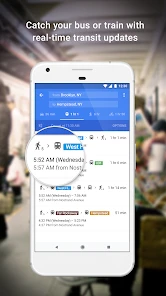
Yes. Google Maps supports route planning for walking, cycling, and public transportation, as well as driving. You can compare the options available for a destination and review estimated travel times before choosing a route. This is useful when you want to consider alternatives to driving or need directions for a journey that combines local exploration with getting from one place to another.
Can I use Google Maps to search for a specific address, business, or landmark?
Google Maps lets you search for specific locations, businesses, and landmarks, then view them on the map and plan a route. This makes it useful whether you already know where you are going or are looking for a place to visit. You can consider the location alongside nearby suggestions and route options before deciding how to get there.
Can I save an area in Google Maps before traveling somewhere with limited data?
Yes. Downloading a map for the area you expect to visit can help you use Google Maps when an internet connection is unavailable or unreliable. It is best to prepare while connected: find the area and download it before leaving. Offline maps are particularly useful for travelers who want access to maps and navigation without depending on mobile data throughout the trip.
Pros
- Accurate real-time navigation.
- Extensive location database.
- Offline maps available.
- Offers street view.
- Integration with other Google services.
Cons
- Can drain battery quickly.
- Occasional GPS inaccuracies.
- Requires internet for live updates.
- Complex interface for beginners.
- Privacy concerns over data usage.
- Category
- Travel & Local
- Version
- Varies with device