trivago: Compare hotel prices
- 5.83K
- 4.4
- Installs
- 100.00M
- Price
- Free

Screenshots

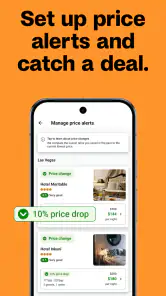
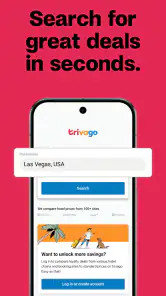


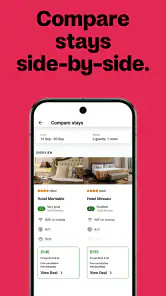

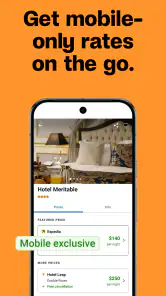
Analysis by Reviewed
Ever found yourself stuck in a city with a dozen hotel options and no idea where to start? Well, that’s where trivago: Compare hotel prices steps in. Let me take you through my experience using this nifty app that’s all about finding you the best place to crash without breaking the bank.
What’s the Deal with Trivago?
So, you open up trivago, and bam, you’re greeted with this super clean interface. It’s like the app knows you’re probably tired from travel planning and just want something easy to navigate. You pop in your desired location, and it spits out a list of hotels faster than you can say "room service." The app compares prices from a multitude of booking sites, ensuring you get the best deal. It’s like having a personal hotel-hunting assistant in your pocket.
Features That Make Trivago Stand Out
One feature I absolutely love is the filter option. You can narrow down your search based on ratings, price range, hotel type, and even amenities like WiFi and breakfast. It’s like the app is saying, "I got your back, buddy!" Another cool feature is the map view, where you can literally see all your options laid out geographically. This is a game-changer when you want to stay close to a particular landmark or area. Talk about convenience!
Let’s not forget the reviews section. I find it super handy to read real user reviews before making a decision. It’s comforting to know what other travelers have to say, especially about the little things like cleanliness and service quality. Plus, the app’s integration with major booking platforms means you’re getting comprehensive data all in one spot.
Booking a Hotel: As Easy as 1-2-3
Once you’ve zeroed in on your dream stay, booking is a breeze. The app redirects you to the booking site with the best price. It’s seamless and hassle-free, just how I like it. No more hopping from site to site trying to find that elusive best rate. With trivago, it’s all done in a few taps.
And hey, if you’re someone who plans trips last minute (guilty as charged), trivago’s got you covered. The app’s dynamic search adjusts to your ever-changing plans, showing up-to-date availability and pricing.
Final Thoughts
In a nutshell, trivago: Compare hotel prices is a must-have for any traveler. It’s reliable, easy to use, and saves you valuable time and money. Whether you’re planning a luxurious getaway or just need a bed for the night, trivago is your go-to app. It’s like having a savvy travel buddy who knows all the best spots and deals.
You May Like

Clash of Clans Is Won Between the Battles

Android Auto Makes the Case for Quieter Car Software

MobiOffice: Transforming Mobile Productivity with Seamless Integration

EA SPORTS FC™ Mobile Soccer: Redefining Mobile Sports Gaming

How Microsoft OneDrive Became a Mobile Productivity Giant

How Google Translate Breaks Language Barriers Effortlessly
So next time you’re on the road and need a place to rest your weary head, give trivago a whirl. You might just find your new favorite hotel booking sidekick. Safe travels!
trivago: Compare hotel prices Frequently Asked Questions
Can I use trivago to compare places to stay for a trip?
Yes. trivago is a travel app for searching and comparing accommodation offers in one place. Its selection covers deals from major booking sites, so you can review available options before deciding where to continue. The app is focused on helping you compare places to stay; the reservation process takes place on the booking site you choose.
Who makes trivago, and what is its reputation among users?
trivago is developed by trivago N.V. It has an average rating of 4.4 from around 357,000 ratings, with roughly 5,800 written reviews. These figures offer a broad indication of how users have responded to the app, but individual experiences can differ. You can use trivago to compare accommodation offers and decide which booking option suits your plans.
Does trivago show deals from more than one booking website?
Yes. trivago compares accommodation offers from major booking sites and brings the options together in one place, making it easier to review prices and choose where to continue. Its selection includes over five million accommodation deals. The app is a comparison tool, so the offer you select leads to the relevant booking site for the next steps.
Is trivago available for my device?
trivago is available as an app for Android and iOS. On Android, it requires Android 9 or later, so check your device’s operating system before downloading. The app is free to install, and its travel-search format is designed for comparing accommodation options on a mobile device. Availability and compatibility can vary by device and operating system.
What is trivago and how does it work?
Trivago is a hotel search and price comparison app that helps users find the best deals on hotel accommodations. By aggregating prices from various booking sites, trivago provides a comprehensive list of accommodations, allowing users to compare hotel prices, ratings, and reviews. This enables users to make informed decisions and find the perfect hotel that fits their budget and preferences.
Pros
- Comprehensive hotel database
- User-friendly interface
- Real-time price updates
- Customizable search filters
- Multi-currency support
Cons
- Can be overwhelming for new users
- Occasional price discrepancies
- Limited customer feedback
- In-app ads can be intrusive
- Requires internet connection
- Category
- Travel & Local
- Version
- 6.49.0