Digital Compass for Android
- 853.00
- 3.0
- Installs
- 10.00M
- Price
- Free

Screenshots
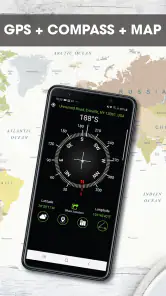
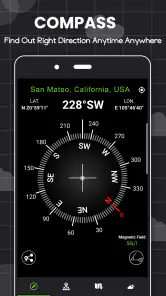
Analysis by Reviewed
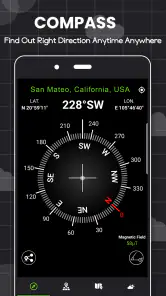
When several people share one Android phone during a day out, a compass can be more useful than it first sounds. One person can check a direction, hand the phone to someone else, and keep moving without passing around a paper map. I see Digital Compass as a simple orientation aid for that kind of moment, rather than a replacement for careful route planning or a dedicated navigation device.
A shared phone, with simple boundaries
Sharing the app does not require sharing a personal account: its core purpose is to show compass directions. That makes it easy to pass the phone between friends or household members who need a quick bearing. I would still agree on who is carrying the device and who is navigating; when everyone changes direction based on a different person’s reading, a small group can quickly become less coordinated.
Before relying on it outdoors, I’d open the compass somewhere with room to pause and check that the phone responds sensibly as I turn. Keep the device level, move it away from magnetic cases or nearby metal if the reading seems odd, and compare the indicated direction with a known landmark. These are practical habits, not special app features, and they help prevent misplaced confidence in any phone compass.
Coordinating a walk without overcomplicating it
Imagine a household arriving at a trail junction where the signs are unclear. One person can use the compass to check which way is north while another consults the route they already planned. The useful division is straightforward: the compass can help orient the group, but it does not decide which trail is safe or correct. I’d agree on a destination and a meeting point before setting off, especially if the group might separate briefly.
Compared with a map app, a compass is quicker when the question is simply “which way am I facing?” A map is better for seeing streets, trails, and route choices. Compared with a physical compass, the phone is convenient because it is likely already in someone’s pocket, but it depends on a charged device and a dependable sensor reading. For unfamiliar terrain, I would carry or prepare a proper map rather than treating a digital compass as the only navigation plan.
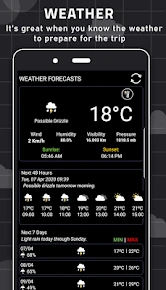
Digital Compass is a free weather-category app from Tools Generation Hub, although its main job is directional guidance. It is rated for Everyone, has a 3.0 average from around 64,000 ratings, and has been installed over 10 million times. The app began in January 2023, and version 10.0.6 is listed for Android 7.0 and newer. Optional in-app purchases range from $2.99 to $15.99 per item, so I’d check what is offered before buying anything; the basic appeal is the quick compass view.
Using Digital Compass in everyday situations
Ever found yourself lost in the woods or just trying to find your way in a new city? Well, let me introduce you to the Digital Compass app for Android. This nifty little tool is more than just your average compass. It's like having a mini-navigation system in your pocket, without the hassle of bulky maps or needing a constant internet connection.
Why the Digital Compass Stands Out
First off, let's talk about its user-friendly interface. From the moment you open the app, you're greeted with a sleek design that's both intuitive and easy to navigate. You don't need to be a tech guru to figure out how it works. It's as simple as pointing your phone in the direction you want to go, and voila! The compass does the rest, guiding you with a clear and accurate direction.
That straightforward interaction is useful when you are sharing the phone with someone who has not used the app before. I would hand it over while stationary, explain that the display is a directional reference, and let the other person turn slowly until the reading settles. This avoids a common group muddle: one person holding the phone still while another turns their own body and assumes the display has updated in the way they expect. A quick demonstration is often enough to make the handoff smooth.
Features Worth Exploring
What sets this app apart is its versatility. The Digital Compass isn't just about pointing north. It's packed with features that make it a must-have for any adventurer. For starters, it includes a GPS speedometer that lets you track how fast you're traveling, which is super handy if you're hiking or biking. There's also a level meter feature, perfect for those moments when you need to check the alignment of a surface.
Those extra tools broaden the app’s appeal, but I would treat them as occasional helpers rather than reasons to depend on it for a whole trip. A speed reading can be interesting while moving, yet it does not replace a route estimate or tell you whether your pace is sustainable. Likewise, a level meter can help with a quick check around the house, but I would not use a phone reading as the final word for careful installation work. The practical advantage is having several simple instruments together; the trade-off is that a phone remains a phone, with sensor readings that deserve a sanity check.
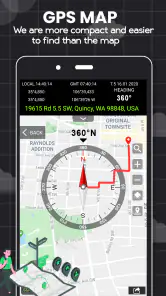
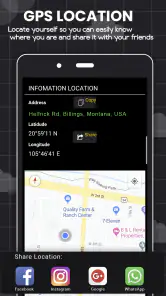
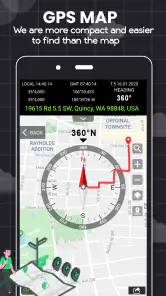
Another cool feature is the built-in map. You can switch between a traditional compass view and a map view, which integrates seamlessly with Google Maps. This means if you're in an unfamiliar area, you can easily see where you are and plan your route accordingly. Plus, with its offline capabilities, you don't have to worry about losing your way in areas with poor reception.
I’d think of the map and compass as complementary views, not interchangeable ones. A map can help you recognize a street pattern or identify a likely route; the compass can help you understand the direction you are facing. If I were preparing for a place with patchy reception, I would sort out the route before leaving and avoid assuming that every map detail will be available offline. The compass can still be useful as a directional reference, but it cannot tell me which turn to take or whether a path has changed.
Personal Experience
Now, let me share a little personal experience. I recently took the Digital Compass on a weekend hiking trip, and it was a game-changer. Not only did it keep me on the right path, but the GPS speedometer allowed me to keep track of my pace, ensuring I stayed on schedule. The app's accuracy was impressive, and I appreciated the peace of mind knowing I had a reliable tool to guide me.
For an everyday version of that outing, picture leaving a busy transit stop to meet friends at a park entrance. Rather than wandering while looking down at the screen, I’d step aside, use the compass to establish the direction of a nearby landmark, and then put the phone away while walking. If the streets make the route uncertain, I’d switch to a map for the actual turns. That small workflow makes the compass useful without letting a directional reading become a substitute for paying attention.
Another sensible use is dividing the task among people without making the phone a shared command center. One person can keep the device and check direction when the group pauses, while someone else remembers the next landmark or checks the route. That arrangement is especially helpful when children are along: they can take part in noticing which way the group is heading, but an adult should remain responsible for decisions, the device, and the route. The app does not need to be treated as a child’s independent navigation plan.
If I had to highlight one thing, it's the peace of mind this app provides. Whether you're an avid hiker, a city explorer, or just someone who likes knowing they won't get lost, this app delivers. It's straightforward, reliable, and incredibly useful.
I’d soften that confidence when the consequences of a wrong turn are serious. A phone compass is most reassuring when it confirms other clues, such as a trail sign, a familiar skyline, or a prepared route. If the direction conflicts with what the landscape suggests, I would stop and investigate rather than keep walking because the screen looks definite. Phone sensors can be affected by the device’s surroundings, so a calm recheck is better than treating one reading as proof.
What to expect from a phone compass
People often ask whether a compass app can work without an internet connection. The directional function relies on the phone’s sensors, so a network connection is not the same thing as the compass itself. But that does not make a phone a complete offline navigation system: maps, location services, and route information are separate concerns. I’d prepare any map or route I need before heading somewhere remote and keep a backup that does not depend on the phone.
Another useful question is whether it can replace a physical compass. For a quick orientation check in a neighborhood, park, or familiar walking area, I’m comfortable using the phone as a convenient aid. For backcountry travel, poor weather, or a journey where battery failure would matter, I prefer a traditional compass paired with a map and the knowledge to use them. The app is easiest to justify as a backup or casual tool, not as safety equipment on its own.
There is also a household trade-off around battery and attention. If the phone is being used for photos, calls, and directions by several people, keeping it open just to watch a compass is unnecessary. I would check the bearing at a stop, agree on the next landmark, and then let the phone rest. That helps preserve the device for the tasks that matter more and keeps the group looking at the surroundings rather than the screen.
Who I’d trust it to help—and when I’d choose something else
For an adult who wants a fast directional check, or a group that already has a route and needs to stay oriented, this can be a handy extra. I would be more cautious about making it the sole guide for a child or anyone unfamiliar with the area. The Everyone age rating describes the app’s content rating, not whether a young user can safely navigate alone; I’d keep an adult responsible for the route and the phone.
Its free starting point makes it easy to try for occasional use, but I would not pay for an optional item unless I understood exactly what it adds and knew I would use it. The app has a 3.0 average from a substantial audience, so I would approach claims of precision with a practical mindset: test it in a familiar place first and judge whether it behaves consistently on your own phone. If it does not agree with landmarks or a trusted map, don’t rely on it for that outing.
I’d recommend it most to people who want a compact directional aid for brief checks, occasional walks, or shared outings where the phone is already coming along. It is a weaker fit for someone who expects detailed turn-by-turn guidance, dependable route planning, or a complete outdoor safety system. A dedicated map app is the better choice when the route itself is the question; a physical compass and map are preferable when electronics are a liability.
One practical way to decide is to try it near home before taking it somewhere unfamiliar. Stand in an open spot, compare its direction with a known landmark, turn slowly, and repeat the check away from metal objects or a magnetic case. This tells you whether the phone’s compass behaves sensibly in your hands and helps you spot a confusing setup before it matters. It is a small test, but more useful than assuming every phone will produce the same reading.
Another question I’d settle before a shared outing is who keeps the phone. Passing it around is easy, but repeatedly changing hands can mean the person following the route is not the person watching the group. I’d designate one navigator, let others help with landmarks, and pause together at junctions. That gives the compass a clear job and reduces the chance that someone walks ahead based on a direction they misunderstood.
A practical household verdict
I’d keep Digital Compass in mind as a convenient backup for brief orientation checks, especially on walks, in a large park, or while finding a direction in an unfamiliar neighborhood. It is less suitable as the only tool for a long hike, a time-sensitive trip, or a route where precise turn-by-turn guidance matters. In those cases, a dedicated map app, downloaded route information, or a traditional compass and map may be the better choice.
For shared use, the simplest arrangement is also the most dependable: choose one navigator, keep the phone charged, agree on the destination, and use the compass alongside landmarks or a map. That gives the app a clear role without expecting it to solve every navigation problem. If all you need is a quick sense of direction, I find that role useful; if you need full route guidance, I’d reach for a map first.
Overall, I see this as a modest utility with a clear place in a household’s collection of everyday tools. Its appeal is not that it removes the need to think about navigation, but that it can answer one small question quickly: which direction am I facing? Used that way, it can help a group get oriented without handing responsibility to an app. I’d install it for occasional reference, test it before relying on it, and keep a more complete navigation option ready whenever the route or setting calls for one.
Digital Compass for Android Frequently Asked Questions
Can Digital Compass be used for hiking and travel?
Digital Compass is intended to show directions on an Android phone, which can make it useful as a quick reference during hiking, travel, or other outdoor activities. It relies on the phone’s magnetic sensor, so check that your device supports this hardware and that the reading is behaving sensibly before setting off. Treat it as a handy aid, not your only safety or navigation plan.
Does Digital Compass show true north or magnetic north?
The app is described as showing true North, South, East, and West directions, while its compass reading relies on your phone’s magnetic sensor and points toward magnetic north. These terms are not interchangeable in every navigation context, so keep in mind what kind of direction the display represents when using it. For everyday orientation, its compass-style direction display can provide a convenient reference.
Can I rely on Digital Compass as my only navigation tool?
Digital Compass can help you check which direction you are facing, but a direction reading alone is not a complete navigation plan. The app depends on the phone’s magnetic sensor, and nearby metal or electronic devices can affect its accuracy. For outdoor trips, use good judgment and avoid relying on a phone compass alone when a mistake could put you at risk.
Does Digital Compass need a magnetic sensor in my phone?
Yes. Digital Compass relies on a built-in magnetic sensor to determine directions, so the app may not work as intended on a phone without one. Many smartphones include this hardware, but it is worth checking your device’s specifications before downloading if you are unsure. Meeting the Android version requirement alone does not guarantee that the compass sensor is present.
Can I use Digital Compass without internet access?
Digital Compass can function without an internet connection because its core direction readings use the phone’s internal sensors. That makes it potentially useful in places with limited connectivity. If you use additional tools or features that depend on maps or location services, those may have separate connectivity needs. For a basic compass reading, internet access is not required.
Pros
- Accurate directional guidance
- User-friendly interface
- Compact size and lightweight
- Energy-efficient
- saves battery
- Offline functionality
Cons
- Ads can be intrusive
- Limited features compared to competitors
- May lag on older devices
- Not suitable for professional use
- Occasional calibration needed

- Category
- Weather
- Version
- 10.0.6