GPS Voice Navigation Live Maps
- 2.00
- 3.7
- Installs
- 10.00K
- Price
- Free
Screenshots
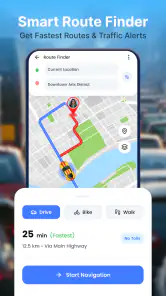


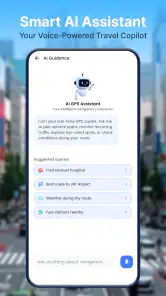
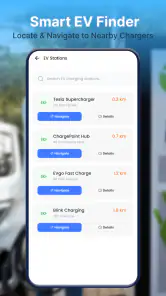
Analysis by Reviewed
I find GPS voice guidance most useful when it takes a small job off my mind: keeping track of the next turn while I focus on the road. GPS Voice Navigation Live Maps is aimed squarely at that everyday need. It is a free navigation app from Tools Generation Hub, with turn-by-turn directions, live maps and spoken guidance at its core. I would consider it for straightforward trips where I want audible prompts rather than constantly checking a map, while keeping a familiar navigation option available for journeys where I need more specialised planning.
One phone, several drivers
A shared phone can be a practical navigation device for a household: one person sets a destination before leaving, and another can follow the route later without having to learn a complicated system. The appeal here is the directness of voice-led directions. Once a route is underway, spoken prompts can help the driver keep attention on the journey instead of glancing down at the screen after every junction.
That shared-device convenience has a boundary. I would treat the phone as a device that needs a clear handoff, not assume the app has household profiles or a way to separate each person’s preferences. Before passing it to another driver, check that the right destination is active and that the person taking over understands the route currently shown. A quick glance at the map while parked is a better handover than trying to sort it out once the car is moving.
For a realistic example, imagine two adults sharing a car to collect someone from an unfamiliar address. The first driver can enter the destination and begin following the spoken directions; if the other person takes over, they can use the visible map to regain context before setting off. That approach makes the app useful as a simple navigation aid without assuming it manages the household’s plans for you.
Keep setup simple and the handoff deliberate
I would set up the trip before departure, rather than treating the first minutes on the road as time to explore. Navigation apps are easiest to judge when the driver can see the route and hear the instructions without fiddling with the phone. If you are sharing a device, agree who is choosing the destination and who is driving. That small routine helps avoid a common source of friction: a passenger changing the route while the driver is trying to follow it.
The app’s basic proposition is clear, but I would not infer that it offers separate user accounts, saved household destinations, or a particular way to sync preferences. If those features matter to your family, look for them in the app itself before making it the centre of a shared routine. For occasional trips, a shared phone and a careful handoff may be enough; for a busy household with distinct commutes and saved places, an established navigation service with the account tools you already use may fit better.
There is also a useful distinction between route guidance and trip coordination. Voice prompts can help someone follow a drive, but they do not by themselves tell another household member when the driver will arrive or whether plans have changed. I would share the destination and expected arrival separately through whichever communication method the household normally uses. That avoids expecting a navigation app to double as a family messaging or location-sharing service.
More From Our News Desk

Weather by Xiaomi Review: Clear at a Glance, Less Clear Up Close

X Under Pressure: Can It Recover When Posting Goes Wrong?

Clash of Clans Is Won Between the Battles

Android Auto Makes the Case for Quieter Car Software

MobiOffice: Transforming Mobile Productivity with Seamless Integration

EA SPORTS FC™ Mobile Soccer: Redefining Mobile Sports Gaming
What the navigation experience is best suited to
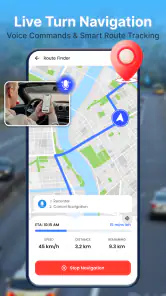
The combination of a live map and spoken turn guidance suits familiar errands as well as occasional journeys into an unfamiliar neighbourhood. A voice prompt is particularly useful when the road layout asks for a decision soon: for instance, when a driver must choose a lane or turn at a busy intersection. The map provides visual context, while the voice can reduce the temptation to keep looking down. Neither replaces attentive driving, but together they make a more comfortable routine than relying on a paper direction list.
One practical tip is to review the route while parked before moving off. That lets you notice whether the destination is correct and gives the passenger a chance to help with orientation. A second is to treat a spoken instruction as a prompt to check the actual road, not as permission to make a sudden manoeuvre. If a turn is missed, the safer response is to continue legally and let the navigation recover rather than force a last-second correction.
Another trade-off concerns how much planning you expect. The app is positioned around guidance while travelling, so I would choose it for getting from a starting point to a destination, not assume it will handle complex multi-stop itineraries or specialised travel needs. Drivers who need detailed route customisation, extensive place discovery, dependable offline preparation, or a particular traffic-planning workflow should compare those requirements directly with their usual map app before switching.
Age, trust and the person holding the phone
The content rating is Everyone, which makes the app broadly suitable from an age-rating perspective. That is different from saying every child should manage navigation independently. For a younger passenger, I would have an adult select the destination and oversee the device; the child can listen to directions or follow the map without being responsible for changes while the vehicle is moving.
For older relatives or anyone less comfortable with smartphone menus, voice guidance may be easier to follow than repeatedly reading small map labels. Still, I would test the setup together on a short, familiar trip before relying on it for an important appointment. Confirm that the person can recognise the spoken prompts, see the route clearly enough, and knows what to do if the journey no longer matches the screen. That is a more meaningful trust check than assuming a simple app is automatically simple for every user.
I would also keep the account and device boundary uncomplicated. If the phone belongs to one person but is used by others, the owner should decide what stays accessible on it and what gets handed over. I would not use a shared navigation session as a substitute for a person’s own communication or safety plan. The app can help with directions, but household rules about who may use the phone and when remain the household’s responsibility.
How it compares with familiar map apps
Against the map apps many people already have, this one’s attraction is its focused description: spoken navigation with a map alongside it. That can be enough for a driver who wants a dedicated route-following experience without making a broader ecosystem of saved places and planning tools the deciding factor. Its reported average is 3.7 from 15 ratings, with 10K+ installs, so I would read that as evidence of some adoption rather than a reason to assume it will outperform long-established alternatives on every route.
The small number of ratings also means I would make my own short-trip test before depending on it for a long or time-sensitive drive. The current version is 1.0.6, and the app is listed for Android 7.0 and later. It is free to install, with in-app purchases priced at $14.99 per item. I would check what an optional purchase covers before spending anything, and decide whether the free experience already meets the household’s needs.
Compared with a general-purpose maps app, the main question is not which one has the most features in theory; it is which one behaves predictably for your trips. If your usual app already handles directions, saved locations and route adjustments in a way you trust, there may be little reason to move. If you want to try a separate voice-navigation option, this app is a reasonable candidate for a low-stakes drive first, where you can compare its instructions and map presentation with what you normally use.
A household verdict based on the way you travel
GPS Voice Navigation Live Maps is easiest to recommend to someone who wants a straightforward route-following companion and is comfortable checking a new navigation app before relying on it. Its combination of spoken directions and a live map addresses a clear everyday need, and the Everyone rating makes its audience broad. Tools Generation Hub presents it as a free app, though optional purchases mean “free” should not be mistaken for a promise that every item or function has no cost.
I would skip it as a household’s only navigation choice if the family depends on advanced route planning, extensive offline use, shared accounts or other specific coordination tools. I would also avoid handing the phone to a driver without first checking the active destination and route. Those are not unusual demands, but they are the kinds of details that separate a convenient trial from a dependable routine.
My practical recommendation is to install it on the device that will actually travel, set a nearby destination while parked, and let the driver assess the spoken prompts and map together. If it feels clear and behaves well for the routes you take, it may earn a place in your household’s navigation toolkit. If your existing maps app is already easier to share and better matched to your planning habits, keeping that familiar option is the sensible choice.
Making a fair first trip comparison
A useful trial is not just a quick look at the map before deciding whether you like it. I would choose a route I already know, preferably one with a couple of ordinary turns and a familiar destination, then compare the spoken instructions with the route I normally take. That makes it easier to notice whether the prompts arrive at a comfortable moment and whether the map gives enough context to understand them. A route you know also gives you a safe reference point if the display seems confusing.
For a household, a second test should involve the person who will actually use the phone most often. A confident driver may find voice prompts intuitive, while someone else might need to adjust how they listen and glance at the map. The point is not to test the driver under pressure; it is to discover before an important trip whether the combination of audio and visual guidance suits that person. If it does not, the usual map app may be the better practical choice even if this one appears simpler at first.
I would also avoid judging navigation solely by whether a single instruction matches my preferred road. People choose different routes for reasons such as familiarity or convenience, and the app’s basic role is to guide the trip, not to know every household preference. If a suggested turn looks unsuitable, follow road signs and safe driving judgement. A navigation screen should support decisions, not overrule them.
Questions worth settling before relying on it
One question many drivers have is whether they can depend on directions when a connection is unreliable. I would not plan a route around an assumed offline mode; if you expect weak coverage, check the app’s actual behaviour before leaving and keep another way to orient yourself. The same caution applies to detailed traffic expectations: if live road conditions are central to your choice, compare the app directly with a service you already trust for that purpose rather than reading “live map” as a guarantee of every traffic feature.
Another practical question is whether the app can replace a household’s current map service. I would only make that change after checking the features your routine depends on, such as saved destinations, route choices and how easily different drivers can use the same device. A separate navigation app can be worthwhile when the household wants a simple route-following option, but switching everyone over is unnecessary if the familiar alternative already handles those jobs well.
People may also wonder whether the free download means the whole experience is cost-free. The app is free to install, but optional in-app items are priced at $14.99 each. I would treat any purchase as a decision to make after seeing what it covers in the app, not as something needed before the first test drive. That keeps the trial low-commitment and helps avoid paying for an item the household does not need.
Who will appreciate it, and who may not
This app makes the most sense for a driver who wants spoken route guidance paired with a map and is willing to test it on ordinary journeys before trusting it for something important. It can also suit a shared-car household that needs a simple way for different drivers to follow a destination, provided someone takes responsibility for preparing the route and checking the phone before the vehicle moves.
It is less compelling for people who expect one navigation tool to handle every part of travel planning. If your day involves several stops, specialised routing, careful offline preparation or ongoing coordination between family members, choose a service whose tools match those needs. Likewise, someone already satisfied with a familiar maps app may not gain much by adding another option unless they specifically want to compare its voice-led experience.
My final view is that GPS Voice Navigation Live Maps is worth a cautious, practical try rather than an automatic household switch. Set up a familiar short trip while parked, let the intended driver judge whether the prompts and map work together, and keep the usual navigation choice available until the new routine feels dependable. For straightforward point-to-point guidance, that is a sensible way to see whether it earns a place on the shared phone.
GPS Voice Navigation Live Maps Frequently Asked Questions
What is GPS Voice Navigation Live Maps, and what can it do?
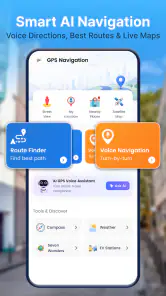
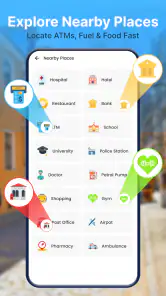
GPS Voice Navigation Live Maps is designed to help you plan routes and follow turn-by-turn directions while traveling. Depending on the version and features available on your device, it may also provide a live map view, estimated travel times, and information about nearby places. Check the app listing and in-app settings to confirm which navigation features are included in your version.
Does GPS Voice Navigation Live Maps work offline?
Offline availability can vary by app version, region, and the maps you have downloaded. Do not assume that every route or map will work without an internet connection: some features may need mobile data for map updates, traffic information, place searches, or route changes. Before traveling somewhere with poor coverage, check the app’s settings and test any available offline maps in advance.
Does the app provide live traffic information and reroute around delays?
The app’s name suggests live navigation, but the availability and accuracy of traffic updates can depend on your location, internet connection, and the specific version you install. If traffic information is offered, it may help you spot delays or adjust your route, but it should not be treated as guaranteed or perfectly current. Compare important directions with road signs and local conditions.
What permissions and personal information might GPS Voice Navigation Live Maps need?
Navigation apps commonly request location access so they can show your position and guide you along a route. Depending on the features you use, the app may also request access to notifications or other device functions. Review the permission prompts, privacy policy, and store listing before installing, and choose the least permissive settings that still allow the features you want to use.
Is GPS Voice Navigation Live Maps free, and what should I check before downloading?
The price, advertising, and availability of optional paid features can differ by platform, country, and app version, so check the current Google Play or App Store listing rather than assuming everything is free. Confirm that the publisher and device compatibility match your expectations, review recent user feedback, and check whether an internet connection is needed for the features you plan to use.
Pros
- Voice guidance lets you focus on the road instead of the screen.
- Live traffic information can help you avoid delays and choose alternate routes.
- Turn-by-turn directions make unfamiliar trips easier to follow.
- Map views provide useful context for locating roads and nearby places.
- Convenient for drivers who prefer spoken directions while navigating.
Cons
- Live traffic and map features may require a reliable internet connection.
- GPS use can drain battery quickly during longer trips.
- Voice prompts may be difficult to hear in a noisy vehicle.
- Route accuracy can vary with GPS reception and map data quality.
- Using navigation while driving still requires a safely mounted device.
- Category
- Maps & Navigation
- Version
- 1.0.6













