Compass360: Smart Compass tool
- 34.00
- 3.6
- Installs
- 1.00M
- Price
- Free
Screenshots
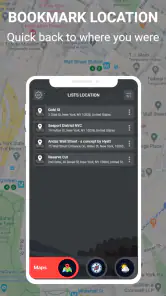
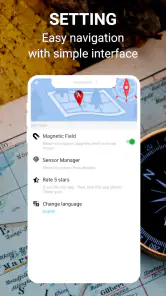
Analysis by Reviewed
I approached Compass360: Smart Compass tool as a practical weather companion rather than as a simple novelty compass. Its appeal is easy to understand: you want direction information in one place while also keeping an eye on changing conditions. In everyday use, that combination can be handy when you are walking somewhere unfamiliar, checking the sky before leaving home, or trying to make a quick outdoor decision without switching between several apps.
The app comes from Avn Global Application and is available free of charge for everyone. It belongs to the weather category, although the compass side gives it a slightly different character from a standard forecast app. I found that its usefulness depends less on long sessions and more on short, well-timed checks. You open it when location and weather context matter, read what is relevant, and then get on with your day.
It has attracted over a million installs, while its average score sits at 3.6 from roughly nine hundred ratings. That tells me it has reached a broad audience, but it also suggests that expectations may vary. People looking for a focused compass, a detailed meteorological dashboard, or highly advanced navigation tools may judge it differently. My experience is that this is best considered a lightweight utility with a useful weather angle, not a replacement for every specialized tool on a phone.
Where connectivity changes the experience
I find connectivity matters most when I treat a weather check as a decision point rather than a constant feed. Before leaving, I can confirm that the information is current, then decide what I need to carry or whether to adjust my plans. That preparation makes the next part of the workflow clearer: fitting a quick compass-and-weather check into the different places I use my phone.
Weather information is most useful at the moment you need it
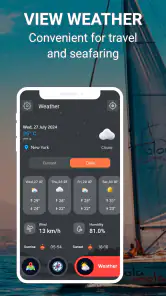
The strongest reason to open Compass360 is the connection between orientation and weather awareness. A direction reading can be useful on its own, but it becomes more meaningful when you are deciding whether to continue a walk, choose an exposed route, or wait before heading outside. Weather alerts and current conditions are the part of the experience that naturally depends on fresh information, so I treated the app as something to check when the phone can communicate reliably.
That matters because a compass and a weather service do not behave in exactly the same way. Direction sensing is tied to the phone’s hardware and surroundings, while weather information is associated with changing external conditions. If you are standing in a place with weak connectivity, the compass-oriented part may still feel like the immediate reason you opened the app, but weather-related information may not be equally timely. I would not plan an important outdoor decision around a screen that has not refreshed recently.
A realistic example is a short afternoon walk in a large park. Before leaving, I would use the app to orient myself and check whether the weather situation looks suitable. Once outside, I would use the direction display as a quick reference rather than expecting it to guide me along a complete route. If conditions begin to change, I would check again when the phone has a dependable connection. That simple workflow keeps the app in its strongest role: a quick decision aid.
More From Our News Desk

Weather by Xiaomi Review: Clear at a Glance, Less Clear Up Close

X Under Pressure: Can It Recover When Posting Goes Wrong?

Clash of Clans Is Won Between the Battles

Android Auto Makes the Case for Quieter Car Software

MobiOffice: Transforming Mobile Productivity with Seamless Integration

EA SPORTS FC™ Mobile Soccer: Redefining Mobile Sports Gaming
Alerts need context, not blind trust
The mention of weather alerts makes the app more useful than a static compass, but alerts should be treated as prompts to pay attention, not as a complete safety plan. Weather can change between updates, and a notification does not explain every local detail. If I were preparing for a long trip, I would still consult a fuller forecast source and consider the route, shelter, battery level, and local conditions.
This is one of the app’s important trade-offs. Its combined design reduces the need to jump between tools, but convenience can encourage overconfidence. I like having direction and weather awareness close together, yet I would not use Compass360 as my only source for severe-weather decisions or unfamiliar wilderness travel. A dedicated navigation app is better for route planning, while an established weather service may offer more depth for forecasts and warnings.
What to do when the signal is unreliable
Connectivity becomes especially noticeable in underground areas, dense buildings, remote paths, and crowded places where a mobile signal may fluctuate. In those moments, I would avoid repeatedly refreshing the app in the hope of forcing a result. That can waste time and battery without improving the information on screen. Instead, I would make the weather check before entering the weak-signal area and use the compass view only as a supporting reference while moving.
A useful habit is to separate preparation from live checking. Before leaving, look at the conditions and decide what you actually need to know. During the outing, open the app only when there is a clear question: which way am I facing, has the weather situation changed, or should I reconsider continuing? This makes the experience less dependent on constant network access and prevents the app from becoming a distraction.
How it fits real mobile situations
In practice, the app’s value changes with the situation: a brief check before crossing a campus is very different from relying on a phone deep into an unfamiliar outdoor route. I use the combined view to answer a narrow question, then hand off to a map or a fuller forecast when the task demands more detail. Thinking through those handoffs helps explain which everyday situations suit it best.
Short checks work better than continuous use
Compass360 feels designed for the way people actually use utility apps on a phone: open, inspect, close. I found the concept most convincing during brief transitions, such as leaving a station, crossing a campus, starting a walk, or deciding whether to take an outdoor route. In these situations, the compass gives immediate orientation while the weather side adds a reason to look at the screen before committing to a plan.
It is less compelling if you expect a full navigation workspace. A magnetic compass does not automatically tell you which street to take, and weather alerts do not replace a route map. If your main goal is turn-by-turn guidance, I would choose a dedicated navigation service. If your main goal is detailed hourly planning, I would lean toward a weather app built around forecasts. Compass360 earns its place when you want a compact combination rather than maximum depth in either area.
The phone environment affects the compass reading
One practical point that is easy to overlook is that compass readings can be affected by the surroundings. Metal structures, vehicles, magnetic objects, and electronic equipment may interfere with the phone’s sensors. When a direction seems wrong, I would first move away from the source of interference and hold the phone steadily instead of assuming the app itself is at fault.
For a more dependable quick check, I would compare the reading after changing position and orientation. If the result shifts dramatically in a location filled with metal or electrical equipment, treat that as a warning to verify your direction another way. This is especially important when leaving a building or standing beside a car, where the environment can be less neutral than it appears.
Use it as a pocket reference, not a travel planner
The app is a good match for people who enjoy walking, casual outdoor activities, sightseeing, and everyday orientation. It can also help someone who wants a simple way to connect “which way am I facing?” with “what are the conditions likely to be?” That is a narrower but genuinely useful purpose.
I would skip it if I needed professional navigation, detailed map layers, route recording, or dependable expedition planning. Those needs call for tools built around maps, tracks, and location workflows. I would also skip it if I wanted only a compass and disliked weather-related elements, because the combined concept is the point of the app rather than a distraction from it.
Compatibility and setup expectations
The current version is 1.2.3, and it supports devices running Android 7.0 or later. That makes it accessible to people using older Android phones, provided the device itself offers the relevant sensor experience. The age rating is Everyone, so the app is positioned as a general-purpose utility rather than something aimed at a restricted audience.
Because it is free, the barrier to trying it is low. I would still approach the first session with a practical checklist: make sure the phone’s sensors behave normally, confirm that weather information can refresh before leaving, and avoid treating one screen as a substitute for common-sense preparation. Those steps take little effort and make the app more useful immediately.
Failure, recovery, and sensible habits
When either the direction or weather information seems inconsistent, I prefer to pause and verify rather than keep tapping for reassurance. Moving away from nearby metal can help with compass uncertainty, while checking again after connectivity improves can help with weather context. These small recovery habits are useful, but they work best alongside sensible preparation and a clear limit on what I ask the app to do.
When a direction reading looks suspicious
The first recovery step is simple: stop moving, hold the phone level, and check the result again in a clearer location. A bad reading is not always an app failure. Nearby metal, a vehicle, or the way the phone is being held can all create confusion. I would also compare the direction with a known landmark rather than trusting a single glance.
If the reading remains inconsistent, I would use another orientation method before continuing. This is where honest expectations matter. Compass360 can be a convenient reference, but a phone sensor is not the same as a dedicated navigation instrument. The app is most valuable when it supports your judgment, not when it replaces it.
When weather information does not match what you see
Weather is local and changeable, so an alert or condition shown in the app should be read alongside the actual sky, wind, temperature, and surroundings. If the display seems out of step with reality, I would avoid assuming that the weather has become safe or dangerous solely because of one screen. Check again when the connection is stable and, for important plans, compare with a more detailed forecast source.
This does not make the weather function useless. It simply defines the right level of trust. For deciding whether to carry a light jacket or postpone a casual walk, a quick check can be enough. For boating, mountain travel, exposed cycling, or an event where conditions carry real risk, I would use more specialized information and keep a backup plan.
When the app is not the right tool
Recovery sometimes means changing tools rather than trying harder. If your task has become route navigation, use a map-based service. If you need a detailed forecast timeline, use a weather specialist. If you are in a situation where connectivity is uncertain, prepare before departure and avoid assuming that every weather detail will remain current throughout the trip.
This is also why I would not judge the app solely by whether it can replace a collection of other apps. Its value is convenience in a specific middle ground. It brings a compass-style reference and weather awareness into one compact experience, but that convenience comes with limits in depth, planning, and confidence during difficult conditions.
Using it without wasting attention or data
I keep attention and data use in check by opening the app for a specific decision, such as whether to take an outdoor route or which way I am facing, and closing it afterward. For a longer outing, I make the weather check before reception becomes uncertain and use a dedicated navigation option if I need route guidance. That deliberate routine leads to a simple final question: who will actually benefit from keeping this utility on their phone?
Check with a purpose
A data-conscious workflow is easy to adopt: open Compass360 before you leave, read the information relevant to the next part of your journey, and close it when you have made your decision. There is little benefit in repeatedly checking weather conditions every few minutes during an ordinary walk. Conditions can change, but constant refreshing does not automatically make the information better.
I would also avoid using the app as a background companion unless I had a specific reason to monitor conditions. Short sessions are more practical for a tool like this, especially when battery and mobile data matter. The best balance is to check before a transition, then check again only after a meaningful change in location or weather.
Prepare before moving into a weak-signal area
If I were heading into a rural area, a large building, or a place known for poor reception, I would make the important weather check while connected. I would then treat the compass as a limited orientation aid and keep my route simple. This approach does not assume that every part of the app behaves identically without a network; it simply avoids depending on a live refresh at the exact moment connectivity becomes uncertain.
For longer outings, I would also conserve the phone’s resources by keeping the screen off between checks and carrying a backup plan for navigation. Compass360 is easier to use responsibly when it is one part of preparation rather than the only thing you bring to an unfamiliar place.
Privacy and permission awareness
As with any utility that combines environmental information with a phone’s sensors, I would read the permission prompts carefully and grant only what feels necessary for the way I intend to use it. I do not see a reason to approve access automatically just because the app is free. A quick review of the device settings after installation can help you understand what the app is allowed to use and lets you change those choices later if your needs change.
That habit is useful beyond this particular app. Weather and compass tools can feel harmless, but a careful user should still know what is active on the phone. I prefer a setup where I understand why a permission is needed and can tell when the app is being used for a live check rather than left open unnecessarily.
Who should install it, and who should pass
I would recommend Compass360 to someone who wants a free, approachable weather utility with a compass element and expects to use it in short bursts. It makes sense for casual walkers, travelers exploring a new area, students moving around a large campus, and anyone who likes having orientation and weather context together. The Everyone rating also makes it suitable as a general household utility rather than a niche specialist product.
I would be more cautious about recommending it to hikers who depend on detailed route information, people planning activities in hazardous weather, or users who want a deep forecast history and rich map presentation. Those users will probably be happier with dedicated navigation and weather applications, even if that means switching between them.
The rating of 3.6 from around nine hundred ratings reflects that middle-ground nature. Some people will appreciate the convenience, while others may expect a more complete navigation or forecasting package. Its install base of more than a million shows that the basic idea has broad appeal, but popularity does not remove the need to match the tool to the task.
My connectivity verdict
After using it as a combined orientation and weather check, I see Compass360 as a practical companion for ordinary mobile situations. Its best moments happen before or during a short outing: check the conditions, confirm your general direction, and continue without opening several separate tools. The experience is most reliable when you plan around connectivity instead of assuming that every update will arrive wherever you happen to be.
The main limitation is also clear. This is not the app I would choose for serious navigation, detailed weather analysis, or high-risk outdoor planning. Its compass function should be interpreted with awareness of sensor interference, and its weather information should be treated as helpful context rather than a complete safety system.
My recommendation is straightforward: try it if you want a free, compact weather-and-direction utility and are comfortable using it for quick checks. Keep a dedicated map or forecast service for tasks that require depth, route planning, or stronger backup options. Used within those boundaries, Compass360: Smart Compass tool offers a sensible convenience without pretending to be every outdoor tool at once.
Compass360: Smart Compass tool Frequently Asked Questions
Is Compass360: Smart Compass tool free to download?
Compass360: Smart Compass tool is free to download, so you can try its compass features without an upfront purchase. Before installing, make sure you select the correct app and check that your device meets the operating-system requirement. As with any free app, review the permissions and settings during setup so you are comfortable with how it works on your phone.
Who makes Compass360: Smart Compass tool, and is it suitable for everyone?
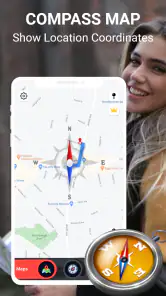
Compass360: Smart Compass tool is made by Avn Global Application and is rated for everyone, making it suitable for a broad audience. The app is listed in the Weather category, and its description highlights a magnetic compass alongside smart technology for directions and weather alerts. As with other navigation tools, young users should follow a trusted adult’s guidance when using it outdoors.
What is Compass360: Smart Compass tool used for?
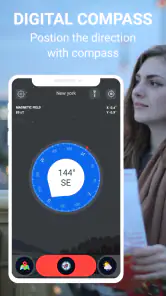
Compass360: Smart Compass tool is designed to help you determine direction and orientation using your phone’s built-in sensors. After opening the app, you can use the compass interface to identify north, south, east, and west, making it useful for hiking, travel, navigation, outdoor activities, map reading, or simply learning your current heading without carrying a traditional magnetic compass.
Does Compass360: Smart Compass tool work without an internet connection?
In most situations, a compass application can calculate direction without mobile data or Wi-Fi because it relies primarily on the device’s magnetometer and motion sensors. Compass360: Smart Compass tool may therefore remain useful in areas with limited coverage. However, features that display maps, location details, advertisements, or additional online information may require an internet connection, depending on the version installed.
How accurate is Compass360: Smart Compass tool?
The accuracy of Compass360: Smart Compass tool depends largely on the quality and calibration of your phone’s sensors. Nearby metal objects, magnets, electronic equipment, vehicle interiors, and magnetic phone accessories can interfere with readings. If the direction appears unstable, move away from possible interference and calibrate the device by following the on-screen instructions before relying on the compass for outdoor navigation.
Pros
- Works without mobile data or Wi‑Fi when device sensors are available.
- Simple interface makes basic direction checks quick and easy.
- Useful for hiking
- travel
- camping
- and everyday navigation tasks.
- Provides immediate heading feedback without requiring an account.
- Small
- lightweight tool that can be opened whenever needed.
Cons
- Accuracy depends on the phone’s magnetometer and surrounding interference.
- Requires calibration from time to time for reliable readings.
- May not work correctly on devices without a magnetic sensor.
- Extra readings can drain battery during extended outdoor use.
- Not a replacement for GPS navigation or professional compasses.
- Category
- Weather
- Version
- 1.2.3













