

Photo Video Maker Music Song
- 411.00
- 4.6
- Installs
- 5.00M
- Price
- Free

Screenshots
Analysis by Reviewed
I find Photo Video Maker Music Song most useful when I want a finished little montage without opening a full desktop-style editor. It focuses on combining photos and clips with music and visual touches, so the appeal is less about elaborate production and more about making everyday memories presentable with a few simple decisions. If that sounds like your kind of editing, it is worth considering; if you need precise control over a complex video, I would look elsewhere.
A quick way to turn a camera roll into a story
A realistic use is putting together a short recap after a family gathering: choose a handful of pictures and clips, trim away awkward starts, arrange the moments, then add music and a few captions. I would keep the selection small and intentional. That makes the slideshow easier to follow and avoids the common trap of adding every photo just because it is available. Text can also help explain a moment that is not obvious from the image, while stickers and effects work best as accents rather than the main attraction.
For a social post, I would make a separate version from the same source material instead of trying to make one video serve every purpose. A brief sequence with a clear beginning and ending tends to feel more considered than a long gallery dump. Before exporting, watch the whole project once with the sound on: music that feels right at the start can overwhelm a spoken clip later, and a transition that looks playful between two photos may distract when used throughout.
Where it fits among video editors
Compared with a conventional timeline editor, this app is better suited to quick photo-led slideshows and simple personal edits than layered, finely timed projects. Its combination of trimming, transitions, effects, text, stickers, and music gives casual users useful creative choices without asking them to learn a dense editing workflow. The trade-off is that anyone who wants detailed control over audio levels, multiple tracks, or exact timing may be more comfortable in a dedicated editor built around those tasks.
It also occupies a different niche from a basic gallery slideshow. A gallery tool can be quicker when you only want pictures to advance automatically; here, the editing options make sense when you want to shape the pace, add a title, or give the sequence a particular mood. I would choose the simplest tool that matches the job: this one for a personalized montage, a more advanced editor for a carefully cut project, and a gallery feature for an instant, no-fuss recap.
Practical choices before you begin
One useful habit is to sort or select your images before opening an editing project. It reduces time spent browsing and makes the order of the story easier to plan. I would also preview the first and last few seconds, since an abrupt opening or an unfinished-feeling ending can make an otherwise polished slideshow seem rushed. Keep effects consistent rather than changing the look on every image; restraint often makes a personal video feel more coherent.
Another trade-off is music. A soundtrack can tie still images together, but it may not suit a clip where the original voices or ambient sounds matter. In that case, build the montage around the moment rather than automatically adding a song. Export choices matter too: a higher-resolution file may be preferable for keeping, while a smaller one can be more convenient to share. The right choice depends on where the video will go, so check the finished result before deleting or moving the source files.
More From Our News Desk

 Weather - By Xiaomi
Weather by Xiaomi Review: Clear at a Glance, Less Clear Up Close
Xiaomi’s weather app makes everyday forecasts quick to scan, but its calm surface can leave useful details and recovery paths harder to find than they should be.

 X
XX Under Pressure: Can It Recover When Posting Goes Wrong?
A resilience-focused review of X, examining setup, mistaken posts, interruptions, weak connections, and the gaps that matter when recovery needs to be dependable.

 Clash of Clans
Clash of Clans Is Won Between the Battles
Its raids are quick; its community is a long-term project of coordination, teaching, rivalry, and shared responsibility—with all the friction that entails.

 Android Auto
Android Auto Makes the Case for Quieter Car Software
The car interface is no longer judged by how much it can do, but by how quietly it helps. Android Auto shows what drivers now expect—and what still gets in the way.

 MobiOffice: Word, Sheets, PDF
MobiOffice: Transforming Mobile Productivity with Seamless Integration
MobiOffice: Word, Sheets, PDF is redefining mobile productivity with a surprising blend of functionality and innovation.

 EA SPORTS FC Soccer Mobile 26
EA SPORTS FC™ Mobile Soccer: Redefining Mobile Sports Gaming
Dive into EA SPORTS FC™ Mobile Soccer, where immersive gameplay and strategic depth transform mobile sports gaming.
Latest News



Getting Started with Ease
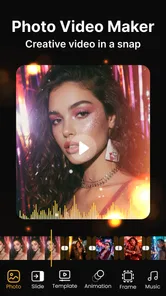
First off, the installation process was a breeze. Available for both Android and iOS, the app is lightweight and doesn't hog much space on your device. Once you fire it up, the user interface greets you with a simple and intuitive layout. Seriously, even if you're not tech-savvy, you'll feel right at home. The main screen offers you options to choose photos or videos from your gallery, or even capture new ones. It's as if the app is saying, "Hey, let's turn these moments into magic!"
Features That Stand Out
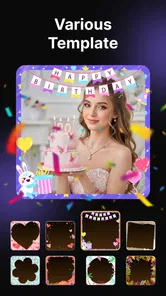
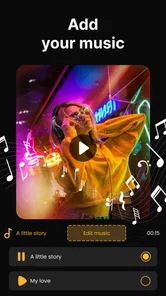
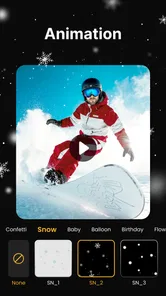
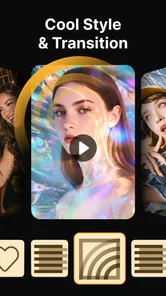
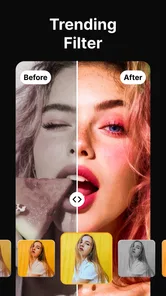
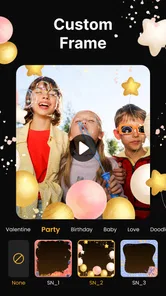
Now, let's talk features. The Photo Video Maker Music Song app comes packed with a plethora of tools to play around with. You can easily trim videos, add transitions, and sprinkle some cool effects to make your content pop. Plus, it offers a variety of music tracks that you can seamlessly integrate into your creations. If you're feeling a bit extra, there's even an option to add text overlays and stickers. Trust me, the customization options are endless, making each video uniquely yours.
For an app centered on photo-and-video creation, I would set expectations around convenience rather than professional finishing. The short name describes its purpose clearly, but the better test is whether the controls help you complete a small project without fuss. I would start with a few images, add one transition style and a single title, then decide whether more decoration genuinely improves the result. That workflow keeps the edit manageable and makes it easier to tell which choices are helping.
Performance and Usability
In terms of performance, the app doesn't disappoint. It runs smoothly without any noticeable lags or crashes, which is always a plus in my book. Editing videos is swift, and the app processes changes in real-time, so you don't have to twiddle your thumbs waiting for it to catch up. One thing I particularly appreciated is how it saves your projects automatically, ensuring you never lose your hard work. It's like the app has your back, always.
Making a small project feel finished
One practical way to keep a quick edit from feeling generic is to give it a simple shape before reaching for effects. For a school presentation, for example, I would open with a title that identifies the subject, group related images together, and use a final card to leave the viewer with a clear takeaway. That approach makes the video easier to understand even if someone watches it without context. It also gives captions a job beyond decoration: they can identify a place, explain a date, or connect two images that otherwise seem unrelated.
For a short trip recap, I would separate the material into a few visual beats rather than follow the camera roll in strict order. A wide view can establish the setting, a couple of close details can make the middle more personal, and a final image can provide a natural ending. The useful trade-off is that a carefully chosen sequence often says more than a longer edit. If the app makes browsing feel slow or you keep changing your mind among dozens of near-identical shots, selecting favorites in the phone’s gallery first can save effort and help the story hold together.
Who should give it a try
The app is aimed at people who want to make birthday recaps, trip highlights, school-project visuals, or simple social clips from material already on their phone. It is especially approachable if you have never edited a video and would rather experiment with a few creative tools than learn a complicated timeline. I would skip it if your work depends on exact frame-level cuts, several coordinated audio layers, or a highly controlled color grade; those needs call for a more specialist editor.
It is a free app, with in-app purchases ranging from $2.49 to $199.00 per item, so I would look carefully at any purchase prompt and decide whether a paid option is worth it for the way I actually edit. The content rating is Everyone, and the minimum Android requirement is 7.0. Avn Global Application is the developer. Those details make it easier to judge fit before installing, especially if you are setting up an older Android device or helping someone else choose an editor.
Its current place and what to expect
Photo Video Maker Music Song is in the video editing category, and its current version is 16.164.20251028. It was released on February 7, 2022, and its rating averages 4.6 from around 79,000 ratings; it has passed 5 million installs. That level of adoption suggests many people find the basic idea useful, though popularity alone cannot tell you whether its editing style matches yours. I would treat the version number as a snapshot of the app’s present state, not as proof of any particular feature change or a promise about what will come next.
If you already use it, the practical question is whether it still handles your usual workflow comfortably: can you find the media you want, make the edits you need, and get a result that looks right on the screen where you plan to share it? For a newcomer, it makes sense to test a short, low-stakes slideshow before committing time to a longer project. That reveals whether the available creative controls feel sufficient without turning the first attempt into a chore.
What its version history can—and cannot—tell you
The app’s release date and current version give a useful timeline anchor, but they do not reveal which tools changed between releases. I would not assume that a high-looking version number means a specific new editing feature has arrived. For someone already using it, the sensible way to judge an update is by the work at hand: open an existing draft, check that its media and edits still appear as expected, then make a small test export before relying on the app for something time-sensitive.
That cautious routine is worthwhile for any editor holding an unfinished personal project. Keep original photos and clips intact, and avoid making the only copy of an important memory depend on a draft inside an app. If you are installing it for the first time, begin with a disposable set of sample images rather than building a long slideshow immediately. You will learn whether the available controls suit you while keeping the stakes low.
What I would watch for
My main caution is to judge the final export, not only the editing preview. A project can feel smooth while you build it and still need a last check for pacing, readability, and whether the music suits the images. I would also keep an original copy of important photos and clips until I have confirmed the finished video is saved where I expect. Those small checks are useful with any mobile editor, but they matter particularly when a quick slideshow is the only copy of a shared moment.
Overall, this is a practical choice for casual creators who want to assemble photos and videos into a more personal story, with music and simple visual details. It is not the editor I would choose for intricate production, but it can be a comfortable middle ground between an automatic gallery slideshow and a more demanding editing app. If your aim is a tidy memory recap rather than a polished commercial piece, I think it is worth trying.
Sharing Your Creations
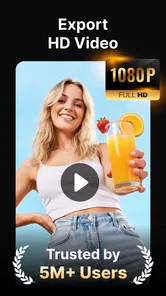
Once you've crafted your masterpiece, sharing it with the world is just a tap away. The app allows you to export videos in various resolutions, perfect for sharing on social media platforms or saving to your device. Whether you're aiming for high-quality content or a quick share, Photo Video Maker Music Song has got you covered. The sharing process is seamless, making it easy to show off your creativity.
Before sending a video, I would watch it once on the kind of screen where it will be seen. A caption that is easy to read on a phone may feel crowded when the clip is displayed elsewhere, and a soundtrack that works through headphones may be too prominent in a quiet room. For a group chat, a compact, clearly paced recap is often more considerate than a long sequence that takes time to load and watch. For keeping a memory, I would choose the export quality with future viewing in mind and retain the originals until I know the saved file is sound.
When I would choose another editor
There are clear situations where I would not start here. If a video needs tightly synchronized narration, music, and natural sound, or if every cut must land at a precise moment, a timeline-based editor gives more room to manage those layers. The same is true for work that needs consistent color treatment across many clips or repeated revisions from someone else. In those cases, the extra learning curve is worth it because the project depends on control rather than speed.
On the other hand, the more demanding tool is not automatically better for a casual job. If all I need is a short sequence from holiday photos, moving into a complex editor can add setup and decisions without improving the result. A gallery slideshow is even quicker when the only goal is to show images in order. I see this app’s best use as the middle choice: more personal shaping than an automatic slideshow, without making a simple memory recap feel like a production assignment.
In conclusion, if you're searching for a versatile and user-friendly video editing app, look no further than Photo Video Maker Music Song. It's got everything you need to turn your photos and videos into stunning masterpieces, all while keeping things fun and straightforward. So go ahead, give it a try, and unleash your inner filmmaker!
Photo Video Maker Music Song Frequently Asked Questions
How much storage should I have available before installing Photo Video Maker Music Song?
It is sensible to leave enough free space for the app and for the photos, videos, and music you plan to use in your projects. Editing and saving media can take additional room beyond the initial installation, especially when you work with several items. Check your device’s available storage before downloading, and remove or move files if space is tight.
Can I use Photo Video Maker Music Song without an internet connection?
The app is intended for creating photo-and-video slideshows with music and effects, so you can use it to work with media on your device. Whether every feature is available offline may depend on the specific tool or content you want to use. If you expect to edit while disconnected, it is a good idea to open the app and check that your chosen media and editing options are accessible.
Can I save and share the videos I create with Photo Video Maker Music Song?
Photo Video Maker Music Song is designed to help you create photo-and-video projects, and its features include options for exporting and sharing finished work. Once you have assembled a slideshow or edited a video, look through the available save and share controls to choose the option that suits you. Consider where you plan to post a creation and check its result before sharing.
Does Photo Video Maker Music Song add a watermark to exported videos?
A watermark can affect how a finished slideshow looks, particularly if you plan to share it publicly or use it in a personal project. Before creating a longer video, try a brief project and inspect the export to see how the app presents the final result. Also review any export choices or purchase prompts shown in the app, since available options can vary.
Can I use my own photos, videos, and music in the app?
Photo Video Maker Music Song is made for combining photos, videos, and music in slideshow-style projects. You can select media from your device for editing, so make sure the files you want to use are accessible and that you are comfortable granting the necessary media permissions. If you plan to include music in a video you share, consider whether you have the right to use that track.
Pros
- Easy-to-use interface for beginners.
- Wide variety of music tracks available.
- Quick processing and video creation.
- High-quality video output.
- Supports multiple video formats.
Cons
- Limited editing features.
- Occasional app crashes reported.
- Ads can be intrusive at times.
- Premium features require payment.
- Limited customization options.













