Weather Radar & Weather Live
- 645.00
- 4.1
- Installs
- 1.00M
- Price
- Free
Screenshots
Analysis by Reviewed
When I plan a walk, a commute, or a day outside, I want more than a sun-or-rain symbol. A radar view can help me judge whether bad weather is moving toward my area or whether I have time to get where I’m going. That practical focus is what makes Weather Radar & Weather Live worth considering. It is a free weather app from Avn Global Application, rated for Everyone, and its radar, UV index, and snow information give me several useful angles for planning. I would still treat any forecast as guidance rather than a guarantee, especially when timing matters.
Trust starts with what the app shows
Weather information can influence decisions about travel, outdoor work, and family plans, so I value clear, usable forecasts over dramatic claims. The app has an average rating of 4.1 from around 20,000 ratings, with about 645 written reviews, and it has been installed over a million times. Those figures suggest that many people have tried it, but they do not tell me whether a particular forecast will be right for my neighborhood on a particular afternoon. I use the app as one planning input, not as an official warning service or a substitute for local emergency guidance.
One useful habit is to look at the radar before leaving, then check it again if the weather is changing quickly. A still forecast can tell me what conditions are expected; the radar view can help me see the shape and movement of precipitation. I would avoid reading too much into a single glance, though. A colored patch on a map is not a promise that rain will begin at my exact location at an exact minute, and local conditions can vary from one street or part of town to another.
Useful controls, with sensible limits
The app’s weather tools are most helpful when I have a specific decision to make. For a walk, I can check rain conditions and the UV index; for a winter outing, a snow report may be more relevant. That combination is more practical than checking only the daily high and low. I would also keep notifications selective: an alert for conditions that could change a real plan is more useful than turning on every possible notice and learning to ignore them.
It is worth checking the app’s visible settings and choices when you first open it, particularly before enabling notifications or making a purchase. The app is free to download, but it offers in-app purchases ranging from $1.99 to $94.99 per item, so I would review each purchase screen carefully and decide whether anything offered solves a need I actually have. I would not assume a paid option is necessary for ordinary weather checks. The current version is 2.4.4, and the app requires Android 7.0 or later.
When weather information becomes personal
Location is central to local forecasts, which makes it worth pausing over the choices presented by any weather app. I prefer to consider whether I can enter or select a place manually rather than grant access to my device’s location, if that option is available in the app. I also review notification choices separately: knowing the forecast and receiving alerts are different needs. These are sensible checks, not claims about specific permissions or data practices. If privacy is a major concern, read the app’s current permission prompts and privacy information before deciding what to enable.
For a realistic example, imagine I have a lunchtime walk planned and a longer trip later in the day. I would check the local forecast and radar before leaving, use the UV index to think about sun exposure, and look again before setting out for the later trip if clouds are building. In winter, I would give the snow report more weight for an outdoor plan. This workflow helps me ask better questions—whether to bring a layer, shift the walk, or make a backup plan—without pretending that an app can remove uncertainty from the weather.
More From Our News Desk

Weather by Xiaomi Review: Clear at a Glance, Less Clear Up Close

X Under Pressure: Can It Recover When Posting Goes Wrong?

Clash of Clans Is Won Between the Battles

Android Auto Makes the Case for Quieter Car Software

MobiOffice: Transforming Mobile Productivity with Seamless Integration

EA SPORTS FC™ Mobile Soccer: Redefining Mobile Sports Gaming
Stay Ahead with Real-Time Weather Updates
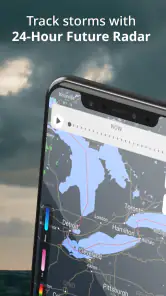
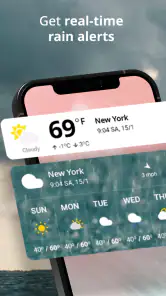
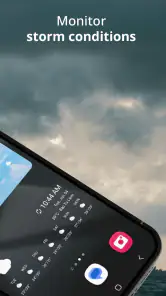
One of the standout features of the Weather Radar & Weather Live app is its real-time updates. It's like having a mini meteorologist in your pocket. The app provides live radar animations that let you track weather patterns as they happen. Whether it's rain, snow, or even a sunny day, you're always in the loop. I found this particularly useful when planning my daily commute. No more guessing if I need to carry that extra layer or leave it at home.
Detailed Forecasts at Your Fingertips
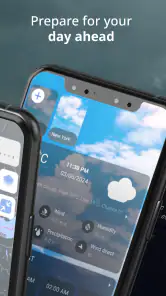
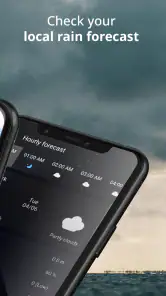
Weather apps are a dime a dozen, but what sets this one apart is the level of detail in its forecasts. You get hourly and weekly forecasts that are incredibly precise. I remember checking the forecast one morning and being skeptical about the predicted afternoon shower. Sure enough, right on time, the raindrops started falling. It's like the app knew more about my local weather than I did!
In my experience, the most useful way to combine these views is to use the weekly outlook for broad planning and the hourly forecast for decisions that are close at hand. If the week looks unsettled, I can keep a flexible outdoor plan rather than canceling it immediately; on the day itself, I can check the radar before choosing when to leave. That distinction matters because a forecast that is helpful for planning several days ahead may not answer the more immediate question of whether rain is approaching now.
Customizable Alerts
Another feature that I absolutely love is the customizable alerts. You can set notifications for specific weather conditions, so you never get caught off guard. I set mine to alert me of severe weather warnings, and it's been a game-changer. It’s like having a personalized weather assistant looking out for you. Plus, the alerts are customizable based on your preferences – whether you’re worried about a heatwave or a sudden cold front.
I would tailor those alerts to the way I actually use the phone. If I mainly need a reminder before commuting, a small number of relevant weather notices is easier to act on than a stream of notifications about conditions that do not affect my plans. Before relying on an alert, I would also check that notifications are enabled in both the app and the device settings. An alert feature is only useful if it is configured in a way that reaches me without becoming background noise.
The app also shines with its beautiful interface. The design is sleek, intuitive, and super easy to navigate. Even if you're not a tech-savvy person, you'll find it straightforward to use. The graphics are crisp, and the color schemes make it easy to differentiate between different weather conditions at a glance. I appreciate not having to squint at my screen to figure out if those are rain clouds or just a bit of overcast.
Where it fits among weather apps
Compared with a basic phone weather widget, this app puts more emphasis on looking at changing conditions and checking details such as UV and snow information. That is useful when I want to explore the forecast rather than glance at a temperature. On the other hand, someone who only wants a quick daily summary may find a built-in weather app simpler and less distracting. If I needed authoritative instructions during a dangerous event, I would rely on official local alerts as well; a consumer weather app is best treated as a planning companion, not the final word on safety.
This is also not the right choice for someone who dislikes notifications, prefers the fewest possible screens, or expects every forecast to be exact. Weather changes, and radar interpretation takes a little attention. I would recommend it more readily to people who regularly make outdoor plans, commute in variable conditions, or want to compare rain, UV, and snow considerations in one place. A casual user who checks the weather only once in a while may be perfectly happy with a simpler alternative.
Using radar without overreading it
A practical way to get more from radar is to compare what it shows with the decision in front of you. If I have a short errand, I look for whether precipitation appears to be moving across the area and check again before I leave, rather than treating one map as a precise countdown. For a longer drive, I would use the radar to spot a potentially wet stretch, then consult a broader forecast and plan a flexible stop or departure time. This is a useful distinction: radar can help with near-term movement, while a forecast gives context for the day.
It also helps to look at the map at a useful scale. A wide view can show the general direction of a weather system, but it may make local variation hard to judge; zooming closer can make a route or neighborhood easier to assess. I would not let a single pixel or color change decide whether an outdoor event is safe. When conditions are serious, official local warnings and instructions matter more than trying to interpret a consumer radar display on my own.
Small planning choices that make a difference
The UV index is easy to overlook because rain tends to dominate weather checks, but it can change how I prepare for a sunny walk. I would check it before leaving for an extended period outdoors and use that information alongside the forecast, rather than assuming mild temperatures mean low sun exposure. It is especially useful when a plan has little shade, such as waiting at a bus stop or walking across an open area. The app helps me notice that factor; it does not replace common-sense protection or personal judgment.
Snow information can be useful for a winter outing, but I would treat it as one part of preparation rather than a complete travel assessment. If I am deciding whether to walk, drive, or postpone a trip, I would consider the route and current local guidance as well as the report. This is where the app’s range of weather views is handy: I can check different concerns in one place, while still recognizing that a snow report cannot tell me every condition along a specific road or path.
What to expect before installing
For someone choosing between this and a built-in weather app, the main question is how often they want to investigate conditions. A simple widget is quicker for checking whether to take a coat; this app makes more sense if I often want to inspect radar, UV, or snow details. That extra context asks for a little more attention, so it is not automatically better for everyone. I would choose it for regular outdoor planning, but keep a simpler option if all I need is a quick glance.
The app is free to start, and the Everyone age rating makes it suitable for a broad audience. It has been available since May 27, 2020, and its 2.4.4 release supports Android 7.0 and later. Those basics make it straightforward to assess compatibility, but they do not answer whether it will suit an iPhone user or every device configuration. Before installing, I would check the relevant app store and confirm that my device meets the requirements shown there.
Why You Need It
In a world where the weather can be unpredictable, having the Weather Radar & Weather Live app is like having a secret weapon. It's not just about staying dry or warm; it's about being prepared for whatever Mother Nature throws your way. Whether you're planning a trip, a day out, or just your daily routine, knowing the weather is essential, and this app delivers on every front.
So, if you're tired of being caught off guard by the weather, give this app a try. With its accurate forecasts, real-time updates, and user-friendly interface, it’s bound to become a staple on your smartphone. Trust me, once you start using it, you'll wonder how you ever planned your days without it.
My cautious verdict
I like the app’s mix of radar, forecast views, UV information, and snow reporting because it supports concrete everyday choices rather than just showing a temperature. The interface and alerts can make those checks convenient, but I would keep expectations grounded: forecasts are estimates, and the usefulness of alerts depends on settings and attention. It is free to start, while optional purchases make it worth reading prompts before tapping through. For someone who wants more weather context than a simple widget provides, it is a reasonable option; for someone seeking a bare-bones summary or an authoritative source for emergencies, another tool may suit the job better.
Weather Radar & Weather Live Frequently Asked Questions
Is Weather Radar & Weather Live suitable for quick checks before leaving home?
Yes, it is a weather app designed to help with everyday planning. Its radar scope focuses on predicting rainy days, so it can be useful for a quick look before you head out. You can also check the UV index and snow report when those details matter to your plans. For changing conditions, it is sensible to check again close to departure.
Who makes Weather Radar & Weather Live, and is it suitable for all ages?
Weather Radar & Weather Live is developed by Avn Global Application and is rated for Everyone. That makes it an option for general household use, including checking forecasts together when planning a day out. As with any weather app, the information is best treated as practical guidance for making plans, rather than as a substitute for using your judgment when conditions change.
Can I use Weather Radar & Weather Live to check conditions for a trip or outdoor activity?
The app is intended to help with everyday weather planning, and its radar scope focuses on predicting rainy days. You can check the forecast before heading out and use the UV index or snow report when deciding what to pack or whether plans may need adjusting. Forecasts are useful guidance, but conditions can change, so check again close to departure.
What features does Weather Radar & Weather Live offer?
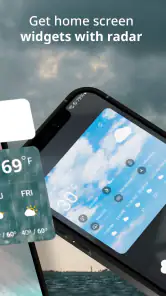
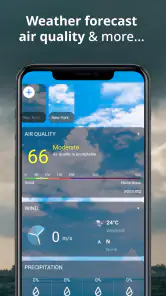
Weather Radar & Weather Live provides users with real-time weather updates, detailed radar maps, and severe weather alerts. It also offers a comprehensive 7-day forecast, temperature and precipitation trends, and customizable widgets for quick access to weather information. The app is designed to help users plan their day effectively by understanding current and future weather conditions.
Is Weather Radar & Weather Live available on both Android and iOS?
Yes, Weather Radar & Weather Live is available for download on both Android and iOS platforms. Users can find the app on the Google Play Store for Android devices and the Apple App Store for iOS devices. It offers a consistent user experience across both platforms, ensuring that all features are accessible regardless of the device being used.
Pros
- Accurate weather forecasts
- Live radar updates
- User-friendly interface
- Customizable alerts
- Detailed weather maps
Cons
- Ads interrupt experience
- Limited free features
- Requires internet connection
- Battery-consuming app
- Occasional loading issues
- Category
- Weather
- Version
- 2.4.4













