

Beauty Camera Selfie Makeup
- 37.00
- 4.6
- Installs
- 1.00M
- Price
- Free

Screenshots
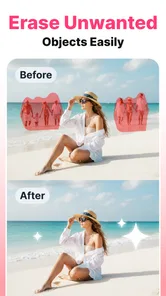
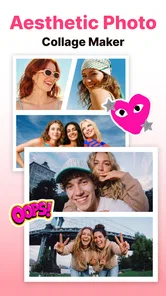
Analysis by Reviewed
I like a selfie editor best when it helps me make a small, deliberate change without turning a quick photo into a complicated project. Beauty Camera Selfie Makeup aims for that easy, playful approach: it is a free beauty app from Avn Global Application, with selfie makeup tools and a background remover at its core. I’d consider it for a casual portrait or a quick profile-picture refresh, rather than as a full replacement for a detailed photo editor.
Where it fits into a real photo routine
The best way to judge a beauty editor is not by how many effects it can show, but by whether it helps with the particular picture I have. A selfie taken in a bright room may need little more than a makeup preview, while a photo with a cluttered wall behind me might benefit more from separating the subject from the background. Beauty Camera Selfie Makeup brings those kinds of quick portrait jobs together, which is more useful than opening a broad editor and searching through tools I do not need.
That focus also makes it a practical choice for a small, specific task: refreshing a profile image before updating an account, preparing a portrait to send to family, or testing a different makeup mood before getting ready. I would not expect the app to rescue every poor photo. A very dark shot, an unflattering camera angle, or motion blur is usually better handled by retaking the picture than by layering on effects. The useful distinction is between polishing a photo that is already workable and trying to repair one that never had a clear subject.
Quick edits, with room to judge the result
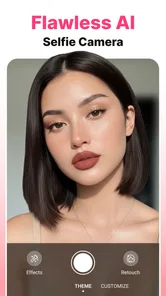
First off, the Beauty Camera Selfie Makeup app is incredibly easy to use. You don’t need to be a tech wizard to figure this one out, trust me. As soon as you open the app, you’re greeted with a user-friendly interface that makes navigation a breeze. Just snap a selfie or upload one from your gallery, and you’re ready to start your magical transformation.
How to get a more natural-looking selfie
The most useful way to approach beauty editing is to make one change at a time and check the overall image before saving. A light touch can help a photo feel more polished while keeping it recognizably yours; piling on several strong effects can make skin, makeup, and facial details compete for attention. I’d start with the look I want, then ease back any effect that becomes the first thing I notice.
That restraint matters especially when the photo will be seen at different sizes. A portrait that looks convincing on a phone may feel over-edited when cropped or viewed on a larger screen. Before sharing, I’d inspect the face edges and hair against the background, too: removing a background can be handy, but a busy outline or an awkward crop can draw more attention than the edit itself. Keeping the original image lets you compare and choose the version that feels right.
Features That Make You Shine
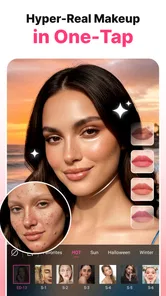
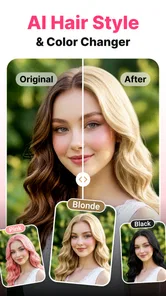
What sets this app apart is its impressive array of features. From basic edits like smoothing skin and whitening teeth to more advanced options like applying virtual makeup and changing your hairstyle, it’s got it all. The makeup feature is particularly fun; you can experiment with different looks without any commitment. Ever wondered how you’d look with a bold red lip or dramatic cat-eye? Now you can find out!
More From Our News Desk

 Weather - By Xiaomi
Weather by Xiaomi Review: Clear at a Glance, Less Clear Up Close
Xiaomi’s weather app makes everyday forecasts quick to scan, but its calm surface can leave useful details and recovery paths harder to find than they should be.

 X
XX Under Pressure: Can It Recover When Posting Goes Wrong?
A resilience-focused review of X, examining setup, mistaken posts, interruptions, weak connections, and the gaps that matter when recovery needs to be dependable.

 Clash of Clans
Clash of Clans Is Won Between the Battles
Its raids are quick; its community is a long-term project of coordination, teaching, rivalry, and shared responsibility—with all the friction that entails.

 Android Auto
Android Auto Makes the Case for Quieter Car Software
The car interface is no longer judged by how much it can do, but by how quietly it helps. Android Auto shows what drivers now expect—and what still gets in the way.

 MobiOffice: Word, Sheets, PDF
MobiOffice: Transforming Mobile Productivity with Seamless Integration
MobiOffice: Word, Sheets, PDF is redefining mobile productivity with a surprising blend of functionality and innovation.

 EA SPORTS FC Soccer Mobile 26
EA SPORTS FC™ Mobile Soccer: Redefining Mobile Sports Gaming
Dive into EA SPORTS FC™ Mobile Soccer, where immersive gameplay and strategic depth transform mobile sports gaming.
Latest News



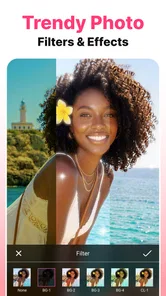
One of my favorite features has to be the real-time editing. You can see the effects live as you tweak them, which feels a bit like magic. It’s perfect for ensuring everything looks just right before you snap that perfect shot. Plus, the app offers a variety of filters to give your photos that final touch of perfection. Whether you’re going for a natural look or something more dramatic, there’s a filter for every mood.
A practical moment for the background remover
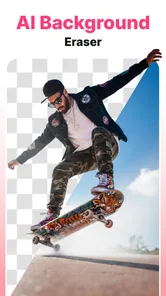
The background tool is useful when the setting is distracting and I want the person in the picture to stand out, such as turning a quick indoor selfie into a cleaner-looking profile image. It is not a substitute for carefully arranging a scene before a professional shoot, but it can save time when retaking the photo is inconvenient. For the cleanest result, I’d choose a picture where the subject is clearly separated from the surroundings; hair, glasses, and similarly fine edges are the places I’d check closely after removing the backdrop.
There is also a useful choice between editing a saved picture and working on a fresh selfie. For an important image, I’d use a copy from the gallery so the untouched original remains available. For a spontaneous look, live adjustments make it easier to assess the makeup while framing the shot. That difference gives the app two distinct roles: experimenting before taking a photo and tidying up one I already like.
Choosing the right photo before you edit
A small amount of preparation can make the editing stage less frustrating. I’d start with a photo where my face is in focus and the lighting is fairly even, then decide whether the goal is a makeup experiment, a simple portrait refresh, or a cleaner background. Choosing that goal first keeps me from treating every tool as a required step. It also makes it easier to spot when an effect is helping and when it is merely changing the image.
For a profile picture, I would check the final crop at the size people are likely to see it. A face that looks balanced in the full photo can become cramped when the image is displayed as a small circle. I’d leave a little breathing room around the head and avoid letting a background adjustment create a sharp-looking edge near the hair. These checks take only a moment, but they matter more than adding one more filter.
Sharing Your Looks
Once you’ve created your masterpiece, sharing it with the world is just a tap away. The app integrates seamlessly with social media platforms, making it super easy to post your enhanced selfies directly to Instagram, Facebook, or wherever you like to share. You can also save your photos in high resolution, so they look just as good printed as they do on your screen.
For a simple everyday workflow, I’d pick a well-lit photo, try one makeup or portrait adjustment, then compare the result with the unedited image before sharing. That makes it easier to avoid chasing every available effect. If I were preparing a batch of portraits for a consistent professional look, though, I’d lean toward a dedicated editor with more deliberate control over each image rather than relying on a quick selfie-focused workflow.
A low-pressure way to test a look
One genuinely useful role for virtual makeup is trying an idea before spending time on the real version. If I am deciding between a subtle everyday look and a bolder lip for an evening out, I can use a selfie to see whether the direction suits the picture I have in mind. That preview is not a substitute for testing makeup in person, since lighting and the screen can affect how colors appear, but it can help narrow down what I want to try.
I would treat these edits as inspiration rather than a final prescription. A look that works in a front-facing selfie may feel different in a full-length photo or under outdoor light. The app is most helpful when I use it to explore possibilities and then make my own choice, not when I expect a digital preview to predict exactly how a real-world look will appear.
What to expect from free and paid use
The app is free to download, and in-app purchases range from $2.99 to $27.99 per item. I’d try the free tools first and only consider paying if a particular option becomes part of my regular routine; there is little reason to spend just to test a look once. Its 4.7 average from around 2.7 thousand ratings suggests many users find it appealing, while the 34 written reviews offer a smaller pool of detailed feedback. It has over 500 thousand installs, is rated for everyone, and its current version is 1.7.3_20251114 for Android 7.0 and newer.
Before buying anything, I’d make sure I know which edit I actually want to use repeatedly. A one-off experiment does not necessarily justify an in-app purchase, while someone who regularly prepares selfies may find a paid option worthwhile if it fits their routine. Since the app is free to try, I would explore the basic experience first and decide based on whether the results feel natural enough for my own photos. The age rating of Everyone makes it broadly accessible, though younger users should still have a sensible adult conversation about purchases.
The version number is useful when checking compatibility or troubleshooting: this release is intended for Android 7.0 and newer. That makes the app relevant to a range of Android devices, but a minimum operating-system requirement is not a promise that every phone will produce the same editing experience. If the camera or screen is older, I’d judge the saved result on the device I plan to use it on rather than assuming a preview will look identical everywhere.
Compared with a general-purpose photo editor, this beauty app is aimed at faster face-focused decisions rather than broad image work. That focus is a plus when all I want is to preview makeup or make a selfie feel more finished. It is less suited to someone who wants extensive manual retouching, precise control over a complex composite, or a consistent workflow across many kinds of photography. For those jobs, a more advanced editing app is likely the better fit.
When another kind of editor makes more sense
Beauty Camera Selfie Makeup is not the tool I would choose for correcting a landscape, building a layered graphic, or matching the color of a whole set of product photos. General photo editors tend to make more sense when the subject is not a face or when I need careful control over the entire frame. A camera app with fewer beauty effects may also be a better choice for someone who wants the photo to stay close to what the lens captured.
The trade-off is convenience versus precision. A focused selfie app can make common portrait edits feel approachable, but that simplicity may not satisfy someone who wants to adjust every detail independently. If I were preparing a portrait for a portfolio or a client, I would want a more controlled editing process and time to inspect the result closely. For an informal social photo, the quick approach is often enough.
Who will enjoy it—and who may not
I’d recommend it to people who enjoy trying different selfie looks, want a quick way to remove a distracting background, or need an uncomplicated edit before sharing a portrait. It also suits someone who is curious about a makeup style but would rather preview it digitally than commit to wearing it. If you rarely take selfies, prefer untouched photos, or need detailed editing controls, the beauty-first approach may feel unnecessary. The best results come when I treat it as a playful finishing tool, not a promise that every picture needs correcting.
For a realistic everyday example, imagine I have a clear selfie taken at home that I want to use for a new profile photo. I would first decide whether the room behind me is distracting; if it is, I would try the background tool and inspect the hairline and glasses. Then I might preview a restrained makeup change, compare it with the original, and save only the version that still looks like me. If the cutout looks rough or the makeup feels too strong, I would stop and use the untouched picture rather than forcing the edit.
That workflow is also a good way to answer the practical question of whether the app is easy enough for occasional use: its appeal is precisely that a casual user can focus on one portrait instead of learning a full editing suite. But the same simplicity will not suit everyone. People who want to preserve every natural detail, dislike beauty filters, or prefer taking time to retouch manually may find that the quick, effect-led approach gets in their way.
Final Thoughts
In a world where first impressions often happen online, having a tool like the Beauty Camera Selfie Makeup app can be a game-changer. Whether you’re a selfie aficionado or just looking to spruce up your photos for a special occasion, this app offers a fun and simple way to elevate your selfie game. So why not give it a try and see how it can transform your pics? Who knows, you might just become the next selfie icon among your friends!
My recommendation is to try it if your photo routine is mostly casual selfies and you want quick ways to test makeup or tidy a distracting scene. I would keep the original, use effects selectively, and treat the free experience as a chance to decide whether any paid option is worth your own use. If you need fine-grained retouching or work across many types of images, a broader editor will probably serve you better. For the right person, though, this is an approachable little beauty tool that makes experimentation feel low-pressure.
Beauty Camera Selfie Makeup Frequently Asked Questions
Can I remove or change the background in a photo with Beauty Camera Selfie Makeup?
Yes. Beauty Camera Selfie Makeup includes an easy background remover, which can help you separate a person from the original setting and create a different look for a selfie. It is a useful option if you want to focus attention on the subject or give a portrait a cleaner appearance. The app is centered on beauty and selfie editing, so the background tool complements its makeup and enhancement features.
Who is Beauty Camera Selfie Makeup intended for, and is it suitable for younger users?
Beauty Camera Selfie Makeup is a beauty app for people who want to enhance selfies and experiment with makeup effects. Its content rating is Everyone, so it is marked as suitable for a general audience. As with any photo-editing app, younger users may still benefit from guidance about how edited images are shared and how they use camera or photo access on their device.
What features does Beauty Camera Selfie Makeup offer?
Beauty Camera Selfie Makeup app provides a variety of features, including real-time beautification tools, makeup effects, and filters to enhance selfies. Users can apply virtual makeup like lipstick, foundation, and blush, as well as adjust facial features such as eyes, lips, and nose. The app also includes skin smoothing and blemish removal options, making it a comprehensive tool for selfie enthusiasts.
Is Beauty Camera Selfie Makeup app free to use?
Yes, Beauty Camera Selfie Makeup app is free to download and use. However, it may offer in-app purchases or a premium version for additional features. Users can enjoy basic beautification and editing tools at no cost, but may need to pay for advanced effects, ad-free experience, or exclusive content. In-app purchases are listed at prices ranging from $2.99 to $27.99 per item, so check the purchase options before buying.
Does Beauty Camera Selfie Makeup require an internet connection?
The Beauty Camera Selfie Makeup app primarily works offline, allowing users to edit and enhance photos without an internet connection. However, certain features, such as downloading additional makeup effects or filters, may require an internet connection. Regular updates and accessing cloud storage options will also need internet access.
Pros
- User-friendly interface
- Wide range of filters
- Real-time makeup effects
- Customizable features
- High-quality output
Cons
- Contains in-app ads
- Requires internet connection
- Limited free features
- Consumes battery quickly
- Occasional app crashes













