AR Drawing : Trace Anything
- 378.00
- 4.5
- Installs
- 5.00M
- Price
- Free
Screenshots
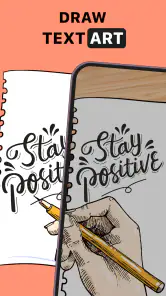
Analysis by Reviewed
At our kitchen table, a shared phone can turn a quiet afternoon into a small drawing session: one person chooses an image, another steadies the paper, and everyone takes a turn tracing. That kind of low-pressure activity is where AR Drawing: Trace Anything makes sense to me. It is a free art-and-design app from GeniusTools Labs, and its camera-based tracing approach is aimed at getting a picture onto paper rather than making you learn a full digital drawing program first.
Sharing one phone without losing the drawing
In practical use, the app’s appeal is the short path from choosing an image to making marks on paper. A child can try a simple outline while an adult helps position the phone; later, someone more confident can pick a detailed reference. The experience is less about producing a polished result in one sitting and more about making the first attempt feel approachable. That makes it useful for rainy-day activities, handmade cards, or a quick sketch beside a reference image.
For a shared device, I’d agree on the image and paper before handing the phone over. The phone is doing the projecting, so it needs to remain in a useful position while the artist works. A stand or another stable support can make the session less fiddly, and placing the paper on a flat surface helps keep the projected guide and the drawing aligned. These small choices matter more than rushing into a complicated picture.
Keep expectations and setup sensible
The app is best understood as a tracing aid, not an automatic drawing tool. You still have to control your pencil, interpret the outlines, and decide how much detail to keep. If the phone shifts, the guide may no longer line up with the marks already on the page, so I would avoid moving the setup halfway through a drawing. For a first try, choose a bold, uncluttered image and work at a comfortable scale; busy references can turn a relaxing exercise into a test of patience.
That trade-off is worth considering when comparing it with ordinary drawing apps. A conventional digital canvas is better if you want layers, editing tools, or a finished image that stays on screen. A printed reference is simpler if you only need to look back and forth while sketching. This app sits between those options: it uses the phone as a visual guide over physical paper, which can help with proportions, but it does not replace the feel or flexibility of drawing directly on a tablet.
Who will enjoy it—and who may not
I can see this being a good fit for beginners who feel stuck at the blank-page stage, parents looking for a hands-on creative activity, and hobbyists who want to practice observing outlines. The app is rated for Everyone, and it has an average rating of 4.5 from around 40,000 ratings, with more than five million installs. It is free to try, though in-app purchases range from under a dollar to just under a hundred dollars per item, so I’d check the purchase options before letting a child explore unsupervised.
That is not a claim that the app has household profiles or parental controls; I would treat a shared phone as a shared device and set expectations outside the app. If you need separate saved projects, a structured art curriculum, or precise drawing tools, a dedicated art program or an in-person class is likely a better choice. Someone who dislikes holding a device steady while drawing may also prefer a paper reference or a tablet-based workflow.
As someone who loves to dabble in art but often finds my sketches lacking, discovering AR Drawing: Trace Anything was like finding a hidden gem in the app store. This app promises to transform your drawing experience by bringing augmented reality into the mix. And let me tell you, it really does feel like a game-changer!
Revolutionizing the Way We Draw
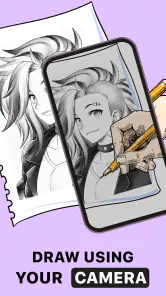
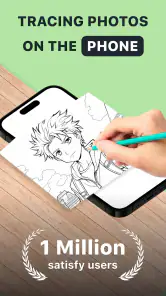
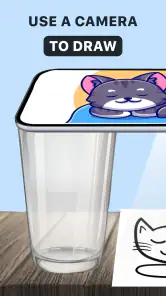
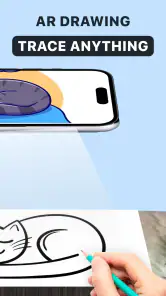
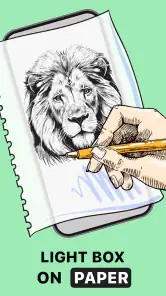
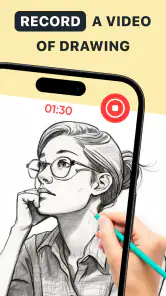
Imagine being able to trace anything you see in real life, but with the added flair of technology. That's exactly what AR Drawing: Trace Anything brings to the table. With its intuitive interface, the app lets you use your smartphone camera to project an image onto a piece of paper. All you need to do is follow the outlines and voila, you've got yourself a masterpiece!
Getting Started
When I first downloaded the app, I was a bit skeptical. How could something so simple actually work? The setup was a breeze – just point your camera at any image you want to trace, adjust the transparency to your liking, and start drawing. It felt almost like magic watching my hand mimic the lines on the screen, transforming blank pages into art.
Features That Stand Out
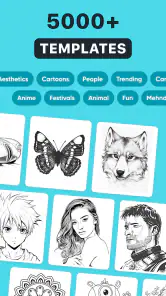
What I love about this app is its versatility. You can choose from a plethora of images in the app's gallery, or upload your own. Whether you're into landscapes, portraits, or abstract art, there's something here for everyone. Plus, the app supports both beginners and seasoned artists with varying levels of difficulty.
The app also boasts a handy feature that lets you adjust the brightness and contrast of the projected image. This means you can work in various lighting conditions without straining your eyes. And for those moments when you crave a bit of guidance, the app offers step-by-step tutorials that are easy to follow.
My Personal Take
Having used AR Drawing: Trace Anything for a couple of weeks now, I can confidently say it's a must-have for anyone interested in art. The app not only improves your drawing skills but also boosts your confidence in tackling more complex subjects. It's like having a virtual art teacher right in your pocket.
Sure, it's not a substitute for traditional art classes, but it's an excellent tool for practicing and honing your skills. The convenience and fun it brings to the table make it a standout choice for budding artists and hobbyists alike.
In conclusion, if you're looking for an innovative way to enhance your artistic abilities, give AR Drawing: Trace Anything a try. It's a delightful blend of technology and creativity that I believe will inspire a new wave of digital artists. Happy drawing!
A few useful habits for better results
One practical way to get more from a tracing session is to treat the first attempt as a layout exercise. Trace the largest shapes lightly, check that they sit comfortably on the page, and then add smaller details. This keeps a reference with lots of lines from overwhelming the drawing. I’d also keep a scrap sheet nearby to test pencil pressure and line weight before committing to the main page; the app guides placement, but the artist still chooses how the finished work should look.
When using a personal photo or image, choose one with a clear subject and strong separation between foreground and background. A busy photo can be difficult to interpret as a tracing guide, while a simple silhouette or object gives you a more readable starting point. For a household activity, letting each person select a different crop from the same picture can make the results feel personal without requiring everyone to learn a new workflow.
What to expect over time
Tracing can help build confidence with proportions, but it will not automatically teach freehand drawing. I’d use it as one part of practice: trace a subject once, then put the phone aside and try drawing the same object from memory or from a regular reference. That comparison makes the app more useful as a learning aid instead of a shortcut you depend on for every sketch. The app is currently at version 4.0.0 and supports Android 5.0 or later, which makes it accessible to many Android users with compatible devices.
It also helps to think about the room before starting. Strong glare, an awkward viewing angle, or a phone that keeps sliding can interrupt concentration, so a stable surface and comfortable lighting are worth sorting out first. On a shared device, agree who is choosing the picture and who is drawing next; this simple turn-taking avoids repeatedly changing the guide while someone is halfway through a line. The developer is GeniusTools Labs, and the app has 378 written reviews alongside its broader rating base.
Making a short session work for everyone
A useful household routine is to separate choosing from drawing. I’d let the next artist pick the image while the current person finishes, rather than swapping references mid-sketch. That small bit of coordination prevents a common frustration: one person changing the screen while another is trying to follow a line. It also gives younger or less confident artists a chance to choose an image that feels manageable without making the session feel like a lesson.
For a quick everyday example, imagine someone wants to make a handmade birthday card after dinner. A simple subject can be traced onto the front of the card or onto a separate sheet to attach later; the person drawing can focus on the outline, then add their own colors and details away from the phone. I would use scrap paper first if the final surface is small or valuable, since positioning and scale are easier to judge before committing to the card.
Choosing references and managing friction
There is a practical trade-off between an image that looks impressive on a screen and one that works well as a guide. A detailed portrait may have many overlapping edges, while a clean silhouette can make a more satisfying first attempt. I’d crop a personal picture around one clear subject instead of trying to trace every object in the scene. That gives the artist a defined task and reduces the temptation to chase tiny details before the main shape is in place.
The same idea helps when several people are taking turns. Rather than passing around an image with a complicated background, each person can work from a distinct, simple subject or crop. The shared phone then acts as a common tool, not a reason for everyone to compete over the same screen. This approach is especially helpful when the artists have different levels of patience or drawing experience.
People often wonder whether they need drawing experience before trying an AR tracing app. I don’t think so: the point is to make a starting outline easier to attempt, not to judge the result. But tracing still asks for steady hand movement and a willingness to make choices. If someone wants to learn how to invent forms from imagination, this can be a useful warm-up, not a substitute for practicing those skills directly.
Account boundaries, age, and trust
On a household phone, I would keep the device owner’s usual boundaries in mind rather than assuming that a drawing app separates each person’s activity. The store rating is Everyone, which makes the app suitable for a broad age range, but an age label does not decide how a family handles purchases or shared access. Since paid in-app options are available, an adult can check the purchase settings and agree on expectations before a child uses the device. That is a sensible precaution for any shared phone, not a special feature of this app.
There is also a difference between sharing an app and sharing an account. If several people use the same device, they should know that they are working within the device owner’s environment and take turns accordingly. I would avoid promising separate workspaces or private project areas; the better approach is to treat each drawing as a casual activity and save or photograph finished work using the household’s normal routine, if that suits them.
When another drawing method is better
Compared with a printed picture, the phone-based guide can be more convenient when you want the image positioned over paper, but paper is simpler when you need to move around or draw without arranging a device. A tablet art program is the stronger option for editing, layers, undoing marks, and keeping digital work organized. A pencil-and-paper class or guided lesson is better when the goal is structured instruction. I see this app as a bridge to making marks on real paper, not a replacement for those other methods.
It may also be the wrong fit for someone who wants every part of a drawing session to happen on one screen. The phone has to be positioned so the guide remains useful, and the artist still needs to look at the paper and control the pencil. If that physical setup sounds irritating, a regular drawing app with a digital canvas is likely more comfortable. If the goal is a quick, hands-on outline, though, the extra setup can be worth it.
My household verdict
For a family or group sharing one phone, I’d treat this as a casual creative tool rather than a complete art-learning setup. It can get people started, make a simple activity out of a chosen image, and offer a different route into drawing on paper. The main compromises are practical: the phone must stay positioned, detailed references can be fiddly, and the tracing guide does not make the drawing decisions for you.
That balance is why I’d recommend trying it when the goal is a relaxed sketching session, especially for someone who needs help getting started. I would skip it if you want a full-featured digital studio, independent project management, or a lesson plan that steadily teaches technique. Used with realistic expectations and a thoughtfully chosen reference, it offers a friendly bridge between looking at an image and attempting to draw it yourself.
AR Drawing : Trace Anything Frequently Asked Questions
What is the current version of AR Drawing: Trace Anything?
AR Drawing: Trace Anything is currently at version 4.0.0. If you already use an earlier release, checking the app store before installing can help you see whether an update is available for your device. The app is an Art & Design tool focused on tracing images, so its version is relevant if you want to use the latest release offered for your platform.
When was AR Drawing: Trace Anything released?
AR Drawing: Trace Anything was released on June 30, 2023. It is an app in the Art & Design category, built around using a visual guide to trace images and practice drawing. If you are deciding whether to try it, the release date is useful background, while the current version and compatibility with your device are more practical considerations before downloading.
Is AR Drawing: Trace Anything free to download and use?
AR Drawing: Trace Anything is free to download, so you can try its tracing approach without paying upfront. The app also offers in-app purchases, with individual items priced from $0.99 to $99.99. Check the available purchase options in the store before downloading if you want to understand what may cost extra. Its free download makes it easy to explore the basic drawing experience first.
Who develops AR Drawing: Trace Anything, and is it intended for all ages?
The app is developed by GeniusTools Labs and is rated Everyone, making it suitable for a broad audience, including people exploring drawing with family. Its focus is guided tracing, so it may appeal to children, students, beginners, and hobbyists who want a visual starting point for sketching. As with any creative app, parents can decide whether its features and any optional purchases are appropriate for younger users.
What is AR Drawing: Trace Anything?
AR Drawing: Trace Anything is an innovative app that leverages augmented reality technology to help users trace and draw objects with ease. By using your device's camera, the app projects images onto a real-world surface, allowing you to trace them directly onto paper. This app is perfect for artists, students, or anyone looking to improve their drawing skills through guided practice.
Pros
- Easy to use for beginners.
- Wide range of templates available.
- Helps improve drawing skills.
- No internet required to use.
- Affordable pricing.
Cons
- Limited editing tools.
- Occasional app crashes.
- Ads can be distracting.
- Requires a good camera.
- No option to save progress.

- Category
- Art & Design
- Version
- 4.0.0













