GPS Maps Voice Navigation App
- 35.00
- 4.8
- Installs
- 1.00M
- Price
- Free
Screenshots
Analysis by Reviewed
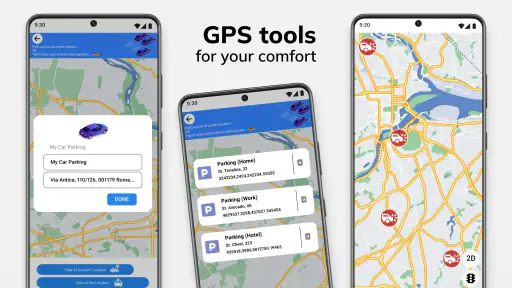
I decide on a navigation app by asking a practical question: will it help me make the next turn confidently, without turning every trip into a screen-watching exercise? GPS Maps Voice Navigation App aims to be an everyday driving companion, combining spoken directions with location tools and extras such as weather, a compass, and a clock. That mix makes it worth considering if you want more than a bare map, though I’d still judge it by how well it fits the routes and habits you actually have.
Choose it for a straightforward driving routine
For a familiar commute or a trip across town, voice guidance can make a real difference: I can keep my attention on the road and use the screen mainly to check the next maneuver. Live route updates are useful when a journey changes unexpectedly, while the ability to find my location gives the app a clear role even before I start navigating. I see the weather, compass, and clock as handy supporting tools rather than reasons on their own to choose it.
One useful habit with any navigation app is to check the route before pulling away, then mount the phone and let spoken prompts do the work. If I’m heading somewhere with uncertain reception, I’d prepare the route and map access in advance rather than assume a connection will be available at the destination. That small bit of planning matters more than relying on a navigation screen while moving.
Where it fits among navigation choices
Compared with a simple map viewer, this app is aimed more directly at getting a driver from one place to another with spoken guidance and route changes. Compared with a dedicated car-navigation device, it keeps the tools on a phone you may already carry. The trade-off is that a phone app depends on the phone being ready for a drive: a secure mount, enough battery, and a GPS signal all matter. If you already have a navigation setup that reliably handles your regular journeys, switching just for extra dashboard tools may not be worthwhile.
I’d also separate ordinary trip planning from situations where precision is critical. For a routine drive, a clear voice prompt and a quick location check can be enough. If I were choosing an app mainly for detailed public-transport itineraries, extensive local discovery, or a highly specialized navigation workflow, I’d compare options built around those needs instead of assuming this general driving-focused tool is the best fit.
First Impressions: Getting Started
Setting up the GPS Maps Voice Navigation App was a breeze. I'm not the most tech-savvy person out there, but the user-friendly interface made it a piece of cake. Just a few taps, and I was ready to hit the road. The app's design is clean and intuitive, which is always a plus in my book. The voice navigation feature caught my attention right off the bat. Imagine having a virtual co-pilot guiding you through the maze of streets without having to constantly glance at your phone. It’s like having a personal assistant who never gets tired!
Features Galore: What Makes It Stand Out?
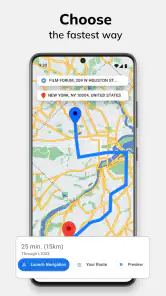
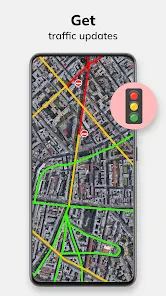
One of the standout features of this app is its ability to provide real-time traffic updates. I hate getting stuck in traffic as much as the next person, and this feature has saved me from more than a few jams. The app also offers route options, so whether you’re in a rush or just out for a leisurely drive, there’s something for everyone. Another feature worth mentioning is the offline maps. Yes, you heard that right! You can download maps and use them without an internet connection. This was a lifesaver during a recent trip where cell service was spotty at best.
More From Our News Desk

Clash of Clans Is Won Between the Battles

Android Auto Makes the Case for Quieter Car Software

MobiOffice: Transforming Mobile Productivity with Seamless Integration

EA SPORTS FC™ Mobile Soccer: Redefining Mobile Sports Gaming

How Microsoft OneDrive Became a Mobile Productivity Giant

How Google Translate Breaks Language Barriers Effortlessly
Performance: Smooth Sailing or Rocky Road?
In terms of performance, I was pleasantly surprised. The app runs smoothly without any noticeable lag, even on my slightly older phone model. The voice guidance is clear and precise, which is crucial when you're driving. I found it especially helpful when navigating busy city streets where missing a turn can mean a lot of frustration. The app recalibrates quickly if you go off course, ensuring you're back on track in no time.
However, no app is perfect. There were a few moments when the GPS signal took a little longer to lock in, but it wasn't a deal-breaker by any means. A quick restart usually did the trick.
Getting more from route preparation
I find it helps to think of navigation in two stages: preparation while parked and guidance once moving. Before leaving, I’d confirm the destination, check that the displayed starting point is sensible, and make sure the phone can stay in a position where I can hear prompts without reaching for it. This is especially useful when an address sits beside a busy road or has several possible entrances. A short check before setting off can prevent a last-minute screen search at the curb.
For a longer drive, I’d treat the weather and clock as planning aids rather than navigation features. Checking conditions before departure can help me decide whether to allow extra time, while a clock is useful for keeping an eye on the trip without opening another app. The compass can provide orientation when I’m stopped and trying to understand which way a road runs, but I wouldn’t rely on it as a replacement for clear route guidance. These extras are most valuable when they reduce app-hopping, not when they invite me to inspect the phone more often.
Features to weigh before switching
One practical question is whether offline maps cover the way you intend to travel and whether you’ve saved the relevant area before leaving a reliable connection. I wouldn’t treat offline access as a substitute for checking the route in advance; it is most useful as a backup for a known journey through patchy coverage. That makes it a good fit for road trips through areas where mobile service can vary, but less compelling if you expect a fully connected, constantly changing trip.
For a realistic everyday example, imagine leaving work for an unfamiliar appointment while traffic is building. I’d set the destination before driving, listen for the spoken directions, and glance at the map only when safely stopped. If the route changes, live updates can help me reassess; if the phone takes time to find GPS, I’d wait until the location settles rather than follow a potentially misplaced position. A stable phone mount and a charged device are simple preparations that make this kind of app easier to use responsibly.
When a different navigation tool is the better fit
The strongest alternative depends on what I need the trip to accomplish. A broad map-and-discovery service may be more convenient if I’m choosing a place to visit as well as finding the way there. A transit-focused planner makes more sense when the journey depends on connections, stops, or schedules. A dedicated in-car system can be preferable if I want navigation that does not rely on my phone’s battery or mount. Those are different priorities, not evidence that one kind of tool is universally better.
For a driver who mainly wants a spoken route and quick access to location, weather, compass, and time, this app’s combination is appealing. But I would not assume its route choices will match the preferences of someone who needs specialized road restrictions, extensive place research, or a carefully planned multi-stop itinerary. If those details matter every day, I’d compare those options on a familiar route before making this my main navigator.
Who should look elsewhere?
This is most appealing to drivers who want voice-led directions, location finding, and a few useful travel tools together. It may not be the right choice for someone who rarely drives, prefers a dedicated navigation device, or needs detailed transit planning as the main feature. I’d also avoid switching mid-trip without first learning the controls: even an intuitive interface is a distraction if you’re searching through it while moving. Try a short, familiar route first, when you can safely judge the prompts and screen layout.
GPS Maps is free to install, with optional in-app purchases ranging from under a dollar to around a hundred dollars per item. It is developed by GeniusTools Labs, has an Everyone age rating, and version 1.61 requires Android 7.0 or later. Its 4.8 average comes from around 14,000 ratings, and it has passed a million installs. Those figures suggest broad interest, but they don’t tell me whether its route behavior suits a particular neighborhood, so I’d test it on a route I know before relying on it for an important drive.
What to expect from the free starting point
Because the app costs nothing to install but offers optional purchases, I’d begin by using the core navigation tools on ordinary journeys rather than buying anything immediately. That gives me a chance to see whether the voice prompts, route handling, and location display work for my own driving. I’d also check the purchase screen carefully before confirming any paid item, especially if I only need basic turn-by-turn guidance. The best value depends on whether an extra solves a real problem in my routine, not on how many features appear in a menu.
It is also worth remembering that a phone-based navigator adds a few small costs of attention even when the app itself is free. I need to keep the battery in mind, secure the device, and avoid handling it while driving. If I’m sharing the car or often switching drivers, I’d make sure the next person can start a route without digging through settings. These practical details are easy to overlook, but they determine whether a navigation app feels dependable on a rushed morning.
Final Thoughts: Worth the Download?
So, is the GPS Maps Voice Navigation App worth downloading? In my opinion, absolutely! It’s packed with features that cater to both casual drivers and road warriors alike. The convenience of voice navigation combined with real-time updates and offline capabilities makes it a must-have for anyone who spends a lot of time on the road. Plus, it’s always evolving with updates that seem to genuinely enhance functionality.
In conclusion, if you're looking for a reliable navigation app that won't let you down, give this one a shot. You might just find it becomes your new favorite travel companion. Safe travels!
GPS Maps Voice Navigation App Frequently Asked Questions
Is GPS Maps Voice Navigation App free to download, and are there optional purchases?
The app is free to download, with optional in-app purchases priced from $0.99 to $99.99 per item. You can start with the free version and decide whether any paid extras suit your needs. Before purchasing, check the options displayed in the app so you understand what each item includes and whether it is useful for the way you plan to navigate.
Can I use GPS Maps Voice Navigation App on my iPhone or Android phone?
GPS Maps Voice Navigation App is an Android app that requires Android 7.0 or later. Before downloading, check the operating system on your device and confirm that the app is available for it in your app store. If you are looking for an iOS version, make sure it appears in the App Store for your device before planning to use it.
Is GPS Maps Voice Navigation App suitable for everyday trips as well as travel?
The app is focused on maps and navigation, with GPS navigation, live route updates, and a location-finding feature. Those tools can be useful when planning a journey or checking where you are while travelling. It also includes weather, a compass, and a clock, giving you a few extra travel references alongside its navigation purpose.
What does the GPS Maps Voice Navigation App show besides routes?
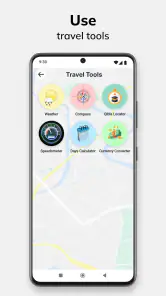
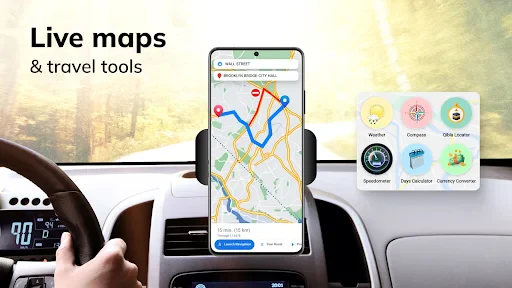
The app’s store summary highlights live route updates, GPS navigation, location finding, weather, a compass, and a clock. These extras make it more than a route planner: the compass and clock can be handy while travelling, while weather information offers another quick reference during a journey. The core purpose, however, remains helping you navigate.
What features does the GPS Maps Voice Navigation App offer?
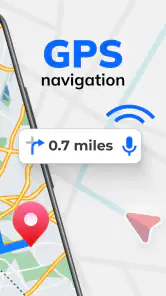
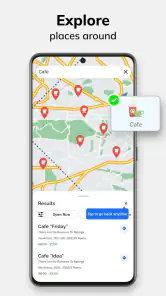
The GPS Maps Voice Navigation App provides users with real-time GPS navigation, voice-guided directions, offline maps, and points of interest. It also offers traffic updates, lane guidance, and speed limit alerts. This app is designed to enhance your travel experience by providing accurate and up-to-date navigation assistance.
Pros
- Accurate real-time GPS tracking.
- Easy-to-use voice navigation.
- Offline maps available.
- Customizable route options.
- Supports multiple languages.
Cons
- Frequent ads disrupt usage.
- High battery consumption.
- Requires data for updates.
- Limited free features.
- Occasional map inaccuracies.
- Category
- Maps & Navigation
- Version
- 1.61