Sweet Editor Camera Lite
- 71.00
- 4.7
- Installs
- 1.00M
- Price
- Free

Screenshots
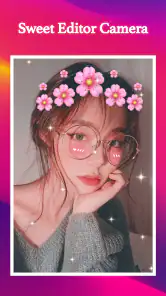

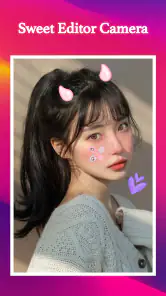


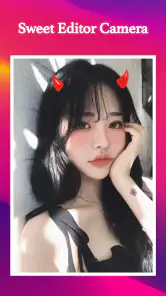
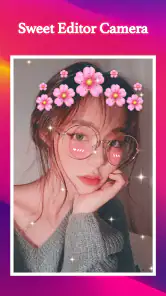

Analysis by Reviewed
I like the idea behind Sweet Editor Camera Lite: it puts a friendly, beauty-focused photo editor within easy reach rather than asking you to learn a complicated editing workflow. That makes it appealing for quick selfies and casual sharing, though I wouldn’t treat it as a replacement for a full photo-editing suite. Its strongest case is convenience; the main question is whether its look and level of control suit the pictures you actually take.
Where it fits in a beauty-editing routine
Sweet Editor Camera Lite is a free beauty app from GeniusTools Labs. It has a 4.7 average from around 9,700 ratings, and over a million installs, so it has clearly found an audience among people who want a straightforward way to polish portraits. The app is rated for Everyone, and its current version is 3.1.3. It can be a useful everyday tool if your goal is a flattering result without turning photo editing into a project.
One practical way to use a beauty filter is to treat it as a starting point, not a finishing instruction. I’d compare the edited image with the original before saving or sharing, especially in soft indoor light, where skin smoothing can make natural texture less visible. A lighter touch usually keeps the picture recognizable while still giving it the brighter, more finished feel you may want.
A quick edit versus a careful one
For an ordinary day, imagine taking a selfie before meeting a friend. You can choose a look, make a restrained adjustment, then check the result at full size before sending it. That last check matters: a preview can look pleasing on a small screen while an effect feels stronger when you see the whole image. If the picture is meant for a profile or a printed keepsake, I’d spend a moment comparing versions rather than choosing the first filter that looks attractive.
This is also where the app’s weekly sticker and filter additions may help keep casual edits feeling fresh. They give users a reason to revisit the camera for a new look, but a changing selection is not the same as detailed manual control. If you want precise color correction, selective adjustments, or a consistent style across a set of photos, a more advanced editor is likely a better fit.
Who will enjoy it—and who may not
I’d recommend it to people who mostly edit faces, prefer approachable controls, and want to make a photo share-ready without learning a professional workflow. It is less suited to someone who wants to retouch landscapes, fine-tune every color, or keep edits deliberately natural with exact control over each effect. Those users may be happier with a general-purpose editor, while someone who wants playful portrait styling may find Sweet Editor Camera Lite more inviting.
The app is free to install, with in-app purchases ranging from $0.99 to $99.99 per item. I’d check the purchase details before committing to anything and decide whether the available free editing already covers your needs. If you are only looking for an occasional selfie touch-up, there is no need to buy anything just because an option appears; if a paid item matters to your routine, weigh its cost against how often you will actually use it.
First Impressions and Interface
When I first opened the Sweet Editor Camera Lite, I was greeted by a sleek and intuitive interface. The app doesn’t bombard you with too many options right off the bat, which I found refreshing. Instead, it gives you a clean, straightforward menu that’s easy to navigate. Even if you’re not a tech whiz, you’ll find your way around without a hitch. The icons are clear and self-explanatory, so you’ll be editing your first photo in no time!
Features that Stand Out
One of the things I absolutely love about this app is the variety of editing tools it offers. From basic adjustments like brightness and contrast to more advanced features like filters and overlays, there’s something for everyone. And let me tell you, the filters are top-notch. Whether you want a vintage vibe or a modern look, you’ll find a filter that fits the bill.
Another cool feature is the beauty enhancement tool. It’s perfect for those days when you need a little extra confidence boost. The app smooths out skin tones and brightens your complexion without making you look like a completely different person. It’s subtle yet effective, which I appreciate. Plus, who doesn’t like looking their best in photos?
Performance and Usability
Performance-wise, the app runs smoothly on both Android and iOS. I didn’t experience any crashes or lags, which is a huge plus in my book. It’s also lightweight, so it doesn’t hog your phone’s resources or battery life. You can edit away without worrying about your phone slowing down.
Usability is another area where this app shines. The learning curve is minimal, so even if you’re new to photo editing, you’ll quickly get the hang of it. The tutorials are helpful but not intrusive, and the app does a good job of guiding you through the editing process step by step.
Making the most of quick portrait edits
For a more dependable result, I’d choose the photo before opening the editor rather than trying to rescue a shot that is badly lit or out of focus. Beauty effects can soften the look of a portrait, but they cannot replace clear light or a steady camera. Near a window, for example, a face is often easier to edit naturally than one photographed under a strong overhead lamp. Starting with a decent image gives the filters less work to do and makes it easier to judge whether the result still looks like you.
I also find it useful to decide what the image is for before choosing a style. A playful sticker can work for a private chat or a casual social post, while a profile picture usually benefits from a calmer treatment that will still look familiar weeks later. If you are preparing several pictures from the same outing, try to keep the effect strength similar instead of applying a different dramatic look to every frame. That small bit of consistency makes a group of photos feel more intentional.
Choosing between a camera editor and a general photo app
Compared with the usual all-purpose photo editors, this app’s appeal is its focus on face-friendly effects and quick styling. A general editor is normally the more sensible choice when you need cropping, precise tonal work, or edits that extend beyond portraits. Sweet Editor Camera Lite makes more sense when your main task is getting a selfie into a shareable state without sorting through a broad set of unrelated tools. The trade-off is straightforward: convenience and a beauty-oriented feel in exchange for less room to shape every detail.
That distinction matters if you are deciding whether to keep it alongside another editor. I would use this for a fast portrait treatment, then turn to a broader editor when a photo needs careful color balance or a crop that must fit a particular layout. There is no need to force one app to handle every image. For someone who rarely edits anything except selfies, a focused tool may be enough; for a hobbyist who works on varied subjects, it is more likely to be a companion than a complete workflow.
Small checks that prevent disappointing results
Before sharing, I’d look at the image in the size people will actually see it and ask whether the face still has believable texture. I’d also check the edges around hair and the face, where a strong filter or overlay can draw attention away from the person. If the picture feels too polished, backing off the effect or returning to the original is often better than adding another filter to compensate. Keeping an untouched copy is a useful habit whenever you are experimenting with a new look.
Another sensible habit is to try a new weekly addition on an unimportant picture first. That lets you see whether a sticker or filter suits your style before using it on a photo you care about. The rotating additions can make the app feel less repetitive, but they may also encourage novelty for its own sake. I’d treat them as optional creative prompts, not as a reason to change a look that already works.
Questions worth considering before installing
If you are wondering whether it is suitable for a first-time editor, I think its approachable beauty focus makes it a reasonable place to start, especially if your goal is a quick portrait rather than a lesson in advanced editing. If you are asking whether it can replace a professional-style editor, my answer is no: its strongest use is casual face-focused styling, not meticulous retouching or comprehensive image work. And if you are unsure whether you need to pay, I’d begin with the free install and only consider a purchase when a particular paid option has a clear, recurring use for you.
The app supports Android devices running version 5.0 or later. That makes it worth checking your device’s software before you install, particularly if you use an older phone. For iPhone owners, I would check the current store requirements on the device before relying on it, since compatibility can vary by platform. It is also rated for Everyone, which makes the intended audience broad, though I’d still use ordinary care when sharing edited portraits, especially images of children.
Final Thoughts
In conclusion, the Sweet Editor Camera Lite is a fantastic app for anyone looking to enhance their photos with ease. Its user-friendly interface, robust features, and reliable performance make it a must-have for photography enthusiasts and casual users alike. Whether you’re editing a selfie or capturing a breathtaking landscape, this app helps you make the most out of every shot. So, go ahead, give it a try and watch your photos transform right before your eyes!
My recommendation is more specific: I’d try it if you regularly want a quick, flattering treatment for portraits and enjoy experimenting with a light, playful style. I’d skip it as a main editor if you need careful control, a repeatable professional look, or serious work on subjects beyond faces. Its free entry point makes a low-commitment trial sensible, but the best result still comes from restraint—choose a look that suits the photo, compare it with the original, and stop before the edit becomes the subject.
Sweet Editor Camera Lite Frequently Asked Questions
Who develops Sweet Editor Camera Lite, and what is the app for?
Sweet Editor Camera Lite is a beauty app developed by GeniusTools Labs, focused on selfie filters and photo editing. Its store summary highlights a selfie filter camera and weekly live stickers and face filters, making it relevant for users who enjoy adding playful effects to portraits. It is presented as Sweet Editor, and its Everyone content rating makes it suitable for a broad audience.
What features does Sweet Editor Camera Lite offer for photo editing?
Sweet Editor Camera Lite offers a wide range of features to enhance your photos, including filters, effects, and various adjustment tools like brightness, contrast, and saturation. It also provides advanced editing capabilities such as background blur, face retouching, and collage making. The app aims to provide both basic and advanced editing tools to cater to beginners and experienced users alike.
Is Sweet Editor Camera Lite free to use, or does it include in-app purchases?
Sweet Editor Camera Lite is free to download and use, offering a variety of features at no cost. However, it does include in-app purchases for advanced tools and additional filter packs. These purchases are optional and designed to enhance the user experience for those who require more professional editing features. The available purchase options range from $0.99 to $99.99 per item, so it is worth checking purchase details before confirming anything.
How user-friendly is the interface of Sweet Editor Camera Lite for beginners?
The interface of Sweet Editor Camera Lite is designed with simplicity and ease of use in mind, making it highly user-friendly for beginners. The app features intuitive navigation and clear instructions for each tool, allowing users to quickly learn and apply various editing techniques. Even those new to photo editing will find it easy to create stunning images with minimal effort.
Does Sweet Editor Camera Lite support social media sharing?
Yes, Sweet Editor Camera Lite supports direct sharing to popular social media platforms like Instagram, Facebook, and Twitter. After editing your photos, you can easily share them directly from the app with just a few taps. This feature makes it convenient for users who frequently post photos online and want to showcase their edited images instantly.
Pros
- High-quality photo filters
- User-friendly interface
- Variety of editing tools
- Fast processing speed
- Low storage usage
Cons
- Limited free features
- In-app purchases required
- Occasional ads
- Requires internet connection
- Limited export options

- Category
- Beauty
- Version
- 3.1.3