Widget 2025: Aesthetic Widgets
- 1.61K
- 4.6
- Installs
- 5.00M
- Price
- Free
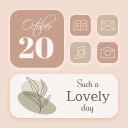
Screenshots
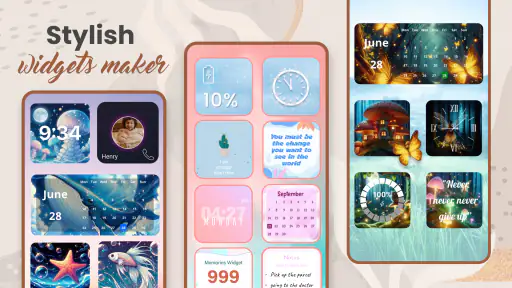
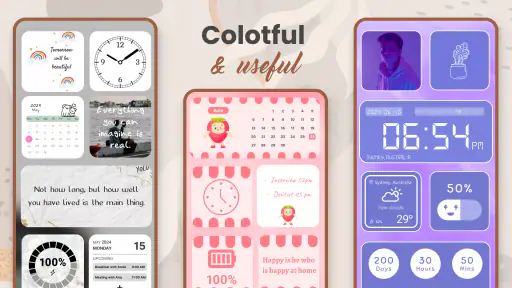
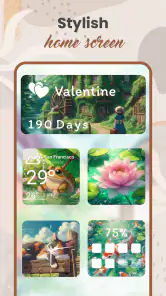
Analysis by Reviewed
I usually start personalizing a phone when its home screen feels busy but still makes me open apps for the same small tasks. That is the problem Widget 2025: Aesthetic Widgets is meant to address: putting useful glances and a chosen visual style in the same place. It is a free personalization app from GeniusTools Labs, rated for Everyone, and the 4.6 average across around 146,000 ratings gives a newcomer a useful sense of its audience. I would approach it as a way to reshape the home screen, rather than as a replacement for the apps that provide the information.
Start with a screen you actually use
Before choosing a look, I’d decide what I want to see without opening anything: perhaps the time and calendar on a work screen, or a weather glance and a short motivational reminder on a personal one. That small bit of planning matters. A widget can make an attractive screen more practical, but adding several just because they match can make it harder to find the app icons I reach for most.
A useful everyday workflow is to pick one area of the home screen, choose a widget style and size, then compare its color and visual weight with the wallpaper and nearby icons. I would make one change at a time and live with it for a day before adding more. That makes it easier to tell whether a design is genuinely helpful or merely looks good in the setup moment. The app is a particularly natural fit for people who enjoy adjusting their phone’s appearance; anyone who wants a set-and-forget screen may find the extra choices unnecessary.
I’d also start from a real routine rather than a mood board. For example, if I tend to check the date before leaving home, a calendar glance earns its space; if I never use a quote to guide my day, a quote widget is just another visual block. This simple filter helps keep the screen useful even when the available styles make it tempting to fill every gap. It also gives me a clear way to judge each choice after a few days: did it save a step, or did I stop noticing it?
First Impressions: A User-Friendly Interface
When I first launched Widget 2025: Aesthetic Widgets, I was greeted with a sleek and intuitive interface. Setting up the app was a breeze, with a straightforward tutorial guiding me through the initial steps. It's designed with everyday users in mind, so even if you're not tech-savvy, you'll find it easy to navigate. The app offers a plethora of customizations that cater to almost every aesthetic preference out there. Whether you're into minimalist designs or vibrant, colorful layouts, there's something for everyone.
For a first session, I would treat the tutorial as orientation, not as a reason to build the finished screen immediately. A better test is to choose one item that solves a small, recurring annoyance, place it where my thumb or eyes naturally go, and then use the phone normally. If I’m deciding between a larger display and a more open home screen, I’d favor the smallest layout that remains readable. The screen has to work in motion, in bright rooms, and during quick checks, not only look composed while I’m editing it.
Customization Galore
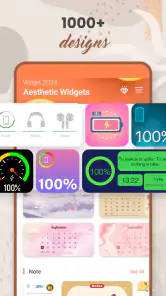
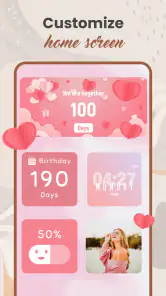
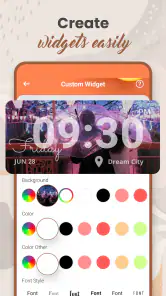
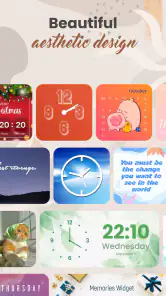
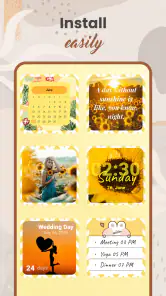
One of the standout features of this app is its extensive range of customization options. I spent hours experimenting with different widget styles, sizes, and colors. The app allows you to mix and match to create a look that's uniquely yours. You can personalize your clock, calendar, weather updates, and even add motivational quotes to your home screen. The level of detail you can achieve is impressive, turning your phone into a reflection of your style.
More From Our News Desk

Weather by Xiaomi Review: Clear at a Glance, Less Clear Up Close

X Under Pressure: Can It Recover When Posting Goes Wrong?

Clash of Clans Is Won Between the Battles

Android Auto Makes the Case for Quieter Car Software

MobiOffice: Transforming Mobile Productivity with Seamless Integration

EA SPORTS FC™ Mobile Soccer: Redefining Mobile Sports Gaming
The best trade-off I found is between decoration and legibility. A pale text color may blend into a light wallpaper, and a compact widget can look tidy while making information less comfortable to read. I’d test each choice at normal screen brightness and from the distance I usually hold my phone, not just while zoomed in on the design. If you use a busy wallpaper, a simpler color scheme can help the clock or calendar stand out without making the whole screen feel crowded.
A useful way to refine a design is to check it against the wallpaper’s brightest and darkest areas, rather than judging it against a blank preview. I’d also avoid matching every element to the exact same accent color: a little contrast can make the information easier to scan while still keeping the screen coordinated. These are small decisions, but they matter more than adding another widget when the real problem is that the existing one is hard to read.
Widgets also sit between two familiar alternatives: leaving the home screen mostly stock, which is simpler, and using a dedicated launcher or deeper system customization, which can change more of the phone’s behavior. This app’s appeal is its narrower focus on widget appearance and quick-glance content. It makes sense if that is the part you want to personalize; if you want to reorganize the entire interface or automate actions, a different kind of tool may be a better match.
Compared with manually arranging only the built-in widgets, this app is the more appealing route when visual consistency is a priority and you want to explore different looks in one place. The stock approach is still better for someone who values a familiar setup and wants as few extra decisions as possible. I’d choose a launcher only if changing app grids, gestures, or broader home-screen behavior is part of the goal; choosing this app for those jobs could lead to disappointment because its strength is the widget layer.
Performance and Usability
Now, aesthetics aside, let's talk about performance. After all, a pretty app is of no use if it slows down your phone, right? Thankfully, Widget 2025: Aesthetic Widgets runs smoothly without any noticeable lag. It’s optimized to use minimal resources, which means your device remains as zippy as ever. I tested it on both Android and iOS devices, and it performed consistently well across the board.
On Android, the current version is 85.1.4 and the minimum operating-system requirement is Android 5.0. I’d still treat the home screen itself as the final test: see whether the chosen widgets fit your launcher and screen layout, and whether the information is readable where you placed it. The app has more than 5 million installs, but that popularity does not guarantee every style will suit every device or personal routine.
One detail worth checking before settling on a layout is how much room remains for the apps you use most. A widget can occupy a useful glance area but also push familiar icons lower or onto another screen. I’d move only one component at a time, then check whether the next action I need is still easy to reach. That makes it simpler to spot a layout problem and undo it without having to reconstruct the whole home screen.
One practical handoff to keep in mind is that a widget’s usefulness depends on the information it presents being relevant when you glance at it. I’d put the items I check most often in the easiest-to-see positions, then keep less-used decorative choices secondary. If a widget looks good but does not help me decide what to do next, I would remove it rather than let it take up valuable space.
For a realistic morning setup, I’d put the clock and date where I can see them while getting ready, then add a weather glance only if it changes what I wear or carry. The calendar can earn a place on a work-focused screen when I need to remember the day’s schedule; it does not need to sit beside the same information in a full calendar app. The result is a quick visual check, with the original apps still there when I need details or want to act on what I’ve seen.
That handoff from glance to action is important. A widget can help me notice a date or weather detail, but I still need to open the relevant app to explore more information or complete a task. I would not count every glance as time saved if it merely adds another step before the action I was going to take anyway. The best layout makes the first check useful and keeps the next step obvious.
If the information doesn’t feel current enough for a decision, or if I find myself opening an app immediately every time, I’d reconsider whether that widget is worth its space. This is not a failure of the look; it is a sign that the particular glance does not fit my routine. Trying a simpler screen can be more effective than continuing to adjust colors around information I rarely use.
Why You Should Try It
If you’re someone who enjoys customizing and personalizing your devices, this app is a must-try. It not only enhances the visual appeal of your home screen but also adds a layer of functionality that makes everyday tasks easier. I found myself checking my phone more often just to admire my handiwork!
I can see it working especially well for someone who likes changing a phone’s look with the season, a new wallpaper, or a different work routine. A student might give a calendar glance a prominent spot during a busy stretch, while someone who keeps a phone on a desk may prefer a larger, calmer clock treatment. Those are not reasons to cover every available space; they are reasons to tailor one or two visible areas around the way the phone is actually used.
It is less compelling for someone who rarely looks at the home screen, already finds the default setup clear, or prefers to open a dedicated app for every detail. If that describes you, the customization time may outweigh the benefit. I’d also skip it if the main thing you want is a complete change to navigation or a more extensive automation setup; a widget-focused personalization app is not the same as a launcher or task tool.
It is free to download, with in-app purchases ranging from $0.99 to $99.99 per item, so I’d check the purchase screen carefully before committing to anything. The app was released on July 19, 2022, and its Everyone rating makes it broadly suitable, but that does not mean the design process will appeal to every user. If you only want the default clock and calendar, the built-in options may be enough; if you like refining colors and layout, the extra control is the point.
The price range is a reason to pause and make sure any paid choice is something I genuinely want, rather than assuming every visual option is included at no cost. I’d begin with the free experience, see whether a specific style solves a real need, and only then decide whether spending makes sense. That approach is especially useful for a personalization app, where it is easy to confuse novelty with lasting value.
One question I’d ask before installing is whether the app suits the phone I have. The Android requirement is clear, but iPhone users should check the version and setup available for their own device before planning a particular layout. Across either platform, the practical answer is to test the result on the actual home screen: a design that looks good in the app still has to fit the operating system’s layout and the user’s habits.
Another sensible question is whether installing it replaces my existing clock, calendar, or weather apps. I would not treat it that way. The point is to put selected information in view, while the underlying apps remain the places to open for fuller details or actions. That distinction keeps expectations realistic and helps explain why the app can make a phone feel more personal without changing every part of how it works.
With 1.6 thousand reviews alongside its broad audience, I’d still make my own decision based on the screen I want rather than expecting other people’s tastes to match mine. A rating can offer a quick sense of reception, but widget design is personal: what feels calm to me may feel too sparse to someone else. A short trial with one practical widget is a better test than building a detailed theme before I know whether I’ll use it.
In conclusion, Widget 2025: Aesthetic Widgets is a delightful app that offers both form and function. It's easy to use, packed with features, and doesn’t compromise on performance. So why not give it a go and add a touch of personality to your smartphone? You won't regret it!
My recommendation is to begin with one useful widget rather than redesigning the entire screen at once. That gives you a low-effort way to judge whether its mix of appearance and at-a-glance usefulness fits your habits. If it does, you can build outward; if it doesn’t, removing a decorative element is an easy way to keep the home screen focused.
I’d keep that first experiment deliberately modest: choose the one detail I check most often, give it a comfortable place, and use the phone through an ordinary day before making another change. That makes the decision less about chasing a perfect-looking screen and more about whether the new arrangement earns its space. For people who enjoy that kind of careful personal touch, this is an approachable place to start; for everyone else, the default home screen may already be doing the job.
Widget 2025: Aesthetic Widgets Frequently Asked Questions
Can I use Widget 2025 to change the look of my Android home screen?
Yes. Widget 2025: Aesthetic Widgets is an Android personalization app focused on creating a more distinctive home-screen appearance with widgets. Its store summary describes it as a way to create stunning widgets for Android, making it a relevant choice if you enjoy adjusting the visual style of your phone. You can explore its widget and style options to see whether they suit your preferences.
What Android version do I need to install Widget 2025?
Widget 2025 requires Android 5.0 or later. Before downloading, check your phone’s Android version in its settings to make sure it meets that minimum. If it does, you can consider the app’s home-screen personalization features; if it does not, the app may not be compatible with your device. The app’s current version is 85.1.4.
Is Widget 2025 free to download, and are there optional purchases?
Widget 2025: Aesthetic Widgets is free to download, so you can try its home-screen personalization features without paying upfront. The app also offers in-app purchases, with individual items priced from $0.99 to $99.99. This gives you the option to explore available features first and decide whether any paid content suits the way you want to customize your phone.
What kind of app is Widget 2025, and who develops it?
Widget 2025: Aesthetic Widgets is a personalization app from GeniusTools Labs. Its main purpose is to help you give your Android home screen a more distinctive look with widgets and visual styles. It may appeal to people who enjoy adjusting their phone’s appearance, whether they want a coordinated theme or simply want to make the screen feel more personal.
What is Widget 2025: Aesthetic Widgets?
Widget 2025: Aesthetic Widgets is a mobile application designed to customize your home screen with visually appealing widgets. It offers a wide range of themes and styles to enhance your phone's aesthetics. The app allows you to personalize widgets according to your preference, making your device more engaging and unique.
Pros
- Highly customizable widget options.
- Smooth and responsive interface.
- Wide range of aesthetic themes.
- Easy to set up and use.
- Regular updates with new features.
Cons
- Some themes require in-app purchases.
- Limited free version features.
- Occasional bugs in some themes.
- Consumes significant battery life.
- May slow down older devices.
- Category
- Personalization
- Version
- 85.1.4













