App Lock - Fingerprint Lock
- 4.82K
- 4.6
- Installs
- 50.00M
- Price
- Free
Screenshots
Analysis by Reviewed
I find an app lock most useful in the small, ordinary moments when I lend someone my phone: showing a photo, letting a friend make a call, or handing it to a child for a video. App Lock - Fingerprint Lock is built for that kind of boundary, adding a lock to selected apps and a private space for photos. It’s a free productivity app from 360 Tool, rated for Everyone, and its focus is straightforward: make personal content less casually accessible without changing how I use the rest of my phone.
Where a second lock earns its place
The strongest reason to try this app is not that I expect someone to break into my phone. It is that an already-unlocked phone can still land in the wrong hands for a minute. A friend borrowing it to check a map, a child watching a video, or a family member looking at pictures may have no bad intentions, but a stray tap can expose a conversation or account screen. A separate check on selected apps addresses that narrow, common problem.
I would not treat an app lock as a substitute for choosing what to share. If I am handing over the phone for one photo, I can show that photo and take the device back; if I expect someone to browse freely, a locked gallery or messaging app can make that boundary easier to maintain. The distinction matters: this is most useful when I want normal access to the phone to remain convenient while a few areas stay private.
It also makes sense for someone who keeps work and personal conversations on the same device. If I need to show a colleague a document or let a family member use a utility app, protecting the messaging app can reduce the chance that a notification or a casual return to the home screen opens something personal. That is a practical, limited benefit rather than a promise of complete separation between work and home.
Everyday privacy without slowing everything down
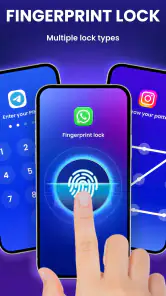
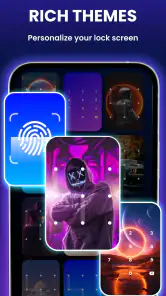
First things first, the setup for App Lock - Fingerprint Lock is a breeze. You download the app, set up a pattern or, even better, your fingerprint, and voila, you're ready to lock down any app you choose. I was pleasantly surprised by how intuitive the interface is. It's like the app holds your hand and guides you through the process, which is great for folks who aren’t exactly tech-savvy.
The useful choice is deciding what not to lock as much as what to protect. I’d start with messaging, photos, and any app that can reveal account details, then try opening them in the situations where I usually share my phone. Locking every app can make quick tasks feel needlessly interrupted, especially if I’m switching between several apps. A selective setup keeps the extra check focused on the things I actually want private.
One small but helpful way to make that selection is to think in terms of consequences rather than app names. If a screen shows private conversations, saved images, or account information, it may deserve an extra barrier. If I use an app repeatedly for ordinary tasks while someone is nearby, locking it could create more nuisance than protection. I would begin with the apps I would genuinely mind someone opening, then live with that setup for a few days before adding more.
You May Like

Clash of Clans Is Won Between the Battles

Android Auto Makes the Case for Quieter Car Software

MobiOffice: Transforming Mobile Productivity with Seamless Integration

EA SPORTS FC™ Mobile Soccer: Redefining Mobile Sports Gaming

How Microsoft OneDrive Became a Mobile Productivity Giant

How Google Translate Breaks Language Barriers Effortlessly
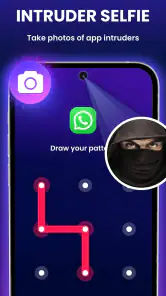
Once set up, you can lock your social media apps, gallery, messaging apps, or any other app you want to keep private. The app also offers a nifty feature that takes a selfie of anyone who unsuccessfully attempts to unlock your apps. So, if your nosy friend tries to sneak a peek, you’ll have photographic evidence! How cool is that?
That failed-attempt feature is best treated as a deterrent and a clue, not as a reason to stage a test or confront someone. A person might tap the wrong thing by accident, and a photo only tells me that an unsuccessful attempt happened; it doesn’t explain why. For a more practical routine, I’d also avoid letting someone repeatedly try to open a locked app while I’m nearby. The point is to reduce casual snooping, not turn a shared phone into a source of suspicion.
Speed when you need your phone
Now, onto the important stuff – does it actually work? In my experience, App Lock - Fingerprint Lock does a stellar job. The fingerprint sensor works like a charm, unlocking apps quickly and efficiently. I didn't experience any lag, which is crucial because nobody wants to wait ages just to open their apps. Plus, the app itself runs smoothly in the background without draining your battery, which is a huge plus.
My speed expectation would be simple: the extra check should feel like one brief step, not a new routine that gets in the way of every tap. Fingerprint access suits quick returns to protected apps, while a pattern gives another way to unlock them. If recognition ever feels inconvenient, I’d first check whether the phone’s own fingerprint unlock is working normally rather than assuming the app can fix a device-side issue. I’d also keep the pattern memorable but not obvious, since a lock is only useful if I can get back in without guesswork.
There is a useful compromise between speed and privacy in choosing a small number of protected apps. For example, I might lock a messaging app and the gallery but leave maps, the camera, and everyday tools open. That way, lending the phone does not turn every step into an authentication pause, while the places most likely to expose personal material still have a boundary. People who move constantly between protected apps should expect more interruptions than someone who only opens them now and then.
Notifications, busy moments, and trade-offs
Another commendable feature is its ability to hide notifications. Imagine you’re in a meeting, and a personal message pops up on your screen for everyone to see. Embarrassing, right? With this app, you can choose to hide sensitive notifications, so your personal business stays personal.
That can help at a desk, on public transport, or while a phone is sitting face-up among other people. It is worth thinking through the trade-off before enabling privacy protections broadly: hiding message previews may protect a private detail, but it can also make an urgent note less informative at a glance. I’d keep alerts visible where convenience matters and use the app’s privacy controls for the conversations or apps that truly need a quieter screen.
A practical test is to leave the phone on a table during an ordinary day and notice what its screen reveals before changing anything. If a preview routinely exposes details I would not want a nearby person to read, hiding it may be worthwhile. If I rely on previews to decide whether a message needs an immediate response, I should weigh that convenience against the privacy gain instead of hiding everything by default.
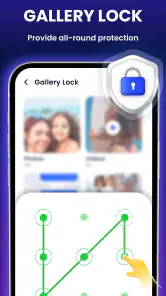
A realistic use case is lending a phone to a relative to browse holiday pictures. I’d secure the gallery and messaging apps, open the gallery myself, and hand over the device without worrying that a casual swipe will lead into a chat. That is a narrower and more dependable habit than trying to remember to watch every movement. For a child using the phone, though, an app lock is not a substitute for supervision or device-level family controls; it protects selected areas, not every possible route through a phone.
In a busy household, I’d also decide in advance what “safe to borrow” means. If someone needs to make a call, leaving the phone unlocked while I stand nearby may be enough; if they need to browse photos, the gallery can be the only app I open for them. The lock helps preserve a boundary around other content, but it cannot choose what the other person sees once I have opened an app for them. That is why a little attention to the handoff still matters.
Reliability and device fit
There are limits to what I’d expect from any app-based lock. It adds a layer around selected apps, rather than replacing the phone’s main screen lock or making the entire device private. I’d keep a strong device passcode in place and treat this as extra protection for particular apps. If someone knows the phone passcode or has unrestricted access to the device, an app-level barrier should not be mistaken for a complete security plan.
The app is currently at version 1.3.7.0 and supports Android 6.0 and later. That makes the stated minimum relatively broad, but actual smoothness can still depend on the phone and its fingerprint hardware. If the device is older or already struggles with background tasks, I’d try protecting only one or two apps first and see whether the added step fits my routine. For someone who wants a simple, consistent boundary, that small trial is more useful than locking everything immediately.
On a phone with an unreliable fingerprint reader, I would not make fingerprint access the only part of my plan. A pattern offers an alternative, but I would still make sure I can use it comfortably and remember it. Anyone sharing a phone with someone who knows that pattern should choose a different one from any familiar unlock pattern. The extra layer is only helpful if it is both usable by me and not already known to the people I am trying to keep out.
For recovery, my practical advice is to set up and remember the chosen unlock method before relying on the app to protect something important. I would test access to a protected app myself, then confirm I can unlock it again without rushing. That is a modest precaution, but it helps catch a confusing pattern or an unexpected fingerprint issue while I still have time to adjust my setup calmly.
Compared with relying only on a phone’s built-in screen lock, this app gives me a more targeted way to restrict access after the phone itself is already open. Compared with simply keeping an eye on a person using my phone, it asks less of my attention. On the other hand, someone who needs comprehensive device controls, detailed family supervision, or a privacy system they can audit closely may be better served by built-in platform tools or a more specialized security solution. I would choose this app for convenience and selective privacy, not as an all-purpose security suite.
There is also a difference between this focused approach and using separate secure folders or a second user profile, where available on a device. Those options can make sense for people who want a more distinct space for files or accounts, but they may be more involved than needed when the goal is simply to put a barrier in front of a few familiar apps. I would choose based on the problem: quick protection for selected apps points toward an app lock; broader separation or managed access points toward device-level tools.
Its popularity is reflected in a 4.6 average from around 315 thousand ratings, and it has passed 50 million installs. The app is free to install, with optional in-app purchases priced at $3.99 per item. I’d consider any purchase only after using the basic setup long enough to know which extra capability I actually need, rather than paying just because the option is available.
Who should choose it
All in all, App Lock - Fingerprint Lock is a solid app for anyone looking to add an extra layer of security to their smartphone. It's user-friendly, reliable, and filled with useful features that make your life a little less stressful. Whether you're a privacy enthusiast or just someone who wants to keep their texts away from nosy siblings, this app is worth a try.
I’d recommend it most to people who regularly share their phone and want selected apps or photos to stay out of casual reach. It is less suited to anyone expecting a full replacement for device security, or to people who find repeated unlock checks more irritating than helpful. The sensible approach is to secure a short list, check that fingerprint access and notification behavior fit the way I use the phone, and adjust from there. That keeps privacy useful rather than turning it into friction.
I would also skip it if my main concern were controlling a child’s overall screen time, managing several people’s accounts, or safeguarding a phone against someone with broad access to the device. Those jobs call for controls designed around the whole device, not an extra checkpoint around selected apps. Likewise, if I rarely lend out my phone and already use strong device security, the added prompts may not improve my day enough to justify them.
For someone who is unsure, the simplest evaluation is to protect just one app that contains material they genuinely want private. Use the phone as usual, including in the situations where it gets passed around, and notice whether the extra step feels worthwhile. If it prevents an awkward glimpse without disrupting ordinary tasks, add another app selectively. If it becomes a constant annoyance, narrowing the list is better than abandoning the phone’s basic security habits.
So, if you're tired of playing the 'please don't swipe left or right' game, give App Lock - Fingerprint Lock a download. It's like having a trusty guard dog for your apps, without the barking!
App Lock - Fingerprint Lock Frequently Asked Questions
What Android version do I need to use App Lock - Fingerprint Lock?
App Lock - Fingerprint Lock requires Android 6.0 or later. Before downloading, check your phone’s software version so you know it meets that requirement. The app is intended to add a lock screen to apps, and its fingerprint option also depends on your device supporting fingerprint authentication. If your phone does not have a fingerprint scanner, consider which other lock options are available on your device.
Who develops App Lock - Fingerprint Lock, and what kind of app is it?
App Lock - Fingerprint Lock is a productivity app from 360 Tool. Its purpose is to add a lock screen to apps and provide a way to hide photos, giving you another layer of privacy when someone else uses your phone. The app may be relevant if you want to control access to selected content without changing how you use your other apps.
Is App Lock - Fingerprint Lock free to download, and are there optional purchases?
App Lock - Fingerprint Lock is free to download, so you can try its app-locking features without paying upfront. In-app purchases are available for $3.99 per item. If you are considering a purchase, check the options shown in the app and decide whether they suit your needs; the basic appeal is protecting selected apps with a lock screen.
What is App Lock - Fingerprint Lock and how does it work?
App Lock - Fingerprint Lock is a security application designed to protect your privacy by allowing you to lock specific apps on your smartphone. It works by requiring a fingerprint authentication to access the locked apps, ensuring that only you can open them. This app is particularly useful for safeguarding sensitive apps like banking, messaging, and social media platforms from unauthorized access.
Is App Lock - Fingerprint Lock compatible with all smartphones?
App Lock - Fingerprint Lock is compatible with most smartphones that have a fingerprint scanner. You need to ensure your device supports fingerprint authentication for the app to function effectively. For devices without a fingerprint scanner, the app may offer alternative security options like PIN or pattern lock, but the full features are best used with fingerprint technology. It requires Android 6.0 or later, so check your phone’s software version before downloading.
Pros
- Easy to set up and use
- Supports fingerprint unlocking
- Customizable lock settings
- Low battery consumption
- Works with various apps
Cons
- Ads can be intrusive
- Limited features in free version
- May not work on all devices
- Occasional performance issues
- No cloud backup option
- Category
- Productivity
- Version
- 1.3.7.0













