Dual App - Web Scanner App
- 806.00
- 4.6
- Installs
- 10.00M
- Price
- Free

Screenshots

Analysis by Reviewed
If you’re trying to keep two app accounts apart or want a scanner close at hand, Dual App - Web Scanner App brings those needs together. I’d approach it as a practical utility rather than a full communication platform: its appeal is having a second app space and a way to scan codes from one place. The first useful test is simple—set up a duplicate for an account you actually use, then try scanning a code you encounter in everyday life.
What to expect from this combination
This is a free communication app from 360 Tool, with a 4.6 average from around 194,000 ratings and over 10 million installs. It is intended for everyone, and its current version is 1.5.8. It was released on September 6, 2022. Those figures suggest that many people have tried it, but they do not tell you whether every app you use will work well as a duplicate. I’d judge it by your own account and phone rather than assuming every setup behaves the same.
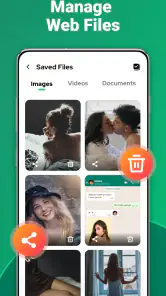
The two jobs also have different rhythms. A duplicate app is something you may return to throughout the day; scanning is usually a quick, occasional task. The app also presents itself as a way to save download status, which may appeal if that is part of your routine. That makes the combination convenient if these functions matter to you, but less compelling if you only need a scanner once in a while. In that case, your phone’s built-in camera or a dedicated scanner may be the simpler choice.
Articles Related to Dual App - Web Scanner App
Clash of Clans Is Won Between the Battles
Its raids are quick; its community is a long-term project of coordination, teaching, rivalry, and shared responsibility—with all the friction that entails.
Android Auto Makes the Case for Quieter Car Software
The car interface is no longer judged by how much it can do, but by how quietly it helps. Android Auto shows what drivers now expect—and what still gets in the way.
MobiOffice: Transforming Mobile Productivity with Seamless Integration
MobiOffice: Word, Sheets, PDF is redefining mobile productivity with a surprising blend of functionality and innovation.
EA SPORTS FC™ Mobile Soccer: Redefining Mobile Sports Gaming
Dive into EA SPORTS FC™ Mobile Soccer, where immersive gameplay and strategic depth transform mobile sports gaming.
Unboxing the Features
The first thing that caught my eye was the app's capability to clone applications. Imagine having two separate accounts for social media, messaging, or any other app, running simultaneously on the same phone. It’s a game-changer! Setting this up was a breeze—just a couple of taps, and voilà! I had a duplicate app ready to go.
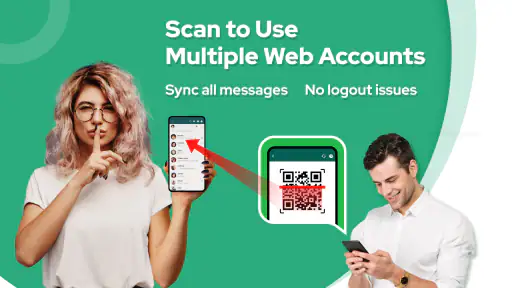
But wait, there’s more! Dual App - Web Scanner App also packs in a web scanning feature. Whether it's QR codes or barcodes, this app handles them all. I found the scanner to be incredibly fast and accurate, making it a handy tool for quickly accessing URLs or product info without any hassle.
Getting the Hang of It
Now, you might be wondering, "Is it user-friendly?" Absolutely! The interface is intuitive and sleek, making navigation a piece of cake even for the less tech-savvy among us. Upon launching the app, I was greeted with a clean dashboard that clearly laid out all the options. No need to dig through menus or settings—everything was right where I needed it.
Make your first setup count
For a smoother first try, choose an account with a clear purpose for being separate—perhaps a work profile you want to keep distinct from personal messages. Before relying on the duplicate for anything urgent, sign in and check that notifications and the account’s everyday functions behave as you expect. This quick check matters because app duplication can be affected by the app being copied, the phone, or account security checks; it is better to discover a snag before you need to respond to someone.
You May Like

How Microsoft OneDrive Became a Mobile Productivity Giant

How Google Translate Breaks Language Barriers Effortlessly

Why Google Sheets Is the Ultimate Mobile Productivity Tool

Unveiling the Dynamic World of My Talking Tom Friends

Free Fire MAX: Dominating the Battle Royale Arena

Free Fire: Winterlands – The Ultimate Winter Gaming Adventure
A useful everyday scenario is a small business owner who wants to keep customer conversations separate from family chats. The second account can make that division easier to manage on one phone, while the scanner can handle a code on a parcel, menu, or printed notice without hunting for another tool. I would still keep important conversations backed up through the original service where possible, rather than treating a duplicate as a backup system.
Another practical tip is to treat scanned links with the same care you would give links received in a message. A QR code can lead somewhere unexpected, so check the destination before entering personal details or signing in. For product barcodes, a scan can be a convenient starting point, but I would not assume it proves a product’s authenticity or guarantees that a listing is current.
The app is a better fit for people who genuinely need a second account and will use scanning now and then. If your phone’s operating system or the original app already handles multiple accounts neatly, that built-in option may be more dependable and avoid maintaining an extra utility. Likewise, if you mainly scan codes, a camera shortcut may be enough. Dual App makes most sense when the two functions together save you a small but repeated amount of friction.
Where the convenience has limits
Keeping a second account means keeping its notifications, login details, and activity straight as well. I’d give the duplicate an unmistakable role and name in my own routine—work, for example—so I do not accidentally reply from the wrong account. If a sign-in fails or a particular app behaves differently when duplicated, I would use the official app’s account-switching option instead of repeatedly reinstalling or resetting things.
The scanner is useful for quick access, but it does not replace judgement. For a code that opens a payment, login, or download page, pause and review what it opens before continuing. And if you want a polished barcode inventory workflow, batch scanning, or dedicated product organization, a specialist scanner is likely a better match than a feature bundled with a dual-app tool.
There are also paid in-app purchases, priced from $1.99 to $59.99 per item, so I’d check what an upgrade offers before spending. You can begin without paying for the app itself, then decide whether the free experience covers your actual routine. It runs on Android 6.0 or later, which is helpful for people using older compatible phones, though performance and compatibility can still vary by device and by the app being duplicated.
Another small trade-off is attention: two accounts can be convenient, but they can also mean more interruptions. I’d turn off alerts that are not useful and decide which account deserves an immediate response. That keeps the separation purposeful instead of doubling every notification.
Another highlight for me was the app’s performance. I didn’t experience any lags or crashes, and the cloned apps ran just as smoothly as their originals. The developers really nailed it on the stability front, which is always a big plus in my book.
Why You’ll Love It
In a world where multitasking is key, the app simplifies life by combining two powerful tools into one app. It’s perfect for entrepreneurs managing multiple social media accounts or anyone who loves the convenience of a reliable scanner on the go. Plus, it saves you space on your phone since you don’t need separate apps for cloning and scanning.
For a first-time user, I’d make the initial session deliberately small. Pick one account you can safely test, complete its sign-in, and then check whether you can recognize which version you are opening. That last detail sounds minor, but it is where the practical value of a second account either becomes clear or turns into a source of mix-ups. A simple naming habit, a different profile picture where the service allows it, or keeping the two icons in separate folders can help you build a routine you will actually remember.
It is also worth separating “having another app copy” from having another identity or another secure backup. The duplicate is useful for access and organization; it does not automatically solve account recovery, preserve messages independently, or make a service’s security checks disappear. I would keep recovery details current with the original service and test the duplicate with ordinary, low-risk activity before moving important work there. If a service flags an unfamiliar login or requires extra verification, follow its own instructions rather than trying to work around them.
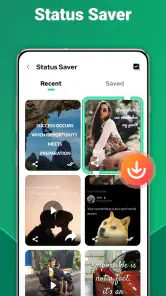
The status-saving angle is another reason to think about what you want from the app before you settle into it. If saving a status is the task that brought you here, check how that workflow fits your expectations and use it only in ways that respect the person who shared the content. A convenient tool does not change the social context: private or sensitive material should not be saved or passed along without permission. If status saving is not part of your needs, you can simply focus on the duplicate-account and scanning tasks that matter to you.
Compared with the usual alternatives, this app’s main distinction is having these utilities gathered in one place. A phone’s built-in account features, when available for the service you use, can be the cleaner route because they are designed around that particular device or app. An official account switcher is often preferable if you only need to alternate between profiles rather than keep both accessible. On the other hand, installing separate tools for scanning and account duplication can mean more icons and more switching; a combined app may feel tidier if you will use both jobs regularly.
That convenience is not automatically a technical advantage. The app being duplicated still matters, and so does the phone’s own behavior. I would not move a time-critical work account over before testing notifications, sending a routine message, and confirming that switching between the two identities feels obvious. If any of those checks are unreliable, the official app’s built-in account controls are a better fit, even if they require a little more tapping.
So, if you’re looking to streamline your mobile experience, give this app a try. It’s a versatile addition to your app collection that you didn’t know you needed!
Who should give it a try—and who should pass
I see the strongest case for someone who carries one phone for both personal and work life, uses two accounts in the same supported app, and occasionally needs to scan a code while away from a computer. A freelancer, shop owner, or community organizer might appreciate having a customer-facing account kept apart from private conversations. The app is less attractive if you rarely switch accounts, if your device already offers a comfortable solution, or if your work depends on a single app behaving identically in every situation.
People who scan codes constantly should also be clear about their priorities. For a quick link or a code on a printed notice, an all-purpose scanner is convenient. For repeated stock checks, organized records, or a specialist business process, a scanner built specifically for that job is more sensible. Likewise, people who want advanced controls over separate profiles should compare the app with their phone’s built-in options before choosing a third-party utility.
My take before you install
I’d try it if juggling a personal and work account is a regular annoyance and you also want a scanner readily available. Start with a low-stakes account, confirm that sign-in and notifications suit you, then use the scanner on a harmless code before depending on either feature. If your main priority is dependable multi-account support for one particular service, its own account switcher is the safer first stop; if you want advanced scanning tools, choose a dedicated scanner. For people who value both tasks in one free app, this is a sensible option—as long as they are comfortable checking how the duplicate behaves on their own device.
Dual App - Web Scanner App Frequently Asked Questions
What is Dual App - Web Scanner App, and who develops it?
Dual App - Web Scanner App is a communication app from 360 Tool. Its short description is “Dual App,” while its summary describes a scanner for Web, dual-account support, and download-status saving. Those details give a quick sense of its focus before you install it; the questions below explain its compatibility, costs, and advertised functions.
Is Dual App - Web Scanner App popular with users?
The app has an average rating of 4.6 from around 194,000 ratings, with about 806 written reviews and over 10 million installs. That level of use may help you gauge how widely it has been tried, but ratings reflect individual experiences. It is still worth checking the app’s features and requirements to see whether they suit your own phone and intended use.
What devices can run Dual App - Web Scanner App?
Dual App - Web Scanner App requires Android 6.0 or later, so check your device’s operating system before downloading. It is a communication app from 360 Tool, with a Everyone content rating. If your phone meets the minimum requirement, you can consider whether its available storage and performance suit your needs, especially if you plan to keep multiple app instances active.
Is Dual App - Web Scanner App free to download?
The app is free to download, though it offers in-app purchases ranging from $1.99 to $59.99 per item. You can therefore try its basic offering without paying upfront, while checking any purchase details shown in the app before confirming a transaction. The developer is 360 Tool, and the app’s listed short description is “Dual App.”
What is Dual App - Web Scanner App used for?
Dual App - Web Scanner App is a versatile tool designed to help users scan web pages and create a dual app experience on their smartphone. This means you can operate two instances of the same application simultaneously, which is particularly useful for managing multiple accounts on social media or messaging apps without needing to log in and out repeatedly.
Pros
- Allows simultaneous login to multiple accounts.
- Easy to switch between cloned apps.
- Supports a variety of social and game apps.
- User-friendly and intuitive interface.
- Secure data protection.
Cons
- Consumes more battery when running multiple apps.
- Might slow down device performance.
- Ads can be intrusive at times.
- Some apps may not clone perfectly.
- Limited customer support.

- Category
- Communication
- Version
- 1.5.8













