Amazon Music: Songs & Podcasts
- 487.93K
- 3.7
- Installs
- 100.00M
- Price
- Free

Screenshots

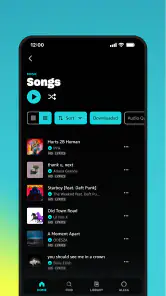
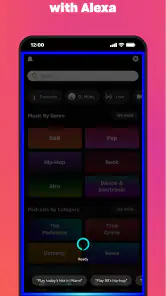
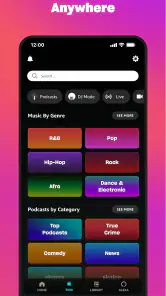
Analysis by Reviewed
I’ve found that music apps are easiest to judge when something goes slightly wrong: a search doesn’t find the track I expect, a playlist isn’t the right fit, or I need to switch from background music to a podcast without breaking my routine. Amazon Music: Songs & Podcasts brings those listening habits together in one place, and that convenience is its clearest appeal. It is a free music and audio app from Amazon Mobile LLC, with optional in-app purchases priced at $11.99 per item. The Teen content rating is worth keeping in mind if younger listeners share your device.
Where listening can get stuck
The broad mix of songs, playlists, and podcasts makes it simple to browse, but it can also mean that a specific listening session takes a little steering. If recommendations start to feel repetitive or miss your mood, I’d use search to make a deliberate choice rather than keep scrolling and hoping the next suggestion lands. Search is most useful when you know an artist, title, or topic; for a vague mood, a prepared playlist may get you moving faster.
One practical trade-off is that music and spoken audio serve different moments, even when they live in the same app. A podcast can be a better choice for a commute or a chore that needs attention, while familiar songs work better when I want steady background sound. Keeping that distinction in mind makes the app feel less like an endless feed and more like a tool for the moment.
The Latest on Amazon Music: Songs & Podcasts
Setup checks before you press play
If playback does not behave as expected, I start with the ordinary checks rather than assuming the app is broken: confirm the device has a working connection, make sure audio is not being sent to an unexpected speaker or headset, and try a different selection. Those small checks help separate a track-specific hiccup from a wider playback problem. If only one item fails, searching for it again or choosing another result is a sensible next step.
For a smoother routine, I’d decide what I want to hear before leaving home, especially if I expect to move between places with uneven reception. I also keep the app’s role clear: it is useful for browsing and listening, but a reliable connection and the right output device still matter. That is a more realistic expectation than treating any streaming service as a guaranteed offline player.
First Impressions and Interface
Jumping into Amazon Music for the first time, I was greeted with a sleek and user-friendly interface. The layout is intuitive, making navigation a breeze. Whether you’re hunting for the latest chart-toppers or diving into some nostalgic classics, everything is just a few taps away. The search function is pretty robust too, which is a lifesaver if you’re looking for something specific.
Music Discovery and Playlists
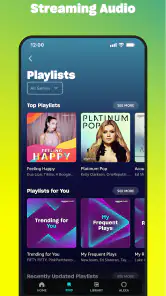
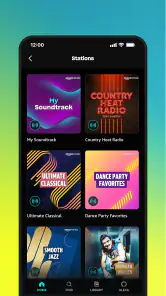
One of the features that blew me away was the music discovery aspect. Amazon Music seems to really nail it with their recommendations. Based on what you’re listening to, it curates playlists that are on point. I’ve found so many hidden gems thanks to their algorithms. Plus, they have a ton of pre-made playlists for every mood you can think of. Feeling the need for some chill vibes? They’ve got you covered. Need a workout playlist to get you pumped? Yup, they’ve got that too.
More From Our News Desk

Clash of Clans Is Won Between the Battles

Android Auto Makes the Case for Quieter Car Software

MobiOffice: Transforming Mobile Productivity with Seamless Integration

EA SPORTS FC™ Mobile Soccer: Redefining Mobile Sports Gaming

How Microsoft OneDrive Became a Mobile Productivity Giant

How Google Translate Breaks Language Barriers Effortlessly
Podcasts Galore
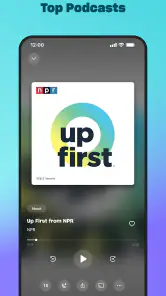
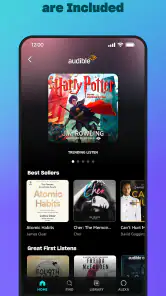
Now, if you’re a podcast junkie like I am, you’re in for a treat. Amazon Music integrates podcasts seamlessly into their platform. You can switch between songs and podcasts without a hitch, which is perfect for those moments when you need to switch gears from music to some engaging storytelling or educational content. The variety is impressive, with podcasts across all genres.
For a normal weekday, I might start with a playlist while getting ready, search for a familiar album on the way to an errand, then swap to a podcast when I’m doing a repetitive task at home. That is where having both formats together earns its place. It is especially handy if I don’t want to maintain separate apps for spoken audio and music, though listeners who already have a carefully organized library elsewhere may prefer not to move their habits.
Sound Quality and Streaming
Another aspect that stands out is the sound quality. Amazon Music offers high-quality streaming that makes a noticeable difference, especially if you’re using good headphones or speakers. It’s like having a concert in your pocket. Plus, the app performs well even with slower internet connections, which is a huge plus for on-the-go listening.
In practice, I would still treat connection quality as a factor: if a stream pauses, trying another network or briefly testing a different selection can tell you whether the issue is tied to reception or that particular item. When sound seems wrong, I check the connected output before changing listening settings elsewhere. For a noisy commute, good headphones may matter more than chasing a subtle improvement in streaming quality.
How it fits alongside other listening apps
Compared with using a music-only service, the appeal here is the mix of podcasts and songs in one listening space. That can reduce app-switching, but it does not automatically make it the best choice for everyone. If your priority is a very particular way of organizing a personal collection, or you already rely on another service’s playlists and discovery habits, switching may feel like work rather than an upgrade. I’d try it alongside your current routine first and see whether its recommendations and podcast selection actually change what you listen to.
The app has an average rating of 3.7 from around 3.3 million ratings, and it has been installed over 100 million times. Those figures suggest a widely used service, not a guarantee that every listener will enjoy the same experience. I’d expect the most from it if I wanted familiar access to popular listening choices and the convenience of moving between music and podcasts, rather than a tool built solely around one narrow listening style.
When playback trouble may be elsewhere
Not every interruption points to an app problem. A weak or changing connection can affect streaming, while a muted device, low volume, or a Bluetooth connection routed to another room can make perfectly ordinary playback seem silent. I check those basics first, then reopen the app or select another item if the problem continues. If other audio apps are also struggling, the cause is more likely to involve the device, connection, or audio output than this service alone.
With a 3.7 average from a large audience, it is sensible to approach the experience as personal rather than assume universal praise. I would skip it if I wanted a completely predictable, self-managed listening setup and had no interest in discovery or podcasts. For someone who likes playlists but also wants spoken audio within the same app, it is easier to recommend. My practical advice is to test it during an ordinary week: search for a few regular listens, try a playlist, and see whether switching to a podcast feels natural.
Making the app work for your day
The easiest way to judge whether the combined format suits you is to give each part a job. I’d use a familiar playlist for a morning routine, then choose a podcast for a stretch of housework where lyrics would compete with concentration. That small distinction can make switching feel purposeful rather than like browsing two catalogs at once. If you mainly listen to albums from start to finish, begin with those instead of letting recommendations set the agenda; it gives you a fairer sense of how quickly the app gets you to your own choices.
It can also help to treat search as a quick reset when the home feed feels busy. Search for a known artist or podcast rather than repeatedly refreshing your attention with more recommendations. If you find a playlist that reliably suits a particular activity, return to it for that context instead of expecting a fresh suggestion to be better every time. This is a simple way to make discovery useful without letting it take over the listening session.
Choosing it over a separate podcast app
If podcasts are your main interest, a dedicated podcast app may feel more focused, particularly if you already have a listening routine built around following shows there. The advantage of keeping them with music is less switching when your day naturally alternates between the two. I’d decide based on how often you actually move between formats: if that happens daily, one place is convenient; if you listen to podcasts for hours and rarely play music, a specialist tool may fit your habits better.
For music, the comparison is similarly personal. People who enjoy algorithmic suggestions and ready-made playlists may appreciate having those choices beside spoken audio. Listeners who want strict control over a collection, or who have spent time building a highly particular organization system elsewhere, may find that convenience does not outweigh the cost of changing routines. There is no need to replace a service that already works well; trying this as a second option first is a low-pressure way to see whether the combined catalog adds anything.
What the free starting point means in practice
The app is free to install, while in-app purchases are listed at $11.99 per item. I’d look at the purchase details shown in the app before committing to anything, and decide whether the listening experience you want is worth that choice. The important practical point is not to assume that “free” means every listening preference is covered in the same way. If you only want to explore the interface and see whether its mix of music and podcasts suits you, you can start there without treating a purchase as an automatic next step.
Because the Teen content rating applies, I would also consider who else uses a shared phone or tablet. A rating is a useful prompt to make a household decision, rather than a substitute for checking what a younger listener is choosing to play. If the device is shared, it is worth agreeing on expectations before handing it over, especially when the app is used for both music and spoken content.
A practical way to troubleshoot a listening session
When a song or episode will not start, I work through the problem in a narrow order: first check whether the device is online, then try a different selection, and then confirm that sound is not going to another output. If only one result is affected, searching for it again or selecting a nearby alternative can help establish whether the trouble is limited to that item. If nothing plays, closing and reopening the app is a reasonable basic step before changing several device settings at once.
That order matters because changing too many things makes it harder to tell what fixed the issue. If playback returns after switching networks, reception was likely part of the problem; if other apps also have no sound, I would look at the device’s volume and audio routing instead. These checks do not promise to solve every interruption, but they help avoid blaming the music app for a connection or output issue that affects listening more broadly.
Who will get the most from it
I see the strongest fit for someone who listens casually across formats: playlists while getting ready, a familiar artist during a short trip, and a podcast during a repetitive task. It is also a reasonable option if you are curious about recommendations and want them close at hand without opening a separate podcast app. The app’s average rating of 3.7 from around 3.3 million ratings gives a useful sense that people have varied reactions, so I would treat my own trial as more important than assuming that broad popularity guarantees a personal match.
I would be less inclined to recommend it to someone who wants a carefully controlled collection above all else, dislikes algorithmic discovery, or has no use for podcasts. In those cases, a music-first service or a dedicated library app may be a more natural fit. The same goes for anyone who needs dependable listening in places where streaming reception is uncertain: plan around the connection you expect rather than assuming a streaming app will behave like a locally managed music player.
Overall, my experience with Amazon Music: Songs & Podcasts has been nothing short of fantastic. It combines the best of both worlds with a vast library of songs and a wealth of podcasts. Whether you’re a casual listener or a hardcore music enthusiast, this app has something for everyone. Give it a whirl and see how it fits into your daily soundtrack!
Amazon Music: Songs & Podcasts Frequently Asked Questions
Can I browse Amazon Music before signing in or choosing a plan?
Amazon Music is free to install, and you can start exploring its music and podcast offering without paying upfront. To use the service, sign in with an Amazon account and review the listening options shown in the app. Those options can vary by plan, so it is worth checking what is available to you before settling into a particular way of listening.
Is Amazon Music suitable for teenagers?
Amazon Music has a Teen content rating, which is useful to keep in mind when deciding whether it is appropriate for a younger listener. The app includes music and podcasts, so the content can vary considerably. Families may want to discuss listening preferences and review the app together before a teenager begins using it regularly.
What does Amazon Music include for someone who mainly wants podcasts?
Podcasts are part of Amazon Music alongside songs, hit music, and trending playlists. That makes the app worth considering if you want spoken-audio content in the same place as music. You can browse for a podcast or choose music depending on what you feel like hearing, rather than treating the app as a music-only service.
Is Amazon Music free to download, and are there costs inside the app?
Amazon Music is free to download, so you can install the app and explore its music and podcast offering without paying upfront. Some features and listening options may involve a subscription or in-app purchase, so check the available choices in the app before committing. The app is rated for Teen audiences.
What is Amazon Music, and what features does it offer?
Amazon Music is a streaming service that provides access to songs, playlists, and podcasts. It offers features like offline listening, personalized recommendations, and integration with Alexa for voice controls. With various subscription tiers, including Amazon Music Unlimited and Prime Music, users can choose a plan that suits their needs.
Pros
- Extensive music library across genres.
- High-quality audio streaming available.
- Seamless integration with Alexa devices.
- Offline listening for downloaded music.
- Personalized playlists and recommendations.
Cons
- Limited features without Prime membership.
- Cluttered user interface at times.
- Occasional playback glitches reported.
- Some songs not available for download.
- Ads in free version may interrupt flow.
- Category
- Music & Audio
- Version
- Varies with device













