Lark Player:Music Player & MP3
- 26.50K
- 4.6
- Installs
- 500.00M
- Price
- Free

Screenshots
Analysis by Reviewed
I judge a music player not only by how quickly it starts a song, but by how much control it gives me over listening and how comfortably it fits the way I keep music on my phone. Lark Player: Music Player & MP3 is an offline-focused music and audio app from Lark Player Studio - Music, MP3 & Video Player. It is free to install, rated for Everyone, and has optional in-app purchases priced from $0.99 to $6.99 per item. Its 4.6 average from around 4.9 million ratings and more than 500 million installs suggest that it has reached a very large audience, though popularity alone does not tell me whether it suits a particular listener.
What trust looks like in everyday use
For me, a sensible way to approach any media app is to pay attention to the choices it presents while I use it, rather than assume that a familiar-looking player is automatically private or risk-free. I can assess whether the playback tools suit me, but I would not treat an app’s popularity as a substitute for checking the permissions and privacy information shown on my own device and in the app store.
The useful distinction here is between playing music already available on a phone and relying on an online music service. Lark Player is positioned as an offline player, so its central job is local playback. That makes it appealing if I want to listen to files I manage myself, but I still recommend reviewing any permission request in context and deciding whether it makes sense for the task I am trying to do. I do not grant access automatically just because an app needs to find music.
Articles Related to Lark Player:Music Player & MP3
Making informed choices with local media
A local player can feel straightforward, but the first useful decision is what access I am comfortable giving it to find and play files. I would read each prompt as it appears, then consider whether the requested access matches the action I have just taken. If I am unsure, I can pause rather than accept by habit and check the device’s controls and app information. That approach is especially useful when a phone contains personal recordings as well as music.
I also like to separate trust from convenience. Keeping playback offline can reduce dependence on a connection, but it does not by itself tell me how an app handles information or what permissions it uses. I therefore treat local playback as a practical feature, not a privacy guarantee. Anyone choosing a player mainly for privacy should make the platform’s permission and privacy screens part of the decision, not rely on the app’s name or popularity.
Features that Make a Difference
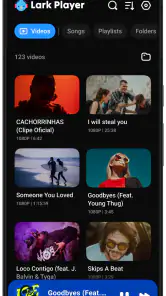
First off, Lark Player is not your average music player. It supports a wide range of audio formats, and I mean everything from the standard MP3 to the more obscure FLAC files. This is perfect for those of us who have a diverse music library. The coolest part? It even supports video playback, so you can enjoy your favorite music videos without having to switch apps.
That combination is useful in a specific situation: if I have audio tracks and music videos saved locally, I can keep both in one listening routine instead of jumping between a dedicated audio player and a separate video app. It also gives me a practical test before committing to moving my library: I can try a few representative files, including the formats I use most, and see whether playback and navigation behave as I expect. For a collection managed on a computer, that small trial is more helpful than assuming every file will feel equally convenient.
You May Like

MobiOffice: Transforming Mobile Productivity with Seamless Integration

EA SPORTS FC™ Mobile Soccer: Redefining Mobile Sports Gaming

How Microsoft OneDrive Became a Mobile Productivity Giant

How Google Translate Breaks Language Barriers Effortlessly

Why Google Sheets Is the Ultimate Mobile Productivity Tool

Unveiling the Dynamic World of My Talking Tom Friends
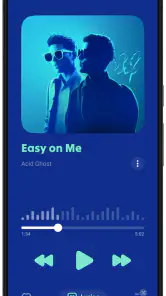
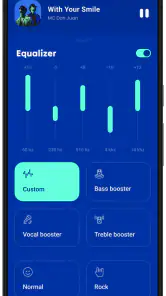
One of my favorite features is the customizable equalizer. If you're someone who loves tweaking sound settings to get that perfect bass or treble, this app will be your best friend. It offers a variety of presets, but you can also adjust the settings manually. I found this especially useful when switching from headphones to speakers.
A good way to use those controls is to make a modest adjustment for the listening setup, then compare it with the original sound before changing several sliders at once. Headphones can make bass feel stronger than a phone speaker does, so a setting that works for one may sound unbalanced on the other. I would avoid treating an equalizer preset as a fix for every track; if a recording already sounds clear, leaving it alone can be the better choice.
Useful routines beyond pressing play
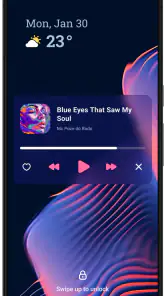
For a commute, I would set up the music I expect to need before leaving, especially if I know reception may be unreliable. One small but helpful habit is to test playback with the phone locked and the headphones I actually use. That reveals whether the everyday controls and sound balance suit my routine, rather than only confirming that a track starts while I am looking at the screen.
The video support also has a trade-off worth considering. It is convenient for a saved music video or other local clip, but it does not make the app a full online video service. I would choose it when I want one place for files already on my phone, not when I want a large streaming catalogue or a feed of new videos. That distinction helps set realistic expectations before moving away from apps built specifically for online media.
User Experience
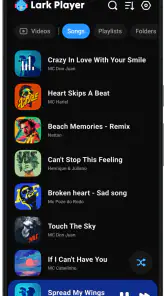
When it comes to user experience, Lark Player is as smooth as butter. The interface is sleek and intuitive, making it easy to navigate through your playlists and find your favorite tracks. The app's design is minimalistic, which I personally love because it keeps the focus on the music.
In a normal day, that simplicity matters most when I am in a hurry: I can pick something familiar for a commute, then switch to a playlist while getting ready, without turning music selection into a separate task. People who keep a carefully organized local library may appreciate having their music gathered in one player. If I mostly stream songs and want recommendations, synchronized listening across devices, or a service-managed catalogue, I would choose a streaming app instead; a local player is not a replacement for those features.
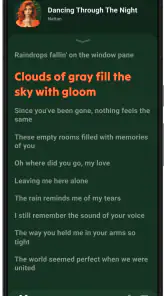
Another aspect that stands out is the offline lyrics feature. I can't count how many times I've wanted to sing along to a song only to find I don't know half the words. With Lark Player, you can download lyrics and view them offline. It's like having a karaoke machine in your pocket!
Lyrics are most useful when I prepare before going somewhere with unreliable connectivity: I can check whether the tracks I care about have lyrics available and save what I need ahead of time. That avoids expecting every song to have a complete or perfectly timed lyric display. For a casual sing-along it is a nice extra; for someone who needs accurate, synchronized lyrics across a large catalogue, I would compare the experience with a dedicated lyrics service before making it the main reason to switch.
Who will get the most from it
I see the clearest fit for someone who has a personal collection of downloaded music, wants to adjust playback, and occasionally watches local video files. It can also suit listeners who are trying to keep an existing library accessible without turning every listening session into a search through folders. A student with saved language lessons, for example, could use the same player for spoken audio and music, while keeping files available away from a stable connection.
On the other hand, I would skip it if my main goal were discovering unfamiliar artists through recommendations, following releases in a subscription catalogue, or seamlessly resuming playback across several devices. Those are streaming-service strengths. I would also look elsewhere if I need a specialized audio workflow rather than a general player. Lark Player’s appeal is its mix of local music, video, lyrics, and sound adjustment, not an answer to every kind of listening.
Choices, trade-offs, and who it suits
The app’s offline emphasis gives me a clear reason to try it if I already own or organize audio files and want playback, video, and sound adjustments together. It is less compelling if nearly all my listening happens through subscriptions, since a streaming-first service is built around browsing and discovery rather than managing a personal collection. The practical question is not which approach is universally better, but whether I want control over local files or the convenience of an online catalogue.
I would also take a moment to look at the choices presented during setup and later use, including any optional purchase prompts. The app is free, with in-app purchases available, so I would first use the core player for my ordinary routine and only consider paying if a specific option clearly matters to me. That is a more useful test than buying anything in expectation of a particular improvement.
If privacy is a deciding factor, I would check the current permission prompts and privacy details through the platform before installing, and revisit them if the app’s behavior or my use changes. I would not infer what information is collected or how it is handled from the fact that playback can work offline. That cautious check is especially worthwhile on a phone shared with family, where each person may have a different comfort level with access to local media.
Practical checks before settling in
Before making it my default, I would try a short, representative set of files rather than importing or organizing everything at once. Include the file types I use regularly, a track for equalizer testing, and a saved video if that matters to me. This is a low-effort way to catch any mismatch between my library and the player’s workflow, and it keeps the decision grounded in what I actually listen to.
For shared devices, I would also make sure other users know which player is being used and review access choices together. The same app can be convenient for a household library and still be the wrong fit for someone who prefers not to grant media access. A good setup is one where the person using the phone understands the choices, rather than one created by tapping through prompts as quickly as possible.
Why You Should Try It
If you're still on the fence about trying Lark Player, let me give you a nudge in the right direction. It's lightweight, so it won't hog your phone's resources. Plus, it's free! Yes, there are some ads, but they're not intrusive, and I think that's a fair trade-off for the features you get.
My recommendation is to try it with a small slice of your actual library first: a familiar MP3, a higher-quality file if you keep one, a video you like, and a track where lyrics would be useful. This quick check tells you more than browsing settings in the abstract. If the app handles the files you care about and its controls feel comfortable, it can be a practical everyday player. If you want a completely ad-free experience or depend on streaming and discovery, another option may fit better.
In conclusion, if you're in the market for a music player that offers versatility, ease of use, and a bit of flair, then Lark Player: Music Player & MP3 is definitely worth a download. So go ahead, give it a try, and let the music play!
Lark Player:Music Player & MP3 Frequently Asked Questions
What is Lark Player, and what kind of listening is it designed for?
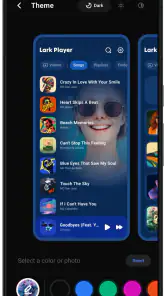
Lark Player is a Music & Audio app focused on playing music files already available on your device. Its features include offline playback, themes, an equalizer, lyrics, and music play modes, making it a local player rather than a service centered on an online streaming catalog. It may suit listeners who want to manage saved music and personalize how they play it.
Which company develops Lark Player?
Lark Player is developed by Lark Player Studio - Music, MP3 & Video Player. The app’s focus is music playback, with tools such as themes, an equalizer, lyrics, and music play modes. If you are checking who is behind an app before installing it, this developer name identifies the team associated with Lark Player.
Can I play music files that are already saved on my phone?
Yes. Lark Player is designed to play audio stored on your device, so you can use it for music files you already have rather than relying on an online catalog. Once your music is available on the phone, you can play it through the app and arrange your library. This is useful for listeners who prefer keeping their collection locally accessible.
Does Lark Player let me create playlists?
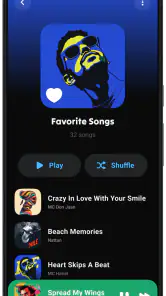
Yes. Lark Player includes playlist features, allowing you to group saved tracks around your preferences or listening occasions. Its music library management also supports organizing music by artists, albums, and genres. These tools can make a collection easier to navigate, especially when you want a particular set of songs without searching through every track each time.
Can Lark Player sort my music library by artist, album, or genre?
Lark Player’s music management features include sorting tracks by artists, albums, and genres. That gives you several familiar ways to browse a saved music collection, alongside the option to create custom playlists. If you keep a range of music files on your phone, these organizational tools can help make the library easier to explore and use.
Pros
- Highly customizable interface
- Supports various audio formats
- Offline music playback
- Equalizer with presets
- Low battery consumption
Cons
- Contains ads in free version
- Limited features without subscription
- In-app purchases required
- No podcast support
- Occasional playback glitches

- Category
- Music & Audio
- Version
- Varies with device