Google Podcasts
- 700.00K
- 4.5
- Installs
- 500.00M
- Price
- Free

Screenshots

Analysis by Reviewed
If you're anything like me, you're always on the hunt for the next great podcast to devour during your morning commute or while you're cooking dinner. And, if you're an Android user, you've probably stumbled across Google Podcasts at some point. Well, let me tell you, it's more than just a run-of-the-mill podcast app.
Discovering New Content
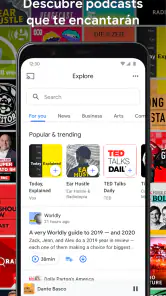
The first thing I noticed about Google Podcasts is its seamless integration with other Google services. It's like they read my mind and knew exactly what I wanted to listen to. The app pulls in recommendations based on your listening habits, and boy, does it get it right most of the time. I found myself diving into podcasts I never would've discovered otherwise. It's like having a personal DJ for podcasts!
User Interface and Experience
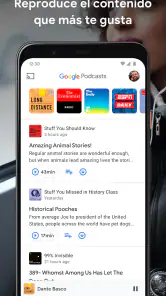
Navigating the app is a breeze. The interface is clean, straightforward, and easy on the eyes. You won't find a cluttered screen here, just a simple layout that makes finding your favorite podcasts a cinch. Swipe here, tap there, and you're good to go. Plus, the dark mode is a lifesaver for late-night listening sessions.
Features That Stand Out
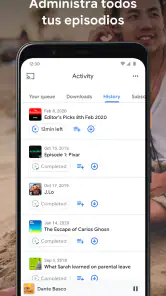
One feature I absolutely love is the ability to speed up or slow down playback. Sometimes, I just can't wait to get to the juicy bits, and speeding up the playback is perfect for that. And for those heavy-laden episodes, slowing it down is a blessing. Another neat feature is the ability to download episodes for offline listening, which is a must for those of us who are always on the move.
Another gem is the "Queue" feature. It lets you line up episodes in the order you want to listen to them, which is perfect for those long road trips. No more fiddling with your phone trying to find the next episode while driving!
Ending Thoughts
Overall, Google Podcasts is a solid choice for any podcast enthusiast. Whether you're a casual listener or a podcast aficionado, this app has something for everyone. It's not just about finding new content, but also about enhancing your listening experience in every possible way. So, if you haven't given it a whirl yet, what are you waiting for? Dive into the world of podcasts with Google Podcasts, and you might just find your next favorite show!
You May Like

Clash of Clans Is Won Between the Battles

Android Auto Makes the Case for Quieter Car Software

MobiOffice: Transforming Mobile Productivity with Seamless Integration

EA SPORTS FC™ Mobile Soccer: Redefining Mobile Sports Gaming

How Microsoft OneDrive Became a Mobile Productivity Giant

How Google Translate Breaks Language Barriers Effortlessly
Google Podcasts Frequently Asked Questions
What is Google Podcasts and how do I use it?
Google Podcasts is a free podcast app that allows you to discover and listen to various podcasts across different genres. To use it, simply download the app from the Google Play Store or Apple App Store, search for your favorite podcasts, and start listening. You can subscribe to shows, download episodes for offline listening, and customize playback settings to suit your preferences.
Can I download episodes for offline listening on Google Podcasts?
Yes, Google Podcasts allows users to download episodes for offline listening. This feature is particularly useful if you have limited data or are traveling to an area with poor connectivity. To download an episode, go to the podcast page, find the episode you want, and tap the download icon. You can then listen to it anytime without an internet connection.
Is Google Podcasts available on both Android and iOS devices?
Yes, Google Podcasts is available on both Android and iOS devices. You can download it from the Google Play Store for Android or the Apple App Store for iOS. The app provides a seamless experience across different platforms, allowing you to enjoy your favorite podcasts regardless of the device you are using.
How does Google Podcasts integrate with other Google services?
Google Podcasts integrates smoothly with other Google services, enhancing your listening experience. It syncs with Google Assistant, allowing you to control playback with voice commands. If you use Google Home or other smart speakers, you can play your podcasts directly through voice commands. The app also integrates with Google Search, making it easier to find podcasts by simply searching for them on Google.
Are there any costs associated with using Google Podcasts?
Google Podcasts is completely free to use. There are no subscription fees or hidden costs involved. You can explore a wide range of podcasts without worrying about any charges. However, keep in mind that data charges may apply if you are streaming episodes over a mobile network, so it might be wise to use Wi-Fi whenever possible.
Pros
- User-friendly interface
- Seamless integration with Google Assistant
- Offline downloads available
- Variety of podcasts across genres
- Free to use with no ads
Cons
- Limited playback speed options
- No personalized recommendations
- Basic playback controls
- Lacks social sharing features
- No exclusive content

- Category
- Music & Audio
- Version
- Varies with device