Shazam: Find Music & Concerts
- 162.51K
- 4.8
- Installs
- 500.00M
- Price
- Free

Screenshots




Analysis by Reviewed
When a song catches my attention in a café or shop, I usually want its name before the next track begins. Shazam: Find Music & Concerts is built for that brief moment: it listens, identifies music, and gives me a way to follow up instead of leaving me to guess. It is a free music and audio app from Apple Inc., and its 4.8 average rating from around 12 million ratings, alongside over 500 million installs, suggests it has become a familiar tool for many listeners. I see its biggest value in how quickly it turns a passing sound into something I can look up later.
Deciding What You Need From Music Discovery
Before installing a music tool, I ask whether I want help finding a track I can already hear or a service that chooses what I might enjoy next. Those are different jobs. Shazam is designed for the first: it responds to music in the environment, while streaming apps are generally more useful for browsing catalogs, building queues, and choosing what to play on purpose.
That distinction matters if you are trying to keep your phone simple. If you already have a listening app you like, Shazam can sit alongside it rather than compete with it. I would consider it most useful when unfamiliar songs regularly catch your ear, and less essential if you mainly listen to saved albums and rarely need to identify anything.
Articles Related to Shazam: Find Music & Concerts
What I Want From a Music Identifier
My first question is practical: can I use it quickly enough to catch a song before it disappears? For that job, a dedicated recognition app has an advantage over opening a streaming service and guessing at lyrics or artist names. It gives me a direct way to investigate a sound I didn’t choose, while a streaming app is better once I already know what I want to hear.
That distinction also helps set expectations. I don’t treat a music identifier as a replacement for a player, a playlist manager, or a concert calendar. I want it to identify a clear recording, keep a useful trail of discoveries, and make it easy to decide what to do next. Shazam’s focus is well suited to that small but common problem.
Discovering Music Made Easy
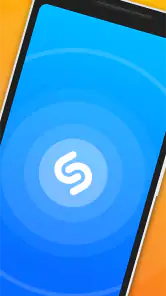
With Shazam, discovering new music is as easy as pie. Just fire up the app, hit the Shazam button, and let it do its magic. Within seconds, you'll have the song title, artist, and even lyrics, right there on your screen. It’s like waving a wand and having the universe of music bow down to your curiosity. And if you’re someone who loves to sing along, the app often provides lyrics in real-time. So, prepare to channel your inner rock star!
That quick lookup is what separates Shazam from searching a music service by typing a lyric or browsing playlists. If I hear a track while carrying groceries, I can try to identify it first and decide what to do with it later; I don’t have to remember a phrase accurately or interrupt what I’m doing to search. The result is most useful when the recording is clear and the song is actually playing, so I treat a missed match as a cue to try again in a quieter moment rather than proof that the track is impossible to find.
You May Like

Android Auto Makes the Case for Quieter Car Software

MobiOffice: Transforming Mobile Productivity with Seamless Integration

EA SPORTS FC™ Mobile Soccer: Redefining Mobile Sports Gaming

How Microsoft OneDrive Became a Mobile Productivity Giant

How Google Translate Breaks Language Barriers Effortlessly

Why Google Sheets Is the Ultimate Mobile Productivity Tool
Concerts and More
But wait, there’s more! Not only does Shazam help you find the name of that catchy tune, but it also connects you to concerts and events featuring your favorite artists. Imagine you’ve Shazamed a song by an artist you love – the app will tell you if they’re performing nearby. How cool is that? It's like having a personal concert planner right on your phone. You can even purchase tickets directly through the app, which is a lifesaver for any avid concert-goer.
For me, concert discovery is a useful second step rather than the main reason to install it. A song identification can turn into a reminder to check whether an artist is playing nearby, but I would still compare event details and ticket options before making plans. That makes this feature handy for the curious listener, while someone who already follows artists through a dedicated concert calendar may prefer to keep using that service for planning.
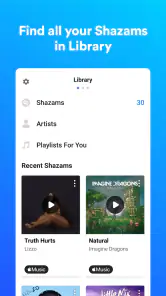
Shazam’s user interface is sleek and intuitive, making navigation a breeze. Whether you're a tech whiz or someone who struggles with smartphones, using this app is straightforward and hassle-free. Plus, it syncs across all your devices, so your Shazam history is always at your fingertips, no matter where you are.
A small habit makes the history more useful: when a match appears, I check that the artist and track are the version I actually heard before moving on. This matters when a song has several recordings or when a cover resembles the familiar original. Later, the saved trail can help me revisit discoveries without relying on memory, which is especially helpful after a busy commute or an evening out when several songs stood out.
Turning a Match Into a Listening Choice
What I personally love about Shazam is its integration with other music apps like Spotify and Apple Music. Once you identify a song, you can add it to your playlists with just a tap. This seamless connectivity is perfect for building your music library without any fuss.
The practical trade-off is that Shazam helps me recognize and collect music, while a streaming app is still where I go to play albums, manage a listening queue, or explore recommendations. If my main goal is to listen to a known artist all day, opening my usual music service is more direct. If the goal is to identify something I didn’t choose, Shazam fills a different gap. I’d use both roles together rather than expect one app to replace the other.
After identifying a song, I don’t automatically add every result to a playlist. I first check whether it is the recording I meant to save, then decide whether I want it in a personal collection or simply want to remember the title. That extra moment prevents a passing curiosity from cluttering a playlist and makes the history serve as a lighter, lower-commitment record of what I’ve heard.
Moreover, Shazam offers a feature called Auto Shazam, which allows the app to continuously identify music and shows around you even when you’re using other apps. It’s like having a superpower – you never miss a beat, literally!
Auto Shazam is most useful when I can’t conveniently reach for the phone each time a song starts, such as during a stretch of background music in a shop. The trade-off is that continuous identification can collect more results than I want, so I’d use it for a particular listening session, then review what it found afterward. For a single song, the regular button is simpler; for a run of tracks, the ongoing mode can save repeated taps.
When Recognition Has Limits
On the flip side, while Shazam is pretty spot-on with most songs, it sometimes struggles with live performances or covers. But hey, nothing's perfect, right? Most of the time, it’s impressively accurate, and the occasional hiccup is easy to overlook given the app’s overall brilliance.
That limitation is worth keeping in mind if live recordings, alternate versions, or music buried under conversation are what I most often want to identify. In those cases, a lyric search in a music app or a quick question to someone who knows the scene may work better. Shazam is strongest as a fast recognition tool for a clearly audible track, not as a guarantee that every performance will resolve to the exact version in the room.
A useful workaround is to wait for an instrumental passage or a moment when nearby voices die down, then try once more. Repeated attempts during the same noisy chorus rarely improve the situation. If I can’t get a clean match, I make a mental note of any lyric or distinctive phrase and switch to a text search later. That is less immediate, but it suits songs Shazam can’t confidently identify.
The app is rated for teens, so families should consider that age guidance when deciding who will use it. For most listeners, the more relevant choice is whether they want quick identification, lyrics, and a path to concerts, or whether they mainly need a full listening service or a specialist event planner. It is free to start using, which makes it easy to try without treating it as a commitment.
Who Benefits Most—and Who May Prefer Another Tool
I’d recommend Shazam to people who regularly hear unfamiliar music away from their own playlists: commuters, café regulars, shoppers, and anyone who wants to remember a tune heard in passing. It is also a good fit for listeners who like to check lyrics or turn an accidental discovery into a saved track. If you rarely wonder what is playing, or you want an app focused mainly on full-length listening and carefully curated recommendations, your existing music service may already suit you better.
For an everyday example, imagine hearing a song during a friend’s dinner while conversation is still going on. If the music is audible, a quick identification can give you a starting point; if voices overpower it, waiting for a quieter section is more sensible than repeatedly trying to capture the same noisy moment. That simple judgment—use the button for one clear song, save Auto Shazam for a longer stretch, and check the result before adding it—is how I get the most out of the app without turning a casual evening into a phone task.
There is also a useful difference between wanting an answer and wanting a whole discovery experience. Shazam is the better fit when I already have a sound in front of me and want to name it. A streaming service’s radio, playlists, or recommendations make more sense when I’m in the mood to browse without a particular song to identify. For live music planning, a dedicated event service can be more suitable if I want to follow a schedule rather than discover concerts through tracks I happen to hear.
Switching to Shazam doesn’t require me to abandon those other habits. I can use it as a companion: identify a track, check the result, and then continue in the music app I already prefer. The main adjustment is remembering to open the identifier while the song is still playing. If I only think of it after the track ends, I may have to rely on lyrics or memory, which is precisely the kind of guesswork the app helps avoid.
Making It Useful Without Letting It Take Over
One small workflow helps keep discovery enjoyable: identify first, decide later. I can let a match stay in my history while I finish what I’m doing, then revisit it when I have time to listen properly. That is particularly practical when I hear several interesting tracks in one outing; I don’t need to stop after every result to build a playlist or research an artist.
The same approach helps separate a fleeting curiosity from a song I genuinely want to keep. A title in my history is a lead, not a commitment. When I return to it, I can check the version, listen through my preferred service, and save it only if it fits. This keeps the app’s identification role tidy and avoids turning every moment of background music into an obligation to curate.
People often wonder whether they need to choose between Shazam and a streaming app. In my view, that is the wrong decision unless you are trying to reduce the number of apps on your phone. The identifier answers “what is playing?”; the music service answers “what should I play now?” They can be useful together, and the handoff is more valuable than asking either one to cover the other’s whole job.
If you are choosing between a recognition tool and a lyric-search approach, think about how you usually encounter songs. Recognition is convenient when the track is audible and time is short. Searching words can be better when the music has stopped, when the recording is a live version, or when you remember a distinctive line but not the sound. I would keep that fallback in mind rather than expect any identifier to work equally well in every room.
My Recommendation
Overall, I’d keep Shazam installed if discovering the names of songs in the world around you is something you do more than occasionally. Its focus is narrower than a streaming platform, but that is also its strength: it helps answer the specific question of what is playing and gives you useful ways to follow the answer. The experience is not flawless with covers or live sound, and it won’t replace a dedicated listening or concert-planning routine. Still, for quick, low-effort music recognition, I find it an easy recommendation.
I’d especially suggest giving it a try if you often leave places with a tune stuck in your head but no way to identify it. It is less compelling for someone who never seeks out unfamiliar music, or who expects one app to handle listening, discovery, and event planning equally well. Used for its particular strength—and paired with the tools you already use for playback—it earns a practical place on my phone.
Shazam: Find Music & Concerts Frequently Asked Questions
Can Shazam identify a song from a short clip or background music?
Shazam listens to music through your device’s microphone and tries to match what it hears to a track. A clear, sufficiently audible sample gives it a better chance of finding a match, while a very brief clip or loud background noise can make recognition harder. If the first attempt does not work, try again when the music is easier to hear.
Can I use Shazam in noisy places?
You can try Shazam in places with other sounds, but its ability to recognize a track depends on whether the music comes through clearly enough for your device’s microphone. Nearby conversations, traffic, or other loud audio may interfere with a match. Moving closer to the music source or trying again during a quieter moment may help.
Will Shazam identify a song if I hum or sing it?
Shazam is designed to identify music it hears through your device’s microphone, so it works best when the original track is playing nearby. Humming or singing may not provide the same musical details as a recording and may not produce a match. For the most useful result, try it while the song itself is playing clearly.
Can Shazam identify music playing on a TV, radio, or computer?
You can try Shazam when music is playing through a TV, radio, or computer, as long as your phone’s microphone can hear it. The quality and volume of the sound, along with surrounding noise, can affect the result. Hold your device where the music is audible and give the app a clear opportunity to listen.
Can I use Shazam with headphones or when music is playing on my phone?
Shazam is designed to identify music it can hear through your device’s microphone. If you are listening through headphones, the sound may not reach the microphone clearly, so results can depend on how the audio is playing and your device setup. For the most straightforward experience, try identifying music that is audible nearby, then use the result to explore the song.
Pros
- Fast music recognition capabilities.
- Simple and user-friendly interface.
- Integrates with popular music apps.
- Provides real-time lyrics display.
- Offline mode for music discovery.
Cons
- Requires internet for full features.
- Limited features in free version.
- Occasional misidentification of songs.
- Ads in the free version can be intrusive.
- Battery consumption can be high.

- Category
- Music & Audio
- Version
- Varies with device