StarMaker: Sing Karaoke Songs
- 38.50K
- 4.4
- Installs
- 500.00M
- Price
- Free

Screenshots

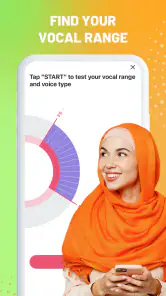
Analysis by Reviewed
I tend to judge karaoke apps by what happens between choosing a song and hearing the playback: how quickly I can get to a track, whether recording feels manageable, and how much effort it takes to share a take I actually like. StarMaker: Sing Karaoke Songs is aimed at people who want that whole sing-and-share loop, not just a backing track to play in the room. It is free to download, though optional in-app purchases range from $0.49 to $199.99 per item, so I would check purchase prompts carefully if I only wanted a casual singing app.
What to expect from the pace
Finding a song and getting started is the kind of quick, low-commitment activity that suits a spare moment. The actual experience can feel busier than a basic karaoke player, since recording, effects, social features, and discovering other performances all sit alongside singing. I would open it with a particular song or purpose in mind if I wanted to get straight to a recording rather than browse for a while.
For a first try, I’d choose a familiar song and treat the initial recording as a test rather than a performance. That gives me a chance to find a comfortable volume and see how the vocal processing affects my voice before I spend time polishing a take. Small test recordings are useful here: they make it easier to decide whether the result sounds like me, instead of assuming that a stronger effect is automatically better.
The Latest on StarMaker: Sing Karaoke Songs
Making a useful practice session
I find the app most useful when I give a session one clear purpose. If I am practising a tricky chorus, I can focus on that familiar song and listen back for the part that feels uncertain, rather than turning the whole session into an open-ended search through performances. If I am singing just to unwind, I can leave the recording imperfect and treat it as entertainment. Keeping those goals separate helps me avoid spending more time adjusting a take than actually singing.
A small workflow makes a noticeable difference: do one short test, listen to it once, adjust either my distance from the phone or the vocal effect, and then record again. Changing one thing at a time makes it easier to tell what improved the result. It also stops me from piling on processing to compensate for a voice level or room sound that would be better fixed at the source.
Let the Music Play
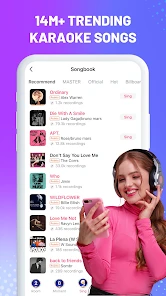
Once you dive into StarMaker, it feels like you've entered a virtual concert hall. The app offers a vast library of songs across genres, from pop hits to timeless classics. Whether you're into the latest chart-toppers or prefer the golden oldies, there's something for everyone. I was amazed at the inclusivity of the song collection, and it didn't take long for me to find my go-to karaoke tracks.
Features That Hit the High Notes
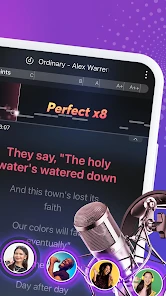
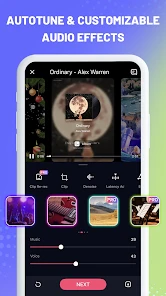
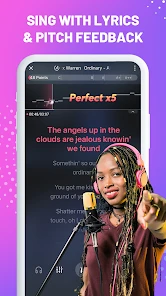
One of the standout features has to be the vocal effects. With options to enhance your voice, you can transform your singing into a professional-sounding performance. If you're feeling creative, you can even tweak these effects to match the mood of the song. It's like having your own studio in your pocket!
More From Our News Desk

Clash of Clans Is Won Between the Battles

Android Auto Makes the Case for Quieter Car Software

MobiOffice: Transforming Mobile Productivity with Seamless Integration

EA SPORTS FC™ Mobile Soccer: Redefining Mobile Sports Gaming

How Microsoft OneDrive Became a Mobile Productivity Giant

How Google Translate Breaks Language Barriers Effortlessly
Another cool feature is the collaboration mode. This allows you to sing duets with friends or even strangers from around the world. It's a fantastic way to connect with fellow music enthusiasts and share your passion for singing. I've had some unexpectedly fun collaborations, and it's a great way to make new friends.
When a session gets demanding
A long evening of recording and browsing is a different use case from singing one song at a time. Audio capture, effects, and moving around a social feed can make a session feel more involved than pressing play on a simple backing-track app. I’d keep the phone comfortably charged, close unrelated tasks if the device is already struggling, and save a take I like before experimenting further. Those are sensible habits for any recording session, not a promise that every phone behaves the same way.
Room conditions matter too. If I’m recording at home, I’d pick a quieter corner and try to avoid competing noise; vocal effects can shape a take, but they can’t make a distracting room disappear. For a better comparison between attempts, I’d keep the phone in roughly the same place and use a similar distance from the microphone. That makes changes in the recording easier to judge than changing the setup and effects all at once.
Choosing between solo singing and the social side
The duet option gives the app a different feel from karaoke tools built mainly for putting lyrics and a backing track in front of a group. It can turn singing into a shared activity even when the other person is not in the room, which is appealing if I enjoy responding to another voice. The trade-off is that someone looking for a party setup may prefer a service designed around a shared display and people singing together in the same space.
I would also decide in advance how public I want a session to be. A private practice habit and a social posting habit are not the same thing: I might record several rough attempts for myself and share only one that feels ready. That simple boundary keeps the community from becoming a source of pressure, especially for a new singer who is still learning what they enjoy about their own voice.
Community, without the pressure
What I absolutely love about StarMaker is its vibrant community. You can share your performances, get feedback, and follow other users. It's like being part of a global talent show, where everyone is cheering you on. Plus, the app regularly hosts contests and challenges, adding a competitive edge that keeps you hooked.
The social side is a strength if feedback and collaboration make singing more enjoyable for you. It is less essential if you only want to practise privately, and sharing a performance can feel exposing when you are still finding your voice. I’d start by recording for myself, then share only when I’m comfortable with the result. Duets are also a useful middle ground: they make a session feel collaborative without requiring you to carry the whole performance alone.
Reliability and everyday use
For a dependable routine, I’d treat each recording as its own small task: choose a song, check the sound, record, and listen back before moving on. If an interruption or a rough take breaks the flow, returning to a simple test recording can help me reset rather than trying to rescue a performance that no longer feels right. That practical workflow matters more to me than expecting an app to make every take effortless.
The user interface is also worth mentioning. It's sleek, intuitive, and user-friendly. Even if you're not tech-savvy, navigating through the app is a breeze. The developers have done a great job ensuring everything is accessible with just a few taps.
A realistic evening with the app
Imagine I have a quiet half hour after dinner and want to sing without setting up a room for karaoke. I choose a song I already know, make a short trial recording, and listen for whether I am too close to the microphone or pushing the vocal effect too far. After a second take, I can decide whether I want to keep the result to myself, share it, or try a duet. The value is that the session can end at any of those points; it does not have to become a polished project.
That flexibility is also why I would not use it as my only tool for every music task. For vocal practice, the recording and playback loop is more helpful than simply singing over a track once. For editing a finished song in detail, a dedicated audio workstation is a better fit. For an impromptu living-room singalong, a basic player or screen-oriented karaoke option may keep everyone involved more easily.
Who will get the most from it?
I’d recommend it to someone who enjoys singing for fun, wants to experiment with vocal effects, or likes the social energy of hearing and joining other people’s performances. A realistic use is winding down after work: pick a song you know, record a take, listen back, then decide whether it is worth sharing. The app can also suit someone practising confidence, since repeating a song privately gives room to try different phrasing without an audience in the room.
If your main goal is a no-frills karaoke setup for a party, a dedicated screen-based karaoke service or a straightforward backing-track player may be more convenient. Those options keep attention on the room rather than a personal recording and community feed. Likewise, singers who want detailed control over a finished studio mix may prefer a dedicated audio workstation; StarMaker’s appeal is quick, social singing, not replacing a full production setup.
Device fit and practical limits
The app runs on Android 6.0 and newer, and its current version is 8.99.4. It is rated Teen, a useful point for families deciding whether its social environment suits a younger user. I’d also remember that this is a connected, community-oriented experience: the appeal of browsing and sharing depends on having a comfortable way to use those social features, while someone who wants strictly offline, private practice may be happier with a simpler alternative.
SKYWORK AI PTE. LTD. is the developer. The app has a 4.4 average from around 3.9 million ratings and more than 500 million installs, which suggests that karaoke and social singing have broad appeal, though popularity alone cannot tell me whether its style fits my habits. The best test is whether I enjoy both the recording process and the community side, rather than judging it only by the song selection.
What to consider before settling in
Because this is more than a backing-track player, I would think about the kind of phone use I want before opening it. A quick one-song break is easy to keep contained if I head straight for a familiar track; browsing performances and trying several takes can stretch that break into a longer session. I cannot assume the same speed or smoothness on every device, so I would judge it by how it behaves on my own phone instead of expecting identical performance across the board.
For device comfort, the practical question is less about chasing a particular specification and more about whether my phone handles recording and effects comfortably while I use it. If it feels strained, I would simplify the session: close other demanding tasks, avoid recording take after take without a pause, and keep a preferred version before experimenting. Those steps make a heavy session easier to manage without pretending they can solve every device limitation.
Sing Your Heart Out
In conclusion, if you're looking for an app that offers fun, engagement, and a sense of community, StarMaker is a must-try. It's more than just a karaoke app; it's a platform for expressing yourself and connecting with others through music. Whether you're a seasoned singer or just want to have some fun, this app should definitely be on your playlist. So go ahead, grab your phone, and let the music play!
My performance verdict
For me, its strongest point is the combination of accessible karaoke, adjustable vocal effects, and the option to make a performance social. Its main trade-off is that the community and discovery layer can distract from a quick, private sing, while a recording’s final feel depends on the room and the phone being used. I’d choose it for playful practice and shared performances, but reach for a simpler player when all I want is to sing along without recording or browsing.
Overall, I see it as a good match for people who want singing to be both an activity and something they can revisit, refine, or share. I would skip it if I wanted a completely uncomplicated accompaniment, a private tool with no social layer, or detailed studio-style editing. For everyone else, starting with one familiar song and a brief test take is the fairest way to find out whether its mix of karaoke and community feels enjoyable rather than distracting.
StarMaker: Sing Karaoke Songs Frequently Asked Questions
Does StarMaker let me practice singing as well as record songs?
Yes. StarMaker is aimed at more than simply playing karaoke tracks: its store summary describes tools for learning to sing and pro audio editors for recording performances. That makes it relevant whether you want to practice a song, experiment with how your recording sounds, or prepare a performance to share. The experience centers on singing and music, so it may suit beginners and casual karaoke fans alike.
Can I sing a duet with someone else on StarMaker?
Duets are one of the ways StarMaker encourages users to make music together. You can explore the collaborative side of the app alongside solo karaoke recordings, then share music with others. This can make a familiar song more engaging and gives users a way to participate with other singers rather than only recording alone. If collaboration is your main reason for downloading, look through the available options in the app after installing it.
What age group is StarMaker intended for?
StarMaker has a Teen content rating, which is worth considering before a child or younger teenager installs it. The app combines singing and recording with sharing and community interaction, so families may want to talk through those social features as well as the music experience. A parent or guardian can review the app together with a teen and decide whether its content and ways of interacting are suitable for them.
What kind of singing experience does StarMaker offer?
StarMaker is designed for people who want to sing karaoke, record performances, and explore music with other users. Its store summary highlights pro audio editors, singing practice, duets, and sharing, so it can suit both casual sing-alongs and users who want to polish a recording. The app is free to download, though some purchases are available.
What is StarMaker and how does it work?
StarMaker is a popular karaoke app that allows users to sing their favorite songs and share their performances with a global community. Users can choose from a wide selection of tracks, use various voice effects, and collaborate with friends or other users. The app also offers features like live streaming and video recording, making it a comprehensive platform for music enthusiasts.
Pros
- Vast song library for all music tastes.
- User-friendly interface with easy navigation.
- Collaborative singing with friends globally.
- Regular updates with new song releases.
- Fun features like voice effects and duets.
Cons
- Limited free song access without subscription.
- In-app ads can be intrusive.
- Occasional app crashes reported.
- Requires stable internet for smooth usage.
- Some features locked behind paywall.
- Category
- Music & Audio
- Version
- 8.99.4