YouTube Music
- 488.99K
- 4.5
- Installs
- 5.00B
- Price
- Free

Screenshots
Analysis by Reviewed
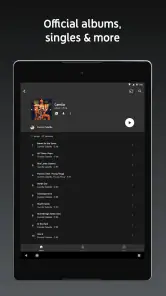
I judge a music app less by how exciting it feels on day one than by whether it still makes listening easier after the novelty wears off. My first week with YouTube Music felt like opening a familiar video rabbit hole in a more music-focused space. I could move from a song to a live performance or a cover without starting a new search, and that made casual listening feel unusually exploratory. The app is a free music and audio app from Google LLC, rated Teen; its average rating is 4.5 from around 7.6 million ratings, and it has over 5 billion installs. That popularity makes sense if, like me, you enjoy following a track wherever it leads.
Discovering New Beats
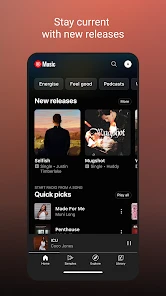
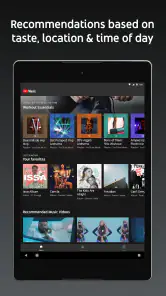
One of the first things that struck me was how the app serves up a platter of music discovery. From the moment you open it, you're greeted with a personalized mix of recommendations. It’s like having a DJ who knows your taste better than you do. I found myself jamming to new artists and forgotten classics alike. The "Discover Mix" and "New Release Mix" are absolute gold mines for fresh tracks.
What makes the first week click
The strongest early appeal is that a search can turn into a listening trail. I might look up one familiar recording, notice a related performance, and end up exploring an artist I had not intended to hear. That suits an evening when I want music to surprise me more than I want to curate a perfect queue. It is less useful when I have a precise album in mind and simply want to play it without detours.
The Latest on YouTube Music
Music for Every Mood
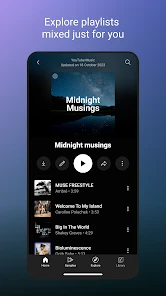
Whether you’re in the mood for some mellow tunes to unwind or something upbeat to get your heart racing, YouTube Music has you covered. The app categorizes playlists for every occasion and mood. I particularly enjoyed the "Chill Vibes" playlist, perfect for those lazy Sunday afternoons. Plus, the app’s ability to seamlessly transition between songs ensures there are no awkward silences to break your groove.
One practical way I’d use those mood-based choices is as a starting point rather than a finished plan. If I have a short stretch to focus, I can begin with a suitable playlist and let it run; if I hear something I want to keep, I can save that specific track instead of relying on the whole playlist to match my taste every time. That small distinction helps recommendations remain useful without turning every casual listen into library housekeeping.
Offline Listening
Now, let's talk about one of my favorite features – offline listening. We’ve all been there: on a road trip or in a place with spotty internet, and bam, the music stops. Thankfully, with YouTube Music, you can download your favorite tracks and playlists to keep the music going, no matter where you are. It's a lifesaver for those long commutes and travel adventures.
For a realistic commute routine, I’d prepare downloads while I still have a reliable connection, choosing a few playlists or albums that fit the journey instead of trying to predict every possible mood. Then I’d check that the saved music is actually available offline before leaving. The useful trade-off is control: a smaller, deliberate offline selection is easier to rely on than assuming an expansive online library will be reachable wherever I go.
More From Our News Desk

Weather by Xiaomi Review: Clear at a Glance, Less Clear Up Close

X Under Pressure: Can It Recover When Posting Goes Wrong?

Clash of Clans Is Won Between the Battles

Android Auto Makes the Case for Quieter Car Software

MobiOffice: Transforming Mobile Productivity with Seamless Integration

EA SPORTS FC™ Mobile Soccer: Redefining Mobile Sports Gaming
Music Videos Galore
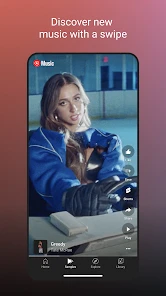
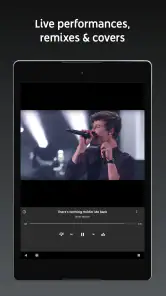
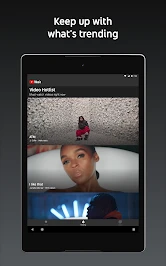
What really sets YouTube Music apart is its vast library of music videos. Not only can you listen to your favorite songs, but you can also watch the official music videos, live performances, and covers. It's a visual and auditory experience that few other apps can offer. I found myself getting lost in live performances from my favorite bands, something that adds an extra layer of enjoyment.
This range is especially valuable when the performance itself is part of what I’m after: a different arrangement, a crowd’s energy, or a singer’s interpretation of a familiar song. It also calls for a little care when saving results. Similar titles can refer to different versions, so I’d check the selected recording before adding it to a playlist meant for repeat listening. That avoids the small but real annoyance of expecting a studio track and getting a live take instead.
Seamless Integration with YouTube
For those already hooked on YouTube, the integration is a blessing. You can easily switch between the YouTube app and YouTube Music, keeping your music preferences in sync. The app even remembers where you left off, ensuring you never miss a beat. It’s like having a seamless musical universe at your fingertips.
This connection makes the app a natural fit for someone who already discovers artists through videos and wants to continue listening in a music-centered setting. It is not automatically the best fit for a listener who keeps video and audio strictly separate. If I want the least distracting way to play a known album, a conventional audio-first service may feel more direct; if I want to follow a song into performances and alternate takes, this one has a more appealing path.
When the novelty settles
The real test is whether those discoveries still help after the first burst of browsing. For me, the app earns a regular place when I let its mixes handle the small decisions: a familiar playlist for a work session, then a new-release mix when I want something different. A useful habit is to save tracks I genuinely want to revisit rather than treating every recommendation as a keeper. That gives future listening a clearer signal and keeps my library from turning into a pile of one-time experiments.
There is a trade-off in that discovery-first approach. If I want a very tidy collection built around albums and carefully curated playlists, a service whose main appeal is a more conventional library can feel easier to manage. YouTube Music is at its best when I’m curious, especially if I want to compare a studio recording with a live version or a cover. If I already know exactly what I want and prefer not to see alternate versions, recommendations can feel like extra noise rather than a benefit.
A routine that makes it useful
On an ordinary day, I might start a playlist at home, switch to downloaded listening before a commute with unreliable signal, and later search for a performance I remember seeing on YouTube. That mix of planned listening and spontaneous searching is the app’s practical strength. Before travelling, I’d download the specific playlists I expect to use and check that they are available offline; relying on a last-minute search when the connection is poor defeats the point. Downloads are most valuable as a small, intentional travel set, not as a substitute for deciding what I actually want to hear.
For someone choosing between music apps, the key question is whether music videos, live recordings and covers matter as much as polished album playback. Many standard streaming services are a better fit if you mainly want a predictable collection of official tracks and a straightforward way to organize it. Here, the bridge between audio and video gives browsing a different feel, but it can also make results less focused when multiple versions of a song compete for attention. I’d use the version labels and previews carefully before saving a track, particularly when a live take and studio recording have similar names.
Keeping it comfortable over time
Maintenance is light if I treat the app as a listening companion rather than a project: revisit recommendations, keep a few dependable playlists, and remove downloads I no longer need when space matters. The app is free to install, with in-app purchases ranging from a few cents to just under a thousand dollars per item, so I’d check the purchase details before confirming anything. Its Teen age rating is also worth noting for families choosing apps together. The large audience—around 489,000 written reviews as well as its millions of ratings—suggests broad reach, but popularity alone can’t tell you whether its mix of video and audio matches your habits.
That light routine is a point in its favor for people who do not want to spend their free time organizing music. I’d keep a handful of reliable playlists, save standout discoveries, and let the app handle the occasional exploratory session. Someone who enjoys building detailed album collections may prefer a service that puts library organization first. The better choice depends less on which app has more ways to listen and more on whether you want to browse or arrive with a fully formed plan.
Where listening can wear thin
My main source of fatigue is repetition: if I keep choosing the same familiar tracks, recommendations can start to feel less surprising, while an endless chain of versions can make a simple listening session less direct. I’d skip it if I want a strictly audio-only environment or if I dislike algorithmic discovery and prefer to build every queue myself. For everyone else, especially people who already use YouTube to find performances, it’s worth giving the recommendations a fair trial and then judging whether they still save effort after the novelty fades.
It also helps to separate occasional exploration from everyday background listening. When I want one uninterrupted mood for a long task, a playlist I already trust may be more comfortable than continually following suggestions. When I want a new release or a version I cannot remember the name of, the search-and-discovery blend is more useful. In other words, I would not ask every listening session to prove the app’s full range; I’d use the feature that fits the moment and ignore the rest.
New users may wonder whether they need to be enthusiastic video watchers to get value from it. I don’t think so: the audio playlists and recommendations can serve ordinary listening, while video and live versions are an extra avenue when curiosity strikes. The reverse is also true: if video results and alternate versions are exactly what you do not want, a more traditional streaming service will likely feel calmer. Its biggest strength is not that every listener needs every format, but that different versions are close at hand for people who enjoy them.
Does it earn a lasting place?
At the end of the day, YouTube Music is more than just a music streaming app; it’s a gateway to a world of sounds and sights. Whether you’re a casual listener or a die-hard music enthusiast, there's something here for everyone. So go ahead, give it a spin, and let the music take you on a journey.
My more measured recommendation is to try it for the habits you already have: play a dependable playlist, search for a performance you remember, and see whether the recommendations make the next listening choice easier. It was released on November 12, 2015, and its longevity is reflected in its broad reach, but lasting value is personal. For me, it earns space when I want discovery and alternate recordings without much setup. If my priority is a clean, carefully controlled audio library, I’d choose an alternative built around that instead.
YouTube Music Frequently Asked Questions
Does YouTube Music require an internet connection?
YouTube Music is built primarily around streaming, so an internet connection is useful for browsing and playing its music catalog. If you want to listen when you are offline, downloads are available with a YouTube Music Premium subscription. That can be helpful during travel or in places with unreliable connectivity, while the free experience is better suited to listening online.
Can I create playlists in YouTube Music?
Playlists are part of YouTube Music’s listening experience, alongside songs, albums, and artist radio. They can help you bring together tracks for a particular mood or occasion and make it easier to return to music you enjoy. The app also offers discovery features, so playlists can sit alongside recommendations when you are looking for something familiar or exploring new music.
Can I use YouTube Music on a tablet or computer?
YouTube Music is available on smartphones and can also be accessed through web browsers, making it usable on more than one kind of internet-connected device. A browser option can be convenient if you want to listen from a computer, while the mobile app is suited to listening on the go. The experience remains focused on streaming music and discovering content.
Does YouTube Music have ads?
The free listening option includes ads, which is one of the main differences between it and a Premium subscription. Premium adds ad-free listening along with benefits such as offline downloads and background play. If you are deciding whether to download the app, consider how often you listen and whether uninterrupted playback is important to you. You can begin with the free option and assess the experience.
Can I use YouTube Music while using other apps?
Background play is one of the benefits associated with YouTube Music Premium. The free version has limitations, so listeners who want music to continue while they use other apps may want to review the Premium option. If you mainly listen with the app open, the free experience may still be enough to explore the service and see whether its catalog and recommendations suit you.
Pros
- Extensive music library
- Offline playback available
- High-quality audio streaming
- Personalized playlists
- Seamless integration with Google services
Cons
- Subscription required for ad-free experience
- Limited free features
- Occasional app crashes
- Regional content restrictions
- Consumes significant data
- Category
- Music & Audio
- Version
- Varies with device