MX Player
- 166.10K
- 4.2
- Installs
- 1.00B
- Price
- Free

Screenshots
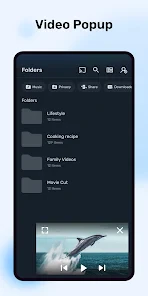
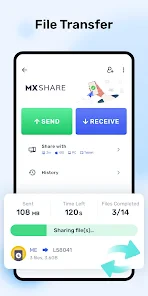

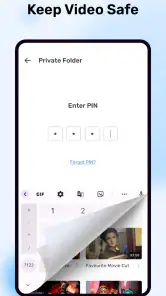
Analysis by Reviewed
I judge a mobile video player by what happens when conditions are less than ideal: a clip has subtitles, I’m watching on a small screen, or the network is unreliable. MX Player is a familiar choice for local video playback, and its hardware acceleration and subtitle tools give it a more hands-on feel than a bare-bones player. I find it most useful when I want control over playback rather than a service built around streaming recommendations.
When the connection changes the experience
Connectivity matters most before playback: browsing for a video, getting a file onto the device, or locating subtitle files can all depend on the workflow and network available. Once I have a playable file to hand, I value a player that lets me focus on the picture and sound instead of making me think about my connection. MX Player is centered on video playback, so I see it as a companion to the ways I already obtain and organize videos, not a replacement for every streaming app.
That distinction helps set expectations. If I want a catalog that streams over Wi-Fi or cellular data, with shows ready to browse, a dedicated streaming service is the more natural fit. If I already have a video and want to adjust how it plays, a local-style player such as MX Player is the more relevant tool. I would check the file is accessible before settling in, especially when I’m away from a dependable connection.
The Latest on MX Player
A practical fit for everyday viewing
For a commute, a lunch break, or a quiet evening, the useful question is not simply whether a player has many controls; it is whether those controls are easy to reach on a phone. Gesture-based adjustments can be handy when I’m holding the device in one hand, while subtitle timing controls matter when dialogue and captions drift apart. I’d test the gestures on a short clip first, since quick swipes can be less convenient than tapping a visible button until I learn their feel.
Subtitle support is especially valuable for foreign-language films, noisy surroundings, or moments when I need to keep the volume low. A practical habit is to check that the subtitle file belongs with the video before playback, then adjust synchronization in small steps rather than making a large change all at once. That makes it easier to tell whether the captions are improving or getting further out of step.
Where it may not be the right choice
MX Player’s breadth of controls is a plus for people who like to tune playback, but it can feel like more than a casual viewer needs. If I only watch videos inside one streaming service, using that service’s built-in player is simpler: there is no separate player workflow to learn. And if a particular file refuses to play, I would first check the file itself and try another player before assuming the phone or network is at fault.
The app is free, though in-app purchases are available, with listed amounts ranging from $0.49 to $239.99 per item. That makes it sensible to explore the free experience before spending anything; I would only consider a purchase after deciding that the app’s controls fit my routine. It is intended for everyone, but parents should still supervise what children watch rather than treating a playback lock as a substitute for choosing suitable content.
More From Our News Desk

MobiOffice: Transforming Mobile Productivity with Seamless Integration

EA SPORTS FC™ Mobile Soccer: Redefining Mobile Sports Gaming

How Microsoft OneDrive Became a Mobile Productivity Giant

How Google Translate Breaks Language Barriers Effortlessly

Why Google Sheets Is the Ultimate Mobile Productivity Tool

Unveiling the Dynamic World of My Talking Tom Friends
Getting Started with MX Player
From the moment I downloaded MX Player, I was impressed by its sleek and user-friendly interface. It's available on both Android and iOS, so whether you're team Android or an Apple enthusiast, you’re covered. The installation was seamless, and within minutes, I was ready to dive into a world of entertainment. Amazon India develops the app, which sits in the video player and editor category. It has a 4.2 average from around 14 million ratings, and it has passed one billion installs. Version 2.4.0 requires Android 7.0 or later; it first appeared on July 18, 2011.
Feature-Packed Entertainment Hub
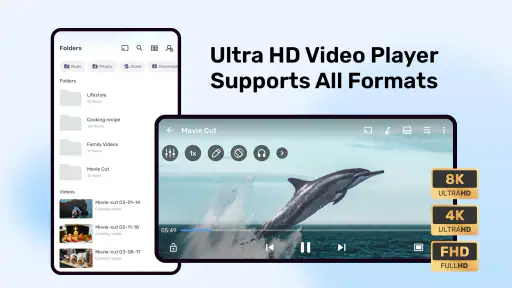
The first thing that caught my attention was the app's support for a wide range of file formats. Whether it's MP4, AVI, MKV, or any other format, MX Player handles it like a pro. No more converting files or dealing with compatibility issues. Just load your video and hit play.
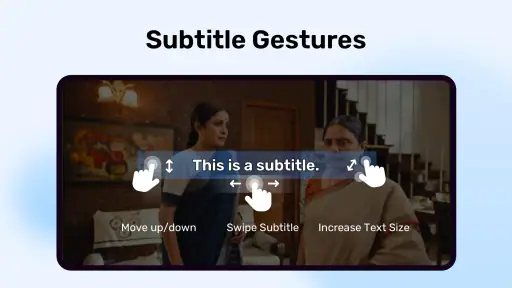
Another standout feature is the subtitle support. As someone who watches a lot of foreign films, having a reliable subtitle feature is crucial. MX Player not only supports a variety of subtitle formats but also allows you to adjust the timing and sync them effortlessly. It’s like having a personal cinema at your fingertips!
Performance and Usability
Now, let's talk performance. MX Player is optimized for both high-end devices and those that are a bit older. The playback is smooth, with no annoying lags or buffering, even in HD quality. This was a big win for me as nothing kills the mood like a video that keeps pausing.
The app also includes a child lock feature, which is a lifesaver for parents. It ensures that your little ones won't accidentally pause or skip through your movie, allowing you to enjoy a stress-free viewing experience.
Personalization and Advanced Features
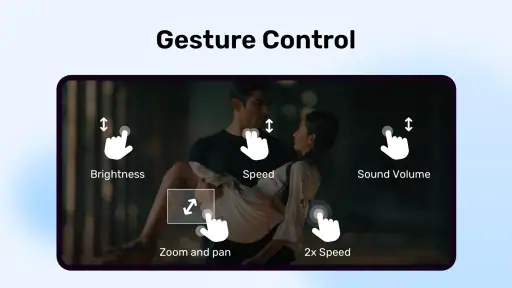
What truly sets MX Player apart is the level of customization it offers. From adjusting the playback speed to tweaking the audio and video settings, you have complete control over your viewing experience. The gesture controls are intuitive, allowing you to easily adjust volume, brightness, and seek through the video with simple swipes.
For the tech-savvy users, MX Player offers advanced features like hardware acceleration, which utilizes your device's capabilities to provide a smoother performance. It also supports multi-core decoding, which means better performance on multi-core devices.
One useful way I’d put those controls to work is with a long lecture or interview: slow playback slightly to follow a dense explanation, then return to normal speed for the parts I already understand. For a film, I’d leave speed alone and use subtitle timing or brightness adjustments instead. Those small choices make the player more adaptable than the standard controls in many gallery apps, though they do reward a little experimentation.
Hardware acceleration can help a compatible device handle demanding playback, but it is not a magic fix for every file or handset. If a video stutters, I’d try changing playback settings where available, close other demanding apps, and test a different file. This is a more useful troubleshooting sequence than repeatedly restarting playback while the same conditions remain. Older hardware may still impose limits, and a different player can be worth trying when one specific format causes trouble.
For data-conscious viewing, I would avoid starting a large stream on cellular data unless I know what the source is doing. A video player and a streaming service are not interchangeable: playback controls do not themselves tell me how much network data a source will use. When I’m on a metered plan, I choose a connection deliberately and confirm the video is ready before watching. If the network drops mid-task, I check whether the file remains accessible and resume from the player rather than assuming every interruption means the video is damaged.
Comparing it with a phone’s built-in gallery player, MX Player is the stronger choice when I need detailed subtitle or playback adjustments. Compared with a streaming app, it is less about discovering a show and more about controlling a video I have selected. That makes it a good fit for people who watch varied files, language learners who rely on captions, and viewers who want convenient speed and gesture controls. It is less compelling if all my viewing happens in a single service or I prefer an interface with almost no settings.
A small-screen routine that makes sense
A realistic use for me is watching a downloaded lecture during a break, then returning to it later at home. I can use captions to catch a technical term in a noisy place, slow the playback briefly when a point is dense, and switch back to normal speed without changing apps. The practical benefit is not just having more controls; it is being able to adapt the same video to different surroundings. I would still check the file is available before leaving a reliable connection, because the player cannot solve a missing-file problem.
For families, the child lock can reduce accidental taps while a video is playing, but it does not choose suitable material or replace adult supervision. For language learners, subtitles and speed adjustment can support close listening, though I find it more useful to change one setting at a time. If I slow the video and alter subtitle timing together, it becomes harder to tell which adjustment helped.
Recovering when playback goes wrong
When a clip refuses to start, I would separate a playback problem from a connectivity problem. First, I’d verify that I can still access the video; then I’d try another file in the same player. If that second clip works, the first file may be the issue. If several files behave badly, trying a different playback setting or another player can help narrow down the cause. This is a calmer approach than repeatedly tapping play or blaming the network without checking the file.
Subtitle trouble deserves its own check. I’d confirm the captions match the video and make a small synchronization adjustment, then watch a brief section to see whether the timing improves. If the captions remain out of step, I would not keep making larger changes blindly. A poor subtitle match can be frustrating even when the video itself plays perfectly, so having a second subtitle option or watching without captions may be the more sensible fallback.
Choosing the right player for the job
The built-in gallery player is often the easiest choice for a quick clip: it is already part of the phone’s usual photo-and-video workflow, and many viewers will not need more than basic playback. MX Player makes more sense when I want to fine-tune subtitles, playback speed, or gestures. A streaming app serves a different purpose altogether, since it organizes a catalog and handles access to its own content. I would not replace one with the other; I’d choose based on whether I’m browsing for something to watch or adjusting a video I already have.
That distinction also helps decide who should skip it. Someone who watches only inside a favorite streaming service may gain little from adding another player. A person with a mixed collection of videos, captions, or learning material is more likely to appreciate the extra control. If a particular file is central to your routine, testing that file early is wise; a player’s broad format support does not guarantee every file will behave identically on every device.
Overall, MX Player is more than just a media player; it's a full-fledged entertainment hub that meets the needs of casual viewers and cinephiles alike. Whether you're watching on a tablet during your commute or on your TV at home, it transforms any device into a mini theatre.
In conclusion, if you're in search of a reliable, feature-rich media player, give MX Player a try. It's a powerhouse app that proves you don't need to compromise on quality or features, even on a mobile device. Happy viewing! My recommendation is practical rather than universal: try it if you want control over subtitles, playback speed, and screen gestures, and keep a simpler built-in player in mind if you rarely adjust anything. The best fit depends on what you watch and how much control you want between pressing play and settling in.
MX Player Frequently Asked Questions
Can MX Player play videos saved on my phone without uploading them anywhere?
MX Player is designed to play video files stored on your device, which makes it useful for watching local videos when you are offline. Keep in mind that playing a locally stored file is different from streaming online content, which needs an internet connection. If you prefer offline viewing, make sure the videos you want are saved on your device.
Does MX Player let me control playback with gestures?
MX Player includes gesture controls, which can make it easier to manage playback while watching a video. If you prefer interacting with a player directly on the viewing screen, this may be a useful part of the experience. The app’s main focus is playing videos, with hardware acceleration and subtitle support among its listed capabilities. Try the controls on your device to see whether they suit your habits.
Can MX Player handle more than one processor core when playing videos?
MX Player includes multi-core decoding, a playback feature that can help it handle media using more than one processor core. This may be relevant if you watch a variety of video files on your phone or tablet. Actual playback still depends on the device and the file, so it is worth trying the videos you regularly watch after installation rather than assuming every file will behave the same way.
Can I adjust subtitle timing or appearance in MX Player?
MX Player is known for subtitle support, and the published app details describe options such as changing synchronization and customizing the appearance of subtitles. These controls can be helpful when captions appear out of time or are difficult to read. The subtitle file and the video you are watching can affect the result, so check how your own content displays before relying on a particular setup.
Does MX Player support a wide range of video formats?
MX Player is described as supporting a wide range of video formats, which can make it useful for a personal media library containing different kinds of files. Playback depends on the specific file and the device, so format support should not be treated as a guarantee that every video will work identically. If you have a file you watch often, try it after installing the app.
Pros
- Supports a wide range of video formats.
- Smooth playback with hardware acceleration.
- Customizable playback speed.
- User-friendly interface with intuitive controls.
- Subtitle support with syncing options.
Cons
- Ads in the free version can be disruptive.
- Some features require a paid version.
- Resource-intensive on older devices.
- No built-in streaming service.
- May struggle with 4K resolution on some devices.
- Category
- Video Players & Editors
- Version
- 2.4.0