Prime Video
- 216.88K
- 4.0
- Installs
- 500.00M
- Price
- Free

Screenshots
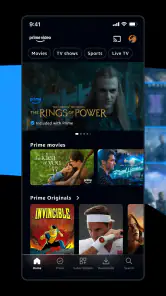

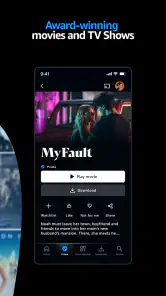
Analysis by Reviewed
I judge a streaming app less by how much it offers on the first evening than by whether it still helps on an ordinary Tuesday a month later. With Amazon Prime Video, the answer depends on how often you use its range of films, series, live programming, and sports—and whether you can find something without turning the evening into a long browse.
A promising first week, with a choice to make
During the first few sessions, I would try the app with a real plan rather than treating it like an endless catalogue. Search for a film you already have in mind, follow one series, or check whether there is live viewing that suits your schedule. That gives you a better feel for the service than sampling random titles and forgetting what you meant to watch.
The app is an entertainment product from Amazon Mobile LLC, and it is free to install. Its Teen content rating is worth keeping in mind if you are choosing something for younger viewers: I would check the rating on an individual title rather than treating the app’s age label as a recommendation for every show or film inside it.
The Latest on Prime Video
When the first-week novelty settles
The real test is whether it earns a regular place in your routine after the initial browsing spree. For me, it does when I use it as a dependable option for a planned evening, a shared watch, or a few downloaded episodes before a trip. It is less compelling if I open it only to scroll without a specific mood in mind; a broad catalogue can make choosing feel like work rather than relaxation.
A practical habit helps: I save a short list of things I genuinely intend to watch, then pick from it instead of restarting the search every night. If I am watching a series in small gaps, the app’s resume point matters more than the size of the catalogue. I also treat downloads as preparation, not something to figure out at the station: choose an episode while connected, then check that it is ready before leaving.
Who gets the most out of it
I would recommend trying it if your household rotates between films, series, sports, and live programming, or if you want one place to check before deciding what to watch together. It is also a sensible companion for someone who watches in short sessions: picking up an episode where you left off can make a scattered week feel less fragmented. The strongest fit is not necessarily the person who watches the most; it is the person who will use more than one part of the app’s range.
By contrast, I would skip it if you rarely watch video, already have a service that reliably covers your specific interests, or want a purely free, uncomplicated catalogue. It is also not my first choice for someone who dislikes making choices among mixed viewing options. A narrower service can feel calmer when you know you mainly want one genre or network, while a free ad-supported app may be better for casual viewing when avoiding paid selections matters more than having a broad mix.
More From Our News Desk

Weather by Xiaomi Review: Clear at a Glance, Less Clear Up Close

X Under Pressure: Can It Recover When Posting Goes Wrong?

Clash of Clans Is Won Between the Battles

Android Auto Makes the Case for Quieter Car Software

MobiOffice: Transforming Mobile Productivity with Seamless Integration

EA SPORTS FC™ Mobile Soccer: Redefining Mobile Sports Gaming
Where it fits beside other streaming choices
Compared with a service built around one narrow specialty, Prime Video’s appeal is range: I can find films and television, plus live programming and sports, in one entertainment app. That makes it useful for households whose tastes do not line up neatly. The trade-off is that a bigger mix does not guarantee that the exact film or show I want is included in the viewing I already have. I check the app before settling on a plan rather than assuming every result is immediately available to watch.
That distinction matters if you are comparing it with free, ad-supported services or a subscription focused on a particular network or genre. If low-cost casual viewing is your only goal, a free alternative may suit you better. If you mainly follow one kind of content, a more focused service can be easier to browse. Prime Video makes most sense to me when its variety matches what I actually watch, not simply because it has a long catalogue.
Exploring the Content Wonderland
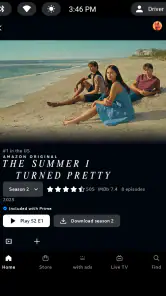
One of the things that immediately struck me about Amazon Prime Video is its extensive selection of shows and movies. Whether you're into action-packed thrillers, heartfelt dramas, or laugh-out-loud comedies, there's something for everyone. The platform also boasts a range of exclusive Amazon Originals, which have quickly become some of my favorites. Shows like "The Marvelous Mrs. Maisel" and "The Boys" are not just entertaining but also bring fresh narratives that keep you hooked from start to finish.
User-Friendly Interface
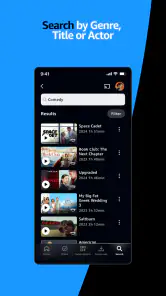
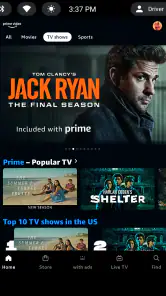
Now, let's talk about the user experience. The interface of Amazon Prime Video is pretty straightforward, which is a big plus for someone like me who isn't exactly tech-savvy. Navigating through the app is a breeze, with easy-to-find categories and a search function that actually works! Plus, the app remembers where you left off, so you can pick up exactly where you stopped, even if it was mid-episode.
Features That Enhance Viewing
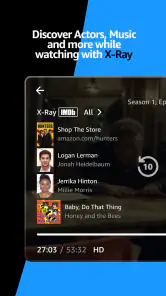
What truly elevates the viewing experience on Amazon Prime Video are the additional features. For instance, the X-Ray feature is a godsend for those "where do I know this actor from?" moments. It provides instant information about the cast, music, and even trivia, all without interrupting your viewing.
I find X-Ray most useful when a face or song catches my attention and I want a quick answer without pausing to search elsewhere. It can also be a distraction if I keep checking details instead of following the scene, so I use it selectively. For a first-time viewer, that extra context is a nice bonus; for someone who prefers a completely uncluttered screen, it is easy enough to ignore and simply keep watching.
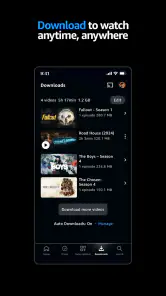
Another feature worth mentioning is the ability to download content for offline viewing. This is perfect for those long flights or commutes where Wi-Fi is non-existent. You can download your favorite episodes or movies and enjoy them anytime, anywhere.
Keeping the app useful month to month
Offline viewing is especially handy for a realistic routine: I can download an episode the night before a commute, watch it on the train, and avoid relying on a patchy connection. It is also a sensible way to plan for travel, though I would not leave the download until the last minute. Downloads need some attention, and they are most valuable when I choose them deliberately rather than filling a device with a queue I may never finish.
For a family film night, I find it useful to settle on a few candidate titles before everyone gathers. I can search those titles rather than asking the whole group to browse from scratch, then confirm what is available to play. That small bit of preparation avoids the common streaming-app trap of spending the first part of the evening negotiating through menus. It is a practical workflow, not a guarantee that every title I have heard about will be included in the same way.
The app is free to install, has a Teen content rating, and carries a 4.0 average from around five million ratings; it has passed over 500 million installs. Those figures suggest broad use, but they do not tell me whether its catalogue fits my taste. In-app purchases range from a few cents to several hundred dollars per item, so I pay attention to what I select instead of assuming every title or option is included in the same way. The app itself does not make the viewing decision for me: I still check what I can access before planning a film night around a particular title.
Maintenance, limits, and who should skip it
Prime Video asks for modest but recurring upkeep: I need to keep my watch choices organized, make downloads before going offline, and resist browsing when I already know what I want. Its interface is approachable, yet a large selection can still create decision fatigue. Live programming and sports add another reason to return, but they will not matter much to someone who only wants a carefully curated film library. Likewise, a viewer who wants one simple, free source with no paid choices to sort through may be happier elsewhere.
The maintenance is less about technical work than attention. I decide what to watch, check that it is available in the way I expect, and prepare downloads when offline viewing matters. This feels manageable when I have a clear plan; it feels like needless housekeeping if I only watch occasionally. A useful rule for me is to avoid downloading a long queue “just in case.” Choosing one or two likely episodes is more practical than using storage on plans I may abandon.
For families or friends with different tastes, the range can make the app a useful shared starting point; for a viewer who rarely watches video, another subscription or app may simply add clutter. I would keep it when I use its mix often enough to justify the attention it takes to browse and prepare downloads. I would skip it if I mostly open it, scroll, and leave without finding something I want.
What to check before settling in
One question I would answer before committing an evening is whether a particular title is available to watch in the way I expect. Search is a helpful first step, but finding a title is not the same as confirming that it is part of the viewing access I plan to use. I make that check before inviting friends or promising a family pick, especially when the title is the whole reason for opening the app.
For sports and live programming, I would also plan around the event rather than assume that browsing later will be just as useful. If a live option is the main attraction, check what is available at the time you intend to watch. This is a more reliable approach than treating a general catalogue as a guarantee of access to every event or broadcast.
Is It Worth Your Time?
In my opinion, Amazon Prime Video is definitely worth checking out. With its vast content library, user-friendly interface, and additional features that enhance your viewing, it stands out among other streaming platforms. Plus, if you're already an Amazon Prime member, you get access to all of this at no extra cost!
So, if you're looking for a reliable streaming service that offers a little bit of everything, give Amazon Prime Video a try. Trust me, your watchlist will thank you!
My long-term verdict
For lasting value, I judge it by whether it solves a recurring viewing problem: finding something that suits different moods, keeping a series easy to resume, or preparing entertainment for a journey. When those needs come up regularly, its breadth gives me a reason to return. When they do not, a large catalogue is not enough on its own to earn space on my phone.
I would start with a specific use rather than trying to explore everything at once: pick a film for tonight, follow one series, or prepare a download for a commute. After a few weeks, it becomes clearer whether the app fits your habits or simply encourages more browsing. My recommendation is therefore measured: Prime Video is worth keeping for viewers who make use of its mix, but a more focused or free alternative is the better choice when that range adds complexity without adding value.
A note on recurring value
Prime Video was released on August 28, 2017, and its scale is clear in its roughly 217,000 written reviews as well as its large audience. I would not use popularity as a substitute for personal fit, though. A viewer who watches live sport and a film now and then may find recurring reasons to open it; someone with one particular series in mind should judge it by that need, not by how much content is visible around it.
The clearest way to decide is to give it a small role in your routine for a while: choose a show, use a download for a journey, or plan one shared watch. If those uses feel natural and the app saves you effort, it has earned its place. If the routine becomes mostly searching and checking, I would remove the obligation to keep returning and choose a service that better matches what I actually watch.
Prime Video Frequently Asked Questions
Can I watch Prime Video on more than one screen in my household?
Prime Video brings movies, TV shows, live programming, and sports together in one entertainment app. Whether you can watch on multiple screens at the same time depends on the service terms and the titles you choose. If several people in your household plan to watch at once, check the account and playback details in the app before relying on simultaneous viewing.
Does Prime Video let me choose subtitles or audio languages?
Subtitle and audio options can vary from one movie, show, or live program to another. Before watching, open the title’s playback options and look for the languages and accessibility choices available for that particular video. This is worth checking if you prefer subtitles, need a different audio language, or are choosing something for viewers with specific accessibility needs.
Can I cast Prime Video to a television?
Prime Video is designed for watching video, and its available features can depend on the device you use. If you want to view a title on a television, check whether the app and your chosen device offer a compatible way to play it on the larger screen. Confirm that the option works with your setup before planning a movie night around it.
Does Prime Video offer content in different video qualities?
The viewing experience can depend on the title, your device, and the way the video is offered. If picture quality matters to you, check the playback options for the title and consider how your device and internet connection affect streaming. This can help you decide whether Prime Video suits your setup without assuming every program has identical quality choices.
Can I cancel a Prime Video membership or purchase through the app?
Prime Video may present viewing options that involve a membership or an additional transaction, and the terms can differ depending on how you access the service. Review the account and purchase details before confirming anything, and use the relevant Amazon account settings to manage subscriptions or purchases. Checking those terms first helps avoid unexpected charges or continued access you no longer want.
Pros
- Extensive content library.
- High-quality original series.
- Offline download feature.
- User-friendly interface.
- Multiple user profiles.
Cons
- Subscription required for premium content.
- Limited content availability by region.
- In-app purchases for some titles.
- No free trial on mobile devices.
- Occasional streaming lags.
- Category
- Entertainment
- Version
- Varies with device