Samsung Music
- 22.07K
- 3.8
- Installs
- 1.00B
- Price
- Free

Screenshots



Analysis by Reviewed
Before choosing a music app, I’d ask myself how I actually listen: do I want a convenient place to play tracks I already have, or a service centered on streaming and discovery? That distinction matters more than a long list of features. Samsung Music is a free audio player from Samsung Electronics Co., Ltd., and it makes the most sense to me as a familiar way to manage a personal music library, particularly on a Samsung Galaxy device.
I’d consider it when I want my own tracks close at hand without making a streaming subscription the center of my listening routine. It has a 3.8 average from around 809,000 ratings, and it has been installed over a billion times. Those figures suggest a familiar, widely used option, but they don’t tell me whether it suits a particular listener. My decision would come down to how I keep music and how much I expect the player to do for me.
First decide what kind of listening you need
For someone who saves albums, downloads tracks, or keeps a carefully arranged local collection, a dedicated player can be more convenient than opening a streaming service every time. It can also make sense when I want to listen to music I already own without browsing recommendations first. The trade-off is that a local library needs some upkeep: if files are scattered or poorly named, browsing may feel less tidy than a streaming catalog with its own search and artist pages.
The Latest on Samsung Music
Samsung Music is listed for Android and has a minimum OS requirement of Android 9. It is rated Teen, and its current version is 16.2.42.0. It is free, which makes trying it a low-commitment choice for someone with a compatible device. I would still choose based on my actual listening habits, not on install totals or a rating alone.
First Impressions: A Seamless Interface
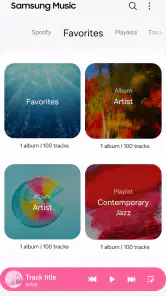
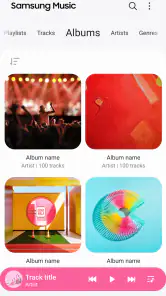
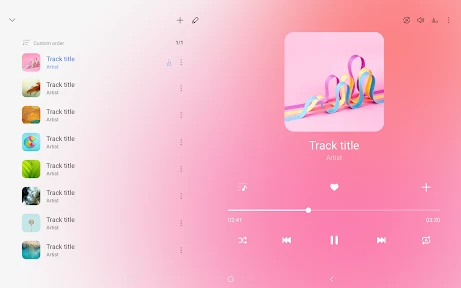
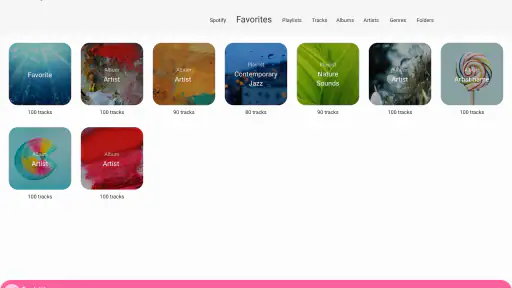
Upon launching the Samsung Music app, the first thing that strikes you is its sleek and intuitive design. The interface is clean, which makes navigating through your playlists and tracks a breeze. It's as if Samsung read the minds of music enthusiasts and designed an app that feels familiar yet refreshingly new.
The home screen showcases your most recently played songs, giving you quick access to your favorites. Plus, the app’s compatibility with various audio formats like MP3, WMA, AAC, and FLAC ensures that no song is left behind. It's like having a personal DJ who knows just what you want to hear.
Features that Hit the Right Note
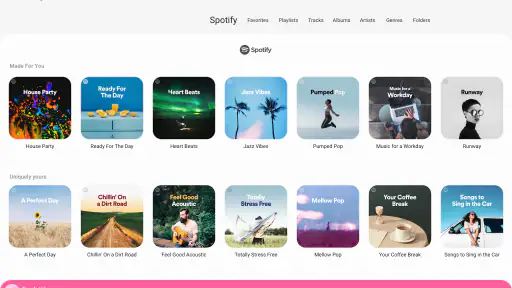
One of the standout features of Samsung Music is its ability to integrate with Spotify. With just a few taps, you can access a vast library of songs, discover new artists, and even create collaborative playlists with friends. It's like having the best of both worlds—your personal music collection and Spotify's extensive library—right at your fingertips.
More From Our News Desk

Clash of Clans Is Won Between the Battles

Android Auto Makes the Case for Quieter Car Software

MobiOffice: Transforming Mobile Productivity with Seamless Integration

EA SPORTS FC™ Mobile Soccer: Redefining Mobile Sports Gaming

How Microsoft OneDrive Became a Mobile Productivity Giant

How Google Translate Breaks Language Barriers Effortlessly
Another cool feature is the "Auto Playlist" option. Imagine the app curating a playlist based on your listening habits—it’s like having an AI-powered DJ who gets your vibe. And for those who love a bit of personalization, the app offers themes to match your mood or style.
Where the player fits among alternatives
I’d put Samsung Music in the local-player corner rather than treat it as a replacement for every music app. A streaming-first service is usually the better fit if I want to search a broad catalog, follow recommendations, or rely on a service to supply music I haven’t saved. A simpler local player may suit someone who wants only basic playback controls. Samsung Music sits between those expectations for listeners drawn to a familiar interface and the Spotify connection described above.
That connection is useful, but I wouldn’t assume it makes every part of the experience identical to using Spotify directly. If playlists, account tools, or discovery are central to your routine, I’d keep the streaming service itself available and treat Samsung Music as a convenient companion. If I rarely use streaming and mainly play my own files, the local-library side is the stronger reason to try it.
Who will get the most from it
I see the clearest fit for a Galaxy owner who has albums or individual tracks stored on the phone and wants to get to them without opening a streaming app first. It can also suit someone who keeps a mix of familiar local music and Spotify listening, provided they’re comfortable switching between the two kinds of library. The app’s broad adoption—more than a billion installs—makes it a recognizable option, but the practical test is whether its browsing style matches the way you sort and revisit music.
It is less compelling for a listener who expects one app to supply every song, handle discovery, and organize an online catalog as the main event. In that situation, a streaming-first service is a more natural starting point. Likewise, people who want deep control over file tags, library rules, or playback workflows should compare dedicated advanced players rather than assume a clean interface means extensive customization. I’d choose for the task I do most often, not for the possibility of using every feature.
A practical routine, and a small library tip
Picture getting ready for a commute: I can return to a recently played album instead of searching through every folder, then switch to a playlist when I want a different mood. For a smoother library, I’d organize files into clear album folders and use consistent artist and album names before importing or scanning them. That small bit of housekeeping can make a bigger difference than repeatedly changing the player’s appearance.
I’d also test a few representative tracks before relying on any player for a whole collection: one familiar album, a less common format, and a playlist I use often. That gives me a practical sense of whether my files appear as expected and whether the navigation fits my habits. It’s a useful check before spending time reorganizing a large library around a new app.
Small decisions that make daily use easier
One useful habit is to treat the recently played area as a shortcut, not as a substitute for organizing the library. It is handy for returning to an album during a busy morning, but a clear folder and naming structure still pays off when I want a particular artist weeks later. I’d make a short trial playlist from tracks I know well, then check whether it remains easy to find and use alongside albums. That is a more revealing test than judging the app after a few minutes of tapping through the home screen.
For a mixed listening routine, I’d also decide in advance which app owns which job. I might keep personal files in Samsung Music and use Spotify when I’m actively looking for something new, rather than trying to force one interface to handle both habits equally. That separation can reduce the small annoyance of searching in the wrong place. It also keeps the local collection useful even on days when I don’t want recommendations or online browsing.
Performance: Smooth as a Melody
In terms of performance, the Samsung Music app delivers a seamless experience. The transition between tracks is smooth, and there’s no lag when switching between different sections of the app. Even with a large music library, the app remains responsive, ensuring your music experience is uninterrupted.
One thing I particularly appreciate is the battery optimization. Even after hours of continuous playback, my phone’s battery life remains relatively unaffected. It’s a small detail, but it makes a big difference for those long road trips or extended music sessions.
What I’d weigh before switching
Moving to another player is not just a matter of pressing play. If I’ve built playlists or sorted files in a particular way, I’d first check how much of that organization depends on the current app and how much is stored in the music files themselves. Keeping a copy of important playlists or a clear folder structure makes experimentation less risky. I’d try Samsung Music alongside my existing player before making it the only route to my collection.
There are also cases where I would skip it. If I mainly listen to music through a streaming subscription, need advanced library controls, or use a phone outside the supported Android range, I would look at alternatives designed around those needs. And if the app’s layout doesn’t match how I browse artists and albums, a different player may feel more natural; a clean interface is only helpful when its organization suits you.
Questions I’d settle during a trial
Would I need a subscription to try the app? No: Samsung Music is free, so I can test whether it suits my local listening without committing to a paid plan. Does it make sense on a non-Galaxy Android phone? It is available for Android, but its strongest case is still as a familiar player for the Galaxy series, so I’d check how it behaves on my own device before moving my whole routine over.
Would it replace Spotify for someone who depends on streaming? I wouldn’t count on that. The Spotify connection can be convenient, but I’d keep Spotify itself for the parts of my routine that depend on its own discovery and account features. And if I have a large collection, I’d avoid reorganizing everything immediately: test a few albums and playlists first, then decide whether the app’s library presentation is worth making my everyday default.
Final Thoughts: A Must-Have for Music Lovers
Overall, the Samsung Music app is a robust and versatile option for anyone looking to elevate their music listening experience. Whether you're an audiophile who values high-quality sound or someone who loves discovering new music, this app caters to all.
Its seamless integration with Spotify, user-friendly interface, and performance-driven design make it a standout choice in the crowded world of music apps. So, if you're in the market for a reliable and feature-rich music app, give Samsung Music a try. You might just find it becoming your go-to source for all things music.
My recommendation is more specific: I’d try it first if I use a Galaxy phone and want a free, familiar home for personal tracks, with Spotify access as an extra convenience. I wouldn’t pick it as my only music destination if discovering unfamiliar artists or streaming-first features are the main point of my day. In short, it’s worth a look for listeners who value their own collection, while the best choice for everyone else depends on whether they want a player or a full streaming service.
Samsung Music Frequently Asked Questions
Can I use Samsung Music to listen without an internet connection?
Samsung Music is suited to playing music stored on your device, making it a useful option when you want to listen without relying on a streaming service. The app’s focus is local music playback, so you can browse and play tracks already available on your phone. Keep in mind that music needs to be stored on the device for this kind of listening.
Who develops Samsung Music, and is it specifically for Galaxy phones?
Samsung Music is developed by Samsung Electronics Co., Ltd. and is intended primarily for the Samsung Galaxy series. It is a Music & Audio app for playing music on Android, with its clearest fit being a Galaxy phone. If you are choosing a player for another Android device, bear in mind that its design and integration are centered on Samsung devices.
Is Samsung Music free to download, and what devices is it intended for?
Samsung Music is a free Music & Audio app from Samsung Electronics Co., Ltd. It is intended primarily for the Samsung Galaxy series, where it provides a dedicated way to play music on an Android device. The app is rated Teen, so it may not be suitable for every age group. If you use a Galaxy phone, its intended audience and purpose are straightforward: playing music with Samsung’s player.
What Android version do I need to use Samsung Music?
Samsung Music requires Android 9 or later, so check your device’s Android version before downloading. It is designed for the Samsung Galaxy series and supports Android, but the experience may differ outside Samsung devices. Its current version is 16.2.42.0. With a minimum OS requirement in mind, you can quickly decide whether your phone is compatible before installing the player.
What features does Samsung Music offer?
Samsung Music provides a comprehensive music listening experience with features such as a powerful equalizer, support for various music file formats, and seamless integration with Samsung devices. Users can create playlists, browse music by album, artist, or genre, and enjoy an intuitive user interface. Additionally, the app supports offline music playback and offers customizable themes.
Pros
- Intuitive user interface
- Wide range of audio format support
- Seamless integration with Samsung devices
- Offline music playback
- Customizable playlists
Cons
- Limited to Samsung devices
- Ads in free version
- No lyrics feature
- No equalizer settings
- Occasional app crashes
- Category
- Music & Audio
- Version
- 16.2.42.0