LiveOne: Stream Music & More
- 111.84K
- 4.5
- Installs
- 100.00M
- Price
- Free

Screenshots


Analysis by Reviewed
I find the most revealing way to judge LiveOne: Stream Music & More is to notice what happens when my connection changes. Music, podcasts, and video all depend on a steady path to the internet, so the app feels most at home when I have reliable Wi-Fi or a strong mobile signal. That makes it useful in a lot of ordinary moments, but it also means I think about where I’ll be listening before I press play.
When a connection changes the listening session
At home or in a place with dependable Wi-Fi, moving between music and other kinds of content feels like the app’s main advantage: I can choose a song, let a station run, or look for something to watch without opening a separate service. The trade-off is that a mix of media can encourage more browsing than I planned. If I only want a specific album and already know what I’m after, a music-first app with a familiar library layout may get me there faster.
On a commute, I’d treat LiveOne as a good companion when reception is consistent, not as something to rely on blindly through every tunnel or weak-signal stretch. A practical habit is to start the session before leaving a stable connection and keep the listening choice simple while moving. That reduces fiddling with the screen and helps me tell whether a pause comes from the network or from the content I selected.
Choosing the right moment to use it
The app suits listeners who like variety and are happy to let recommendations or a station guide the next choice. It is less compelling for someone who wants a strictly offline routine, a very minimal player, or complete control over a carefully organized personal collection. I would also think twice about making video the default while away from Wi-Fi: it is a more demanding way to use a mobile connection than audio, and the experience can be less predictable when coverage shifts.
A realistic use case is getting ready in the morning: I can start with a station based on an artist I like, then switch to a podcast when I’m ready to hear something more focused. If I’m heading out, I make that decision before walking away from the router rather than assuming every part of the session will behave identically on the street. That small change in routine makes the app’s range feel helpful instead of distracting.
What to expect if playback stalls
When streaming hesitates, I first check whether other online content is loading slowly. If it is, changing apps probably won’t solve the underlying connection problem. I’d pause briefly, move to a stronger-signal spot if possible, and then try playback again. Repeatedly tapping different stations can make it harder to know whether the original stream has recovered, so I prefer to retry one choice before moving on.
Live events deserve a little extra planning because watching a stream is less forgiving than listening to audio: a brief network interruption is more noticeable when the picture and sound need to stay together. I’d join from reliable Wi-Fi when I can, especially if the event is something I don’t want to miss. For casual listening, a short pause may be no big deal; for a scheduled performance, connection quality becomes part of the experience.
More From Our News Desk

Weather by Xiaomi Review: Clear at a Glance, Less Clear Up Close

X Under Pressure: Can It Recover When Posting Goes Wrong?

Clash of Clans Is Won Between the Battles

Android Auto Makes the Case for Quieter Car Software

MobiOffice: Transforming Mobile Productivity with Seamless Integration

EA SPORTS FC™ Mobile Soccer: Redefining Mobile Sports Gaming
Keeping mobile use intentional
Since the app can serve up audio as well as video, I’d choose content with my setting in mind. Audio is the natural pick when I’m walking, doing chores, or using the phone for something else; video makes more sense when I can give it attention and have a solid connection. If I’m watching mobile data, I avoid leaving a video playing in the background. It’s an easy way to keep the session focused and avoid using a richer format when I only need sound.
LiveOne is free to download, with in-app purchases listed from $3.99 to $39.99 per item. I’d check the purchase details in the app before paying, rather than assuming every listening option is included at no cost. It has a Teen content rating, and Slacker Inc. is the developer. Those details are useful context for households deciding whether the app fits their listening habits and spending preferences.
First Impressions
Right off the bat, LiveOne: Stream Music & More impressed me with its sleek and intuitive design. You know how some apps make you jump through hoops just to find your favorite playlist? Not here. Everything is laid out in a way that just makes sense. The app’s interface is clean, and navigation is a breeze. Whether you're tech-savvy or a bit of a technophobe, you’ll find it easy to dive right in.
Music, Podcasts, and More
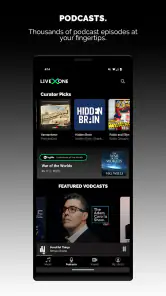
So, what can you do with LiveOne? Well, it’s not just about streaming music. Yes, it has an extensive library of songs, but it also offers podcasts, live events, and even video content. Imagine having a concert in your pocket wherever you go. That’s the kind of vibe LiveOne is going for, and it delivers.
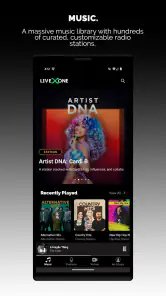
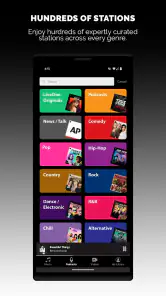
The music library is vast, covering a range of genres from pop and rock to indie and classical. I’ve discovered some new favorites thanks to the personalized recommendations. It's like having a friend who knows your taste down to a tee.
Live Events Feature
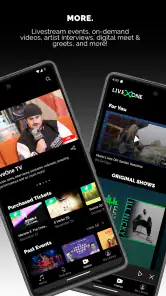
One of the standout features of LiveOne is its live events. I recently tuned into a live-streamed concert and it was nothing short of fantastic. The video quality was crisp, and there were no annoying lags. It felt like I was right there in the front row, minus the crowd.
Plus, the app offers a nifty schedule of upcoming events so you can plan your virtual concert nights. No more missing out on your favorite band’s gig just because they're playing halfway across the globe.
Personalized Experience
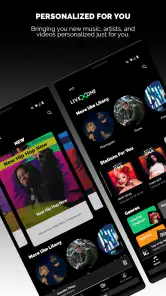
In today's age, personalization is key, and LiveOne nails it. From customized playlists to tailored podcast recommendations, the app takes your listening habits and curates content that fits your mood. It's like having your own DJ who knows exactly what you want to hear.
The app also has a nifty feature where you can create your own radio station. Just pick a song or artist, and LiveOne curates an entire station just for you. It's perfect for those days when you can't decide what to listen to.
Quality and Performance
Streaming quality is top-notch. Whether you’re on a Wi-Fi network or relying on mobile data, the app buffers quickly and plays smoothly. I didn't experience any hiccups, even when I was out and about. The audio quality is excellent, providing a rich and immersive listening experience.
That said, I wouldn’t treat one smooth session as a guarantee for every trip or network. My practical advice is to begin a live stream or video while connected to dependable Wi-Fi if timing matters, then switch to lighter audio listening when I’m moving around. This distinction is useful because a station can keep the music going with little attention, while a live performance asks for a steadier connection and more of mine.
Accessibility and Usability
LiveOne is available on both Android and iOS, which means you can enjoy it on almost any device. The app’s layout is consistent across platforms, so transitioning from your phone to your tablet is seamless. It’s also compatible with smart speakers, which is a huge plus if you like to blast your tunes at home.
As a music and audio app, it sits between focused music streamers and broader entertainment platforms. Compared with a basic radio app, its mix of personalized stations, podcasts, events, and video gives me more ways to fill a session. Compared with a service built around albums and precise track selection, it may feel less direct when I already know exactly what I want to hear. I’d choose it for discovery and variety; I’d choose a more library-centered alternative when meticulous collection management is the priority.
The app has an average rating of 4.5 from around 355,000 ratings, with roughly 112,000 written reviews and over 100 million installs. I see that scale as a sign that it has broad appeal, not proof that every listener will like its mix of content. The more useful question is whether I want a flexible listening hub or a single-purpose player. If recommendations and switching between formats sound appealing, the combination earns its place; if I dislike suggestions and want a lean interface, the extra choice may feel like clutter.
Making recommendations work for you
One small way I’d get more from the personalized side is to use a station when I’m open to discovery, then switch to a podcast or a known favorite when I need a particular mood or topic. That gives recommendations room to surprise me without making them responsible for every listening decision. It also helps separate background listening from active listening: a station can carry a routine task, while a podcast is better when I can follow the conversation.
For someone trying the app for the first time, I’d explore one format at a time rather than judge it by a quick scroll across everything. Start with a station based on an artist you already enjoy, then see whether its suggestions keep you listening. After that, look at podcasts or events if those matter to you. This is a more useful test than expecting a mixed-content app to feel like a dedicated music library from the first screen.
Who will get the most from it
I’d recommend LiveOne to people who want a single place for casual music discovery and are interested in more than songs. It can suit a household that uses a smart speaker at home, a listener who likes artist-led radio, or someone who wants to browse an event before settling into a regular listening session. Its variety is the point, and the app is at its best when I’m willing to move between options instead of demanding one narrow workflow.
I’d steer away from it if my main requirement were dependable listening in places where I expect little or no connectivity, or if I want the app to behave like a carefully curated personal library first and foremost. I’d also pick another option when a video-heavy session needs a connection I can’t count on. The key trade-off is straightforward: LiveOne offers breadth, but that breadth makes network conditions and content choice more central to the experience.
Making a session fit the day
I find the app most useful when I decide what kind of attention I can give it before choosing what to play. If I’m cooking, cleaning, or getting ready, an artist-based station keeps the music moving without requiring constant selection. If I have time to sit down, browsing an event or choosing a podcast feels more intentional. That simple distinction keeps the range of formats from turning into a long, aimless search.
For a busy day, I’d also avoid treating every pause as a prompt to explore something new. If a stream falters while I’m moving between coverage areas, returning to one familiar station is less disruptive than repeatedly opening different pages. It makes the app easier to use one-handed and helps me get back to what I was doing. That is a small but practical advantage for anyone who mainly listens in the background.
Where the trade-offs matter
LiveOne’s variety is not automatically a benefit for every listener. Someone who builds a collection around albums, saves precise queues, and expects a compact player may prefer a service designed around that kind of control. A conventional radio app can also be the simpler pick if all I want is a station and no interest in podcasts, events, or video. LiveOne makes more sense when I value having those different routes in one place enough to accept a broader interface.
I’d be cautious about assuming that free access means every part of the experience will meet my needs without a purchase. The app includes in-app purchases, so I would inspect the specific option and its terms before committing. That matters most if I’m installing it for a family member or planning to use it as a regular service: a quick look at the purchase screen is better than making assumptions from the free download.
Final Thoughts
All in all, LiveOne: Stream Music & More is more than just a music streaming app. Its combination of music, podcasts, and live events makes it a versatile and entertaining platform. The personalized features ensure that your experience is tailored just for you, making it a worthy contender in the world of streaming apps.
If you're looking for an app that offers variety and quality, give LiveOne a try. Whether you’re a music lover or a podcast enthusiast, there’s something here for everyone. Happy listening!
LiveOne: Stream Music & More Frequently Asked Questions
What kind of content can I find in LiveOne?
LiveOne brings music, podcasts, and more together in one app, making it a convenient option if you want to explore different kinds of audio in a single place. Its focus is broader than music alone, so listeners can use it to find podcasts alongside music. The app is categorized under Music & Audio and is described as a place for your favorite music, podcasts, and more.
Is LiveOne suitable for families and younger listeners?
LiveOne has a Teen content rating, which is useful to keep in mind when deciding whether it is suitable for a younger listener. Families may want to consider that guidance before installing the app, particularly if it will be used on a shared device. It can also help to discuss the app’s content with the intended user and review any relevant settings together.
What does the Teen content rating mean for LiveOne?
LiveOne is rated Teen, so that age guidance is worth considering before installing the app, especially if it will be used by younger listeners. The app brings music, podcasts, and other entertainment together, and its content rating can help families decide whether it suits their household. Parents and guardians may also want to review the app’s content and settings with the intended user.
Is LiveOne free to download, and are there in-app purchases?
LiveOne is free to download, and it offers in-app purchases ranging from $3.99 to $39.99 per item. That means you can try the app without paying upfront, but some options may involve an additional purchase. Check the purchase details shown in the app before confirming anything, particularly if you share a device or payment method with other family members.
What features does LiveOne: Stream Music & More offer?
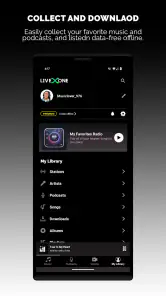
LiveOne provides a wide array of features including access to a vast library of music, live concerts, and exclusive video content. Users can create personalized playlists, enjoy curated radio stations, and discover new music through genre-based channels. The app also offers offline listening and high-quality audio streaming for subscribers.
Pros
- Extensive music library available.
- Customizable playlists for users.
- High-quality audio streaming.
- Exclusive live performances access.
- User-friendly interface design.
Cons
- Requires premium for ad-free experience.
- Limited offline download options.
- Occasional app crashes reported.
- Some features need stable internet.
- In-app ads can be intrusive.
- Category
- Music & Audio
- Version
- Varies with device