Spotify: Music and Podcasts
- 1.81M
- 4.3
- Installs
- 1.00B
- Price
- Free

Screenshots

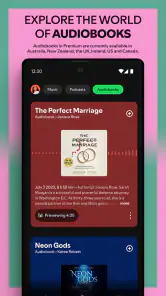
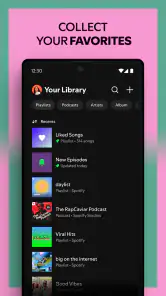
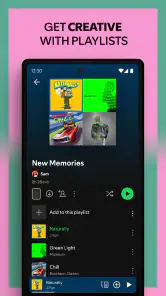
Analysis by Reviewed
Have you ever been in the middle of a mundane task and suddenly felt the urge to jazz it up with some music? Well, that’s where Spotify: Music and Podcasts comes into play. It's like having a jukebox in your pocket, but way cooler. Whether you’re a die-hard music fan or just someone who likes a little background noise, Spotify has something for everyone.
Starting with a clear idea of what you want
My easiest first-session advice is to choose one concrete goal before opening the app: find an album for the evening, make a short playlist for the commute, or locate a podcast you already follow. That keeps the large choice of music and spoken audio from turning into aimless browsing. You can explore more once you have something familiar playing and know how the controls fit your habits.
If you are choosing between this and keeping separate apps, think about how often you switch between music and podcasts. Having both together is most useful when those are part of the same day; it is less persuasive if you only listen to one format. I’d judge it by whether it makes the next listening decision easier, not by how much content appears on the screen.
The Latest on Spotify: Music and Podcasts
Discover Music Like Never Before
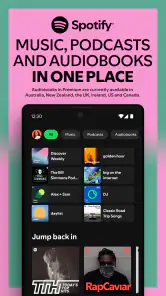
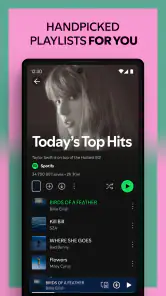
If you’re the type who loves discovering new tunes, then you’re in for a treat. Spotify’s got this killer feature called "Discover Weekly". It’s like having a friend who knows your taste better than you do. Every Monday, you get a fresh playlist tailored just for you. And let’s not forget about the endless playlists curated by both humans and algorithms. From "Chill Hits" to "RapCaviar", the choices are endless.
Podcasts Galore
Now, if you’re more of a podcast person, Spotify has you covered there too. There’s a whole universe of podcasts waiting for you, from true crime to comedy to those that help you fall asleep. I mean, who knew listening to people talk about random stuff could be so entertaining? With Spotify, you can have your daily dose of knowledge and laughter, all in one place.
User-Friendly Interface
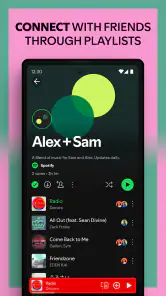
One of the first things you’ll notice about Spotify is its sleek and intuitive interface. It's super easy to navigate. Whether you’re on the hunt for your favorite artist’s new album or a podcast episode you missed, everything’s just a few taps away. And the best part? You can create your own playlists, making it a breeze to save all your favorite tracks and episodes in one spot.
And let’s talk about the cross-platform capability. You can start listening on your phone, switch to your desktop, and continue right where you left off. It’s seamless, and honestly, it’s one of those small things that makes a big difference.
More From Our News Desk

Weather by Xiaomi Review: Clear at a Glance, Less Clear Up Close

X Under Pressure: Can It Recover When Posting Goes Wrong?

Clash of Clans Is Won Between the Battles

Android Auto Makes the Case for Quieter Car Software

MobiOffice: Transforming Mobile Productivity with Seamless Integration

EA SPORTS FC™ Mobile Soccer: Redefining Mobile Sports Gaming
Offline Listening
Picture this: You’re on a long flight with no Wi-Fi, and you’ve got hours to kill. No worries! With Spotify Premium, you can download your favorite songs, albums, and podcasts to listen offline. It’s a game-changer for frequent travelers or anyone who’s ever been stuck without internet. Plus, the sound quality is top-notch, which is always a win.
To wrap it up, Spotify: Music and Podcasts offers a dynamic platform for all your audio needs. It’s like having a world of music and podcasts right at your fingertips. Whether you’re looking to discover new music, dive into podcasts, or simply enjoy the convenience of offline listening, Spotify has got you covered. So why not give it a spin and see (or rather, hear) what all the fuss is about?
What to expect from the listening experience
Spotify is a music and audio app from Spotify AB, and the basic download is free. It has a 4.3 average from around 35 million ratings, with over a billion installs, so it is clearly a familiar option for people who want music and spoken audio together. The Teen age rating is worth noting for families choosing an app for younger listeners. Optional in-app purchases range from $5.99 to $400 per item, so check the plan details shown in the app before committing to anything.
For a first-time listener, the main strength is having familiar songs, recommendations, playlists, and podcasts in one place. That convenience matters if your day moves between different kinds of audio: a playlist while getting ready, a podcast during a walk, then an album at home. The trade-off is that a large catalog can feel busy at first. I’d start with one artist or mood rather than trying to explore every category at once.
A simple route from setup to a first good playlist
After installing, create or sign in to an account, then search for an artist, song, or podcast you already enjoy. Play something you know before judging the recommendations; it gives you a useful baseline for browsing. Save a few tracks you genuinely like and make a small playlist for a real routine, such as a commute or cooking. This is more practical than building a huge collection on day one, and it gives you an easy destination the next time you open the app.
A useful habit is to treat playlists as separate tools rather than one enormous favorites folder. I’d keep one for dependable background music, another for new discoveries, and a podcast queue for episodes I intend to finish. That separation makes it easier to pick something quickly when you have only a few minutes. It also helps you notice whether recommendations are matching your current mood or simply repeating a familiar sound.
Everyday listening and small points of friction
Imagine leaving home with a playlist ready for the bus, then switching to a podcast while making lunch. Keeping both kinds of listening in the same app saves the hassle of remembering where each one lives. If you move between devices, the continuity can be convenient, but I still recommend checking what is playing before handing audio to another device; switching screens is not the same as choosing a new listening session.
Free access makes it easy to try the service before deciding whether a paid plan suits you. Offline downloads, as described in the original review, require Premium, so they are not a solution for every free listener. If you rely on music during travel, prepare downloads while connected and confirm that the intended items are available offline before leaving. If you mainly listen at home with reliable internet, that paid feature may matter much less.
Who will get the most from it
I’d recommend it to someone who wants a single place for music discovery and podcasts, especially if they like letting recommendations suggest what to play next. It also suits people who make playlists around activities and switch between listening on a phone and a computer. If your priority is owning files, managing a personal music library, or avoiding subscriptions and purchase prompts altogether, a local music player or another service may fit better. Likewise, a podcast-focused app can be a cleaner choice if music discovery is not part of your routine.
Compared with using separate music and podcast apps, Spotify’s advantage is convenience; its limitation is that one interface has to serve two different listening habits. Search and recommendations can help you find a starting point, but I wouldn’t expect them to replace the satisfaction of exploring an artist’s albums yourself. My advice is to try the free experience with a small, specific routine first, then decide whether its discovery tools, cross-device listening, and offline option solve problems you actually have.
Making discovery work for you
Recommendations are most useful when I treat them as invitations, not instructions. If a playlist puts an unfamiliar track beside something I love, I’ll check the artist or album rather than letting the playlist run indefinitely. That small detour often turns a passing song into a deliberate listen, and it keeps discovery from becoming a stream of background sound I barely notice. When a recommendation misses, I move on instead of assuming the whole service has misunderstood my taste.
There is also a practical difference between saving music and making a playlist for a specific job. A saved track is easy to find again, while a short activity playlist answers the immediate question of what to play now. I find that distinction especially useful for workouts, focused work, and household chores: the playlist can have a clear mood without taking over my broader collection. For podcasts, keeping intended episodes separate from music helps me avoid opening the app and spending time deciding what I meant to hear.
Choosing between Spotify and other audio options
Against music services that emphasize a personal library or a tightly organized collection, Spotify feels strongest when I want suggestions and ready-made routes into listening. Against dedicated podcast apps, it is convenient if I already use it for music, but less compelling when episode management is the main reason I’m opening an app. The best alternative depends on what you value: a local player for files you already own, a podcast-first app for spoken shows, or a different music service if its catalog and listening tools better match your habits.
I would also think about how much control you want over the listening session. Curated playlists reduce the effort of choosing, but they can make it easy to leave music running without paying attention to album order or artist context. When I want to hear a record as a complete work, I search for the album directly; when I need suitable background sound, a playlist is faster. Using both approaches keeps convenience from replacing intentional listening.
Useful checks before you rely on it
If you are deciding whether the free version is enough, ask how often you need offline playback and whether you are comfortable with the listening experience it offers before paying. The app is free to download, while optional purchases are available, so I’d review the plan and purchase terms displayed in the app rather than treating the download as a commitment. The listed purchase range runs from $5.99 to $400 per item; those figures describe a broad range, not a recommendation to buy anything.
For travel, I would prepare more than one kind of audio before leaving: a familiar album or playlist for when I want music, and a few podcast episodes for when I want voices. Then I’d check the downloads while still connected, because remembering to save something is different from having it ready offline. At home, that preparation is less important, and streaming can be the simpler choice. This is a good example of why the right plan depends on routine rather than on a feature sounding impressive in isolation.
Who should look elsewhere
Spotify is not my first pick for someone who wants a simple player for a collection of personal audio files, or for a listener who wants every session to be organized around podcast episodes. In those cases, a dedicated local music player or podcast app may reduce clutter and make the main task easier. It may also be a poor fit if you dislike recommendation-led browsing, prefer to choose every album yourself, or do not want to consider optional paid features. A large combined catalog is useful, but it is not automatically the best interface for every listener.
For a first-time user, I’d give it a fair test with one familiar artist, one short playlist for a daily activity, and one podcast you already meant to try. That gives you a concrete sense of search, saving, and switching between formats without turning setup into a project. If those simple tasks feel natural and the recommendations add value, it is worth keeping in your rotation. If you find yourself fighting the interface or rarely using more than one kind of audio, a more focused alternative may suit you better.
One more useful way to test it
Try a full ordinary day rather than judging the app by a single session: choose music while getting ready, resume something familiar during a break, and switch to a podcast when you want spoken company on the way home. This reveals whether the combined setup actually removes small hassles from your routine. It also exposes the opposite possibility: if changing formats makes you lose track of what you meant to hear, keeping a separate podcast app may feel calmer.
For shared spaces, I’d also make a playlist around the situation instead of relying on whatever happens to be recommended next. A low-key cooking mix, for example, is easier to use than repeatedly searching while your hands are busy. The trade-off is that building a useful playlist takes a little attention up front; the payoff is less decision-making later. If you only need background sound occasionally, a ready-made playlist may be enough, with no need to organize a large personal collection.
Making the choice after the first week
Once you have tried search, a saved track, a purpose-built playlist, and a podcast, ask which of those actions you actually repeated. If recommendations are helping you find music you would not have searched for, that is a meaningful reason to keep using the app. If you mostly replay the same albums and rarely open the podcast side, a service focused on your preferred listening style may be more straightforward. I would make the decision based on repeated use, not on the size of the catalog or the novelty of a new interface.
My overall recommendation is to start small and let your routine decide how far you go. Spotify is particularly handy when music discovery, familiar listening, and podcasts all have a place in your week; its broad approach can feel less tidy when you want a specialist tool or complete control over a local collection. Give it a few purposeful listens, check the paid terms before choosing offline access, and keep it only if it makes finding your next good listen feel easier.
Spotify: Music and Podcasts Frequently Asked Questions
Can Spotify help me replace separate music and podcast apps?
Spotify brings music and podcasts together in one app, so you can switch between songs, albums, and shows without using separate listening services. You can also create playlists and explore recommendations for finding music. It is a convenient option if you want to keep different kinds of audio in one place, though your listening habits and preferences will determine how well it fits your routine.
Is Spotify easy to start using if I have never tried a music streaming app?
Spotify is centered on playing music and podcasts, with playlists and discovery features that give new users several ways to get started. You can look for a particular song or show, or browse recommendations and organize tracks you like into playlists. If you are new to this kind of app, its mix of direct listening and browsing offers a straightforward way to explore.
Can Spotify help me find audio for different moods or activities?
You can create playlists around songs, artists, or moods, making it easier to collect music for different moments. Spotify also offers recommendations and curated listening options, so you can explore beyond tracks you already know. Podcasts are available alongside music, giving you another option when you want spoken audio. The app’s discovery and playlist tools can help shape a listening experience around your preferences.
Is Spotify a free download, and are there paid options inside the app?
Spotify is free to download, and it offers in-app purchases as well. The available purchases span a broad price range, so check the options shown in the app before choosing one. You can use Spotify to listen to music and podcasts, create playlists, and discover music. Whether you decide to make a purchase depends on the options and listening experience you want.
What should I consider about Spotify’s content before installing it for a younger listener?
Spotify has a Teen content rating and brings together music and podcasts from a wide range of creators. Topics and themes can therefore vary from one track or show to another. Parents and younger listeners may want to consider their own preferences when choosing what to play. The app can be used to explore music, follow creators, and build playlists around content that suits the listener.
Pros
- Extensive music library available worldwide.
- Personalized playlists and recommendations.
- Offline listening for premium users.
- Seamless cross-platform integration.
- High-quality audio streaming options.
Cons
- Frequent ads in the free version.
- Limited skips in free mode.
- Some songs/artists missing.
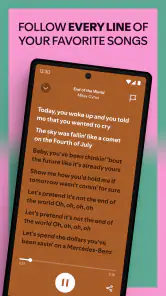
- No lyrics feature in some regions.
- High data usage on mobile networks.
- Category
- Music & Audio
- Version
- Varies with device