Amazon A to Z
- 14.41K
- 4.5
- Installs
- 5.00M
- Price
- Free

Screenshots
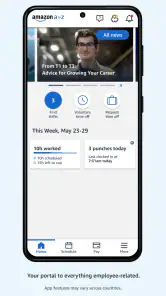
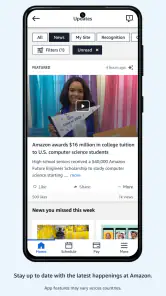
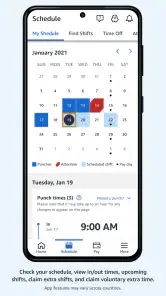
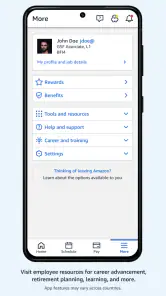
Analysis by Reviewed
I think of Amazon A to Z less as a general business app and more as a workday companion for people employed by Amazon. Its purpose is practical: put common work details in one place so you can check them when it suits you, rather than hunt through messages or rely on memory. That focus is useful, but it also sets a clear boundary. If you are not part of Amazon’s workforce, there is little reason to install it.
Quick checks, not a replacement for every work conversation
For an employee, the useful test is whether a small task can be handled between other parts of the day. Checking a shift before making plans, looking over a payslip when budgeting, or sending a time-off request without waiting until you are at a computer are the kinds of moments where a staff app can earn its place. I would still treat a submitted request as something to verify through the app’s status or the appropriate workplace channel before making firm plans; sending a request and having it approved are not the same thing.
That distinction is one of the more important trade-offs. A central app can make information easier to reach, but it does not remove the need to read details carefully or follow up when a decision matters. For anything time-sensitive, I would check the relevant screen before relying on an old note, screenshot, or remembered schedule.
How it fits a real workday
Imagine checking tomorrow’s shift while you are arranging a ride home, then later reviewing a payslip after noticing a change in your monthly budget. Keeping those checks together can be simpler than searching through separate tools. The app is especially sensible for employees who want routine work information close at hand and prefer handling straightforward requests on a phone.
It is less compelling for someone who rarely needs work details outside a desktop setting, or who is looking for a general planner, payroll service, or messaging app for a mixed workplace. Compared with those usual alternatives, A to Z has the advantage of being tailored to Amazon employment tasks; a standalone calendar may be better for coordinating personal commitments, while a direct conversation remains the better choice for a nuanced question that needs discussion.
What to check before relying on it
Because the app is tied to an employer, access depends on being able to sign in with the appropriate Amazon credentials. I would install it only for that work purpose and make sure I can reach the account recovery route if a login problem appears at an inconvenient time. A phone is handy for quick checks, but a larger screen can be more comfortable when you need to inspect a detailed document rather than glance at a schedule.
Amazon A to Z is a free business app from Amazon Mobile LLC, with an Everyone age rating. Its average rating is 4.5 from around 90,000 ratings, and it has over 5 million installs. It was released on August 29, 2018, and version 4.0.81469.0 lists Android 7.0 as the minimum requirement. Those details make it relevant to a broad range of Android devices, though how smoothly it feels on any particular phone will depend on that device and its software.
More From Our News Desk

Weather by Xiaomi Review: Clear at a Glance, Less Clear Up Close

X Under Pressure: Can It Recover When Posting Goes Wrong?

Clash of Clans Is Won Between the Battles

Android Auto Makes the Case for Quieter Car Software

MobiOffice: Transforming Mobile Productivity with Seamless Integration

EA SPORTS FC™ Mobile Soccer: Redefining Mobile Sports Gaming
Have you ever wondered how Amazon manages to keep its operations running so smoothly? Well, much of the magic happens thanks to the Amazon A to Z app. If you’re an Amazon employee, this app is pretty much your best friend when it comes to managing your work life. Let me take you through my experience with it.
Getting Started with Amazon A to Z
First things first, downloading and setting up the Amazon A to Z app is a breeze. Available on both Android and iOS, it’s just a matter of hitting download from your app store of choice and logging in with your Amazon credentials. The interface is neat and intuitive, which means you don’t have to be a tech whiz to navigate through it. It immediately gives off this "I’ve got your back" vibe.
Features That Make Life Easier
One of the standout features of the app is its ability to let you check your work schedule. No more guessing games or last-minute phone calls to HR. It’s all there at your fingertips. You can also apply for time off directly through the app. Just a few taps, and your request is submitted. Talk about convenience!
Another fantastic feature is the paystub access. You can view your earnings, deductions, and even download your payslips whenever you need them. It’s like having your own personal accountant in your pocket. Oh, and if you’re curious about your benefits, the app lays it all out clearly, so there’s no room for confusion.
Staying Connected
Communication is key, and the app understands that. It provides alerts and announcements straight from the management, ensuring you’re always in the loop. Whether it’s a change in company policy or a reminder about a team meeting, the app keeps you informed without overwhelming you with notifications.
And let’s not forget the directory feature. Need to get in touch with a colleague? The app’s got you covered. It’s like having a digital office Rolodex, minus the clutter.
My Personal Take
Personally, I found the app to be incredibly efficient. It’s like Amazon packed all the essential tools an employee might need into one handy package. And the best part? It’s constantly being updated to improve functionality and add new features. That’s something I truly appreciate.
In a nutshell, if you’re part of the Amazon workforce, the Amazon A to Z app is indispensable. It’s designed to make your work life easier, more organized, and less stressful. So, if you haven’t already, do yourself a favor and check it out. You’ll wonder how you ever managed without it!
Speed and stability in everyday use
For the tasks described here, what matters most is getting to a schedule, request, or pay detail without turning a quick check into a long detour. I would judge its speed by that everyday friction rather than by a benchmark: a familiar layout and a direct route to common employee information are more valuable than visual extras. The experience can still feel slower when a connection is weak, a sign-in needs attention, or a detailed document takes longer to inspect on a phone.
At busy moments, such as checking a shift while leaving home or reviewing a payslip during a break, I would avoid relying on a half-read screen. Confirm the date or relevant detail before acting, and revisit the app if an announcement or schedule change could affect your plans. This is a sensible habit with any work portal, especially when the consequence is missing a shift or misunderstanding a request’s status.
Device limits and a sensible verdict
The Android minimum of 7.0 makes the app a possibility on older supported phones, but an operating-system threshold alone cannot promise equal performance on every device. If the app feels sluggish, first consider whether the phone is under strain or the connection is unreliable, then try again before assuming the account or work information is at fault. For lengthy payslip checks, a computer can be easier on the eyes; for a quick schedule lookup or simple request, a phone is the more convenient tool.
Overall, I see A to Z as a focused employee utility rather than a full workplace communication system. Its strongest case is routine access to Amazon work information in one place. The trade-off is that it is useful only within that employment context, and important changes still deserve a careful check rather than blind reliance on a notification. If you work at Amazon and want those everyday details close by, it is a practical option; if you need a general work organizer or a place to resolve a complicated issue, another tool or a direct conversation will serve you better.
Making the app part of a dependable routine
I would use the app as a convenient reference point, not as the only place where I keep track of commitments. For example, after confirming a shift, I might add it to my personal calendar so it sits alongside appointments and family plans. That small habit addresses a practical gap: an employer-focused app can show work information, while a personal calendar helps me see how the whole day fits together. I would still return to A to Z to verify any work detail that may have changed.
The same approach helps with time-off requests. I would submit the request in the app, make a note to check its status, and wait for confirmation before booking anything that depends on approval. It is tempting to treat a completed form as a settled arrangement, but the useful distinction is between sending a request and having it approved. Keeping that step in mind can prevent an avoidable clash between a personal plan and a work schedule.
Useful when a quick glance is enough
The phone format makes the most sense when I need a fast answer: confirming a shift date, checking whether a request has moved forward, or opening a pay detail while organizing a monthly budget. It is less suited to careful reading when I am distracted or in a hurry. If I need to compare several payslip details, I would choose a quiet moment and a larger screen when available rather than trying to make sense of everything during a short break.
For announcements, I would treat an alert as a prompt to open and read the actual information, rather than as a complete explanation on its own. This is a useful habit because a brief notification may tell me that something needs attention without providing all the context I need to act. If the message raises a question about a particular situation, the app’s convenience does not make it a substitute for asking the appropriate person or using the usual workplace channel.
Who will get the most from it
I can see the strongest fit for Amazon employees who handle work details on the move or whose schedules make a desktop inconvenient. Someone who checks shifts regularly, needs to submit routine leave requests, or wants payslips and benefits within reach has a clear reason to keep it installed. The app’s value is not that it replaces every workplace process; it is that it can make common, repeatable checks less dependent on finding a computer or digging through old messages.
On the other hand, I would skip it if I were looking for a tool for a different employer, a shared team workspace, or a universal way to plan tasks. It is also not the right answer to a complicated employment question that calls for back-and-forth conversation. A separate calendar is more flexible for personal scheduling, and a direct workplace conversation is better when a situation needs explanation, judgment, or clarification.
Practical trade-offs around access and documents
Because sign-in is connected to Amazon employment, the app is only as useful as access to the relevant account. If I were setting it up before relying on it for an important shift check, I would first make sure I can sign in successfully and know where to go if access becomes a problem. That is more useful than waiting until I am already rushing out the door to discover that I need to resolve a login issue.
For payslips, having a phone copy available can be handy when I need to check a figure, but it does not automatically make a small screen ideal for reviewing a document in detail. I would avoid relying on a quick glance for anything I need to understand precisely, and use the option of a larger screen when the layout feels cramped. The convenience is immediate access; the trade-off is that close reading can take more care on a phone.
What its reputation and requirements mean in practice
The app’s 4.5 average across roughly 90,000 ratings suggests that many users find it useful, while more than 5 million installs show that it has reached a broad audience. I would take those figures as context, not a promise that every employee will have the same experience. Access, device condition, internet quality, and the particular task all shape whether a quick check feels smooth on a given day.
Its Android 7.0 minimum gives owners of some older phones a chance to use it, but supported does not necessarily mean equally comfortable. If a device struggles with other apps or has little available space, I would not assume A to Z will feel effortless simply because it meets the operating-system requirement. For a work app used to make decisions, a stable connection and a phone that is responsive enough to read details matter more than having the newest device.
My performance verdict
I would describe A to Z as a focused, practical companion whose best performance is measured in saved steps: opening one place for work details instead of switching among unrelated tools. Its speed is most valuable for short, familiar tasks, while a weak connection, sign-in friction, or a dense document can interrupt that quick flow. I would not judge reliability by a single slow opening; I would retry when the connection is better and confirm important information before acting.
For an Amazon employee, I think the app is worth considering when a phone is the easiest way to stay on top of routine work matters. It is not a general business suite, and it cannot turn a pending request into an approved one or replace a conversation that needs nuance. Used with those limits in mind, it can make everyday checks more convenient without asking you to treat every alert or screen as the final word.
Amazon A to Z Frequently Asked Questions
Do I need an Amazon employee account before downloading Amazon A to Z?
Amazon A to Z is intended for managing work life at Amazon, so its main tools are relevant to people who work for the company. Downloading the app does not by itself create access to employee information or work features; you need valid Amazon login credentials to use them. If you are considering the app for general scheduling or job searching, it is not designed for those purposes.
Who develops Amazon A to Z, and what kind of app is it?
Amazon A to Z is a business app developed by Amazon Mobile LLC. Its focus is helping Amazon employees manage aspects of their work life through a mobile device, rather than providing a general-purpose business toolkit. That distinction matters before downloading: the app is most useful when you have an Amazon employee account and need to access work-related tools in one place.
Is Amazon A to Z free to download, and what is its age rating?
Amazon A to Z is free to download and is rated for Everyone. It is a business app for managing work life at Amazon, rather than a general shopping or job-search app. Before installing it, consider whether you are an Amazon employee and have the login credentials needed to access its work-related tools.
What devices and operating systems can run Amazon A to Z?
Amazon A to Z is available for Android and iOS devices. On Android, the listed minimum requirement is Android 7.0, so check your device’s operating system before downloading. The app is published by Amazon Mobile LLC and has a current version of 4.0.81469.0. Keeping the app updated can help you use its latest available features.
What is Amazon A to Z and who can use it?
Amazon A to Z is a mobile application designed specifically for Amazon employees. Its purpose is to provide a place to manage work life at Amazon, with an interface for handling schedules, tracking time, and accessing employment information. Only Amazon employees with valid login credentials can use the app to manage their work-related tasks.
Pros
- User-friendly navigation
- Comprehensive employee resources
- Efficient shift scheduling
- Easy access to pay stubs
- Real-time notifications
Cons
- Limited offline functionality
- Occasional app crashes
- Slow customer support
- Privacy concerns
- Complex initial setup
- Category
- Business
- Version
- 4.0.81469.0













